

Acpt – Custom Post Types Plugin For WordPress
/Year
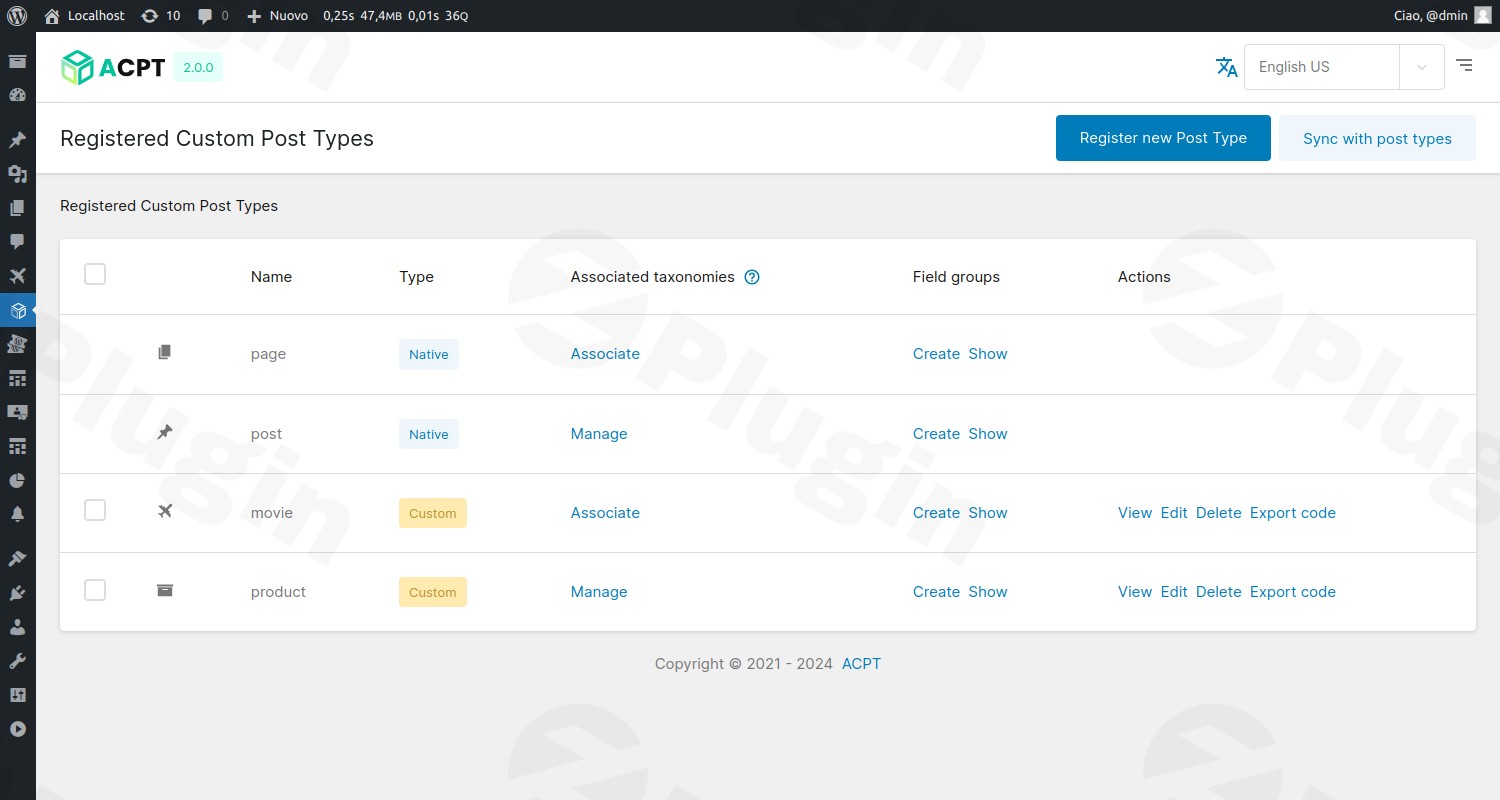
Empower Your WordPress Site with Custom Post Types and Meta Fields
WordPress is a capable content management system, but going beyond standard posts and pages often requires complex coding or multiple conflicting plugins. ACPT (Advanced Custom Post Types) provides a unified, visual workspace to design, register, and manage custom post types, taxonomies, and deep metadata structures directly from your admin dashboard. This plugin streamlines dynamic data architecture, helping you build sophisticated, tailored websites in a fraction of the time.
What ACPT Does and Who It Is For
ACPT serves as a comprehensive visual framework for developers, designers, and site builders who need to structure complex data without writing manual PHP template files. Whether you are constructing a real estate listing platform, an e-commerce directory, or a custom review site, ACPT helps you establish relationships between post types, assign custom taxonomies, and deploy advanced custom fields. This eliminates the need to edit your active child theme functions or register post types manually.
Key Capabilities of ACPT
- Visual Post Type & Taxonomy Wizard: Register new content structures and custom classification systems in seconds using an intuitive three-step configuration setup.
- Advanced Meta Field Manager: Choose from over 25 field types, including rich text, maps, color pickers, and conditional logic rules to control administrative layouts.
- Flexible Repeater Fields: Group recurring custom fields together, allowing content editors to append repeatable blocks of structured data, such as pricing tables or specifications.
- Deep Builder Integrations: Render metadata and build custom archives or single templates using dedicated modules for Elementor, Bricks, Breakdance, and Gutenberg.
- Developer-Ready API Dashboard: Harness headless WordPress capabilities with built-in REST API endpoints and native WPGraphQL integration.
Practical WordPress Use Cases
- Real Estate Directories: Create a “Properties” custom post type associated with “Locations” and “Amenities” taxonomies, while utilizing custom fields for price, square footage, and neighborhood maps.
- Online Course Libraries: Manage an educational platform by building a “Courses” post type, embedding video links, teacher profiles, and repeatable lists of lesson topics.
- Custom Product Data for WooCommerce: Extend default product page layouts with bespoke specifications, technical charts, or user-restricted download fields.
Setup and Compatibility Context
ACPT integrates directly into the WordPress admin sidebar. After activation, users can construct relationships, set visibility preferences, and designate default sorting criteria for their post tables. The plugin supports major page builders such as Elementor Pro, Bricks Builder, GenerateBlocks Pro, and Divi, allowing you to fetch dynamic tags seamlessly. It is fully compatible with WPML for managing multilingual custom field translations without database duplication.
Why Choose ACPT on WPPick?
ACPT reduces dependence on bloated multi-plugin setups. Instead of installing separate plugins for custom post types, custom fields, taxonomies, and API schemas, ACPT delivers all of these mechanisms within a single, highly optimized environment. Developers can maintain a minimal plugin footprint, safeguard performance, and customize administrative interfaces from a central hub.
Latest Version Context: ACPT v2.0.65
The latest version 2.0.65 of ACPT brings critical stability improvements, security hardening, and framework additions. Key highlights of this update include native integration with the Abilities API along with output-schema validation fixes, the addition of new mathematical functions (such as square root, absolute value, and median) for Table fields, and more robust attachment lookup mechanisms through REST. This release also resolves layout issues like CodeMirror text overflow, dynamic block rendering in the Full Site Editor (FSE), and WPML translation caching errors.
Frequently Asked Questions
Do I need PHP coding skills to register custom post types with ACPT?No. ACPT features a visual interface that allows you to configure labels, slugs, visibility, and dashboard icons without writing any code.
How does ACPT handle dynamic data in page builders?ACPT includes native integrations and custom widgets for Elementor, Bricks, Divi, and Breakdance, allowing you to select and display custom field values dynamically in your layouts.
Does ACPT support repeater fields?Yes. The plugin features a grouped repeater field option, enabling content editors to add repetitive rows of mixed fields such as text, links, and media.
Can I use ACPT for headless WordPress builds?Yes. ACPT contains a dedicated API dashboard and integrates with WPGraphQL and the native WordPress REST API, facilitating clean data transfer to front-end frameworks.
I. Download Limits & Account Benefits
- Free Downloads: Each email address receives 3 downloads per day for free products
- Upgrade Benefits: Purchase any paid product to increase your daily download limit by 3 for each paid product
- No Account Required: You can download immediately by receiving the download link via email
- Account Recommended: Create an account for easier access to your order history and direct update downloads
II. Understanding GPL vs Official Versions
Important: The products available on WPPick are GPL-licensed versions, which differ from official developer versions. Before purchasing, please read our comprehensive guide: Understanding GPL & Official Differences at WPPick
Key Points:
- GPL versions may not include premium support from original developers
- Updates may be delayed compared to official releases
- Some premium features might have limitations
- Always consider your specific needs and support requirements
III. Support & Assistance
We’re here to help through multiple channels:
- Email Support: Direct email assistance for all inquiries
- Live Chat: Real-time support during business hours
- Comprehensive Documentation: Detailed guides and tutorials
IV. Order Tracking
Access your complete purchase history and download links anytime: Order History
V. Account Access
New to WPPick? Login or Create Account to manage your downloads and orders efficiently.
VI. Refund Protection
We stand behind our products with a clear refund policy. Review our terms: Refund Policy
VII. Privacy & Security
Your data security is our priority. Learn how we protect your information: Privacy Policy
VII. Terms of Service
Understanding our service terms ensures a smooth experience: Terms of Use
Quick Tips for Best Experience
- Verify Compatibility: Check plugin/theme compatibility with your WordPress version
- Backup First: Always backup your site before installing new plugins or themes
- Test Environment: Consider testing on a staging site first
- Stay Updated: Regularly check for updates in your account dashboard
- Read Documentation: Review any included documentation for optimal setup
Need Help?
If you have questions about downloads, licensing, or need technical assistance, don’t hesitate to contact our support team. We’re committed to ensuring you have the best possible experience with WPPick products.
Ready to get started? Your download adventure begins with just one click!
- Integration with the Abilities API, including output-schema fixes for `save-post-type` and 9 other providers whose output validation was broken.
- `append_acpt_meta_field_value()` function/ability to append a single Repeater row without resending existing ones - new `AppendMetaFieldRowCommand`, wired into the Abilities API as `acpt/append-meta-field-value`.
- New Table field arithmetic functions: `SQRT`, `ABS`, `MOD`, `MEDIAN`, `COUNT`.
- New telemetry insight keys (DB engine, multisite, active theme, PHP memory limit, WooCommerce version, feature usage counters) plus a deactivation ping.
- Table field `Maths` singleton memoization (was comparing flattened data against raw input, so caching never worked); malformed formulas (e.g. `=(ROUND("abc",2))`) now return a graceful error instead of crashing the live AJAX formula editor.
- CodeMirror text overflow in admin meta field editors - long lines/URLs now wrap instead of overflowing the layout.
- Etch fatal error when an Image field is nested inside a Repeater (`WPAttachment` private property access via `property_exists()`).
- Dynamic blocks not appearing/rendering in the FSE site editor.
- REST block-renderer live-preview error when inserting a dynamic block in the FSE site editor.
- ACPT loop fields empty on Bricks top-level term-archive templates.
- Front URL prefix causing 404s on Custom Post Type permalinks (Ticket #1153).
- WPML custom field translations getting stuck in one language (Ticket #1118).
- Image/Audio/Video/File field values silently not persisting to `wp_postmeta` via the REST save path: `WPAttachment::fromUrl()` now resolves attachments through query-string, URL-encoding, and `-scaled` suffix variants instead of only an exact `_wp_attached_file` match, and `ACPT_Api_Rest_Fields::updateCallback()` now returns a `WP_Error` when a field fails to save instead of silently discarding the failure.
- Refactored `Request`: replaced ambiguous `has()` with explicit `hasGet()`/`hasPost()`; `all()` now delegates to `requestAll()`.
- `PostField::renderRelationFieldSelector()` fatal error.
- `FORMAT_NATIONAL` fallback for PHP < 8.1 environments.
- `s.charAt` crash when Phone field has free `defaultValue` or Etch key in description.
- Add comprehensive test suite for `IP` utility class (9 tests covering all IP source priorities and newline handling)
- Add comprehensive test suite for `Browser` utility class (15 tests covering all browser and platform detection)
- Add comprehensive test suite for `Email` template classes (62 tests across BlankEmailTemplate, LightEmailTemplate, DarkEmailTemplate)
- Improve cache handling: suppress `fopen` and `unserialize` errors with reusable method
- Preventing fatal error triggered by `CustomPostTypeAdminColumnsGenerator:applySortingBasedOnUserPreferences()`
- Fix `fetchAllMetaAction()` to group meta fields by actual belong conditions instead of repository lookups, with human-readable labels
- Add fallback for clipboard copy on HTTP and unsupported browsers
- Fixed error handling in Elementor PRO dynamic data provider
- Fix email preview newline rendering: HTML minification was corrupting newlines in email headers/footers
- Replace unsafe `unserialize()` with JSON serialization
- Refactor `MetaGroupModel::isVisible()` with `Request` object for testability and add a comprehensive visibility test suite
- Refactor `IP::getClientIP()` to accept optional `Request` object for better testability
- Improved email template newline handling: added explicit conversion of all newline types (CRLF, CR, LF) to HTML line breaks
- Add configurable default sort order per CPT in admin list table
- Fixed image field preview not showing after save/refresh on Option Pages
- Fixed field visibility not resolving correctly when called programmatically
- Fixed field resolution on child posts in Breakdance integration
- Fixed cache key mismatch on Option Page meta saving
- Fixed map field skipping default marker on pristine maps and invalid fitBounds error
- Fixed Slim SEO data fetching
- Fixed Elementor and Elementor PRO data fetching on archive pages
- Fixed safe free handling in Elementor template editing
- Improved attachment URL resolution performance in `WPAttachment::fromUrl()`
- Added arithmetic calculations to Table fields in Bricks builder
- New renderer for relational fields in GenerateBlocks Pro integration
- Added carousel speed control option to Gutenberg Gallery Block
- Added fixed-height option to the mosaic gallery in Gutenberg Gallery Block
- Added pagination to the post type ↔ taxonomy association pages
- Added G (24-hour without leading zero) to convertTimeFormatForJS(), mapping to Moment.js H token
- Correct use of menu_order for custom post type sorting
- Collect all validation errors before persisting meta fields, replacing the previous fail-fast behaviour
- Trim slashes from taxonomy rewrite slug to prevent double slashes in rewrite rules
- Prevent duplicate rewrite rule when custom_rewrite and front_url_prefix are identical
- Fixed time picker opening in the wrong position on first render by deferring picker.move() with setTimeout(0)
- Invalidate license on site URL mismatch after domain migration
- Fixed the last carousel slide not being responsive in the Gutenberg Gallery Block
- Correct G:i time format conversion