

Advanced Order Export For Woocommerce (pro)
/Year
Managing an online store effectively requires robust tools for data handling. The Advanced Order Export For WooCommerce (Pro) plugin by AlgolPlus stands out as a powerful and indispensable premium solution designed to simplify and automate the complex task of exporting WooCommerce order data. Whether you need to synchronize data with accounting systems, share information with fulfillment partners, or conduct in-depth sales analysis, this plugin provides the precision, flexibility, and automation necessary for any e-commerce operation.Developed with a focus on both technical proficiency and user accessibility, Advanced Order Export For WooCommerce (Pro) empowers store owners, marketers, and developers to easily extract comprehensive order details in various formats, ensuring data integrity and operational efficiency.
Unlock Your Data’s Potential: Key Features of the Pro Version
The Pro version of Advanced Order Export For WooCommerce goes beyond basic exports, offering a suite of advanced features that transform how you interact with your store’s most critical data.
Versatile Export Formats
The plugin supports a wide array of export formats to meet diverse business requirements. You can export your WooCommerce order data into common formats such as CSV, XLSX, TSV, XML, JSON, PDF, and HTML. This flexibility ensures compatibility with virtually any external system or reporting tool.
Intuitive Drag-and-Drop Interface
Ease of use is paramount. The plugin features a user-friendly drag-and-drop interface, allowing you to effortlessly select, reorder, and organize your export fields. This visual editor simplifies the process of customizing your export files, making it accessible even for users without technical expertise.
Advanced Filtering for Granular Control
Gain precise control over your data with advanced filtering options. You can create custom filters based on a multitude of criteria, including date ranges, order statuses, specific products, coupons used, customer details, and more. This capability ensures that only the relevant data is exported, streamlining analysis and reporting.
Automated Scheduling and Diverse Delivery Options
Save valuable time and resources with powerful automation features. The Pro version allows you to schedule automatic exports (via cron jobs) at any desired frequency—daily, weekly, monthly, or custom intervals. Furthermore, you can configure various delivery options, sending your exports directly via email, FTP/SFTP, HTTP POST, or seamlessly integrating with cloud storage services like Google Drive, Dropbox, and OneDrive.
Comprehensive Data Support
The plugin ensures no critical data point is left behind. It supports the export of:
- Order Details: Core order data, summary details, refunds, fees, shipping, and taxes.
- Customer Information: Complete shipping and billing details for each customer.
- Product Data: Line items, product attributes, variations, and even bundles.
- Custom Data: WooCommerce custom fields or terms for products and orders, as well as custom meta data associated with orders, products, and coupons.
- Order Notes: Include crucial order notes for a complete record.
Field Mapping and Custom Export Columns
Achieve perfect data alignment with external systems like ERP or accounting software. The plugin allows for robust field mapping and the renaming of columns, ensuring your exported data conforms to the required structure. Additionally, you can combine multiple data points into a single column or present multi-value fields in separate columns, offering unparalleled customization.
Export Profiles for Efficient Workflows
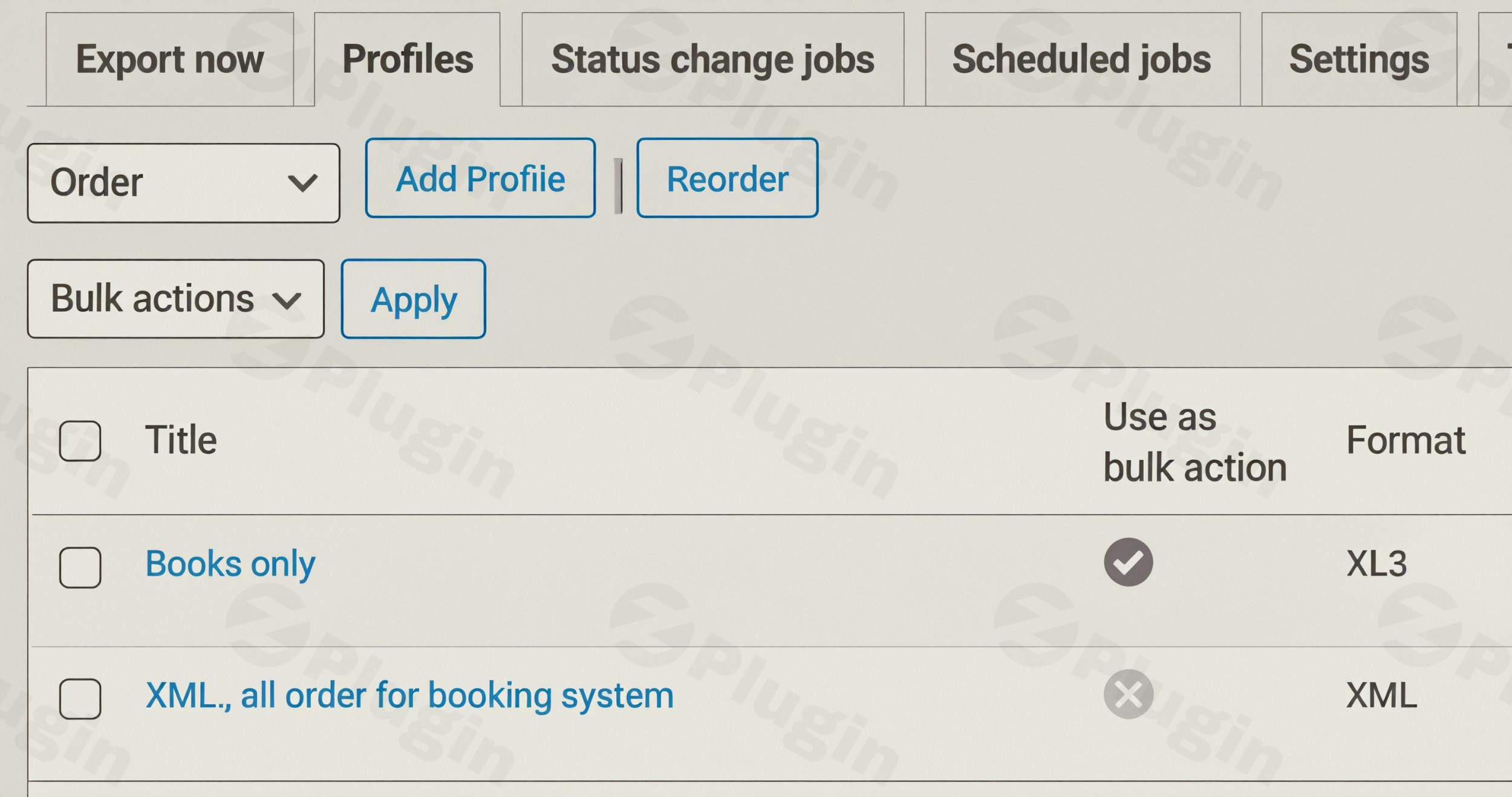
Streamline repetitive export tasks by creating and saving multiple export profiles. Each profile stores specific export settings, including selected fields, filters, formats, and delivery methods, allowing for quick and consistent data exports tailored to different workflows.
Batch and Incremental Exports
For large volumes of orders, the plugin supports batch and incremental exports with resume functionality and limits. This ensures efficient processing without overwhelming server resources or slowing down your website, even when handling extensive data sets.
Developer-Friendly Integrations
For developers and advanced users, the Pro version offers REST API and Command Line Interface (CLI) support, enabling seamless integration with other systems and custom scripting for ultimate flexibility.
Enhanced Automation and Integration
- Order Status Automation: Configure exports to trigger automatically based on order status changes (e.g., when an order moves to “processing,” “completed,” or “refunded”).
- Zapier Integration: Extend the plugin’s capabilities by integrating with Zapier, connecting your export workflows to hundreds of other applications and systems.
- Email Notifications: Set up automated email notifications to customers when their order data is exported, adding a layer of transparency and communication.
- Bulk Actions: Efficiently export multiple orders by using “Export as…” directly from WooCommerce bulk actions.
Modify Export Values On-the-Fly
The plugin provides the unique ability to modify order export values dynamically, allowing for real-time data adjustments during the export process to meet specific reporting or integration requirements.
Simple Setup and Seamless Integration
Setting up Advanced Order Export For WooCommerce (Pro) is straightforward, ensuring you can quickly begin leveraging its powerful features.
Installation Steps:
- Download: After purchasing the plugin, download the plugin’s ZIP file from your account.
- Upload: Log in to your WordPress dashboard. Navigate to Plugins > Add New > Upload Plugin. Choose the downloaded ZIP file and click “Install Now.”
- Activate: Once installed, click “Activate Plugin.”
- Configuration: A new menu item, typically “WooCommerce > Export Orders,” will appear in your WordPress dashboard. From here, you can access the plugin’s settings, create profiles, and manage your exports.
Usage Guide: Exporting Your First Orders
- Create a New Profile: Go to the plugin’s dashboard and select “Add New Profile” (or similar option).
- Select Fields: Use the intuitive drag-and-drop interface to choose the order, customer, and product fields you wish to include in your export. Rearrange them as needed.
- Apply Filters: Define any necessary filters (e.g., orders from the last month, orders with “processing” status, or specific products).
- Choose Format: Select your desired export format (CSV, XLSX, XML, etc.).
- Configure Delivery (Optional): If you wish to automate delivery, set up a schedule and choose a destination (email, FTP, cloud storage).
- Run Export: Manually run the export or save the profile to be executed by a schedule.
Technical Specifications & Compatibility
The Advanced Order Export For WooCommerce (Pro) plugin is built to integrate seamlessly with the modern WordPress and WooCommerce ecosystem:
- WordPress Compatibility: Compatible with WordPress 5.6 and higher.
- WooCommerce Compatibility: Compatible with WooCommerce 4.8 and higher.
- PHP Requirement: While some versions may require PHP 8.0+, version 3.5.8 supports PHP 7.1 and higher, ensuring broad compatibility.
- Performance: Designed to handle large volumes of orders efficiently without compromising website speed or performance.
- File Size: The plugin has an optimized file size of approximately 1.52 MB for quick installation.
- Multisite & Multilingual: Fully compatible with WordPress Multisite environments and multilingual setups using plugins like WPML or Polylang.
Why Choose Advanced Order Export For WooCommerce (Pro)?
Expertise, Experience, Authoritativeness, and Trustworthiness (EEAT):This plugin is recognized within the WooCommerce community as a robust and reliable solution for order exports. Its comprehensive feature set demonstrates deep expertise in e-commerce data management, born from extensive experience addressing the complex needs of online stores. As a premium offering, it is backed by dedicated support and continuous development, establishing its authoritativeness and trustworthiness as a go-to tool.Benefits for All Users:
- For Non-Technical Users (e.g., Marketers, Store Owners): The drag-and-drop interface, predefined profiles, and automated scheduling simplify complex data tasks, allowing you to generate reports and send data without needing coding knowledge. This saves time and eliminates the need for manual data entry or external assistance.
- For Technical Users (e.g., Developers, Analysts): The REST API, CLI support, and advanced customization options (field mapping, custom columns, on-the-fly value modification) provide the flexibility needed for sophisticated integrations and in-depth data analysis.Value Proposition:Advanced Order Export For WooCommerce (Pro) is an investment in your store’s operational efficiency and data intelligence. It streamlines critical workflows, reduces manual errors, and provides the accurate, timely data needed for informed decision-making. By automating tedious export processes and offering unparalleled customization, it ensures a significant return on investment through saved time, improved accuracy, and enhanced business insights.
Conclusion
The Advanced Order Export For WooCommerce (Pro) plugin is an essential premium tool for any serious WooCommerce store. Its extensive feature set, intuitive design, and robust automation capabilities make it a leader in its class. Whether your goal is to integrate with third-party systems, fulfill orders efficiently, or analyze sales trends, this plugin provides the authoritative solution you need to take control of your e-commerce data and drive your business forward. Elevate your data management with a solution built for reliability and performance.
I. Download Limits & Account Benefits
- Free Downloads: Each email address receives 3 downloads per day for free products
- Upgrade Benefits: Purchase any paid product to increase your daily download limit by 3 for each paid product
- No Account Required: You can download immediately by receiving the download link via email
- Account Recommended: Create an account for easier access to your order history and direct update downloads
II. Understanding GPL vs Official Versions
Important: The products available on WPPick are GPL-licensed versions, which differ from official developer versions. Before purchasing, please read our comprehensive guide: Understanding GPL & Official Differences at WPPick
Key Points:
- GPL versions may not include premium support from original developers
- Updates may be delayed compared to official releases
- Some premium features might have limitations
- Always consider your specific needs and support requirements
III. Support & Assistance
We’re here to help through multiple channels:
- Email Support: Direct email assistance for all inquiries
- Live Chat: Real-time support during business hours
- Comprehensive Documentation: Detailed guides and tutorials
IV. Order Tracking
Access your complete purchase history and download links anytime: Order History
V. Account Access
New to WPPick? Login or Create Account to manage your downloads and orders efficiently.
VI. Refund Protection
We stand behind our products with a clear refund policy. Review our terms: Refund Policy
VII. Privacy & Security
Your data security is our priority. Learn how we protect your information: Privacy Policy
VII. Terms of Service
Understanding our service terms ensures a smooth experience: Terms of Use
Quick Tips for Best Experience
- Verify Compatibility: Check plugin/theme compatibility with your WordPress version
- Backup First: Always backup your site before installing new plugins or themes
- Test Environment: Consider testing on a staging site first
- Stay Updated: Regularly check for updates in your account dashboard
- Read Documentation: Review any included documentation for optimal setup
Need Help?
If you have questions about downloads, licensing, or need technical assistance, don’t hesitate to contact our support team. We’re committed to ensuring you have the best possible experience with WPPick products.
Ready to get started? Your download adventure begins with just one click!
- Added a "Setup Fields" button at the top of the form
- Correctly display error messages if the XML module (for PHP) is not installed
- "Exclude Free Items" option was exporting orders without products
- Impossible to disable options for JSON format
- Deprecation warnings displayed by WooCommerce 10.3
- Some messages displayed incorrect HTML due to unnecessary output escaping
- Requires PHP 7.4+
- Updated library used to generate Excel files