

Advisor — Business / Consultancy Website Template (breakdance Builder)
/Year
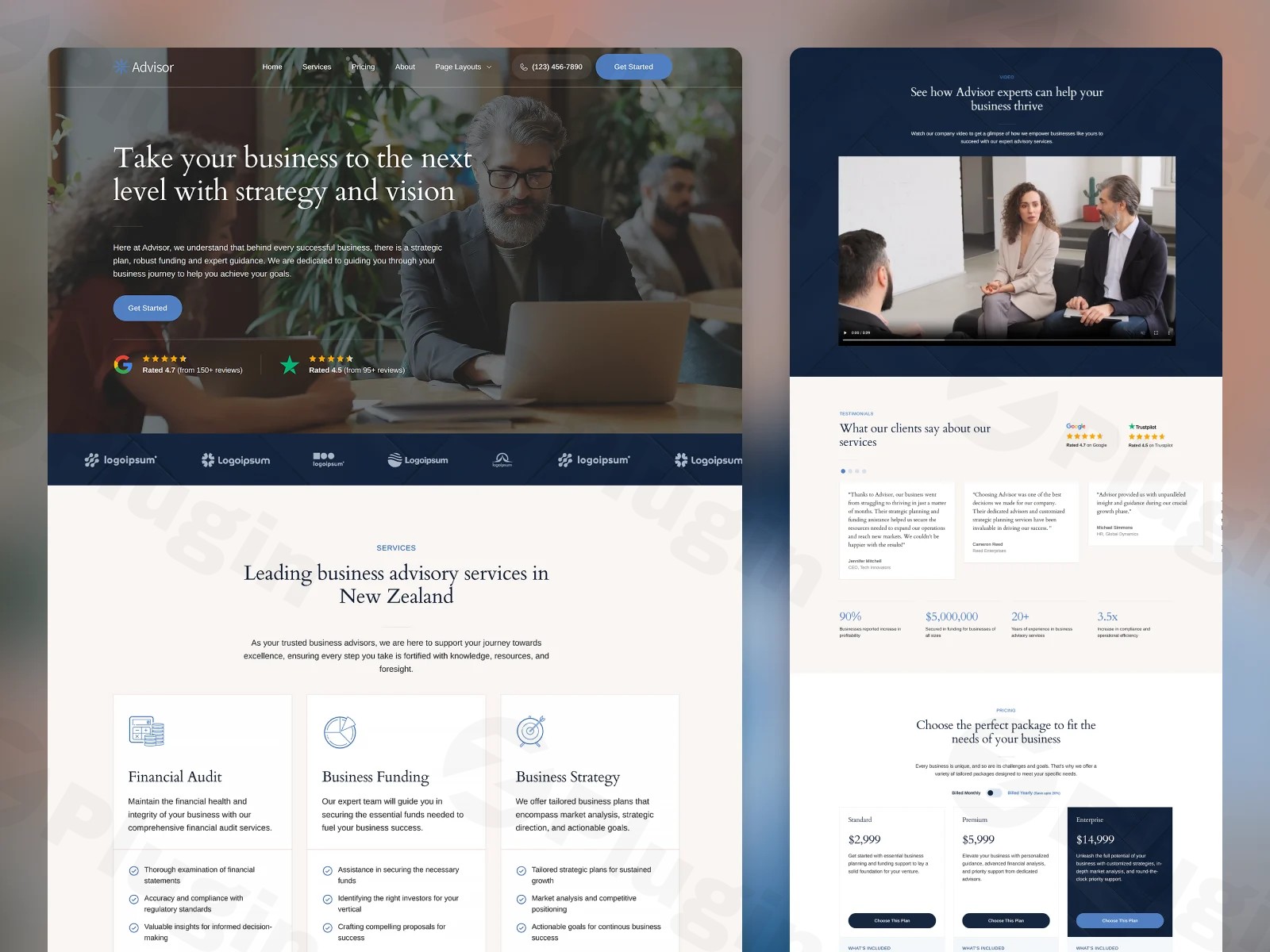
Establishing a credible online presence is non-negotiable for modern firms, and the Advisor WordPress theme Breakdance Builder edition offers a sophisticated solution for professionals who demand both speed and style. Designed specifically for consultancy firms, financial advisors, and digital agencies, this template moves away from the cluttered “multipurpose” approach. Instead, it provides a clean, high-conversion design philosophy that prioritizes user experience and brand authority from the moment a visitor lands on the homepage.
Key Features: Design, Layout & Performance
The Advisor theme is more than just a skin; it is a comprehensive design set built to leverage the full power of the Breakdance Page Builder. It focuses on a “modern spin on classic business themes,” ensuring your site looks established yet forward-thinking.
Design & Layout Options
The theme offers a professional visual hierarchy with plenty of whitespace, ensuring your value proposition isn’t lost in the noise. Key layout features include:
- Animated Homepage: Subtle, professional animations that draw attention to Call-to-Action (CTA) buttons and key statistics.
- Mobile-Friendly Mega Menu: An animated, responsive mega menu that makes deep-site navigation effortless on smartphones and tablets.
- Comprehensive Template Library: You aren’t just getting a homepage. Advisor includes pre-built templates for Services, Pricing, About, Contact, and a dedicated Style Guide page to maintain brand consistency.
Customization Capabilities
Because this theme is built exclusively for Breakdance, customization is intuitive and deep:
- Global Styles: Manage your entire brand identity—colors, buttons, and form fields—from a single central location.
- Advanced Typography: Support for over 500 Google Fonts with built-in fluid typography and spacing, ensuring your text scales perfectly across all screen sizes.
- Flexible Inner Templates: Easily modify headers and footers using the Breakdance Inner Template system, allowing for unique designs on specific landing pages.
Performance & SEO Features
Speed is a core component of this theme’s DNA. By utilizing Breakdance Builder v2.5.2, the Advisor theme avoids the heavy “div-bloat” common in older builders.
- Clean Markup: Minimal code output leads to faster “Time to First Byte” and better Core Web Vitals.
- SEO-Ready Structure: With a clear heading hierarchy (H1-H6) and lightweight design, this modern business website template for Breakdance is optimized for both traditional Google search and AI-based answer engines.
Installation & Demo Import
Setting up the Advisor theme is a streamlined process, provided you have the Breakdance Builder plugin active on your WordPress site.
- Install & Activate: Upload the Advisor theme folder via your WordPress Dashboard (Appearance > Themes).
- Plugin Requirements: Ensure the Breakdance Builder plugin is installed and licensed. This theme is built specifically for this ecosystem.
- Import the Design Set: Navigate to the Breakdance settings in your dashboard. Use the “Design Sets” feature to import the Advisor library.
- Final Polish: Once imported, navigate to the “Style Guide” page provided with the theme to verify that your global colors and fonts have applied correctly across all pre-built sections.Note: Ensure your hosting environment meets modern PHP requirements (PHP 7.4 or 8.x) to prevent timeouts during the initial design set import.
Customization Guide: Branding & Layout
Personalizing the Advisor – Business / Consultancy Website Template (Breakdance Builder) is handled through a visual, drag-and-drop interface that requires zero coding knowledge.
Setting Global Styles
Start by opening the Breakdance editor on any page and navigating to the Global Settings. Here, you can define your primary and secondary brand colors. Because the theme uses a “Global Style” architecture, changing a color here will instantly update every button and icon across your entire site.
Typography and Spacing
The theme uses a fluid spacing system. Instead of setting fixed pixel margins, you can define your site’s rhythm, and the theme will automatically adjust padding and font sizes for mobile users. This ensures that your consultancy site looks just as professional on an iPhone as it does on a 27-inch monitor.
Header & Footer Customization
The animated mega menu and footer are controlled via “Inner Templates.” To change your logo or update your contact info, simply edit the Header or Footer template within Breakdance. This allows you to add dynamic elements, such as a “Request a Quote” button, that stay sticky as users scroll.
FAQ & Troubleshooting
Is the Advisor theme compatible with Elementor or WPBakery?No. This specific version of the Advisor WordPress theme is built exclusively for Breakdance Builder. This exclusivity allows for better performance and a more integrated design experience than generic multipurpose themes.Is Advisor a good WordPress theme for consultancy and finance websites?Yes. Its clean aesthetics, focus on trust-building elements (like testimonial sections and service grids), and professional typography make it ideal for financial advisors, legal consultants, and corporate agencies.Does it support WooCommerce for online stores?While the Advisor theme focuses on lead generation and services, it is fully compatible with Breakdance’s robust WooCommerce integration. You can easily add a shop section or digital product downloads to your business site.How do I update the theme without losing my customizations?Since all customizations are stored within the Breakdance Global Styles and templates, updating the theme core will not overwrite your design. However, it is always recommended to perform a backup of your site settings before running updates.
Conclusion
The Advisor — Business / Consultancy Website Template (Breakdance Builder) stands out as a high-performance tool for agencies and freelancers who want to deliver a premium product to their clients quickly. By moving away from the resource-heavy builders of the past, Advisor leverages the speed of Breakdance to provide a site that is as fast as it is beautiful.Whether you are a startup looking for a “lifetime license” value or an established consultancy needing a modern refresh, this theme provides the flexibility and professional polish required to compete in a digital-first market. For more WordPress theme reviews and SEO strategies, visit wppick.com.
I. Download Limits & Account Benefits
- Free Downloads: Each email address receives 3 downloads per day for free products
- Upgrade Benefits: Purchase any paid product to increase your daily download limit by 3 for each paid product
- No Account Required: You can download immediately by receiving the download link via email
- Account Recommended: Create an account for easier access to your order history and direct update downloads
II. Understanding GPL vs Official Versions
Important: The products available on WPPick are GPL-licensed versions, which differ from official developer versions. Before purchasing, please read our comprehensive guide: Understanding GPL & Official Differences at WPPick
Key Points:
- GPL versions may not include premium support from original developers
- Updates may be delayed compared to official releases
- Some premium features might have limitations
- Always consider your specific needs and support requirements
III. Support & Assistance
We’re here to help through multiple channels:
- Email Support: Direct email assistance for all inquiries
- Live Chat: Real-time support during business hours
- Comprehensive Documentation: Detailed guides and tutorials
IV. Order Tracking
Access your complete purchase history and download links anytime: Order History
V. Account Access
New to WPPick? Login or Create Account to manage your downloads and orders efficiently.
VI. Refund Protection
We stand behind our products with a clear refund policy. Review our terms: Refund Policy
VII. Privacy & Security
Your data security is our priority. Learn how we protect your information: Privacy Policy
VII. Terms of Service
Understanding our service terms ensures a smooth experience: Terms of Use
Quick Tips for Best Experience
- Verify Compatibility: Check plugin/theme compatibility with your WordPress version
- Backup First: Always backup your site before installing new plugins or themes
- Test Environment: Consider testing on a staging site first
- Stay Updated: Regularly check for updates in your account dashboard
- Read Documentation: Review any included documentation for optimal setup
Need Help?
If you have questions about downloads, licensing, or need technical assistance, don’t hesitate to contact our support team. We’re committed to ensuring you have the best possible experience with WPPick products.
Ready to get started? Your download adventure begins with just one click!
No changelog available.