

Advisor — Business / Consultancy Website Template – Oxygen 6 Builder
/Year
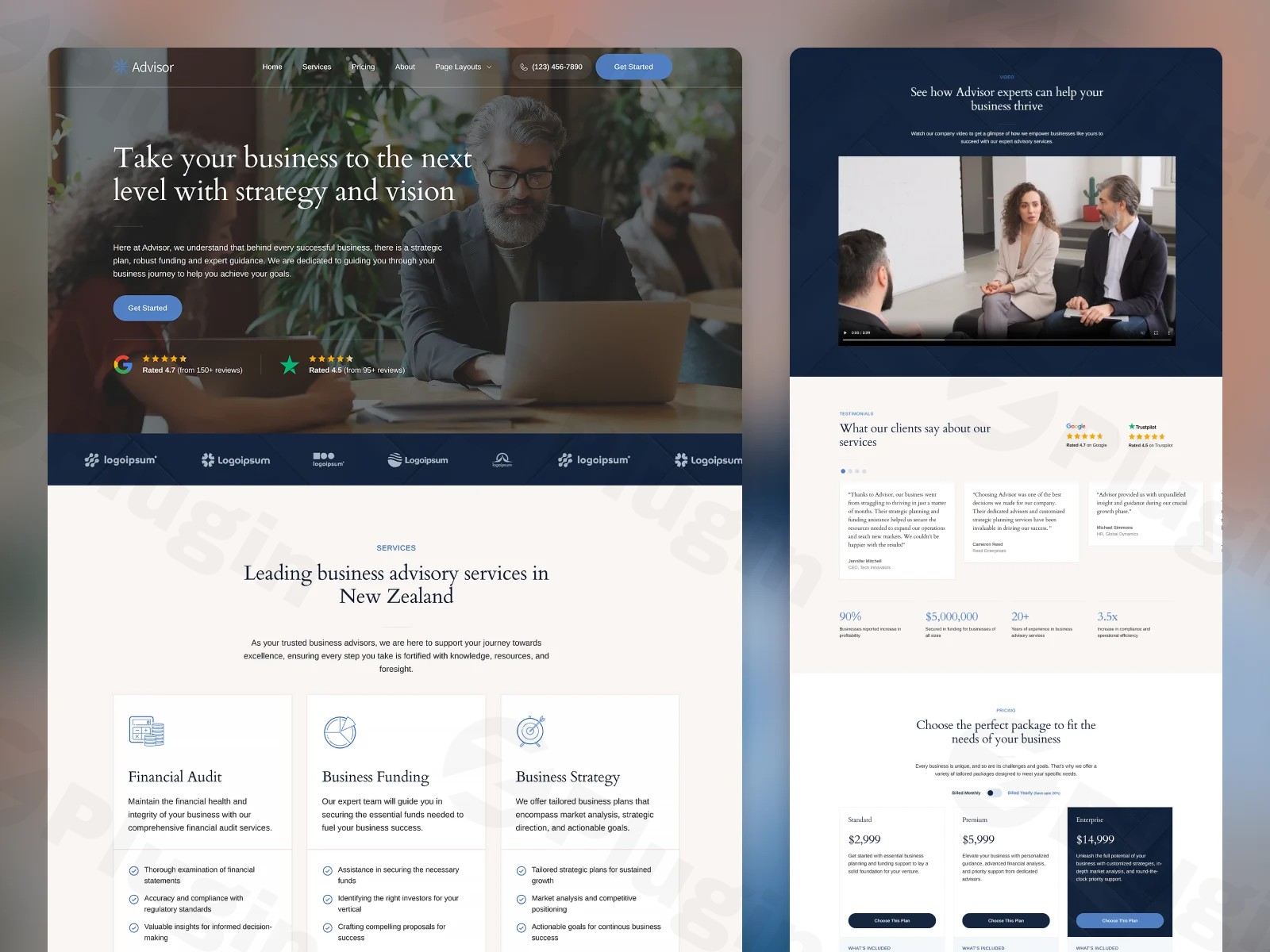
Creating a high-performance, professional consulting website WordPress users will love requires a balance of sophisticated design and technical efficiency. The Advisor — Business / Consultancy Website Template for Oxygen 6 Builder is a premium design set specifically engineered to provide business owners and agencies with a polished, modern foundation. Unlike traditional “bloated” themes, Advisor leverages the power of the Oxygen Builder to deliver a lightweight, pixel-perfect experience that prioritizes both aesthetics and site speed.This design set is ideal for consultancy firms, financial advisors, and digital agencies who want a bespoke look without the overhead of a standard multipurpose theme.
Key Features: Design, Layout & Performance
The Advisor design set is more than just a skin; it is a comprehensive toolkit built for the modern web. It emphasizes a “clean and trendy” aesthetic that builds immediate trust with potential clients.
Professional Layout Options
Advisor comes equipped with a full suite of pre-built pages and inner templates, ensuring your entire site maintains a cohesive visual identity. These include:
- Strategic Home Page: Designed to convert visitors into leads with clear calls to action.
- Services & Pricing: Structured layouts to showcase your expertise and transparent billing.
- About & Contact: Professional templates for storytelling and lead generation.
- Blog & Single Post Templates: Optimized for readability and SEO.
- Inner Templates: Includes specialized templates for Headers, Footers, and a dedicated Style Guide.
Advanced Customization Capabilities
Because this is a business consultancy website template for Oxygen 6, customization isn’t limited by a rigid options panel. Instead, you have “developer-level” control through Oxygen’s visual interface:
- Global Style System: Manage colors, typography, and spacing sitewide using CSS variables.
- Micro-Animations: The template features subtle animations for buttons and links, providing a premium, interactive feel.
- Mega Menu Builder: Includes an animated, mobile-friendly mega menu for complex site navigation.
- Fluid Spacing: Layouts use modern CSS principles to ensure perfectly balanced whitespace on any screen size.
High-Performance & SEO Ready
Oxygen 6 is renowned for its performance-centric approach. Since Advisor doesn’t rely on heavy third-party skins, it generates extremely clean code.
- Speed: Expect faster loading times and better Core Web Vitals scores compared to traditional builders.
- SEO Markup: Clean HTML structure and proper heading hierarchies make it easier for search engines to crawl and rank your content.
- Mobile Responsiveness: Every section is built with a mobile-first mindset, ensuring a seamless experience for users on the go.
Installation & Demo Import
Setting up the Advisor design set differs slightly from installing a standard .zip theme. Follow these steps to get started:
- Install Oxygen Builder: Ensure you have the Oxygen 6 plugin installed and activated on your WordPress site.
- Access Design Sets: Navigate to Oxygen > Settings in your WordPress dashboard.
- Enable Library: Under the “Library” tab, ensure that “Enable Default Design Sets” and “Enable Third Party Design Sets” are checked.
- Import the Site: Use the provided Site Key (or the Design Set import tool) to pull the Advisor templates into your library.
- Assign Templates: Once imported, go to Oxygen > Templates to assign your Header, Footer, and Main templates to the appropriate pages.Note: Ensure your server is running PHP 7.4 or higher to maintain compatibility with Oxygen 6’s latest features.
Customization Guide: Branding & Layout
Personalizing your Advisor WordPress theme Oxygen 6 Builder setup is intuitive once you understand the Oxygen workflow.
Branding with Global Styles
To update your branding, open the Oxygen editor on any page and go to Settings > Global Styles. Here, you can update your brand colors and typography. Because the Advisor template uses global variables, changing a “Primary Color” here will automatically update every button and accent across your entire site.
Editing Headers and Footers
Unlike traditional themes where the header is “locked,” Advisor uses an Inner Template. You can drag and drop elements within the Header template to add logos, social icons, or change the layout of the animated mega menu.
Building with Block Patterns
You can easily mix and match sections from the Advisor design set. If you need a new page, simply open a blank page in Oxygen and browse the “Advisor” library to find pre-designed hero sections, testimonials, and contact forms.
FAQ & Troubleshooting
Is the Advisor template compatible with WooCommerce?
Yes, the Advisor design set is designed to be compatible with WooCommerce. However, you will need to use Oxygen’s WooCommerce integration to style your shop and product pages to match the Advisor aesthetic.
How to build a consultancy website with Oxygen 6 using this template?
To build your site, start by importing the Advisor design set. Then, use the Global Styles menu to set your branding. Finally, replace the demo text and images within the pre-built Home, Services, and Contact pages to launch your professional presence quickly.
Does Advisor support child themes?
Oxygen Builder works differently than traditional themes; it effectively “disables” the active theme to render its own templates. Therefore, you do not need a child theme to protect your customizations. All your changes are stored in the database and are safe during plugin updates.
What should I do if the demo import fails?
If the design set doesn’t appear, check your server’s memory limit (recommend 256M or higher) and ensure your site can communicate with external APIs. Also, verify that “Third Party Design Sets” is enabled in your Oxygen settings.
Conclusion
The Advisor — Business / Consultancy Website Template for Oxygen 6 Builder is an elite choice for professionals who refuse to settle for “generic” website performance. By combining the visual polish of a high-end design set with the technical superiority of the Oxygen 6 Builder, it provides a foundation that is both beautiful and lightning-fast.While there is a steeper learning curve for users completely new to Oxygen, the reward is total design freedom and a site that outperforms the competition. Whether you are an agency building for clients or a consultant looking to elevate your brand, Advisor is a robust, SEO-friendly investment for your digital future.Find more reviews and WordPress guides at wppick.com.
I. Download Limits & Account Benefits
- Free Downloads: Each email address receives 3 downloads per day for free products
- Upgrade Benefits: Purchase any paid product to increase your daily download limit by 3 for each paid product
- No Account Required: You can download immediately by receiving the download link via email
- Account Recommended: Create an account for easier access to your order history and direct update downloads
II. Understanding GPL vs Official Versions
Important: The products available on WPPick are GPL-licensed versions, which differ from official developer versions. Before purchasing, please read our comprehensive guide: Understanding GPL & Official Differences at WPPick
Key Points:
- GPL versions may not include premium support from original developers
- Updates may be delayed compared to official releases
- Some premium features might have limitations
- Always consider your specific needs and support requirements
III. Support & Assistance
We’re here to help through multiple channels:
- Email Support: Direct email assistance for all inquiries
- Live Chat: Real-time support during business hours
- Comprehensive Documentation: Detailed guides and tutorials
IV. Order Tracking
Access your complete purchase history and download links anytime: Order History
V. Account Access
New to WPPick? Login or Create Account to manage your downloads and orders efficiently.
VI. Refund Protection
We stand behind our products with a clear refund policy. Review our terms: Refund Policy
VII. Privacy & Security
Your data security is our priority. Learn how we protect your information: Privacy Policy
VII. Terms of Service
Understanding our service terms ensures a smooth experience: Terms of Use
Quick Tips for Best Experience
- Verify Compatibility: Check plugin/theme compatibility with your WordPress version
- Backup First: Always backup your site before installing new plugins or themes
- Test Environment: Consider testing on a staging site first
- Stay Updated: Regularly check for updates in your account dashboard
- Read Documentation: Review any included documentation for optimal setup
Need Help?
If you have questions about downloads, licensing, or need technical assistance, don’t hesitate to contact our support team. We’re committed to ensuring you have the best possible experience with WPPick products.
Ready to get started? Your download adventure begins with just one click!
No changelog available.