

Agroverde – Agriculture & Organic Farming Elemenntor Template Kit
/Year
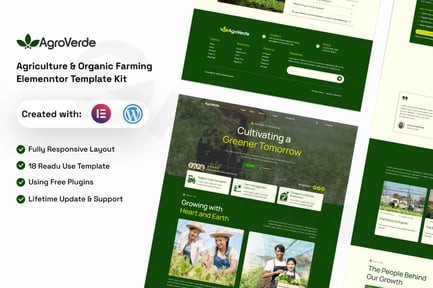
Building a professional digital presence for an agricultural business can be a daunting task for those without coding skills. The Agroverde WordPress template kit solves this problem by providing a high-quality, ready-to-use design framework specifically tailored for modern farms, organic produce suppliers, and eco-friendly ventures. Using an Agriculture Elementor template like Agroverde allows you to bypass the expensive costs of custom development while achieving a premium, responsive aesthetic.Agroverde is not a standalone theme; it is a collection of pre-designed templates built for the Elementor Page Builder. It offers a “what-you-see-is-what-you-get” experience, making it an ideal organic farming website builder for non-technical users who want complete control over their brand’s look and feel.
Key Features of the Agroverde Template Kit
The Agroverde kit is designed to provide everything an agricultural business needs to showcase its services, products, and values. Here is a breakdown of what makes this kit stand out:
- Comprehensive Template Library: The kit includes approximately 16 templates and 14 inner pages, covering everything from “About Us” to “Service Details.”
- Fully Responsive & Mobile-Optimized: Agriculture often happens on the go. Agroverde ensures your site looks perfect on smartphones, tablets, and desktops.
- Drag-and-Drop Customization: Built specifically for Elementor, you can change colors, typography, and layouts without touching a single line of code.
- Modern, Eco-Friendly Aesthetic: The design uses clean lines, natural color palettes, and professional layouts that resonate with the organic and sustainable farming industry.
- Essential Business Pages:
- Home Page: Multiple layouts to showcase your farm’s mission.
- Services & Projects: Highlight your expertise and past work.
- Team & Testimonials: Build trust with potential customers.
- FAQ & Contact: Streamline customer inquiries.
- Blog Templates: Share farming tips and news to boost your SEO.
Technical Specifications & Compatibility
To ensure a smooth performance on your WordPress site, Agroverde relies on a specific ecosystem of tools:
| Requirement | Specification |
|---|---|
| Core Platform | WordPress (Latest version recommended) |
| Page Builder | Elementor (Free version supported; some features may benefit from Pro) |
| Base Theme | Hello Elementor (Highly recommended for speed) |
| Additional Plugins | ElementsKit Lite, MetForm, and Gum Elementor Addon |
| Responsive | Yes, 100% mobile-friendly |
How to Install the Agroverde Elementor Template Kit
Setting up your website with Agroverde is straightforward. Follow these steps to get started:
- Install the “Hello Elementor” Theme: Go to Appearance > Themes > Add New and search for “Hello Elementor.” This lightweight theme provides the perfect blank canvas.
- Install Required Plugins: Ensure you have Elementor installed. You should also install the “Envato Elements” plugin to make the kit import process easier.
- Upload the Template Kit:
- Go to Elements > Installed Kits.
- Click the Upload Template Kit Zip File button and select your Agroverde file.
- Install Requirements: Once uploaded, you will see a notice to “Install Requirements.” Click this to automatically install necessary plugins like ElementsKit Lite or MetForm.
- Import Templates: Navigate through the kit and click Import Template on the specific pages you want to create (e.g., Home, About, Contact).
- Create Your Pages: Go to Pages > Add New, click Edit with Elementor, and then use the Elementor folder icon to insert the templates you just imported from your “My Templates” tab.
Practical Usage & Best Practices
The Agroverde kit is versatile enough for various niches within the agricultural sector. Here is how different users can maximize its value:
1. Organic Produce Retailers
Use the “Services” and “Project” pages to showcase your seasonal harvests. Incorporate high-resolution imagery of your produce to appeal to health-conscious consumers. This kit is the best Elementor template kit for organic produce because it emphasizes clean, natural layouts that reflect product quality.
2. Agritourism & Farm Tours
The “Gallery” and “About” sections are perfect for promoting farm stays or educational tours. Use the MetForm integration to create custom booking or inquiry forms for visitors.
3. Agricultural Consultants & Agencies
If you provide soil testing, equipment leasing, or farm management services, utilize the “Pricing” and “Service Details” pages. The professional design helps establish authority in the B2B agricultural space.
Best Practice Tip:
To maintain fast loading speeds, always optimize your images before uploading them to WordPress. Agricultural sites often rely heavily on photography; using tools like TinyPNG or WebP conversion can keep your Agroverde site running smoothly.
FAQ & Troubleshooting
Is Agroverde Elementor template kit compatible with Elementor Pro?
Yes, Agroverde is fully compatible with Elementor Pro. While many of its features work with the free version of Elementor, having Elementor Pro gives you additional control over global headers, footers, and advanced motion effects.
Can I use Agroverde with other themes?
While Agroverde is optimized for the Hello Elementor theme, it is generally compatible with any theme that supports the Elementor page builder. However, using a lightweight theme like Hello Elementor ensures the best performance and avoids styling conflicts.
Does Agroverde include the photos seen in the demo?
Typically, template kits include placeholder images or license-free images. It is always recommended to replace demo images with your own high-quality photography to make your agriculture website unique and trustworthy.
How do I fix the “Missing Requirements” error during import?
If you see a “Missing Requirements” warning, click the Install Requirements button provided by the Envato Elements plugin. This will automatically download and activate the specific addons (like ElementsKit) needed for the Agroverde templates to display correctly.
Is this a WordPress theme?
No, Agroverde is a Template Kit. Unlike a theme, it does not control your entire site’s settings (like headers/footers in the Customizer). Instead, it provides individual page designs that you import into Elementor.
Conclusion: Final Verdict
The Agroverde WordPress template kit is an excellent investment for anyone looking to build a professional, high-converting website in the agriculture niche. Its combination of 16+ templates, clean aesthetic, and ease of use makes it a top-tier choice for organic farmers and agricultural businesses alike. By leveraging the power of Elementor and the specific agricultural layouts provided by Agroverde, you can establish a digital presence that builds trust and grows your brand. For more WordPress resources and plugin reviews, stay tuned to wppick.com.
I. Download Limits & Account Benefits
- Free Downloads: Each email address receives 3 downloads per day for free products
- Upgrade Benefits: Purchase any paid product to increase your daily download limit by 3 for each paid product
- No Account Required: You can download immediately by receiving the download link via email
- Account Recommended: Create an account for easier access to your order history and direct update downloads
II. Understanding GPL vs Official Versions
Important: The products available on WPPick are GPL-licensed versions, which differ from official developer versions. Before purchasing, please read our comprehensive guide: Understanding GPL & Official Differences at WPPick
Key Points:
- GPL versions may not include premium support from original developers
- Updates may be delayed compared to official releases
- Some premium features might have limitations
- Always consider your specific needs and support requirements
III. Support & Assistance
We’re here to help through multiple channels:
- Email Support: Direct email assistance for all inquiries
- Live Chat: Real-time support during business hours
- Comprehensive Documentation: Detailed guides and tutorials
IV. Order Tracking
Access your complete purchase history and download links anytime: Order History
V. Account Access
New to WPPick? Login or Create Account to manage your downloads and orders efficiently.
VI. Refund Protection
We stand behind our products with a clear refund policy. Review our terms: Refund Policy
VII. Privacy & Security
Your data security is our priority. Learn how we protect your information: Privacy Policy
VII. Terms of Service
Understanding our service terms ensures a smooth experience: Terms of Use
Quick Tips for Best Experience
- Verify Compatibility: Check plugin/theme compatibility with your WordPress version
- Backup First: Always backup your site before installing new plugins or themes
- Test Environment: Consider testing on a staging site first
- Stay Updated: Regularly check for updates in your account dashboard
- Read Documentation: Review any included documentation for optimal setup
Need Help?
If you have questions about downloads, licensing, or need technical assistance, don’t hesitate to contact our support team. We’re committed to ensuring you have the best possible experience with WPPick products.
Ready to get started? Your download adventure begins with just one click!