
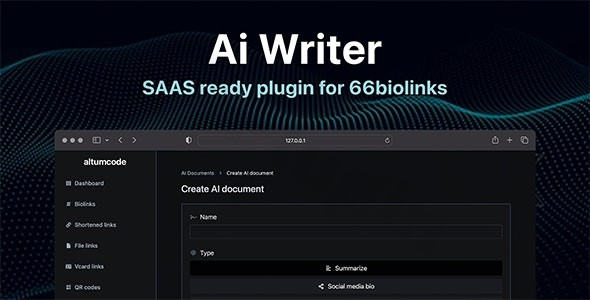
Ai – Writing Assistant, Image Generator, Speech To Text – Altumcode
/Year
In today’s fast-paced digital landscape, content creation demands both speed and quality. For users of the popular 66biolinks platform, managing multiple bio link pages and generating engaging content can be a significant challenge. This is where the Altumcode AIX Plugin steps in, offering a robust 66biolinks AI integration to revolutionize your workflow. As a powerful add-on, the AIX Plugin transforms your 66biolinks experience by bringing advanced artificial intelligence capabilities directly to your content creation process, making it easier than ever to produce high-quality text, stunning visuals, and accurate transcriptions with its cutting-edge Altumcode AI content generator.While not a standalone WordPress plugin, the Altumcode AIX Plugin seamlessly extends the functionality of the self-hosted 66biolinks PHP script, providing an integrated suite of AI tools that are invaluable for marketers, content creators, and agencies looking to scale their operations or even build their own AI-powered SAAS.
Supercharge Your Content Creation with the Altumcode AIX Plugin
The AIX Plugin leverages advanced AI to provide an all-in-one solution for generating diverse content types, enhancing your 66biolinks profiles, and streamlining your overall digital strategy. This powerful extension brings a suite of features designed to amplify your productivity and creative output.
AI Writing Assistant: Generate High-Quality Content with Altumcode AI
Say goodbye to writer’s block and tedious content drafting. The Altumcode AI content generator empowers you to produce compelling text in seconds. Whether you need engaging bio link descriptions, social media updates, article outlines, email copy, or even full blog posts, the AI Writing Assistant can quickly generate high-quality, relevant content based on your prompts. This feature is a game-changer for maintaining a consistent online presence across all your 66biolinks pages without sacrificing quality.
AI Image Generator: Create Custom Visuals with Altumcode AI Image Creation
Visuals are crucial for capturing attention online. With the integrated Altumcode AI image creation tool, you can generate custom, unique images directly from text prompts. Leveraging advanced AI models, this feature allows you to produce stunning graphics, illustrations, and photos tailored to your content needs, eliminating the need for extensive design skills or expensive stock photo subscriptions. Enhance your 66biolinks pages, articles, and social posts with captivating visuals effortlessly.
Speech-to-Text: Effortless Transcription in 66biolinks
The 66biolinks speech to text capability is a powerful addition for anyone working with audio content. This feature allows you to convert spoken words into accurate written text, making it ideal for transcribing interviews, podcasts, video voiceovers, or even your own spoken ideas directly into content. By leveraging advanced machine learning, the AIX Plugin provides a seamless way to transform audio into editable text, saving hours of manual transcription work.
SEO Optimization & Content Templates
Beyond creation, the AIX Plugin also offers AI-powered suggestions to improve your content’s search engine rankings. This means you can generate content that is not only engaging but also optimized for visibility. Additionally, access to pre-built content templates provides ready-to-use frameworks for various content types, helping you kickstart your writing and maintain consistency across your projects.
Installing and Configuring Your Altumcode AIX Plugin for 66biolinks
Getting started with the Altumcode AIX Plugin requires a few straightforward steps, as it functions as an add-on for your existing 66biolinks installation.
- Purchase and Download: Obtain the AIX Plugin from ZeroPlugin.com or another authorized vendor. You’ll receive a compressed file containing the plugin.
- Access Your 66biolinks Installation: Log in to your 66biolinks administration panel.
- Upload the Plugin: Navigate to the section dedicated to plugins or extensions within your 66biolinks admin area. Follow the instructions to upload the downloaded AIX Plugin file.
- Activate the Plugin: Once uploaded, activate the Altumcode AIX Plugin from your 66biolinks admin dashboard.
- Configure API Keys: The AIX Plugin relies on external AI services (such as OpenAI for text generation, DALL-E/Stable Diffusion for images, and Whisper for speech-to-text). You will need to obtain API keys from these respective services and configure them within the AIX Plugin’s settings in 66biolinks. This is how the plugin communicates with the AI models to perform its functions.
- Review Altumcode AIX Plugin System Requirements: Before installation, ensure your server environment meets the technical specifications for both 66biolinks and the AIX Plugin. Altumcode products typically require PHP 8.x and MySQL 8.x. Sufficient server resources (e.g., 16GB+ RAM, multi-core processor) are recommended for optimal AI performance, especially if you plan heavy usage or to offer SAAS services.This process effectively demonstrates how to add AI writing to 66biolinks, integrating powerful generative capabilities directly into your platform.
Maximizing Your Workflow: Practical Uses for the 66biolinks AI Integration
The Altumcode AIX Plugin for 66biolinks isn’t just a collection of tools; it’s a strategic asset that can transform how you operate your online presence and even generate revenue. Here are some practical use cases:
- For Content Creators & Influencers: Quickly populate your 66biolinks pages with engaging descriptions, personalized greetings, and calls to action. Use the image generator to create unique profile pictures or banner images that stand out. Transcribe audio snippets from your podcasts or videos into text for quick bio link updates. This
66biolinks AI integrationsaves valuable time, allowing you to focus on your core creative work. - For Digital Marketers & Agencies: Scale your client’s content output significantly. Generate multiple variations of ad copy, social media posts, and landing page content for different campaigns. Utilize the AI image tool to rapidly produce visual assets for diverse marketing channels. This allows you to serve more clients and deliver faster results, enhancing your agency’s efficiency and competitive edge.
- For SAAS Business Owners & Entrepreneurs: The Altumcode AIX Plugin, when combined with 66biolinks, opens the door to powerful monetization opportunities. You can leverage the
Altumcode SAAS AI toolsto build your own AI-powered content generation service. Offer premium tiers for AI writing, image creation, or speech-to-text transcription to your customers, effectively creating a new revenue stream and a fully-fledged SAAS platform. This is ideal for those looking to tap into the growing demand for AI services.
Frequently Asked Questions About the Altumcode AIX Plugin
Here are answers to common questions about the Altumcode AIX Plugin and its integration with 66biolinks.
What is Altumcode AIX Plugin?
The Altumcode AIX Plugin is a powerful add-on for the 66biolinks PHP script, developed by Altumcode. It integrates advanced artificial intelligence capabilities—including an AI Writing Assistant, an Image Generator, and Speech-to-Text transcription—directly into your 66biolinks platform to streamline content creation.
Is the AIX Plugin a WordPress plugin?
No, the Altumcode AIX Plugin is not a WordPress plugin. It is specifically designed as an extension for Altumcode’s self-hosted 66biolinks platform. While WordPress users might benefit from the output it generates (e.g., content for blog posts), the plugin itself operates within the 66biolinks ecosystem.
Can I monetize AI features with 66biolinks and the AIX Plugin?
Yes, a significant advantage of the Altumcode AIX Plugin is its robust monetization potential. By integrating it with 66biolinks, you can create a SAAS (Software as a Service) platform, offering AI-powered content generation, image creation, and speech-to-text services to your own clients on a subscription basis.
How does 66biolinks integrate AI writing with this plugin?
The Altumcode AIX Plugin integrates AI writing capabilities into 66biolinks by providing an interface within the platform where users can input prompts or select templates. The plugin then utilizes external AI models (via API keys) to generate text, which can then be used for bio link content, articles, marketing copy, and more, directly within your 66biolinks installation.
What are the system requirements for the Altumcode AIX Plugin?
The Altumcode AIX Plugin requires an active installation of Altumcode’s 66biolinks platform. This means your server must meet the technical specifications for 66biolinks, typically including PHP 8.x and MySQL 8.x. For optimal performance of the AI features, sufficient server resources such as 16GB+ RAM and a multi-core processor are highly recommended.
Final Verdict: Why the Altumcode AIX Plugin is a Game-Changer for 66biolinks Users
The Altumcode AIX Plugin stands out as an indispensable tool for anyone utilizing the 66biolinks platform who is serious about content creation and efficiency. With its comprehensive suite of AI-powered features—including a sophisticated Altumcode AI content generator, a versatile image generator, and an accurate speech-to-text transcriber—it offers unparalleled value.From rapidly generating captivating content for your bio link pages to creating unique visual assets and even building a lucrative SAAS business, the Altumcode AIX Plugin significantly reduces manual effort and boosts productivity. Supported by Altumcode’s reputation for clean code, regular updates, and professional support, this 66biolinks AI integration is a trustworthy investment that empowers content creators, marketers, and entrepreneurs to achieve more with less. If you’re looking to elevate your 66biolinks strategy and unlock the full potential of artificial intelligence, the AIX Plugin is an essential addition to your toolkit.
I. Download Limits & Account Benefits
- Free Downloads: Each email address receives 3 downloads per day for free products
- Upgrade Benefits: Purchase any paid product to increase your daily download limit by 3 for each paid product
- No Account Required: You can download immediately by receiving the download link via email
- Account Recommended: Create an account for easier access to your order history and direct update downloads
II. Understanding GPL vs Official Versions
Important: The products available on WPPick are GPL-licensed versions, which differ from official developer versions. Before purchasing, please read our comprehensive guide: Understanding GPL & Official Differences at WPPick
Key Points:
- GPL versions may not include premium support from original developers
- Updates may be delayed compared to official releases
- Some premium features might have limitations
- Always consider your specific needs and support requirements
III. Support & Assistance
We’re here to help through multiple channels:
- Email Support: Direct email assistance for all inquiries
- Live Chat: Real-time support during business hours
- Comprehensive Documentation: Detailed guides and tutorials
IV. Order Tracking
Access your complete purchase history and download links anytime: Order History
V. Account Access
New to WPPick? Login or Create Account to manage your downloads and orders efficiently.
VI. Refund Protection
We stand behind our products with a clear refund policy. Review our terms: Refund Policy
VII. Privacy & Security
Your data security is our priority. Learn how we protect your information: Privacy Policy
VII. Terms of Service
Understanding our service terms ensures a smooth experience: Terms of Use
Quick Tips for Best Experience
- Verify Compatibility: Check plugin/theme compatibility with your WordPress version
- Backup First: Always backup your site before installing new plugins or themes
- Test Environment: Consider testing on a staging site first
- Stay Updated: Regularly check for updates in your account dashboard
- Read Documentation: Review any included documentation for optimal setup
Need Help?
If you have questions about downloads, licensing, or need technical assistance, don’t hesitate to contact our support team. We’re committed to ensuring you have the best possible experience with WPPick products.
Ready to get started? Your download adventure begins with just one click!
No changelog available.