

Amoja – Resort & Hotel WordPress Theme
/Year
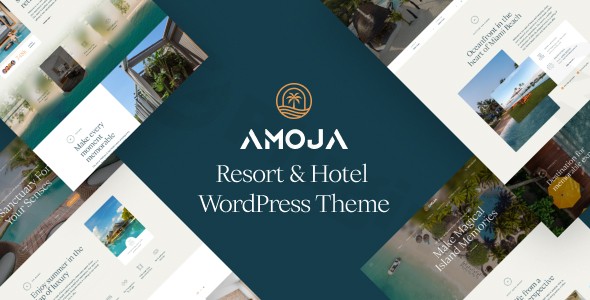
The hospitality industry relies heavily on first impressions, and your website is often the first “room” a guest visits. The Amoja WordPress theme is a premium, high-performance solution specifically crafted for resorts, hotels, and vacation rentals. Developed by Opal_WP—a team with a track record of serving over 100,000 users—Amoja combines a luxury aesthetic with a robust hotel booking theme WordPress engine, ensuring that your property looks as inviting online as it does in person.
Key Features: Design, Layout & Performance
Amoja is more than just a visual skin; it is a comprehensive toolkit designed to showcase accommodations and convert visitors into guests.
Elegant Design & Layout Options
The theme features a modern, stylish interface that prioritizes high-quality imagery and white space, perfect for luxury resorts and boutique hotels.
- Multiple Homepage Layouts: Whether you are highlighting a private beach, a city-center hotel, or a wellness spa, Amoja provides diverse homepage templates to suit your specific niche.
- Specialized Content Areas: Built-in templates for room details, dining menus, and spa services allow you to present your amenities with professional visual hierarchy.
- Full-Width & Boxed Layouts: Users have full control over site width, allowing for an immersive edge-to-edge experience or a more traditional, contained look.
Advanced Customization Capabilities
As an Elementor compatible hotel theme, Amoja offers a friction-less design experience.
- Drag-and-Drop Building: You don’t need to touch a single line of code. Using Elementor or Visual Composer, you can move elements, adjust margins, and build custom sections in real-time.
- Global Styling: Through the WordPress Customizer, you can globally manage color schemes and typography to ensure your digital presence aligns perfectly with your physical branding.
- Header & Footer Builder: Customize the navigation experience with flexible header and footer options, including specialized side-area menus and social link integrations.
Performance & SEO Optimization
In the travel sector, speed is a ranking factor and a conversion driver. Amoja is built with clean, lightweight code to ensure a fast loading hotel WordPress theme experience.
- Mobile Responsiveness: The theme is fully responsive, providing a flawless booking experience on smartphones and tablets—a critical feature since a large percentage of travel research happens on mobile.
- SEO Ready: With clean markup and structured heading tags, Amoja helps your property rank higher in search engine results and AI-driven answer engines.
Installation & Demo Import
Getting your hotel website live is straightforward thanks to Amoja’s user-friendly setup process.
- Install & Activate: Upload the theme files through your WordPress Dashboard (Appearance > Themes > Add New).
- Plugin Activation: Upon activation, you will be prompted to install required plugins, including Elementor and the core Amoja functional plugin.
- One-Click Demo Import: Navigate to the demo import section within the theme settings. This allows you to import pre-designed starter sites, including images, menus, and booking layouts.
- Configuration: After the import, check your menus and widgets. It is often helpful to verify your permalink settings (Settings > Permalinks) to ensure your “Rooms” and “Services” pages load correctly.Pro Tip: Ensure your server’s memory limit is set to at least 256MB to avoid timeouts during the demo content import process.
Customization Guide: Branding & Layout
Once the demo is imported, personalizing the Amoja WordPress theme to match your brand identity is handled through the WordPress Customizer.
- Logo and Branding: Upload your high-resolution logo and set your brand’s primary and secondary colors. These will automatically update across buttons, icons, and highlights.
- Typography: Choose from a wide array of fonts to match your hotel’s personality—whether that’s a classic serif for a luxury estate or a clean sans-serif for a modern urban hotel.
- Booking Integration: The heart of Amoja is its integrated booking system. You can manage room availability, set seasonal pricing, and configure booking calendars directly within the dashboard, reducing the need for expensive third-party subscriptions.
FAQ & Troubleshooting
Is Amoja compatible with Elementor and Gutenberg?
Amoja is fully optimized for Elementor and Visual Composer, providing a powerful drag-and-drop experience. However, it is important to note that Amoja is not currently Gutenberg-optimized. If you prefer building primarily with the default WordPress Block Editor, you may find the customization options more limited compared to its Elementor integration.
Can Amoja theme integrate with WooCommerce?
Yes, Amoja offers full WooCommerce support. This allows you to sell hotel packages, gift vouchers, or even merchandise directly through your website. It also provides a secure framework for handling booking payments.
Does it support child themes?
Yes, Amoja supports child themes. We highly recommend using a child theme for any custom CSS or functional modifications to ensure your changes are not lost when the parent theme is updated.
How do I set up the booking system in Amoja?
The booking system is integrated into the theme’s core functionality. To set it up, go to the dedicated “Booking” or “Rooms” post types in your WordPress sidebar. From there, you can define room types, add amenities, set pricing, and manage the availability calendar that guests see on the front end.
Is Amoja theme good for small hotels?
Absolutely. Amoja is designed to scale. While it has the features to support large resorts, its ease of use and “all-in-one” booking functionality make it an excellent choice for small boutique hotels, B&Bs, and guesthouses that need a professional look without a massive development budget.
Conclusion
The Amoja WordPress theme stands out as a top-tier choice for the hospitality industry. By blending high-end design with specialized functionality like room management and WooCommerce compatibility, it removes the technical hurdles usually associated with building a hotel website.While the lack of Gutenberg optimization is a consideration for some, its seamless integration with Elementor provides more than enough design flexibility for most users. If you are looking for a professional, SEO-friendly, and conversion-optimized theme to grow your hospitality business, Amoja is a powerful investment for your digital strategy.For more WordPress theme reviews and SEO strategies, visit us at wppick.com.
I. Download Limits & Account Benefits
- Free Downloads: Each email address receives 3 downloads per day for free products
- Upgrade Benefits: Purchase any paid product to increase your daily download limit by 3 for each paid product
- No Account Required: You can download immediately by receiving the download link via email
- Account Recommended: Create an account for easier access to your order history and direct update downloads
II. Understanding GPL vs Official Versions
Important: The products available on WPPick are GPL-licensed versions, which differ from official developer versions. Before purchasing, please read our comprehensive guide: Understanding GPL & Official Differences at WPPick
Key Points:
- GPL versions may not include premium support from original developers
- Updates may be delayed compared to official releases
- Some premium features might have limitations
- Always consider your specific needs and support requirements
III. Support & Assistance
We’re here to help through multiple channels:
- Email Support: Direct email assistance for all inquiries
- Live Chat: Real-time support during business hours
- Comprehensive Documentation: Detailed guides and tutorials
IV. Order Tracking
Access your complete purchase history and download links anytime: Order History
V. Account Access
New to WPPick? Login or Create Account to manage your downloads and orders efficiently.
VI. Refund Protection
We stand behind our products with a clear refund policy. Review our terms: Refund Policy
VII. Privacy & Security
Your data security is our priority. Learn how we protect your information: Privacy Policy
VII. Terms of Service
Understanding our service terms ensures a smooth experience: Terms of Use
Quick Tips for Best Experience
- Verify Compatibility: Check plugin/theme compatibility with your WordPress version
- Backup First: Always backup your site before installing new plugins or themes
- Test Environment: Consider testing on a staging site first
- Stay Updated: Regularly check for updates in your account dashboard
- Read Documentation: Review any included documentation for optimal setup
Need Help?
If you have questions about downloads, licensing, or need technical assistance, don’t hesitate to contact our support team. We’re committed to ensuring you have the best possible experience with WPPick products.
Ready to get started? Your download adventure begins with just one click!
No changelog available.