

Azulirius | Baby Shop And Kids Store Shopify Theme Os 2.0
/Year
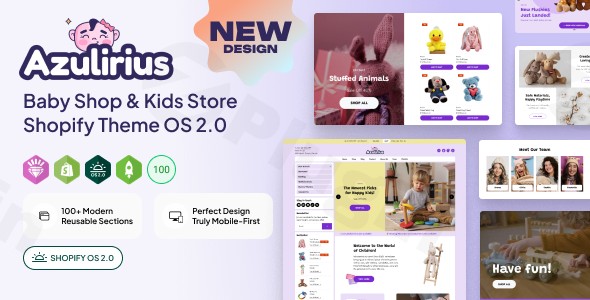
Launching a successful online boutique for children requires more than just cute products; it demands a high-performance, visually engaging, and user-friendly platform. The Azulirius Shopify Theme is a premium solution specifically engineered for the modern Baby Shop and Kids Store Shopify Theme OS 2.0 ecosystem.
Designed to solve the common friction points of slow loading times and rigid layouts, Azulirius provides store owners with the flexibility of Shopify’s Online Store 2.0 architecture. Whether you are selling organic infant clothing, educational toys, or nursery furniture, this theme ensures your storefront is as professional as it is charming.
Key Features of the Azulirius Shopify Theme
The Azulirius theme is built to convert visitors into loyal customers by combining aesthetic appeal with robust technical functionality.
1. Advanced Shopify OS 2.0 Architecture
Unlike older “Vintage” themes, Azulirius is fully optimized for Online Store 2.0. This means you have “Sections on Every Page,” allowing you to drag and drop banners, testimonials, and product collections anywhere on your site without touching a single line of code.
2. Blazing-Fast Performance & SEO Optimization
In the world of e-commerce, speed equals revenue. Azulirius is performance-optimized with:
- Image Optimization: High-quality retina-ready visuals that don’t lag.
- Lightweight Codebase: Built with HTML5 and CSS3 for rapid execution.
- SEO-Friendly Structure: Designed to help your Kids Store Shopify Theme rank higher on Google and Bing.
3. Enhanced Shopping Experience (AJAX Powered)
To minimize page reloads and keep customers engaged, the theme includes:
- Ajax Add to Cart & Wishlist: Allows users to save items and build carts seamlessly.
- Quick View: Customers can preview product details in a popup without leaving the collection page.
- Dynamic Product Filtering: Includes a price range slider and OS 2.0 compatible filters to help parents find exactly what they need in seconds.
4. Immersive Product Media
Modern shoppers want to see products in action. Azulirius supports:
- Video Integration: Host videos directly or embed from YouTube and Vimeo.
- 3D & AR Support: Allow customers to view toys or furniture in Augmented Reality.
- Image Zoom: High-resolution hover-zoom for inspecting fabric textures and details.
How to Install and Set Up Azulirius
Setting up your Baby Shop Shopify Theme OS 2.0 is straightforward, even for those without technical backgrounds. Follow these steps to get started:
- Purchase and Download: Secure the theme file (usually a
.zipfile) from the marketplace (e.g., ThemeForest). - Upload to Shopify: Log in to your Shopify Admin, go to Online Store > Themes, and click Add Theme > Upload zip file.
- Publish the Theme: Once uploaded, click Actions > Publish to make Azulirius your live storefront.
- Customize Your Layout: Click the Customize button to enter the visual editor. Use the “Add Section” feature to build your homepage, about page, and contact pages.
- Configure Navigation: Set up your Mega Menu under the Header settings to categorize products (e.g., Newborn, Toddler, Toys, Sale).
- Set Up Filters: Go to Online Store > Navigation > Filters to enable the dynamic OS 2.0 search filters.
Practical Usage & Best Practices
The Azulirius Shopify Theme is ideal for various niches within the children’s market. Here is how to maximize its ROI:
- For Clothing Boutiques: Use the Grid/List view toggle and the Image Zoom feature. High-quality photography is essential for baby clothes; use the retina-ready display to highlight soft textures.
- For Toy Stores: Leverage the Live Search and Mega Menu. If you have hundreds of SKUs, these features help users navigate deep inventories without feeling overwhelmed.
- For Global Brands: Take advantage of the Multi-Currency and Multi-Language support. This allows you to scale your kids’ store to international markets with localized pricing.
- Best Practice Tip: Always utilize the Sticky Header. It ensures that the cart and search bar are always visible, reducing the “abandonment” rate on long-scrolling mobile devices.
FAQ & Troubleshooting
Is the Azulirius theme fully compatible with Shopify OS 2.0?
Yes. Azulirius is a native Shopify OS 2.0 theme, meaning it supports sections on all pages, app blocks, and the latest dynamic filtering system provided by Shopify.
Does this theme support product videos and 3D models?
Absolutely. Azulirius supports various product media types, including standard images, YouTube/Vimeo videos, and 3D/AR models, ensuring a modern and interactive shopping experience.
How do I update the theme without losing my settings?
Since Azulirius follows Shopify’s standard architecture, you can use the Shopify Theme Updater or manually migrate settings. It is always recommended to keep a backup of your current theme before performing major updates.
Can I use Azulirius for a multi-language store?
Yes, the theme is designed to be translation-ready and supports multiple currencies, making it an excellent choice for international e-commerce themes for kids.
Final Verdict: Is Azulirius Right for You?
The Azulirius Shopify Theme provides a perfect balance of “cute” aesthetics and “beast” performance. By leveraging the power of Shopify Online Store 2.0, it offers a level of customization that previously required expensive developer hours.
If you are looking for a Baby Shop and Kids Store Shopify Theme that is fast, SEO-optimized, and packed with conversion-boosting features like Ajax search and AR support, Azulirius is a top-tier investment for your business. It is particularly well-suited for growing brands that need a scalable, professional presence on the Shopify platform.
I. Download Limits & Account Benefits
- Free Downloads: Each email address receives 3 downloads per day for free products
- Upgrade Benefits: Purchase any paid product to increase your daily download limit by 3 for each paid product
- No Account Required: You can download immediately by receiving the download link via email
- Account Recommended: Create an account for easier access to your order history and direct update downloads
II. Understanding GPL vs Official Versions
Important: The products available on WPPick are GPL-licensed versions, which differ from official developer versions. Before purchasing, please read our comprehensive guide: Understanding GPL & Official Differences at WPPick
Key Points:
- GPL versions may not include premium support from original developers
- Updates may be delayed compared to official releases
- Some premium features might have limitations
- Always consider your specific needs and support requirements
III. Support & Assistance
We’re here to help through multiple channels:
- Email Support: Direct email assistance for all inquiries
- Live Chat: Real-time support during business hours
- Comprehensive Documentation: Detailed guides and tutorials
IV. Order Tracking
Access your complete purchase history and download links anytime: Order History
V. Account Access
New to WPPick? Login or Create Account to manage your downloads and orders efficiently.
VI. Refund Protection
We stand behind our products with a clear refund policy. Review our terms: Refund Policy
VII. Privacy & Security
Your data security is our priority. Learn how we protect your information: Privacy Policy
VII. Terms of Service
Understanding our service terms ensures a smooth experience: Terms of Use
Quick Tips for Best Experience
- Verify Compatibility: Check plugin/theme compatibility with your WordPress version
- Backup First: Always backup your site before installing new plugins or themes
- Test Environment: Consider testing on a staging site first
- Stay Updated: Regularly check for updates in your account dashboard
- Read Documentation: Review any included documentation for optimal setup
Need Help?
If you have questions about downloads, licensing, or need technical assistance, don’t hesitate to contact our support team. We’re committed to ensuring you have the best possible experience with WPPick products.
Ready to get started? Your download adventure begins with just one click!
No changelog available.