

Barn2 Media Woocommerce Product Filters
/Year
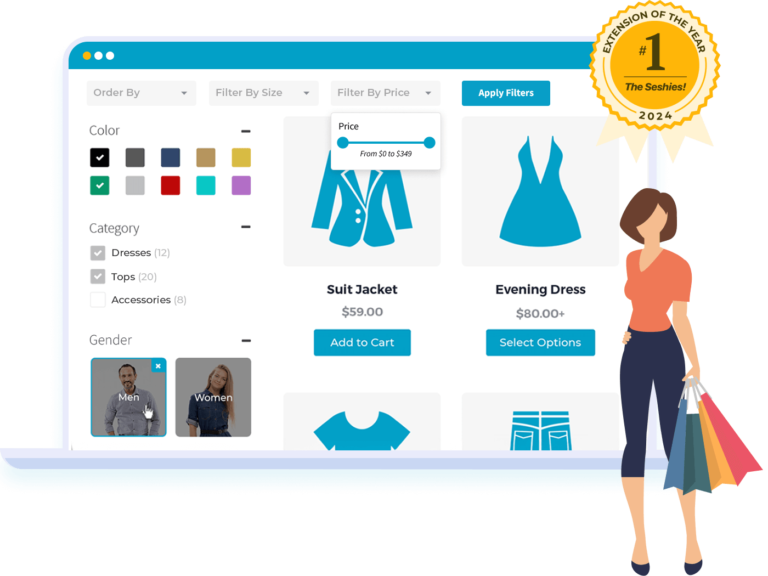
Transforming an online store from a chaotic catalog into a streamlined shopping experience is crucial for success. For WooCommerce store owners, helping customers find exactly what they’re looking for, effortlessly and quickly, directly impacts sales. This is where the Barn2 WooCommerce Product Filters plugin shines, offering a comprehensive and intuitive solution to revolutionize product discovery. This premium WooCommerce filter plugin empowers your customers with powerful, instant filtering capabilities, drastically enhancing user experience and driving conversion rates.
Key Features: Unleashing Advanced Product Filters for Every Store
The Barn2 WooCommerce Product Filters plugin is packed with robust features designed to cater to both simple and complex filtering needs, ensuring your customers can navigate your product catalog with unparalleled ease.
Multi-Dimensional Product Filtering
Empower your shoppers with extensive filtering options. Customers can filter by virtually any criteria imaginable, making this a true WooCommerce advanced product filters solution.
- Standard Taxonomies: Filter by product categories, tags, and attributes like size, material, or brand.
- Visual Selections: Utilize color swatches and image-based selectors for visually-driven product attributes.
- Numeric Ranges: Implement precise price range sliders for intuitive budget-based filtering.
- Product Status: Easily display “in stock” items, products currently on sale, or items based on their average customer ratings.
- Custom Data: Leverage the power of WooCommerce filter by custom field or custom taxonomies, including integration with Advanced Custom Fields (ACF), for highly specialized product data filtering.
- Keyword Search: Integrate a dedicated search box that works in tandem with the filters for precise product name or description matches.
Versatile Filter Display Options
The plugin offers diverse presentation styles to seamlessly integrate with your store’s design and user preferences:
- Basic Controls: Choose from classic dropdown menus, checkbox lists, and radio buttons.
- Visual Enhancements: Implement engaging color swatches and image pickers for attribute selection.
- Interactive Sliders: Utilize range sliders for price, weight, or other numeric criteria.
- Labels/Tag Clouds: Present options in a tag-cloud style for easy browsing.
Instant AJAX Filtering Technology
Say goodbye to frustrating page reloads! The AJAX product filters WooCommerce integration delivers lightning-fast results the moment a customer refines their search criteria. This seamless experience keeps shoppers engaged, reduces bounce rates, and provides immediate feedback, significantly improving the shopping flow. Users can also choose to apply filters with a button click if preferred.
Mobile-Optimized Shopping Experience
Recognizing the dominance of mobile commerce, this plugin is specifically designed to supercharge mobile shopping. It offers responsive filtering interfaces that work flawlessly across all devices. You can configure different filter layouts for desktop and mobile users, including convenient slide-out panels that maximize screen real estate on smaller screens, addressing the need for WooCommerce product filters mobile responsive solutions.
Flexible Implementation & Placement Strategies
Display your product filters exactly where they make the most sense for your store’s layout:
- Above Product Grids: Position filters prominently at the top of your shop pages.
- Sidebar Widgets: Utilize standard sidebar areas for traditional filter placement.
- Mobile Overlay Panels: Implement space-saving, slide-out panels specifically for mobile users.
- Shortcode Integration: Embed filter groups anywhere on your site using simple shortcodes, offering unparalleled flexibility.
Theme Compatibility & Design Integration
Built with clean, minimal design principles, Barn2 WooCommerce Product Filters integrates seamlessly with any WordPress theme and existing WooCommerce setup. It maintains visual consistency while providing powerful functionality right out of the box. It’s also fully compatible with popular page builders like Elementor, Divi, Avada, Bricks, and the Gutenberg block editor.
Advanced Logic & Performance
The plugin employs intelligent interdependent filter logic. When a customer selects options from one filter, the available options in other filters instantly update to show only possible combinations. Furthermore, for those dealing with WooCommerce filter plugin for large catalogs, Barn2 includes a unique indexing system that ensures blazing-fast filtering performance, even with thousands of products, by retrieving results instantly in the background. Each filter combination generates a unique, SEO-friendly URL, beneficial for search engine indexing and direct linking.
Installation & Setup: Your Barn2 WooCommerce Product Filters Setup Guide
Getting the Barn2 WooCommerce Product Filters plugin up and running is a straightforward process, designed for all user levels. Here’s a step-by-step guide:
- Purchase & Download: After purchasing the plugin from Barn2 Media, download the plugin .zip file from your account area.
- Upload to WordPress:
- Log in to your WordPress admin dashboard.
- Navigate to Plugins > Add New.
- Click the “Upload Plugin” button at the top of the page.
- Click “Choose File” and select the .zip file you downloaded.
- Click “Install Now”.
- Activate the Plugin: Once installed, click “Activate Plugin”.
- Initial Configuration: The plugin typically features an intuitive setup wizard. Follow the on-screen prompts to configure your first set of filters. You can use the drag-and-drop builder to easily create and arrange filter groups without any coding.
- Placement: Decide where you want your filters to appear (e.g., above the product grid, in a sidebar widget, or via a shortcode on a specific page). The plugin provides options within its settings to manage these placements.
- Test Your Filters: After setting up, visit your shop page or any page where filters are enabled and test them thoroughly to ensure they function as expected and enhance product discovery.
Practical Usage & Best Practices for Enhanced Product Discovery
Implementing Barn2 WooCommerce Filters effectively can dramatically improve your store’s user experience and conversion rates. Here are some practical usage scenarios and best practices:
- Optimize for Large Product Catalogs: If your store boasts thousands of products, leverage the plugin’s unique indexing system. Group your filters logically (e.g., “General Filters” in the sidebar, “Specific Attributes” above the products) to prevent overwhelming users while ensuring fast performance. This is ideal for stores needing a
WooCommerce filter plugin for large catalogs. - Improve Mobile Shopping Experience: Utilize the dedicated mobile-friendly slide-out panel option. This saves screen real estate on smaller devices, making the filter experience clutter-free and highly accessible, directly addressing the need for
WooCommerce product filters mobile responsivedesign. - Create Targeted Sales & Promotion Experiences: Easily set up a dedicated filter for “On Sale” items. Combine this with other attribute filters (e.g., “On Sale T-Shirts”) to create highly targeted promotional pages that use unique, shareable URLs, boosting the visibility of your discounted products.
- Leverage Custom Fields for Niche Products: For stores selling highly specialized items, like custom-built computers or artisan crafts, use the plugin’s ability to
WooCommerce filter by custom field. If you’re using Advanced Custom Fields (ACF) to store unique product data (e.g., “Processor Type” for computers, “Material” for crafts), you can create filters based on these custom fields, providing unparalleled granularity for your customers.
FAQ & Troubleshooting
Here are answers to common questions about the Barn2 WooCommerce Product Filters plugin, ensuring you have the information you need for a smooth experience.
How to add product filters in WooCommerce?
To add product filters in WooCommerce using the Barn2 plugin, first, install and activate the plugin as described in the “Installation & Setup” section. Then, navigate to the plugin’s settings in your WordPress dashboard. Here, you’ll find an intuitive interface to create filter groups, select the types of filters you want (e.g., price, category, attribute), and configure their display styles (e.g., dropdown, checkbox, color swatch). Finally, assign these filter groups to display areas like sidebars, above the product grid, or use shortcodes for custom placement.
What is the best WooCommerce product filter plugin?
While “best” can be subjective, the Barn2 WooCommerce Product Filters plugin is consistently ranked as a top contender and often the #1 choice among WooCommerce filter plugin solutions. It stands out due to its comprehensive range of filter types, superior AJAX-powered performance even with large product catalogs, exceptional mobile optimization, ease of use with its drag-and-drop builder, and highly-rated customer support. It surpasses many alternatives by offering advanced filtering capabilities like custom field support and providing a seamless user experience.
Does Barn2 WooCommerce Filters support custom taxonomies and custom fields?
Yes, absolutely. The Barn2 WooCommerce Product Filters plugin offers robust support for both custom taxonomies and custom fields, including seamless integration with Advanced Custom Fields (ACF). This means you can create highly specific and unique filtering options based on any custom data you’ve added to your WooCommerce products, going far beyond standard categories and attributes. This makes it a powerful WooCommerce filter by custom field solution.
How to improve WooCommerce product search with filters?
To significantly improve your WooCommerce product search, integrate the Barn2 Product Filters plugin. By enabling multi-dimensional filtering options such as categories, attributes, price ranges, and even custom fields, customers can quickly narrow down vast product catalogs to find exact matches. The plugin’s instant AJAX filtering updates results in real-time, making the search process faster and more engaging. Additionally, configuring mobile-responsive filters ensures a great experience for all users, regardless of device.
Is the Barn2 WooCommerce Product Filters plugin compatible with page builders?
Yes, the Barn2 WooCommerce Product Filters plugin is designed for broad compatibility. It integrates seamlessly with popular WordPress page builders like Elementor, Divi Builder, Avada Fusion Builder, and Bricks. It also works perfectly with the native Gutenberg block editor and standard WooCommerce shortcodes, ensuring you can display and manage your product filters effectively within your preferred website building environment.
Conclusion
For any serious WooCommerce store looking to elevate its customer experience and boost conversions, the Barn2 WooCommerce Product Filters plugin is an indispensable tool. It solves the critical problem of product discoverability with an elegant, performant, and feature-rich solution. From its instant AJAX filtering and mobile optimization to its support for diverse filter types and custom fields, this plugin offers unparalleled flexibility and ease of use.Whether you’re a store owner seeking a straightforward way to implement WooCommerce advanced product filters or a developer needing powerful extensibility, Barn2’s offering delivers. Its robust architecture, commitment to security, and professional support ensure a reliable and effective WooCommerce filter plugin that will pay dividends by keeping your customers engaged and turning browsers into buyers. Invest in a superior shopping journey today and watch your sales grow.
I. Download Limits & Account Benefits
- Free Downloads: Each email address receives 3 downloads per day for free products
- Upgrade Benefits: Purchase any paid product to increase your daily download limit by 3 for each paid product
- No Account Required: You can download immediately by receiving the download link via email
- Account Recommended: Create an account for easier access to your order history and direct update downloads
II. Understanding GPL vs Official Versions
Important: The products available on WPPick are GPL-licensed versions, which differ from official developer versions. Before purchasing, please read our comprehensive guide: Understanding GPL & Official Differences at WPPick
Key Points:
- GPL versions may not include premium support from original developers
- Updates may be delayed compared to official releases
- Some premium features might have limitations
- Always consider your specific needs and support requirements
III. Support & Assistance
We’re here to help through multiple channels:
- Email Support: Direct email assistance for all inquiries
- Live Chat: Real-time support during business hours
- Comprehensive Documentation: Detailed guides and tutorials
IV. Order Tracking
Access your complete purchase history and download links anytime: Order History
V. Account Access
New to WPPick? Login or Create Account to manage your downloads and orders efficiently.
VI. Refund Protection
We stand behind our products with a clear refund policy. Review our terms: Refund Policy
VII. Privacy & Security
Your data security is our priority. Learn how we protect your information: Privacy Policy
VII. Terms of Service
Understanding our service terms ensures a smooth experience: Terms of Use
Quick Tips for Best Experience
- Verify Compatibility: Check plugin/theme compatibility with your WordPress version
- Backup First: Always backup your site before installing new plugins or themes
- Test Environment: Consider testing on a staging site first
- Stay Updated: Regularly check for updates in your account dashboard
- Read Documentation: Review any included documentation for optimal setup
Need Help?
If you have questions about downloads, licensing, or need technical assistance, don’t hesitate to contact our support team. We’re committed to ensuring you have the best possible experience with WPPick products.
Ready to get started? Your download adventure begins with just one click!
- Added `wcf_display_all_choices` filter to keep all filter choices visible when using AND logic.
- Updated internal dependencies.
- Tested up to WooCommerce 10.5.2.
- Improved caching logic.
- Avada - groups unable to render the mobile drawer.
- Product collection block - duplicated rendering.
- Updated internal dependencies.
- Tweak: Added a filter to change the viewport width threshold for mobile/desktop layouts.
- Fix: security fixes.
- Fix: "OR" logic not working correctly.
- Fix: Avada and WooCommerce Product Table unstyled quantity buttons.
- Fix: Elementor unable to use widgets due to object caching.
- Dev: Updated internal dependencies.
- Dev: Tested up to WooCommerce 10.4.3.
- SQL predicate grouping in multi-filter AND logic to ensure proper intersection behavior.
- Updated language files.
- Divi - disabled object caching for groups queries.
- Added new hooks.
- Updated internal dependencies.
- Taxonomy restriction not removed when using OR logic.
- WP 6.9 - unable to select specific terms through the filters editor.
- "Apply filters" button not visible on certain mobile browsers.
- Flatsome - certain elements were not hidden.
- Elementor - drawer button not visible on desktop when using certain configurations.
- Tested up to WooCommerce 10.4.2. and WP 6.9.
- Added ability to set custom labels for the checkbox filter.
- Columns in the horizontal group are now all equal width.
- Added new hook "wcf_filter_can_index_taxonomy_only_used_as_variation".
- Some attributes of [products] shortcode were not recognised.
- Filters not loading when the individual category display type was changed.
- Vertical scrollbar not visible for filters inside popovers.
- Elementor - filters not displaying on smaller screens.
- Inconsistent filters reset due to short-lived cache.
- Entities decoding for certain filter types.
- Group shortcode not loading filters when used within a text widget.
- Unable to clear custom fields rendered as checkboxes.
- Sorting by "most recent" ignored.
- WooCommerce Product Table - filters displaying on empty tables.
- WooCommerce Product Table - pagination not working on lazy loaded tables.
- Tested up to WooCommerce 10.3.3.
- Updated internal dependencies.
- Added styling for the Bricks theme.
- Prevent errors when object caching plugins fail to cache filters data.
- URL parameters persisting after clearing when toggling inputs.
- Drawer button size.
- Astra - input styling issue.
- WooCommerce product catalog display setting being ignored when displaying categories.
- Updated internal dependencies.
- Tested up to WooCommerce 10.2.2 and WP 6.8.3.