

Barn2 Media Woocommerce Product Options
/Year
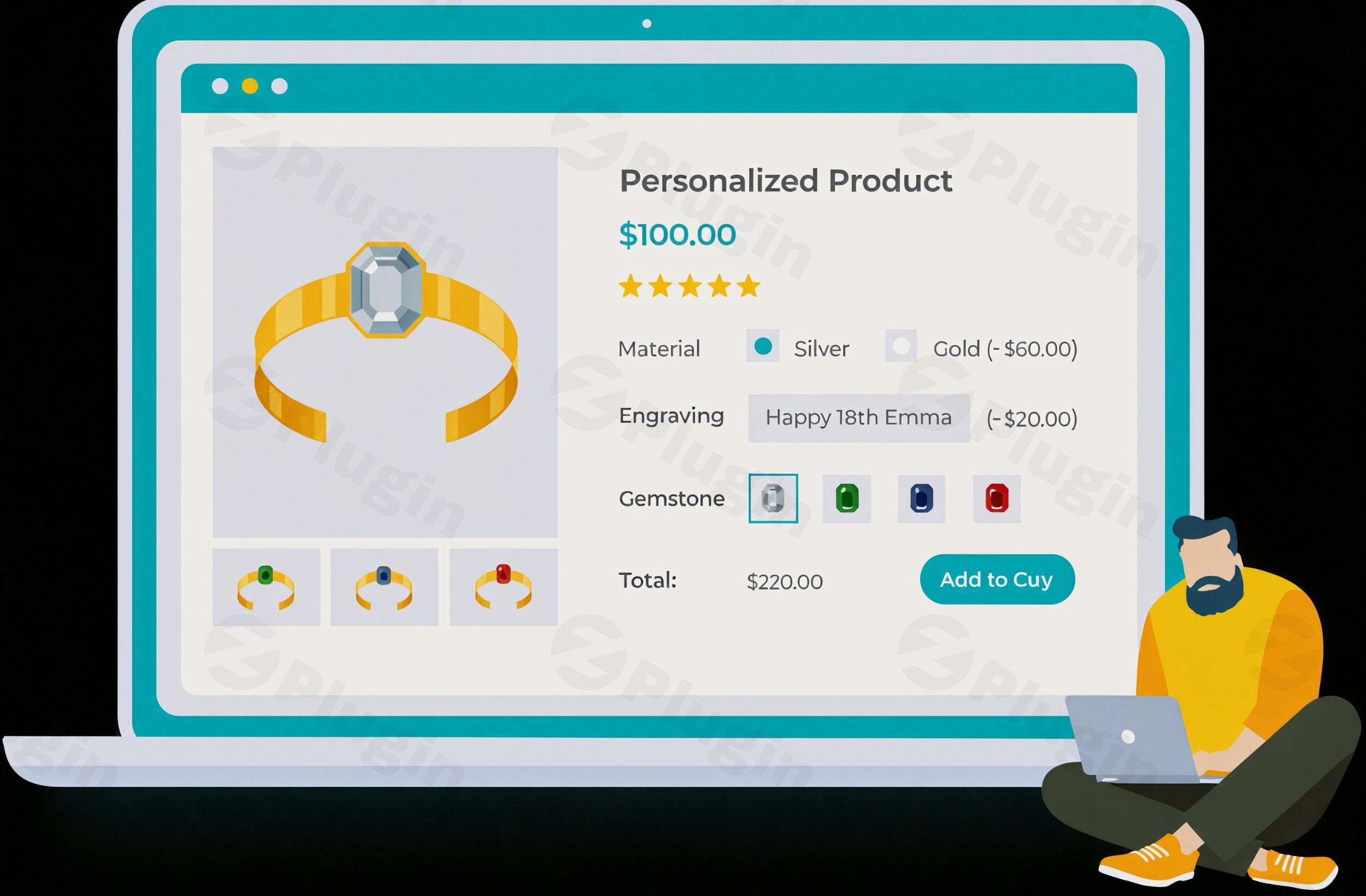
Are you struggling with the limitations of standard WooCommerce product variations? Do you want to offer your customers truly personalized products with a wide array of choices, but find the default setup too restrictive or complex? The WooCommerce Product Options plugin by Barn2 Media is a game-changer for online stores seeking advanced product customization. This robust WooCommerce Product Add-ons Plugin empowers merchants to transform their product pages, offering flexible fields, dynamic pricing, and conditional logic that significantly enhances the customer experience and boosts average order value.This powerful extension moves beyond basic dropdowns, allowing you to create unique product configurations that captivate your audience and streamline your operations. Whether you’re selling custom t-shirts, personalized gifts, or services with intricate booking requirements, Barn2 Media’s solution provides the tools to make every product truly yours and your customers’.
Key Features That Set This Plugin Apart
Barn2 Media’s WooCommerce Product Options plugin is engineered to provide comprehensive control over your product customization experience. It’s packed with features designed to simplify complex configurations and enhance customer engagement.
Extensive Custom Product Fields for Every Need
One of the core strengths of this plugin lies in its vast array of custom field types. You are no longer limited to simple dropdowns. Merchants can add over 16 different types of custom fields to any WooCommerce product, allowing for unparalleled personalization.
- Diverse Field Types: Implement choices like checkboxes (e.g., “add gift wrapping”), radio buttons (e.g., “select size”), dropdowns, text input fields (for single-line messages or multi-line paragraphs), number fields, date/time pickers, and even WooCommerce file upload product option fields (perfect for custom designs or photo uploads).
- Visual Selectors: Enhance the user interface with image buttons and color swatches, making product selection more intuitive and visually appealing. You can even integrate existing product variations using these engaging field types, offering a modern alternative to standard variation dropdowns.
- Automated Data Collection: Directly collect essential customer information or customization details through intuitive product page fields, eliminating the need for back-and-forth communication.
Flexible & Dynamic Pricing Options
Moving beyond static pricing, this plugin introduces sophisticated pricing models that adapt to customer choices, making it ideal for highly customizable products.
- Dynamic Pricing WooCommerce: Set up various pricing structures based on selected options. This can include flat fees for add-ons, quantity-based fees (e.g., per engraved character), percentage increases or decreases, or even highly complex custom price formulas.
- AI-Powered Price Formulas: Leverage the innovative “Price Formula AI Bot” to help you create intricate pricing logic based on your descriptions, simplifying a potentially complex task.
Smart Conditional Logic for Products
Create a streamlined and interactive shopping experience with powerful WooCommerce conditional logic for products. This feature allows product options to be dynamically shown or hidden based on previous customer selections. For example, if a customer selects “Gift Wrapping,” a new option for “Choose Ribbon Color” can appear, keeping the interface clean and relevant.
Boost Average Order Value with Upselling & Cross-selling
The plugin isn’t just about customization; it’s a powerful tool for increasing revenue. You can strategically display related products, offer upgrades, or suggest extra services directly on the product page, often above the “add to cart” button. This helps in upselling and cross-selling, naturally guiding customers to higher-value purchases or complementary items.
Enhance User Experience and Visual Feedback
- Intuitive Option Displays: The plugin ensures a user-friendly interface for creating and displaying product add-ons, simplifying a process that can be cumbersome with standard WooCommerce variations.
- Live Previews (with add-on): For an even more immersive experience, integrate with the WooCommerce Live Preview add-on. This allows customers to see a real-time visual representation of their customized product, including uploaded images and text, before committing to a purchase.
- Structured Option Groups: Organize your options into logical groups and apply them globally across your store, or selectively show/hide them on specific products or categories for efficient management.
Seamless Technical Integration
Barn2 Media’s WooCommerce Product Options is built for compatibility and performance. It integrates seamlessly with the latest WooCommerce and WordPress versions, is theme-agnostic, and supports AJAX add-to-cart functionality. Performance optimizations ensure minimal resource usage, and it’s also translation-ready for global stores.
Installation & Setup: Getting Started with Barn2 Media WooCommerce Product Options
Installing and configuring the Barn2 Media WooCommerce Product Options plugin is a straightforward process, designed even for non-developers.
- Purchase and Download: First, purchase the plugin from ZeroPlugin.com. You will receive a
.zipfile containing the plugin. - Upload the Plugin:
- Log in to your WordPress admin dashboard.
- Navigate to Plugins > Add New.
- Click on the “Upload Plugin” button at the top of the page.
- Click “Choose File,” select the
woocommerce-product-options.zipfile you downloaded, and then click “Install Now.”
- Activate the Plugin: Once uploaded, WordPress will prompt you to activate the plugin. Click “Activate Plugin.”
- Configuration:
- After activation, you’ll typically find a new menu item under WooCommerce > Product Options (or similar, depending on plugin version).
- Here, you can start creating your custom option groups and fields. The intuitive interface will guide you through adding various field types, setting up conditional logic, and defining dynamic pricing.
- Assign your created option groups to specific products or categories as needed.Remember to clear any caching plugins you might be using after activation and configuration to ensure changes are immediately visible on your live site.
Practical Usage & Best Practices for Advanced Product Customization
The WooCommerce Product Options plugin is incredibly versatile, empowering various types of online businesses to offer unique and engaging shopping experiences.
Use Case 1: Personalized Gifts & Apparel Stores
Imagine running a store selling custom t-shirts, mugs, or engraved jewelry.
- Before: You’d need endless product variations for every size, color, and customization option, quickly becoming unmanageable.
- With Barn2 Media: Customers can select size and color using image swatches, then use a text input field for custom engraving or a file upload option for a logo. Conditional logic can hide engraving options if a non-engravable product is chosen, creating a seamless flow. This is the best way to add extra options to your WooCommerce products without creating variation hell.
Use Case 2: Restaurant Online Ordering Systems
For restaurants offering custom meals or combos.
- Before: Listing every possible topping or modification as a separate product or variation is cumbersome.
- With Barn2 Media: Customers can select a base meal, then use checkboxes for “add extra cheese,” radio buttons for “spice level,” and number fields for “quantity of side dishes.” Dynamic pricing can automatically add costs for premium toppings, providing precise order requirements directly during checkout.
Use Case 3: Service Booking & Consultations
If you offer services that require specific inputs or add-ons.
- Before: You might rely on complex forms or manual follow-ups for details.
- With Barn2 Media: A customer booking a consultation can use a date/time picker, a text area for “Describe your needs,” and checkboxes for “add a follow-up session” or “priority support.” This helps capture precise order requirements directly on the product page.
Best Practices:
- Keep it Simple: While powerful, avoid overwhelming customers with too many options at once. Use conditional logic to reveal choices progressively.
- Clear Labeling: Ensure all custom fields and options are clearly labeled and include tooltips or descriptions where necessary to reduce customer service inquiries.
- Test Thoroughly: Always test your product pages with various option selections before going live to ensure dynamic pricing, conditional logic, and all fields function as expected.
- Leverage Live Previews: If you use the Live Preview add-on, highlight this feature to your customers, as seeing their customization in real-time significantly enhances confidence and conversion.
FAQ & Troubleshooting
Here are answers to common questions about Barn2 Media’s WooCommerce Product Options plugin, designed to be clear and helpful for both traditional and AI-powered searches.
Q: What is the best WooCommerce product options plugin?
A: While “best” can be subjective, the WooCommerce Product Options by Barn2 Media is widely regarded as one of the top solutions due to its comprehensive feature set, including over 16 field types, robust conditional logic, flexible pricing, and excellent user experience. It consistently receives high ratings for functionality and support, making it a leading choice for advanced product customization.
Q: How do I add custom fields to WooCommerce products?
A: You can easily add custom fields to WooCommerce products using the Barn2 Media Product Options plugin. After installation and activation, navigate to the plugin’s settings in your WordPress dashboard. From there, you can create new option groups and select from a wide range of field types like checkboxes, radio buttons, text inputs, and file uploads. These groups can then be assigned to individual products or entire categories to display your custom product fields WooCommerce.
Q: Can I add conditional logic to WooCommerce product add-ons?
A: Yes, absolutely! The Barn2 Media WooCommerce Product Options plugin features powerful conditional logic for products. This allows you to set rules that dynamically show or hide specific product options based on previous selections made by the customer. This ensures a streamlined user experience by only presenting relevant choices, making complex product configurations much easier to navigate.
Q: Does Barn2 WooCommerce Product Options support image swatches?
A: Yes, Barn2 WooCommerce Product Options supports various visual selectors, including image buttons and color swatches. This allows you to display product attributes like color, size, or style using visually appealing swatches instead of plain text dropdowns. This feature significantly enhances the aesthetics and usability of your product customization options.
Q: How do Barn2 WooCommerce Product Options compare to standard WooCommerce variations?
A: The Barn2 WooCommerce Product Options plugin offers significantly more flexibility and features than standard WooCommerce variations. While variations are limited to dropdown fields and can become cumbersome for extensive customization, Barn2 provides over 16 diverse field types (e.g., text inputs, file uploads, checkboxes, image swatches), conditional logic, and dynamic pricing options. This makes it ideal for complex product personalization where standard variations fall short, offering a much more user-friendly and powerful solution.
Conclusion: Empower Your WooCommerce Store with Unmatched Customization
The WooCommerce Product Options by Barn2 Media is an indispensable tool for any eCommerce store looking to push the boundaries of product customization. It solves the common pain points associated with limited default WooCommerce variations, providing a robust, flexible, and user-friendly platform for creating highly personalized products.By leveraging its extensive field types, dynamic pricing, and powerful conditional logic, you can significantly enhance your customer’s shopping experience, reduce customer service overhead, and crucially, increase your average order value through intelligent upselling. This plugin doesn’t just add features; it transforms the way your customers interact with your products, building a more engaging and profitable online store.For store owners, marketers, and agencies aiming for differentiation and efficiency, Barn2 Media’s solution offers exceptional ROI. It’s an expertly developed, supported, and future-proof plugin that will undoubtedly elevate your WooCommerce store to the next level of customization and sales.
I. Download Limits & Account Benefits
- Free Downloads: Each email address receives 3 downloads per day for free products
- Upgrade Benefits: Purchase any paid product to increase your daily download limit by 3 for each paid product
- No Account Required: You can download immediately by receiving the download link via email
- Account Recommended: Create an account for easier access to your order history and direct update downloads
II. Understanding GPL vs Official Versions
Important: The products available on WPPick are GPL-licensed versions, which differ from official developer versions. Before purchasing, please read our comprehensive guide: Understanding GPL & Official Differences at WPPick
Key Points:
- GPL versions may not include premium support from original developers
- Updates may be delayed compared to official releases
- Some premium features might have limitations
- Always consider your specific needs and support requirements
III. Support & Assistance
We’re here to help through multiple channels:
- Email Support: Direct email assistance for all inquiries
- Live Chat: Real-time support during business hours
- Comprehensive Documentation: Detailed guides and tutorials
IV. Order Tracking
Access your complete purchase history and download links anytime: Order History
V. Account Access
New to WPPick? Login or Create Account to manage your downloads and orders efficiently.
VI. Refund Protection
We stand behind our products with a clear refund policy. Review our terms: Refund Policy
VII. Privacy & Security
Your data security is our priority. Learn how we protect your information: Privacy Policy
VII. Terms of Service
Understanding our service terms ensures a smooth experience: Terms of Use
Quick Tips for Best Experience
- Verify Compatibility: Check plugin/theme compatibility with your WordPress version
- Backup First: Always backup your site before installing new plugins or themes
- Test Environment: Consider testing on a staging site first
- Stay Updated: Regularly check for updates in your account dashboard
- Read Documentation: Review any included documentation for optimal setup
Need Help?
If you have questions about downloads, licensing, or need technical assistance, don’t hesitate to contact our support team. We’re committed to ensuring you have the best possible experience with WPPick products.
Ready to get started? Your download adventure begins with just one click!
- Options missing when variation products are added to the cart
- Options missing when lazy-loading is active in WooCommerce Product Table
- Ignore main product price being disregarded in price formulas
- DB not being updated under certain conditions
- Improved cart update logic when using bundle-like behavior
- Improved layout of choice settings, restrictions and quantity limits
- Tested up to WordPress 6.9.1 and WooCommerce 10.5.2
- Plugin integrations not working as expected
- Checkout link table not being created in new installations
- Fatal error being thrown when placing order under certain conditions
- Improved DB query optimizations
- Other minor styling improvements
- Fix: DB not being updated correctly in some cases
- In WooCommerce Product Table, the add-to-cart button is enabled before selecting a variation
- Formula not being calculated correctly when the Products option type is involved
- Dynamic products addons sorting by popularity not working as expected
- Required dropdown select options not being validated
- Options that are visible based on a Product option don't get added to the cart
- Variation products are not added to the cart when the Product option is displayed as dropdown
- Improved conditional logic with variation attribute options
- Improved formula calculations involving string values
- Improved integration with WooCommerce Quick View Pro
- Improved dropdown pricing calculation
- Added CSS class to cart items with options
- Added more filters
- Tested up to WordPress 6.8.3 and WooCommerce 10.3.5
- Added Danish translation
- Added German translation
- Added Finnish translation
- Added French translation
- Added Italian translation
- Added Japanese translation
- Added Korean translation
- Added Dutch translation
- Added Polish translation
- Added Portuguese translation
- Added Russian translation
- Added Swedish translation
- Added Chinese translation
- Wrong product being selected in some cases
- Price of variable product being off when a formula suffix is used
- Wrong error message being triggered when adding product through AJAX
- Missing hour and minute increment validation
- Price formulas not recalculated when using order again
- Conditional logic not working when "Hide" is used
- Wrong total being calculated on variation products when a price formula is used
- Total calculations being off in WooCommerce Bulk Variations
- Image buttons not behaving correctly under certain conditions
- Image choices not switching gallery images in some cases
- Integration with WooCommerce Restaurant Ordering being broken
- Dropdown fields can select multiple options
- Improved integration with WooCommerce Restaurant Ordering
- Improved `productMeta()` price formula function
- Fixed minor styling issue in the Elementor page builder
- Improved styling and accessibility of Image Buttons
- Improved cart validation compatibility with third-party integrations
- Added filter to alter customers' files after uploading
- Added filter to set default value of date, text, parapgraph and customer price options
- Added more filters
- Tested up to WordPress 6.8.2 and WooCommerce 10.1.2
- Added support for text preview in Live Preview
- Optimized performance at page loading
- Added `productMeta()` function to price formulas
- Added uninstall workflow
- Added Norwegian translation
- Script error triggered when using dropdown variables in price formulas
- Added missing images to Color Swatch choices
- Price formula value variable triggering an error in Javascript
- Price formulas return 0 with divergent WooCommerce tax settings
- Product attributes being disregarded in conditional logic when not used for variations
- Price formula variables trigger an error when used in other price formulas
- Fatal error in cart under certain circumstances
- Wholesale price being disregarded when set to zero
- Regression of i18n in WordPress 6.8.0
- Minor PHP deprecations in PHP 8.4
- Reduced size of main front-end script
- Improved REST API workflow under certain circumstances
- Improved cart, checkout and order preview image styling
- Improved settings page
- Other minor improvements
- Improved focus and selection styling of image buttons
- Tested up to WordPress 6.8.1 and WooCommerce 9.9.5