

Barn2 Media Woocommerce Quick View Pro
/Year
Are you looking to enhance the shopping experience on your WooCommerce store and significantly boost your conversion rates? The WooCommerce Quick View Pro plugin from Barn2 Media is a powerful solution designed to do just that. This essential WooCommerce product lightbox plugin allows your customers to instantly preview product details and add items to their cart without ever leaving the main shop or category page. By eliminating unnecessary page loads, Quick View Pro streamlines the buying process, making it faster and more enjoyable for your shoppers, ultimately leading to more sales for your business.
Key Features of WooCommerce Quick View Pro
Barn2’s WooCommerce Quick View Pro is packed with features designed for flexibility, performance, and seamless integration, making it the most comprehensive quick view solution available.
Faster Order Processing and Enhanced User Experience
The core benefit of this plugin is its ability to accelerate the customer journey.
- Instant Product Previews: Customers can click a button or image to open a convenient lightbox containing essential product information, eliminating the need to visit individual product pages for every item they’re considering.
- AJAX Add to Cart Functionality: Shoppers can add products directly to their cart from the quick view lightbox with an AJAX-powered action. This means no page reloads, allowing them to continue browsing effortlessly. This feature is a game-changer for improving conversion rates.
- Supports All Product Types: Whether you sell simple products, complex variable products, grouped products, or even external/affiliate products, WooCommerce Quick View Pro ensures a consistent and efficient preview experience across your entire catalog. This is especially useful for managing WooCommerce quick view for variable products.
- Seamless Return to Listings: After previewing or adding to cart, customers are immediately returned to the product listing page, encouraging continued browsing and purchasing.
Customizable Quick View Experience
Tailor the quick view lightbox to perfectly match your brand and display only the information your customers need, ensuring optimal clarity and conversions. This offers extensive WooCommerce quick view customization options.
- Complete Control Over Lightbox Content: You decide exactly what appears in your quick view lightbox. Choose between displaying full or partial product information.
- Show/Hide Specific Elements: Easily toggle the visibility of product images and galleries (including full product gallery with zoom functionality), product title, price, reviews, short description, meta information, and the add-to-cart button.
- Flexible Layout Options: Configure different layouts, such as images only, product details only, or both, to best suit your product presentation.
- Customizable Quick View Button: Adjust the button text, position, label, and even add an icon to optimize conversions and seamlessly integrate with your store’s design. Learn how to add quick view button to WooCommerce shop page exactly where you want it.
- Product Navigation: Enhance browsing by allowing customers to move between products directly within the quick view modal using “next” and “previous” buttons.
- Responsive and Mobile-Friendly: The quick view lightboxes are fully responsive, ensuring a perfect shopping experience on desktops, tablets, and smartphones. This answers the query: Is Barn2 Quick View Pro mobile responsive?
Unmatched Integration Capabilities
WooCommerce Quick View Pro is built for compatibility, working harmoniously with popular WordPress and WooCommerce tools.
- Barn2 Media Plugin Integrations: Enjoy deep and seamless integration with other powerful Barn2 Media plugins, including WooCommerce Product Table and WooCommerce Product Add-Ons.
- WooCommerce Extensions Compatibility: Fully compatible with official WooCommerce extensions like Product Add-ons, Bundles, and Subscriptions.
- Multilingual Support: Reach a global audience with full compatibility for leading multilingual plugins such as WPML, Weglot, and TranslatePress.
- On-page Cart & Checkout: When combined with WooCommerce Fast Cart, customers can review their order and complete the checkout process directly within a conversion-optimized pop-up, further reducing friction.
Installation & Setup of WooCommerce Quick View Pro
Getting Barn2 WooCommerce Quick View up and running on your site is a straightforward process, even for non-developers.
- Purchase and Download: First, purchase WooCommerce Quick View Pro from ZeroPlugin.com. You will receive a ZIP file containing the plugin.
- Upload the Plugin:
- Log in to your WordPress admin dashboard.
- Navigate to Plugins > Add New.
- Click the “Upload Plugin” button at the top of the page.
- Click “Choose File”, select the
woocommerce-quick-view-pro.zipfile you downloaded, and then click “Install Now”.
- Activate the Plugin: Once installed, click the “Activate Plugin” button.
- Configure Settings:
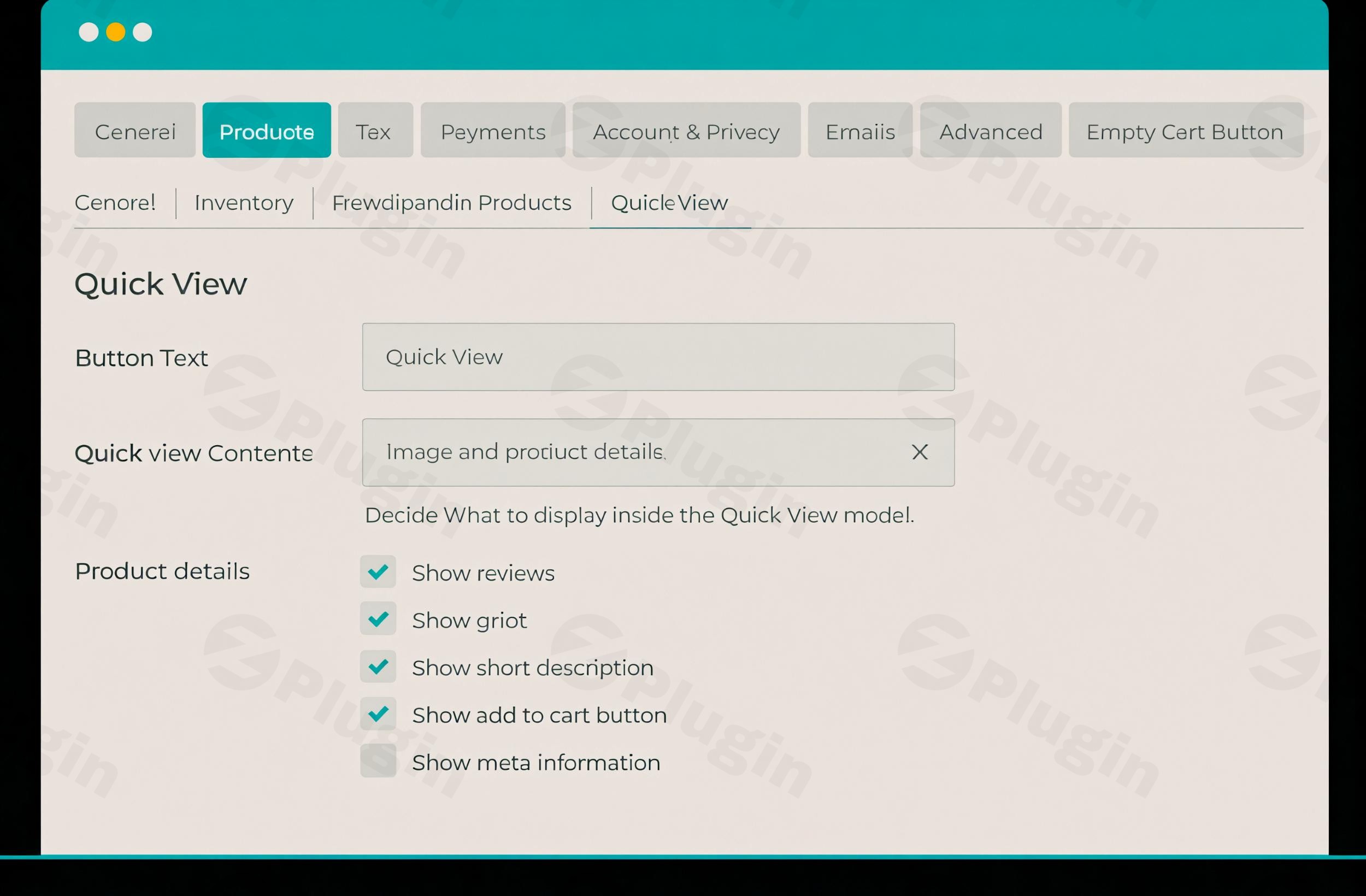
- Go to WooCommerce > Settings > Products > Quick View.
- Here you can configure all the plugin’s options, including:
- Quick View button text: Customize the text for your quick view buttons.
- Content to display: Select which product details (images, title, price, description, add to cart, etc.) appear in the lightbox.
- Layout: Choose how the content is arranged within the quick view.
- Position: Determine where the quick view buttons appear on your shop and category pages.
- Lightbox appearance: Adjust colors and styling to match your theme.
- Test Thoroughly: After configuring, visit your shop page and test the quick view functionality for various product types to ensure everything is working as expected.
Practical Usage and Best Practices
WooCommerce Quick View Pro is ideal for various eCommerce businesses seeking to optimize their customer’s journey. Here are some real-world use cases and best practices:
- Fashion Boutiques & Clothing Stores:
- Use Case: A customer is browsing a collection of dresses. Instead of clicking into each product page to see multiple angles or material details, they can use the quick view to rapidly preview different options, compare styles, and quickly add their preferred size to the cart.
- Best Practice: Display product images, key features (like material or fit), and the add-to-cart button. Minimize the full description to encourage fast decision-making.
- Restaurants & Food Delivery Services:
- Use Case: An online restaurant menu often requires customers to click into each dish to see ingredients, allergen info, or portion sizes. With quick view, they can rapidly browse the menu, get essential details in a pop-up, and add items to their order instantly.
- Best Practice: Show a main image of the dish, a brief description, price, and any add-on options (e.g., spice level, extra toppings) directly in the quick view.
- Wholesale & B2B Stores:
- Use Case: Wholesale buyers often need to order many items quickly. A quick view allows them to scan product listings, get a summary, and add bulk quantities to their cart without constant page reloads, significantly speeding up large orders.
- Best Practice: Focus on displaying product codes, unit prices, stock levels, and a quantity selector with the add-to-cart button. Integrate with WooCommerce Product Table for an even more efficient ordering interface.
- Photography & Digital Product Shops:
- Use Case: Customers browsing a gallery of stock photos or digital art might want to see a larger preview or a brief license description before purchasing. Quick view provides this without taking them away from the main gallery.
- Best Practice: Prioritize a large, high-quality image preview, key licensing details, and the purchase button within the lightbox.By implementing these strategies, you leverage the full potential of Barn2 WooCommerce Quick View Pro to create a frictionless shopping experience that encourages more conversions.
FAQ & Troubleshooting
Here are answers to some common questions about Barn2 WooCommerce Quick View Pro.
What is Barn2 WooCommerce Quick View Pro?
Barn2 WooCommerce Quick View Pro is a premium WordPress plugin for WooCommerce stores that enables customers to view product details in a customizable pop-up lightbox without leaving the shop or category page. Its primary goal is to streamline the buying process, reduce friction, and increase conversion rates by allowing shoppers to quickly preview products and add them to their cart.
How does WooCommerce Quick View Pro improve conversion rates?
WooCommerce Quick View Pro improves conversion rates by significantly speeding up the customer’s buying journey. It eliminates the need for multiple page loads, allowing shoppers to quickly browse, compare, and add products to their cart. The seamless AJAX add-to-cart functionality and ability to instantly return to product listings reduce bounce rates and encourage customers to explore more products, leading to higher engagement and more completed purchases.
Is Barn2 Quick View Pro mobile responsive?
Yes, Barn2 Quick View Pro is fully mobile responsive. The quick view lightboxes are designed to adapt seamlessly to all screen sizes, from desktops to tablets and smartphones. This ensures a consistent and optimal shopping experience for all your customers, regardless of the device they are using.
Which plugins are compatible with WooCommerce Quick View Pro?
WooCommerce Quick View Pro offers strong compatibility with a wide range of popular WordPress and WooCommerce plugins. It seamlessly integrates with other Barn2 Media plugins such as WooCommerce Product Table and WooCommerce Product Add-Ons. It is also compatible with official WooCommerce extensions (e.g., Product Add-ons, Bundles, Subscriptions) and leading multilingual plugins like WPML, Weglot, and TranslatePress. Most standard WordPress themes are compatible, though themes with their own built-in quick view features (e.g., Flatsome) require disabling the theme’s feature to avoid conflicts. Partial compatibility is noted with Divi, and incompatibility with Uncode.
How can I customize the content displayed in the quick view lightbox?
You can easily customize the content displayed in the quick view lightbox by navigating to WooCommerce > Settings > Products > Quick View in your WordPress dashboard. From there, you have full control over which elements appear, such as product images, title, price, short description, reviews, meta information, and the add-to-cart button. You can also choose between various layout options to tailor the lightbox’s appearance to your specific needs.
Conclusion
WooCommerce Quick View Pro is an indispensable tool for any serious WooCommerce store owner aiming to optimize their customer experience and significantly boost sales. By providing a faster, more efficient, and highly customizable product preview solution, it addresses critical friction points in the online shopping journey. Its robust feature set, seamless integrations, and responsive design make it a standout choice, especially when compared to generic alternatives.If you’re looking to empower your customers with rapid browsing, effortless adding to cart, and an overall smoother shopping experience, then investing in Barn2 WooCommerce Quick View Pro is a smart decision for a tangible return on investment. It’s the ideal plugin for businesses across various niches, from fashion and food to wholesale and digital products, all seeking to convert more visitors into loyal customers.
I. Download Limits & Account Benefits
- Free Downloads: Each email address receives 3 downloads per day for free products
- Upgrade Benefits: Purchase any paid product to increase your daily download limit by 3 for each paid product
- No Account Required: You can download immediately by receiving the download link via email
- Account Recommended: Create an account for easier access to your order history and direct update downloads
II. Understanding GPL vs Official Versions
Important: The products available on WPPick are GPL-licensed versions, which differ from official developer versions. Before purchasing, please read our comprehensive guide: Understanding GPL & Official Differences at WPPick
Key Points:
- GPL versions may not include premium support from original developers
- Updates may be delayed compared to official releases
- Some premium features might have limitations
- Always consider your specific needs and support requirements
III. Support & Assistance
We’re here to help through multiple channels:
- Email Support: Direct email assistance for all inquiries
- Live Chat: Real-time support during business hours
- Comprehensive Documentation: Detailed guides and tutorials
IV. Order Tracking
Access your complete purchase history and download links anytime: Order History
V. Account Access
New to WPPick? Login or Create Account to manage your downloads and orders efficiently.
VI. Refund Protection
We stand behind our products with a clear refund policy. Review our terms: Refund Policy
VII. Privacy & Security
Your data security is our priority. Learn how we protect your information: Privacy Policy
VII. Terms of Service
Understanding our service terms ensures a smooth experience: Terms of Use
Quick Tips for Best Experience
- Verify Compatibility: Check plugin/theme compatibility with your WordPress version
- Backup First: Always backup your site before installing new plugins or themes
- Test Environment: Consider testing on a staging site first
- Stay Updated: Regularly check for updates in your account dashboard
- Read Documentation: Review any included documentation for optimal setup
Need Help?
If you have questions about downloads, licensing, or need technical assistance, don’t hesitate to contact our support team. We’re committed to ensuring you have the best possible experience with WPPick products.
Ready to get started? Your download adventure begins with just one click!
- Updated internal libraries and tested up to WooCommerce 10.1.2 and WordPress 6.8.2
- Added filters for better integration with WooCommerce Discount Manager
- Added the translation files
- Additional information tab is not showing when the product has weight/dimension
- Updated internal libraries
- Tested up to WordPress 6.8.1 and WooCommerce 9.9.5
- Improved HTML markup of product images