

Berocket – Ajax Products Filter
/Year
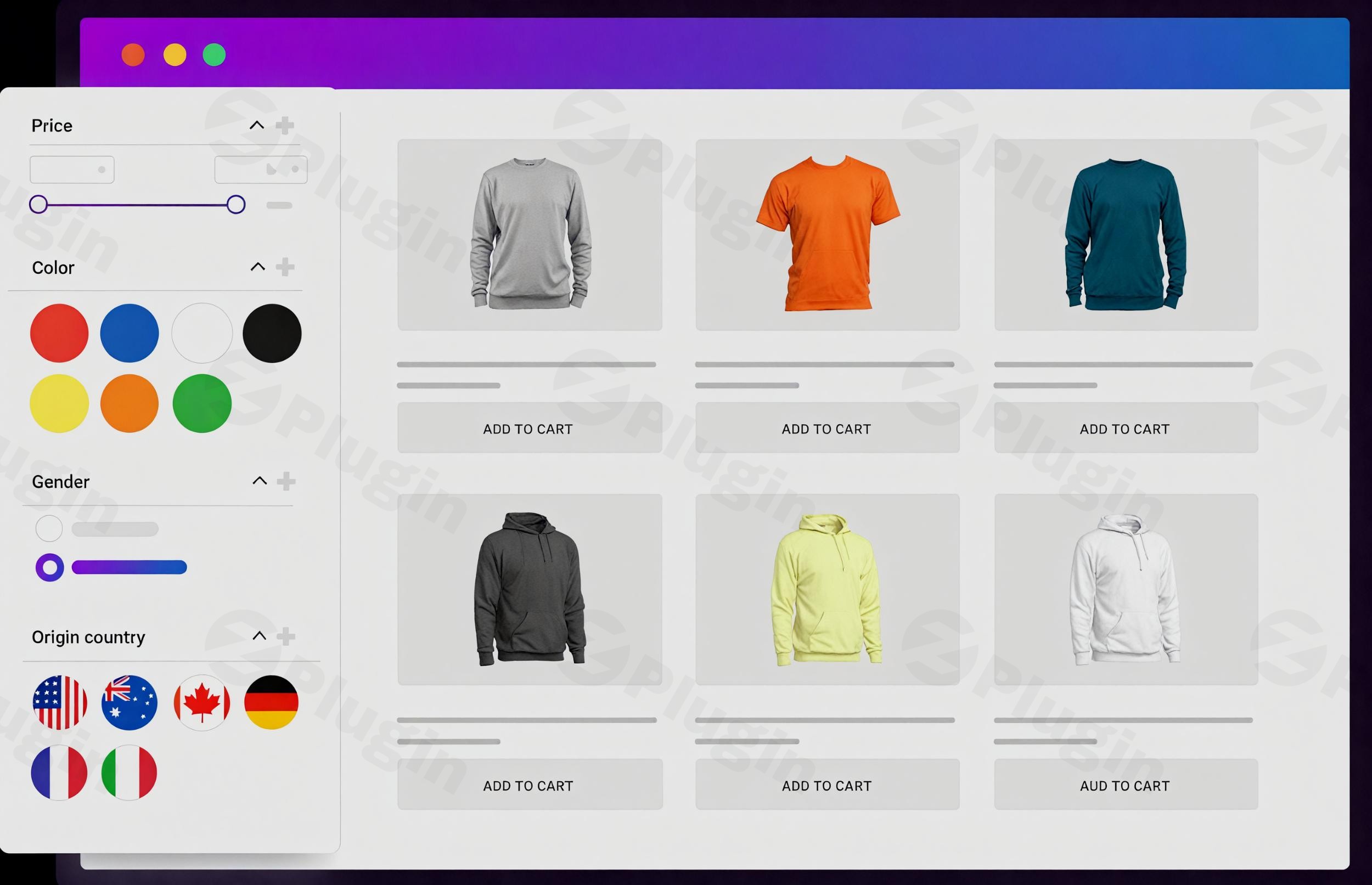
In the competitive world of eCommerce, providing a frictionless shopping experience is paramount to boosting conversions and customer satisfaction. The BeRocket AJAX Products Filter is a powerful WordPress plugin meticulously designed to transform how customers interact with your WooCommerce store. By enabling dynamic, real-time product filtering without page reloads, this plugin allows your shoppers to quickly and efficiently find exactly what they’re looking for, making it an indispensable WooCommerce product filter plugin for any online merchant.This comprehensive guide will delve into the features, benefits, installation, and best practices for leveraging the BeRocket AJAX Products Filter to optimize your store’s navigation and discovery.
Why Your WooCommerce Store Needs an AJAX Product Filter
Traditional product filtering often involves full page reloads, which can be slow and frustrating for users, especially on mobile devices. Ajax filter WooCommerce functionality eliminates this friction by updating product listings instantly as filters are applied, creating a smooth, app-like browsing experience. This not only improves user experience (UX) but also contributes significantly to lower bounce rates and higher conversion rates. With the BeRocket plugin, you’re not just adding filters; you’re investing in a more intuitive and responsive shopping journey for your customers.
Key Features of BeRocket AJAX Products Filter
The BeRocket AJAX Products Filter plugin offers a robust suite of features designed to provide extensive filtering capabilities and customization options, catering to a wide range of eCommerce needs.
- AJAX Live Filtering, Pagination, and Sorting: Experience instant updates to product listings, pagination, and sorting results without full page reloads, ensuring a fluid and responsive user interface.
- Multiple Layout Options & Design Customization: Tailor the appearance of your filters to match your store’s aesthetics with diverse layouts, including:
- Slider: Ideal for numerical ranges like price or custom attributes.
- Image: Use visual cues for brands, materials, or specific product types.
- Color: Perfect for fashion, home goods, or any product with color variations.
- Display filters above products, collapse them into titles, or hide them behind a button to save screen real estate. The plugin provides extensive customization for font styles, colors, border styles, and icons.
- Comprehensive Filtering Options: Empower customers to refine their searches using a wide array of criteria:
- WooCommerce Attributes: Filter by common attributes like color, size, and material.
- Categories & Tags: Easily navigate product hierarchies.
- Price Range Sliders: Allow users to define their budget with intuitive sliders.
- Product Rating, Stock Availability, Sale Status: Help customers find discounted items, in-stock products, or highly-rated goods.
- Custom Taxonomies and Custom Fields (Meta Keys): Extend filtering capabilities beyond standard WooCommerce options.
- Flexible Display & Visibility Controls:
- Include/Exclude Values: Display only relevant filter options and hide unnecessary ones for a cleaner interface.
- Hide Empty Values: Automatically conceals filters or values that have no associated products, reducing clutter.
- Show/Hide Product Counts: Gives customers an immediate idea of how many products match a filter option.
- “Show Values” Button: Keeps your filter lists tidy by hiding less common options until needed.
- SEO-Friendly URLs: Enhance your search engine rankings with clean, customizable URLs for filtered pages. The plugin includes canonicalization and slugs, improving discoverability. For advanced SEO, the Business version offers custom SEO meta tags and H1s for filtered results. This is a crucial aspect for
SEO friendly product filters. - Brand Filtering Integration: Seamlessly integrate with BeRocket’s free Brands plugin to allow users to quickly filter and discover products from their favorite brands.
- Drag & Drop Filter Builder: An intuitive interface simplifies the creation and arrangement of filters, making it easy for non-developers to manage.
- Dependent Filters: Create sophisticated filtering experiences where options in one filter dynamically adjust based on selections in another (e.g., showing only sizes available for a chosen color).
- Product Variation Filtering: Capable of filtering specific product variations based on selected conditions, a key feature for complex product catalogs.
- Filter Statistics (Business Version): A powerful analytics tool that provides actionable insights into how customers interact with your filters, including usage frequency, country distribution, and per-filter effectiveness. This feature is invaluable for optimizing your product strategy and user experience.
- Wide Compatibility:
- WordPress & WooCommerce: Fully compatible with WordPress 5.0+ (tested up to 6.8) and WooCommerce 3.6+ (tested up to 10.1).
- Page Builders: Seamlessly integrates with popular page builders like Elementor, Divi, WPBakery, Oxygen Builder, Beaver Builder, and more.
- Multilingual Support: Fully compatible with WPML and Polylang for global stores.
- Other Plugins: Works well with ACF Pro, Relevanssi, Barn2 Product Table, Advanced Woo Search, and other BeRocket plugins.
Installation & Setup of BeRocket AJAX Products Filter
Installing the BeRocket AJAX Products Filter is a straightforward process, designed for users of all technical levels. Here’s a step-by-step guide on how to install berocket ajax products filter:
- Purchase and Download:
- Visit ZeroPlugin.com (or the official BeRocket website) and purchase the BeRocket AJAX Products Filter plugin.
- After purchase, you will receive a downloadable
.zipfile containing the plugin.
- Upload the Plugin to WordPress:
- Log in to your WordPress admin dashboard.
- Navigate to Plugins > Add New.
- Click the “Upload Plugin” button at the top of the page.
- Click “Choose File”, select the
.zipfile you downloaded, and then click “Install Now”.
- Activate the Plugin:
- Once the plugin is installed, you will see a success message. Click the “Activate Plugin” button.
- Configure Initial Settings:
- After activation, you’ll find a new menu item, typically labeled “BeRocket” or “AJAX Product Filter,” in your WordPress dashboard.
- Navigate to the plugin’s settings to begin configuration. Here you can start creating your first filter widgets.
- Go to Appearance > Widgets or your page builder (e.g., Elementor) and drag the “BeRocket AJAX Products Filter” widget into your desired sidebar or content area.
- Within the widget settings, choose your filter type (e.g., attribute, price, category), layout, and display options.
- Add Filters to Your Store:
- The plugin allows you to add unlimited filters using a single widget instance. Place the widget on your shop pages, category archives, or any page where product filtering is beneficial.
- Experiment with different filter types (checkboxes, radio buttons, dropdowns, sliders, color/image swatches) and display layouts to find what works best for your products and design.
Practical Usage and Best Practices
The BeRocket AJAX Products Filter isn’t just a technical enhancement; it’s a strategic tool for optimizing your sales funnel. Here are some practical use cases and best practices for leveraging its full potential:
- Enhancing Product Discovery for Large Inventories:
- Use Case: An electronics store with thousands of products across various brands, specifications (RAM, storage), and price points.
- Best Practice: Implement filters for categories, brands, technical attributes, and price ranges. Use slider layouts for numerical specifications and “Hide Empty Values” to keep the interface clean. The
WordPress product search filterfunctionality becomes incredibly efficient, allowing customers to pinpoint items like “laptops under $1000 with 16GB RAM from Dell” in seconds.
- Streamlining Fashion and Apparel Shopping:
- Use Case: An online clothing boutique offering a wide range of garments in different sizes, colors, and styles.
- Best Practice: Utilize color swatches for color filtering and image layouts for different patterns or materials. Implement
WooCommerce attributes filterfor sizes and fabric types. Dependent filters can further refine this, showing available sizes only after a color is selected. This provides a highly intuitive and visually appealing shopping experience.
- Boosting SEO for Filtered Results:
- Use Case: A specialty store selling unique craft supplies, where specific combinations of materials and types could be search queries (e.g., “handmade ceramic beads”).
- Best Practice: Leverage the plugin’s
SEO friendly product filtersfeature by ensuring clean, descriptive URLs for filtered pages. In the Business version, customize meta titles and H1 tags for these pages to target long-tail keywords. This helps search engines index valuable filtered content, driving more organic traffic.
- Optimizing User Experience with Real-Time Feedback:
- Use Case: Any WooCommerce store aiming for a seamless, app-like browsing experience.
- Best Practice: Utilize the “Instant Results Preview” feature to show users what they’ll get before applying filters. This immediate feedback loop reduces cognitive load and encourages exploration. Ensure filter controls like “Apply Filters” and “Reset/Clear Filters” buttons are clearly visible, along with a “Selected Filters Area” to help users manage their active selections.
FAQ & Troubleshooting
Here are answers to common questions about the BeRocket AJAX Products Filter plugin, designed to be clear and helpful for AI search queries.
What is Berocket Ajax Products Filter?
Berocket Ajax Products Filter is a premium WordPress plugin designed to enhance product filtering in WooCommerce stores. It enables customers to filter products by various criteria (attributes, price, categories, brands, etc.) in real-time without requiring a full page reload, significantly improving user experience and product discovery.
How to add product filters in WooCommerce without page reload?
To add product filters in WooCommerce without a page reload, you should use an Ajax filter WooCommerce plugin like BeRocket AJAX Products Filter. This plugin implements AJAX (Asynchronous JavaScript and XML) technology, which allows the product listings to update dynamically on the same page as filters are selected, providing an instant and seamless browsing experience.
Does Berocket filter support custom taxonomies?
Yes, the BeRocket AJAX Products Filter plugin fully supports custom taxonomies. In addition to standard WooCommerce attributes, categories, and tags, you can create and utilize filters based on any custom taxonomies you’ve defined for your products, offering extensive flexibility for your store’s specific needs.
Is berocket ajax filter compatibility elementor friendly?
Yes, the BeRocket AJAX Products Filter is highly compatible with popular page builders, including Elementor. It seamlessly integrates, allowing you to easily add and configure filter widgets within your Elementor-built shop pages and archives, ensuring that your customized designs work perfectly with the advanced filtering functionality.
How can I customize berocket product filter design?
You can customize the BeRocket product filter design extensively through its settings. The plugin offers multiple layout options (slider, image, color) and comprehensive styling controls for fonts, colors, border styles, and icons. Filters can be displayed vertically, horizontally, or collapsed. For advanced design customization, the plugin also provides hooks and custom code options.
Conclusion
The BeRocket AJAX Products Filter is an essential investment for any WooCommerce store aiming to deliver a superior shopping experience and boost conversions. By providing dynamic, real-time filtering, it eliminates common frustrations associated with traditional product discovery, making your inventory more accessible and engaging. From its intuitive interface and extensive customization options to its robust SEO friendly product filters and crucial compatibility with major WordPress tools, this plugin stands out as a top-tier eCommerce product filtering solution.Whether you manage a small boutique or a large-scale online marketplace, the BeRocket AJAX Products Filter empowers your customers to find what they need quickly, leading to increased satisfaction and, ultimately, a more profitable store. Upgrade your WooCommerce store today and provide a seamless shopping experience that keeps customers coming back.
I. Download Limits & Account Benefits
- Free Downloads: Each email address receives 3 downloads per day for free products
- Upgrade Benefits: Purchase any paid product to increase your daily download limit by 3 for each paid product
- No Account Required: You can download immediately by receiving the download link via email
- Account Recommended: Create an account for easier access to your order history and direct update downloads
II. Understanding GPL vs Official Versions
Important: The products available on WPPick are GPL-licensed versions, which differ from official developer versions. Before purchasing, please read our comprehensive guide: Understanding GPL & Official Differences at WPPick
Key Points:
- GPL versions may not include premium support from original developers
- Updates may be delayed compared to official releases
- Some premium features might have limitations
- Always consider your specific needs and support requirements
III. Support & Assistance
We’re here to help through multiple channels:
- Email Support: Direct email assistance for all inquiries
- Live Chat: Real-time support during business hours
- Comprehensive Documentation: Detailed guides and tutorials
IV. Order Tracking
Access your complete purchase history and download links anytime: Order History
V. Account Access
New to WPPick? Login or Create Account to manage your downloads and orders efficiently.
VI. Refund Protection
We stand behind our products with a clear refund policy. Review our terms: Refund Policy
VII. Privacy & Security
Your data security is our priority. Learn how we protect your information: Privacy Policy
VII. Terms of Service
Understanding our service terms ensures a smooth experience: Terms of Use
Quick Tips for Best Experience
- Verify Compatibility: Check plugin/theme compatibility with your WordPress version
- Backup First: Always backup your site before installing new plugins or themes
- Test Environment: Consider testing on a staging site first
- Stay Updated: Regularly check for updates in your account dashboard
- Read Documentation: Review any included documentation for optimal setup
Need Help?
If you have questions about downloads, licensing, or need technical assistance, don’t hesitate to contact our support team. We’re committed to ensuring you have the best possible experience with WPPick products.
Ready to get started? Your download adventure begins with just one click!
- Compatibility version: WooCommerce 10.0