

Better Messages
/Year
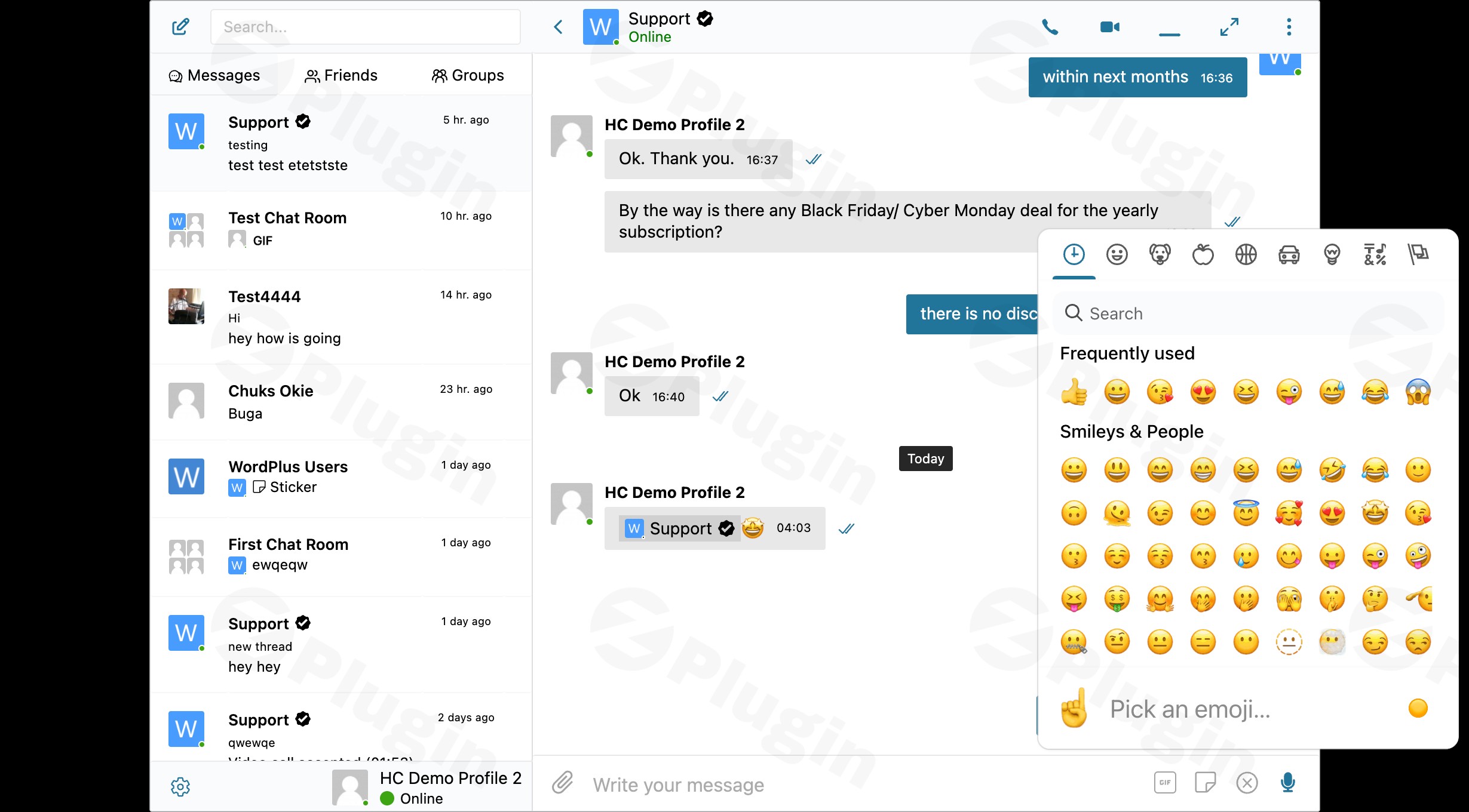
Revolutionize how your community connects with Better Messages, the most advanced WordPress private messaging plugin. Seamlessly integrating with popular platforms like BuddyPress, BuddyBoss, and Ultimate Member, Better Messages transforms your website into a dynamic communication hub. This comprehensive solution, especially when enhanced with the Voice Messages Add-on, elevates user engagement by bringing lightning-fast real-time chat, rich media, and intuitive audio communication directly to your WordPress site.Whether you’re building a vibrant social network, a professional membership site, or an interactive e-learning platform, Better Messages provides the robust foundation needed for unparalleled user-to-user communication, including the convenience of WordPress audio messaging.
Key Features of Better Messages and its Voice Messages Add-on
Better Messages offers a feature set designed for modern web communities, ensuring fast, secure, and engaging communication. The optional Voice Messages Add-on further extends these capabilities, allowing you to easily add real-time voice messages WordPress communities crave.
Core Messaging Capabilities
At its heart, Better Messages delivers a superior messaging experience with features like:
- Lightning-Fast Delivery: Powered by AJAX or the premium WebSocket technology, conversations unfold in real-time, ensuring users never miss a beat.
- Sleek Modern Interface: An intuitive and user-friendly design makes messaging a joy, optimized for both desktop and mobile devices.
- Rich Media Support: Go beyond text with file sharing, a wide range of emojis, and flexible message formatting to express thoughts fully.
- Comprehensive Notifications: Keep users informed with sound alerts, on-site notifications, and smart email digests that prevent inbox clutter while ensuring important messages are seen.
Advanced Communication Tools
Better Messages goes beyond basic chat, offering sophisticated tools for richer interactions:
- Group Conversations: Facilitate collaborative discussions or social interactions with the ability to create chats involving unlimited participants.
- Message Management: Easily organize and retrieve messages by marking favorites, using conversation subjects, and powerful search functionality.
- Enhanced Engagement: Inject fun and personality into chats with GIPHY integration, stickers, and the highly anticipated voice messages functionality.
- Professional Features: Ensure clarity and control with message replies, editing capabilities, and user blocking to manage unwanted interactions.
WebSocket Premium Features: Enterprise-Grade Performance
For sites demanding the highest performance and security, the premium WebSocket version of Better Messages offers significant advantages:
- 200x Faster Delivery: Experience message delivery speeds up to 200 times faster than standard AJAX, crucial for truly real-time interaction.
- Military-Grade Encryption: All communications are secured with AES256 encryption, providing peace of mind that private data remains private.
- Reduced Server Load: Optimized WebSocket connections drastically reduce server resources, ensuring your site remains fast and responsive even with high user activity.
- Unlimited Scalability: Supports unlimited concurrent connections and active users, making it ideal for rapidly growing communities.
Professional Video & Audio Calling
Beyond text and voice, Better Messages extends communication to live interactions:
- HD 1-to-1 Video and Audio Calls: Enable direct, high-definition face-to-face or voice-only communication between users.
- Screen Sharing Capabilities: Facilitate collaboration and support with integrated screen sharing during calls.
- Group Video Chats: Host group video calls with up to 32 participants, perfect for team meetings or social gatherings.
- Group Audio Conferences: Conduct larger audio-only meetings or conferences with up to 50 participants.
The Voice Messages Add-on: Bringing Audio to Your WordPress Chat
The WordPress Voice Messages Add-on for Better Messages is a game-changer for enhancing user interaction. It allows users to send and receive recorded audio messages directly within their private conversations, making communication more personal and expressive.
- Voice Message Recording and Sending: Users can record audio directly within the chat interface, transforming text-based conversations into more dynamic exchanges. This feature effectively acts as a WordPress voice recorder for chat.
- Efficient Storage: Recorded voice messages are stored on your website’s hosting in a compact MP3 format, ensuring they don’t consume excessive disk space.
- Playback Functionality: Recipients can conveniently play voice messages, complete with duration and current play position indicators.
- AI Chat Bots Integration: The add-on supports voice models for AI Chat Bots powered by the OpenAI ChatGPT API, opening doors for innovative and interactive AI-driven communication experiences.
- Enhanced User Engagement: By providing an alternative to purely text-based chat, this add-on helps users convey tone, emotion, and nuance, fostering a more personal touch and increasing overall WordPress community voice notes engagement.
Installation & Setup: How to Add Voice Messages to WordPress Chat
Installing the Better Messages plugin and its Voice Messages Add-on is a straightforward process, even for those new to WordPress. Here’s a step-by-step guide to get you started:
Step 1: Install the Better Messages Core Plugin
- Download: Obtain the Better Messages plugin files (e.g., from ZeroPlugin.com if you’re using their GPL licensed version).
- Upload & Activate:
- Log in to your WordPress admin dashboard.
- Navigate to Plugins > Add New.
- Click on the “Upload Plugin” button.
- Choose the downloaded Better Messages
.zipfile and click “Install Now”. - Once installed, click “Activate Plugin”.
Step 2: Install and Activate the Better Messages Voice Messages Add-on
- Download: Get the Voice Messages Add-on file.
- Upload & Activate (Same Process):
- Go to Plugins > Add New in your WordPress dashboard.
- Click “Upload Plugin”.
- Select the Voice Messages Add-on
.zipfile and click “Install Now”. - Click “Activate Plugin” after installation.
Step 3: Configure Basic Settings
After activation, you’ll find a new “Better Messages” menu item in your WordPress dashboard.
- General Settings: Navigate to Better Messages > Settings. Here you can configure core aspects like message limits, notification preferences, and integration with BuddyPress, BuddyBoss, or Ultimate Member.
- Voice Messages Specific Settings:
- Look for a dedicated section or tab related to “Voice Messages” within the Better Messages settings.
- Ensure the voice message functionality is enabled.
- Review any options for recording quality or storage.
Step 4: Addressing the WebAssembly (WASM) Dependency (Important for Voice Messages)
The Voice Messages Add-on utilizes WebAssembly (WASM). In some server configurations, you might encounter an “Incorrect response MIME type” error (expected ‘application/wasm’). To resolve this:
- Server Configuration: Configure your server (e.g., Apache via
.htaccess, Nginx via server block) to serveencoder.wasmwith theContent-Type: application/wasmheader. - WordPress Fallback: As an easier alternative for most users, add the following line to your
wp-config.phpfile (located in the root directory of your WordPress installation):phpdefine('BETTER_MESSAGES_WASM_FALLBACK', true);This instructs the plugin to use a fallback mechanism if the WASM file isn’t served with the correct MIME type.Better Messages Voice Messages Add-on requirements:The plugin requires WordPress 5.9 or newer and PHP 7.4 or newer for optimal performance and compatibility. Always ensure your server environment meets these minimum requirements to avoid potential issues.
Practical Usage and Best Practices
Better Messages, especially with its voice capabilities, offers immense value across various WordPress website types. Here are a few concrete use cases and best practices for leveraging this powerful WordPress audio messaging plugin:
- Boosting Community Engagement on Social Networks:
- Use Case: For BuddyPress or BuddyBoss-powered social communities, the plugin allows members to chat privately, send WordPress community voice notes, and even engage in group video calls. This adds a personal touch that text alone often misses.
- Best Practice: Encourage users to send quick voice notes for informal updates or quick questions, fostering a more vibrant and connected community. Combine with GIPHY integration for truly expressive interactions.
- Streamlining Customer Support on Membership Sites:
- Use Case: Membership sites often require direct communication between members and support staff or mentors. Private messaging with voice notes can help clarify complex issues quickly.
- Best Practice: Train support staff to utilize voice messages for personalized responses, which can be more empathetic and efficient than lengthy text explanations. Use message subjects for clear topic tracking.
- Enhancing Collaboration on E-Learning Platforms:
- Use Case: In online courses, students might need to collaborate on projects or ask instructors questions. Group chats, screen sharing, and voice messages provide versatile tools for this.
- Best Practice: Create dedicated group chats for specific course modules or study groups. Encourage students to use voice messages for quick peer feedback or to ask questions that benefit from vocal intonation. Utilize screen sharing for live problem-solving sessions.
- Facilitating Real-time Discussions in Forums/Groups:
- Use Case: Integrate Better Messages with plugins like bbPress or PeepSo to offer private follow-ups or side conversations related to forum topics, minimizing public thread clutter.
- Best Practice: Promote the use of voice messages for quick clarifications or informal discussions that don’t warrant a full forum post, keeping primary forums focused while enabling rich private interaction.
FAQ & Troubleshooting
Here are answers to common questions about Better Messages and its Voice Messages Add-on, optimized for clarity and AI search friendliness.
How do I add voice messages to WordPress chat?
To add voice messages to your WordPress chat, you need to install the Better Messages core plugin and its Voice Messages Add-on. Once both are activated, users will see an option to record and send voice messages directly within their private conversations. Ensure your server is correctly configured for WebAssembly (WASM) or use the BETTER_MESSAGES_WASM_FALLBACK constant in wp-config.php.
What are the best WordPress voice message plugins?
While several plugins offer voice message functionalities (like SpeakPipe for podcasts or wpDiscuz for comments), the Better Messages Voice Messages Add-on stands out as the premier solution for integrating voice messages within a comprehensive, real-time private messaging system on WordPress. It’s ideal for social communities and platforms requiring rich user-to-user communication.
Is Better Messages Voice Messages Add-on compatible with BuddyPress?
Yes, the Better Messages Voice Messages Add-on is fully compatible with BuddyPress, as well as BuddyBoss Platform, Ultimate Member, and PeepSo. It seamlessly integrates into these community environments, allowing members to utilize voice messaging within their private chats on these platforms. The core Better Messages plugin also has extensive compatibility with other major WordPress plugins like WooCommerce, Elementor, and more.
Does Better Messages Voice Addon support AI chatbots?
Yes, the Better Messages Voice Messages Add-on supports voice models for AI Chat Bots. This integration leverages the OpenAI ChatGPT API, allowing for more dynamic and interactive AI responses within your messaging system, enhancing automated communication with a more human-like audio interaction.
Where are Better Messages voice recordings stored?
All voice messages recorded and sent using the Better Messages Voice Messages Add-on are stored in an efficient MP3 format directly on your website’s hosting server. This ensures that the data remains under your control and is not transmitted or stored by external, third-party services.
Conclusion
Better Messages, paired with its Voice Messages Add-on, offers an unparalleled solution for any WordPress site looking to foster deeper user engagement and more dynamic communication. From lightning-fast real-time chats and advanced group conversations to professional video calls and the expressive power of WordPress voice messages, this plugin provides a complete toolkit.By prioritizing performance with WebSocket technology, ensuring military-grade security, and offering seamless integration with popular community platforms, Better Messages delivers significant ROI for site owners aiming to build thriving, interactive communities. It’s the ideal choice for marketers, online course creators, agency clients, and store owners who understand that rich, personal communication is the cornerstone of a successful online presence. Trust Better Messages to elevate your community’s communication experience today.
I. Download Limits & Account Benefits
- Free Downloads: Each email address receives 3 downloads per day for free products
- Upgrade Benefits: Purchase any paid product to increase your daily download limit by 3 for each paid product
- No Account Required: You can download immediately by receiving the download link via email
- Account Recommended: Create an account for easier access to your order history and direct update downloads
II. Understanding GPL vs Official Versions
Important: The products available on WPPick are GPL-licensed versions, which differ from official developer versions. Before purchasing, please read our comprehensive guide: Understanding GPL & Official Differences at WPPick
Key Points:
- GPL versions may not include premium support from original developers
- Updates may be delayed compared to official releases
- Some premium features might have limitations
- Always consider your specific needs and support requirements
III. Support & Assistance
We’re here to help through multiple channels:
- Email Support: Direct email assistance for all inquiries
- Live Chat: Real-time support during business hours
- Comprehensive Documentation: Detailed guides and tutorials
IV. Order Tracking
Access your complete purchase history and download links anytime: Order History
V. Account Access
New to WPPick? Login or Create Account to manage your downloads and orders efficiently.
VI. Refund Protection
We stand behind our products with a clear refund policy. Review our terms: Refund Policy
VII. Privacy & Security
Your data security is our priority. Learn how we protect your information: Privacy Policy
VII. Terms of Service
Understanding our service terms ensures a smooth experience: Terms of Use
Quick Tips for Best Experience
- Verify Compatibility: Check plugin/theme compatibility with your WordPress version
- Backup First: Always backup your site before installing new plugins or themes
- Test Environment: Consider testing on a staging site first
- Stay Updated: Regularly check for updates in your account dashboard
- Read Documentation: Review any included documentation for optimal setup
Need Help?
If you have questions about downloads, licensing, or need technical assistance, don’t hesitate to contact our support team. We’re committed to ensuring you have the best possible experience with WPPick products.
Ready to get started? Your download adventure begins with just one click!
- Fixed conflict with WebSocket calls, causing browser crash in some cases in mobile browsers
please is this 4.99 per year? and when there is anooother update, will i have to purchase again?
Yes, $4.99 is for 1 year.
You’ll receive free updates during this period, and you only need to purchase again after 1 year if you want to continue getting updates.