

Better Payment Pro – One-click Easy Payment For Elementor
/Year
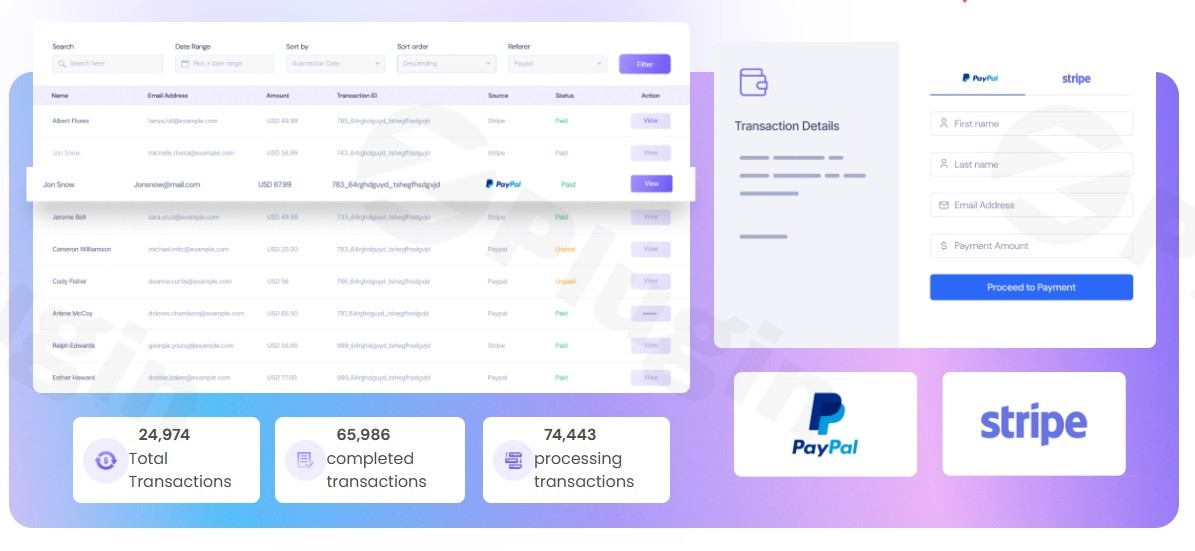
In the fast-paced world of e-commerce, every second added to the checkout process is a potential lost sale. Better Payment Pro is a powerful WordPress payment plugin Elementor users can leverage to bridge the gap between browsing and buying. By offering a streamlined, one-click checkout experience, this plugin removes the friction typically associated with complex checkout pages, allowing site owners to boost conversion rates without needing a deep technical background.
Whether you are running a simple landing page, a donation site, or a subscription service, finding a reliable Elementor payment gateway that doesn’t require a full WooCommerce setup is a common challenge. Better Payment Pro solves this by integrating directly into the Elementor editor, providing a seamless workflow for marketers and developers alike.
Key Features of Better Payment Pro
Better Payment Pro is designed specifically to enhance the one-click payment Elementor experience. Below are the standout features that make it a top choice for WordPress sites:
- One-Click Checkout: Reduce cart abandonment by allowing customers to complete transactions instantly.
- Deep Elementor Integration: Unlike generic plugins, this was built for Elementor. You can design your payment forms using a dedicated widget or integrate directly with Elementor Forms (both Free and Pro versions).
- Multi-Gateway Support: Offer your customers flexibility by integrating with Stripe (Credit/Debit cards), PayPal, and Paystack.
- Versatile Payment Scenarios: This isn’t just for products. Use it as a donation plugin Elementor tool for fundraising, or set up subscription payment Elementor options for recurring revenue.
- On-Site Stripe Elements: Keep users on your website during the checkout process. The Stripe Elements integration provides a secure, embedded checkout experience that feels native to your brand.
- Transaction & Refund Management: Track every sale from your WordPress dashboard. You can view transaction IDs, customer emails, and even process refunds without leaving your site.
- Automated Invoicing: Professional PDF receipts are generated automatically for every successful transaction, saving you manual administrative work.
- Built-in Analytics (PRO): Gain insights into your revenue with reports on completed, in-progress, and refunded payments.
How to Set Up One-Click Payments in Elementor
If you are wondering how to add Stripe payment to Elementor form or set up a quick checkout, follow these steps:
- Install the Plugin: Navigate to your WordPress Dashboard > Plugins > Add New. Search for “Better Payment” and install the version by WPDeveloper.
- Activate & Configure Gateways: Go to the Better Payment settings menu. Here, you can use the One-Click Stripe Integration to connect your account or enter your PayPal/Paystack credentials.
- Create Your Payment Form: Open any page in the Elementor Editor. Search for the “Better Payment” widget and drag it into your design.
- Customize the Style: Use the Elementor style tab to match the buttons, input fields, and typography to your site’s branding. This allows you to customize payment form Elementor plugin settings without writing any CSS.
- Set Payment Parameters: Choose your currency, set the price (fixed or custom for donations), and toggle between one-time or recurring payments.
- Publish: Save your changes. Your site is now ready to accept live payments.
Practical Usage & Best Practices
Better Payment Pro is the best WordPress plugin for Elementor one-click payments because it adapts to various business models. Here are some ideal use cases:
1. Landing Pages for Digital Products
If you are selling a single eBook or a software license, you likely don’t need the overhead of WooCommerce. Using Better Payment Pro allows you to keep your site lightweight and your checkout process lightning-fast. It is the perfect Elementor payment gateway without WooCommerce.
2. Non-Profit Fundraising
Non-profits need a low-friction way to collect money. Use the plugin as a donation plugin Elementor solution by enabling the “Custom Amount” field, allowing donors to choose how much they wish to give.
3. Service-Based Subscriptions
For agencies or SaaS startups, the subscription payment Elementor feature (via Stripe) allows you to bill clients monthly or annually. This ensures consistent cash flow with minimal manual invoicing.
4. Professional Invoicing for Freelancers
By setting up a private “Pay My Invoice” page, freelancers can allow clients to pay via Stripe or PayPal, with the plugin automatically generating a professional receipt for the client’s records.
FAQ & Troubleshooting
Can I use Better Payment Pro with Elementor free?
Yes, Better Payment Pro is fully compatible with both the Free and Pro versions of Elementor. While some advanced integrations might benefit from Elementor Pro features, the core one-click payment functionality works perfectly with the free version of the page builder.
What payment gateways does Better Payment Pro support?
The plugin currently supports Stripe (including Stripe Elements for on-site checkout), PayPal, and Paystack. This allows you to accept credit cards, debit cards, and regional payment methods globally.
Does Better Payment Pro support recurring payments?
Yes, through its integration with Stripe, Better Payment Pro allows you to manage subscription payment Elementor setups for recurring billing, making it ideal for membership sites or service packages.
How do I handle refunds?
You can manage and process refunds directly from the Better Payment transaction dashboard within your WordPress admin area. This eliminates the need to log into your payment gateway provider for every refund request.
Is my customer’s data secure?
Absolutely. Better Payment Pro uses secure integrations like Stripe Elements, which ensures that sensitive payment data is handled by the payment processor and never stored directly on your WordPress server, keeping your site PCI-compliant.
Conclusion: Is Better Payment Pro Right for You?
Better Payment Pro is an essential tool for any website owner looking for a high-converting, easy-to-manage Elementor payment gateway. By removing the complexity of traditional e-commerce setups, it allows you to focus on design and sales rather than technical configuration.
Developed by WPDeveloper (the team behind Essential Addons), the plugin carries a strong pedigree of reliability and performance. If you need a WordPress payment plugin Elementor solution that supports one-click checkouts, global gateways, and recurring subscriptions, Better Payment Pro is a top-tier investment for your digital toolkit.
I. Download Limits & Account Benefits
- Free Downloads: Each email address receives 3 downloads per day for free products
- Upgrade Benefits: Purchase any paid product to increase your daily download limit by 3 for each paid product
- No Account Required: You can download immediately by receiving the download link via email
- Account Recommended: Create an account for easier access to your order history and direct update downloads
II. Understanding GPL vs Official Versions
Important: The products available on WPPick are GPL-licensed versions, which differ from official developer versions. Before purchasing, please read our comprehensive guide: Understanding GPL & Official Differences at WPPick
Key Points:
- GPL versions may not include premium support from original developers
- Updates may be delayed compared to official releases
- Some premium features might have limitations
- Always consider your specific needs and support requirements
III. Support & Assistance
We’re here to help through multiple channels:
- Email Support: Direct email assistance for all inquiries
- Live Chat: Real-time support during business hours
- Comprehensive Documentation: Detailed guides and tutorials
IV. Order Tracking
Access your complete purchase history and download links anytime: Order History
V. Account Access
New to WPPick? Login or Create Account to manage your downloads and orders efficiently.
VI. Refund Protection
We stand behind our products with a clear refund policy. Review our terms: Refund Policy
VII. Privacy & Security
Your data security is our priority. Learn how we protect your information: Privacy Policy
VII. Terms of Service
Understanding our service terms ensures a smooth experience: Terms of Use
Quick Tips for Best Experience
- Verify Compatibility: Check plugin/theme compatibility with your WordPress version
- Backup First: Always backup your site before installing new plugins or themes
- Test Environment: Consider testing on a staging site first
- Stay Updated: Regularly check for updates in your account dashboard
- Read Documentation: Review any included documentation for optimal setup
Need Help?
If you have questions about downloads, licensing, or need technical assistance, don’t hesitate to contact our support team. We’re committed to ensuring you have the best possible experience with WPPick products.
Ready to get started? Your download adventure begins with just one click!