

Blog Designer Pack Pro
/Year
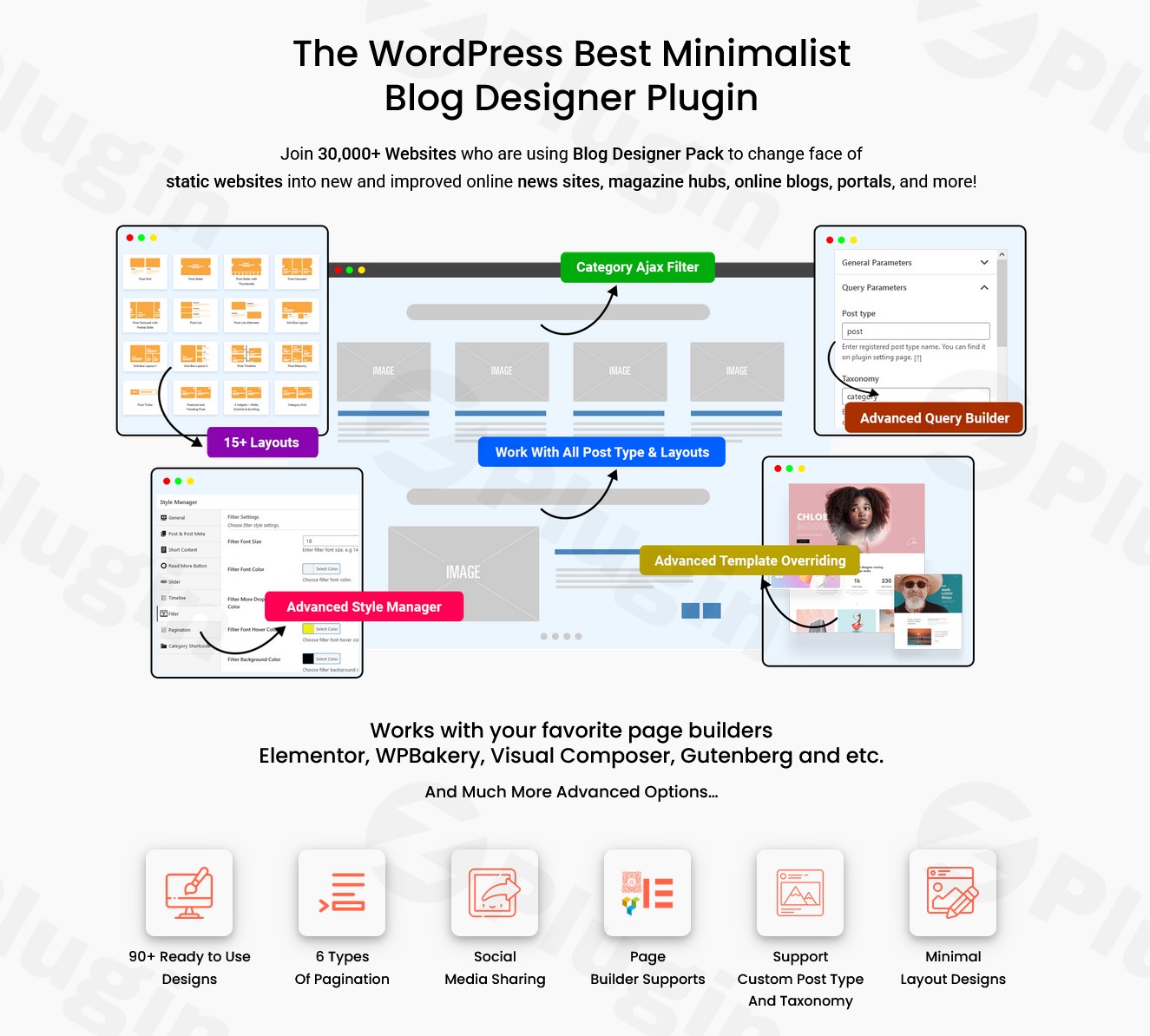
Are you looking to elevate your static WordPress website into a vibrant, engaging content hub? Blog Designer Pack Pro is a powerful WordPress blog plugin designed to revolutionize how you display posts, news, and magazine content. It’s the go-to solution for transforming ordinary blogs into dynamic, visually stunning platforms that captivate readers and keep them exploring.Join over 30,000 websites that have already chosen Blog Designer Pack Pro to convert their static pages into professional news sites, online magazines, and content portals. This comprehensive WordPress blog layout plugin offers unparalleled flexibility and functionality, ensuring your content stands out without requiring any coding knowledge.
Key Features to Supercharge Your Content Presentation
Blog Designer Pack Pro goes far beyond basic blog layouts, providing a robust suite of tools to create a truly immersive content experience. Its features are crafted to enhance user engagement, improve navigation, and provide extensive design control.
Advanced Ajax Category Filter System
One of the standout features is the sophisticated Ajax-powered category filter. This system allows your visitors to effortlessly navigate your content by categories and tags without a single page reload. This seamless filtering significantly enhances user experience, encouraging longer browsing sessions.
- Smart Content Organization: Implement powerful filters that make content discovery intuitive and fast.
- Multiple Layout Positions: Choose from three strategic filter positions: top, left, or right sidebar. When placed at the top, you gain additional alignment options including left, center, and right, ensuring perfect integration with your site’s design.
Six Pagination Options for Infinite Content Exploration
Keep your audience engaged with diverse pagination styles that facilitate smooth content loading. Whether you prefer a classic numbered approach or a modern “load more” button, Blog Designer Pack Pro delivers. These options include:
- Traditional numbered pagination
- Next/Previous buttons
- “Load More” functionality (Ajax-powered)
- Auto-load on scrollThis variety allows you to select the best method to encourage continuous content consumption and enhance user experience.
Extensive Design Templates & Multiple Layout Options
Blog Designer Pack Pro boasts an impressive collection of unique and clean designs, offering 90+ to 120+ templates suitable for various content types, from personal blogs to large news portals. Beyond the sheer number, it provides diverse WordPress post grid plugin layouts to showcase your content:
- Grid View: Perfect for organizing many posts into a responsive, easy-to-digest grid.
- Slider View & Carousel View: Present posts dynamically in interactive sliders and carousels for a modern, engaging look.
- List View: A timeless, clean layout for sequential content presentation.
- Masonry View: Arranges posts of varying heights in a gapless, aesthetically pleasing format.
- Timeline View: Displays posts chronologically, ideal for historical content or event summaries, offering a unique way to create a WordPress timeline layout.
- Ticker View: For displaying short, scrolling news headlines, much like a news channel.
- Creative Designs: Regularly updated with new, innovative designs and dedicated shortcodes.
Custom Post Type Support
The plugin’s versatility extends beyond standard WordPress posts. You can apply its beautiful designs to custom post types and custom taxonomies, making it suitable for portfolios, products, testimonials, or any other custom content you create. This makes it an ideal WordPress blog layout plugin for diverse content needs.
Highlighting Featured and Trending Posts
Easily designate and display featured and trending (most popular) posts across all layouts and designs, ensuring your most important content gets the attention it deserves.
User-Friendly Shortcode Generator with Live Preview
No coding? No problem! The intuitive shortcode generator comes with a live preview panel, simplifying the process of creating and embedding complex layouts onto any page or post. This empowers you to achieve a custom WordPress blog design without writing a single line of code.
Widget Compatibility & Customization Options
Blog Designer Pack Pro includes widgets for displaying posts in slider and grid formats, offering additional flexibility for sidebars, footers, or any widgetized area. Furthermore, you gain extensive control over design elements:
- Colors, font styles, and font families.
- Content length control.
- Ability to show/hide post meta (author, date, comments, tags, categories).
- Add custom CSS for advanced styling.
Social Sharing Integration & GDPR Compatibility
The plugin comes with built-in social share options for posts, including a WhatsApp share option for mobile users, boosting your content’s reach. It is also designed to be GDPR compliant, giving you peace of mind regarding data privacy.
Installation & Setup: Get Your Dynamic Blog Running in Minutes
Installing Blog Designer Pack Pro is straightforward, even for non-developers. Here’s a step-by-step guide to get your new WordPress blog layout plugin up and running:
- Purchase and Download: First, purchase Blog Designer Pack Pro from a trusted source like ZeroPlugin.com. You will receive a ZIP file containing the plugin.
- Upload the Plugin:
- Log in to your WordPress admin dashboard.
- Navigate to Plugins > Add New.
- Click on the “Upload Plugin” button at the top of the page.
- Click “Choose File”, then select the ZIP file you downloaded.
- Click “Install Now”.
- Activate the Plugin: Once installed, WordPress will prompt you to activate the plugin. Click “Activate Plugin”.
- Configuration: After activation, a new menu item, usually labeled “Blog Designer Pack Pro” or similar, will appear in your WordPress dashboard. Click on it to access the plugin’s settings.
- Explore Layouts: Browse the extensive collection of layouts (Grid, Slider, Masonry, Timeline, etc.) and select the one that best suits your needs.
- Generate Shortcodes: Use the intuitive shortcode generator to customize your display options (categories, number of posts, order, pagination, etc.). The live preview helps you visualize changes instantly.
- Embed Shortcodes: Copy the generated shortcode and paste it into any WordPress page, post, or widget area where you want your dynamic blog layout to appear.That’s it! Your website will now display content using the beautiful, dynamic layouts provided by Blog Designer Pack Pro.
Practical Usage & Best Practices for Your Content Platform
Blog Designer Pack Pro is incredibly versatile, making it ideal for various content-driven platforms. Here are some concrete use cases and best practices:
- For News Websites & Online Magazines: Easily transform your homepage and category archives into engaging WordPress news plugin layouts. Utilize the Ajax Category Filter System to allow readers to quickly sort by topics like “Politics,” “Technology,” or “Lifestyle” without reloading the page. Implement ticker views for breaking news and WordPress post slider/carousel for featured stories. This ensures a professional and highly navigable news delivery.
- For Blog Networks & Content Portals: If you manage multiple blogs or a large content library, Blog Designer Pack Pro enables you to create distinct layouts for different sections or categories. Use the Timeline View for company history or event recaps, and Masonry View for visually rich photo blogs. This helps in organizing vast amounts of content into digestible, attractive formats.
- For Business News Sections & Educational Hubs: Businesses can leverage the plugin to create a polished “News” or “Resources” section on their corporate site. Educational platforms can use it to display courses, articles, or research papers in an organized WordPress post grid plugin. The consistent, professional presentation builds trust and authority.
- Achieving Custom Blog Design Without Code: The plugin’s shortcode generator and extensive customization options mean you can achieve sophisticated, custom WordPress blog design effects without needing a developer. Experiment with different layouts, colors, and typography to perfectly match your brand aesthetic.
FAQ & Troubleshooting
Here are answers to common questions about Blog Designer Pack Pro to help you make the most of this powerful WordPress blog layout plugin.
What are the main features of Blog Designer Pack Pro?
Blog Designer Pack Pro is a comprehensive WordPress plugin for designing and displaying blog posts. Its main features include an advanced Ajax category filter system, six types of pagination (including “load more”), fully responsive design, 90+ to 120+ unique design templates, multiple layout options (Grid, Slider, Carousel, List, Masonry, Timeline, Ticker), support for custom post types and taxonomies, featured/trending post highlighting, a shortcode generator with live preview, extensive customization options, social sharing integration, and GDPR compatibility.
Is Blog Designer Pack Pro compatible with Gutenberg, Elementor, and other page builders?
Yes, Blog Designer Pack Pro is built for broad compatibility. It integrates seamlessly with popular page builders like Elementor, Gutenberg (the native WordPress block editor), and WPBakery Page Builder. This allows users to easily drag-and-drop elements and embed its dynamic layouts into their page builder designs, simplifying the process of creating complex, visually rich pages.
How do I use Blog Designer Pack Pro for custom post types?
Blog Designer Pack Pro extends its functionality beyond standard WordPress posts to support custom post types. After activating the plugin, navigate to its settings in your WordPress dashboard. When using the shortcode generator, you’ll typically find an option to select the post type you wish to display. Simply choose your registered custom post type, and the plugin will apply its design templates and features to that specific content, making it a versatile WordPress blog plugin for any content structure.
What are the technical specifications and compatibility requirements for Blog Designer Pack Pro?
Blog Designer Pack Pro is compatible with the latest versions of WordPress (e.g., version 3.4.4 is compatible up to WordPress 6.8.X). It ensures optimal display across all major browsers (Firefox, Chrome, Safari, Opera) and is fully responsive for desktops, tablets, and mobile devices. The plugin also provides RTL (Right-to-Left) support for specific languages and is 100% translatable, supporting multilingual plugins like WPML, Polylang, and Loco Translate.
Does Blog Designer Pack Pro offer a free version, and how does it compare to the Pro version?
Yes, there is a free version called Blog Designer Pack. The Pro version significantly expands upon the free one. While the free version offers about 6-15 basic layouts and limited features, Blog Designer Pack Pro provides a much larger selection of designs (90+ to 120+), more pagination types (6 vs. fewer), advanced filtering (like the Category Ajax Filter), full custom post type support, and dedicated functionalities for featured/trending posts. The Pro version offers a far more comprehensive and flexible solution for advanced WordPress blog layout needs.
Conclusion: Elevate Your Content with Blog Designer Pack Pro
Blog Designer Pack Pro is more than just a WordPress blog plugin; it’s a complete content presentation toolkit. It empowers site owners, marketers, and agencies to transform basic content displays into captivating news websites, online magazines, and content portals without the need for intricate coding.With its advanced Ajax filtering, diverse pagination options, an extensive library of responsive designs, and seamless integration with popular page builders, the plugin offers exceptional ROI for anyone serious about engaging their audience through visually stunning and highly navigable content. If you’re looking for the best responsive blog layouts for WordPress and a powerful way to enhance your content delivery, Blog Designer Pack Pro is a confident choice that delivers professional-grade results and keeps visitors coming back for more.
I. Download Limits & Account Benefits
- Free Downloads: Each email address receives 3 downloads per day for free products
- Upgrade Benefits: Purchase any paid product to increase your daily download limit by 3 for each paid product
- No Account Required: You can download immediately by receiving the download link via email
- Account Recommended: Create an account for easier access to your order history and direct update downloads
II. Understanding GPL vs Official Versions
Important: The products available on WPPick are GPL-licensed versions, which differ from official developer versions. Before purchasing, please read our comprehensive guide: Understanding GPL & Official Differences at WPPick
Key Points:
- GPL versions may not include premium support from original developers
- Updates may be delayed compared to official releases
- Some premium features might have limitations
- Always consider your specific needs and support requirements
III. Support & Assistance
We’re here to help through multiple channels:
- Email Support: Direct email assistance for all inquiries
- Live Chat: Real-time support during business hours
- Comprehensive Documentation: Detailed guides and tutorials
IV. Order Tracking
Access your complete purchase history and download links anytime: Order History
V. Account Access
New to WPPick? Login or Create Account to manage your downloads and orders efficiently.
VI. Refund Protection
We stand behind our products with a clear refund policy. Review our terms: Refund Policy
VII. Privacy & Security
Your data security is our priority. Learn how we protect your information: Privacy Policy
VII. Terms of Service
Understanding our service terms ensures a smooth experience: Terms of Use
Quick Tips for Best Experience
- Verify Compatibility: Check plugin/theme compatibility with your WordPress version
- Backup First: Always backup your site before installing new plugins or themes
- Test Environment: Consider testing on a staging site first
- Stay Updated: Regularly check for updates in your account dashboard
- Read Documentation: Review any included documentation for optimal setup
Need Help?
If you have questions about downloads, licensing, or need technical assistance, don’t hesitate to contact our support team. We’re committed to ensuring you have the best possible experience with WPPick products.
Ready to get started? Your download adventure begins with just one click!