

Bookly Chain Appointments (add-on)
/Year
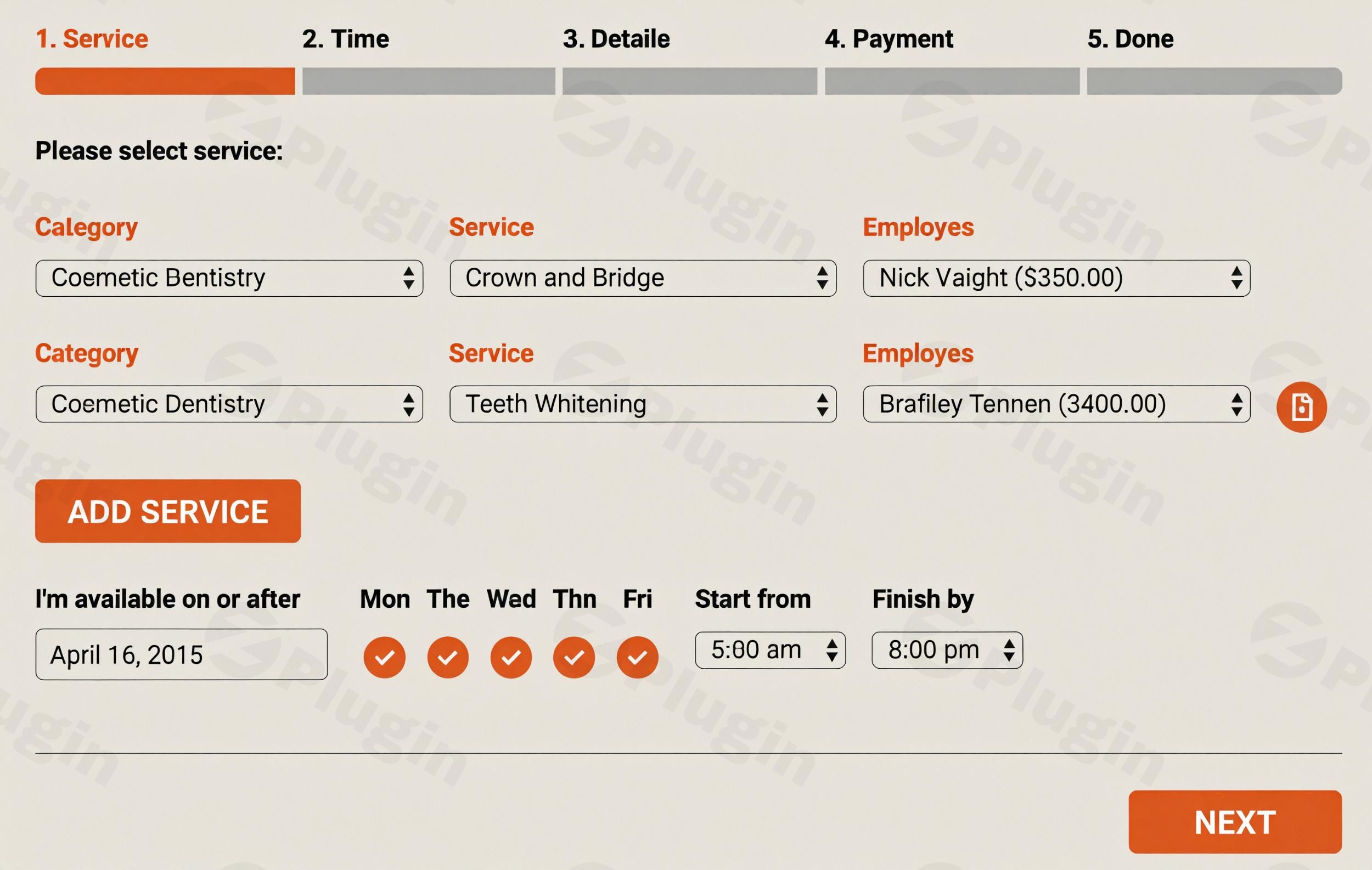
Managing a service-based business often involves more than just a single time slot. Whether you run a spa where a massage is followed by a facial, or a medical clinic requiring a consultation before a procedure, manual scheduling for sequential services is a logistical nightmare. The Bookly Chain Appointments add-on is the definitive solution for businesses using WordPress that need to offer seamless, multi-step booking experiences.
In this guide, we will explore how this powerful extension for Bookly PRO enables multi-step booking on WordPress, allowing your clients to schedule a series of consecutive appointments in a single transaction.
What is the Bookly Chain Appointments Add-on?
The Bookly Chain Appointments add-on is a premium extension designed specifically for the Bookly PRO plugin. It solves the “fragmented booking” problem by allowing customers to select multiple services and book them back-to-back. Instead of checking out three separate times for three different services, the system finds a window where all services can be performed sequentially and bundles them into one checkout process.
Using a sequential appointments plugin like this ensures that your staff’s schedule is optimized and your customers enjoy a frictionless “one-and-done” booking experience.
Key Features & Benefits
1. Seamless Sequential Appointment Booking
The core value of this add-on is the ability to link services. Clients can choose several treatments or sessions, and the plugin intelligently identifies the nearest available time slots that accommodate the entire “chain” without gaps.
2. Multi-Staff Selection per Chain
Not every service in a sequence is performed by the same person. For example, a “Wedding Prep” chain might include a hair stylist and a makeup artist. This add-on allows clients to select different staff members for each step of the appointment chain, provided they are available during those consecutive slots.
3. Smart Time Management & Conflict Detection
The system performs real-time validation across all staff calendars. If Step 1 is available but Step 2 is blocked, the system won’t show that start time as an option. This eliminates the risk of double-booking or scheduling “impossible” sequences.
4. Unified Cart and Notifications
Rather than receiving five different emails for five services, the client receives a unified notification. This summary includes all appointments, staff names, and times in one clear message. Similarly, the checkout process is handled via a single payment gateway interaction.
5. Flexible Admin Controls
Administrators can define which services are mandatory in a chain and which are optional. You can also set specific buffer times or intervals between chained appointments to allow for room cleanup or staff transitions.
How to Install and Set Up Bookly Chain Appointments
Setting up WordPress chain appointments is straightforward, provided you already have the foundation ready.
Prerequisites
- WordPress Website: Ensure your site is up to date.
- Bookly PRO: This add-on requires Bookly PRO to function. It is not compatible with the free version of Bookly.
Step-by-Step Configuration
- Install the Add-on: Upload the Bookly Chain Appointments zip file via Plugins > Add New > Upload in your WordPress dashboard. Activate the plugin.
- Enable the Chain Feature: Navigate to Bookly > Settings > Chain Appointments. Ensure the feature is toggled to “Enabled.”
- Configure the Booking Form: Go to Bookly > Appearance. You will notice new options for the “Service” step. You can enable the “Chain” mode, which allows users to click a “plus” icon to add more services to their current session.
- Assign Staff and Locations: In the Bookly > Services tab, ensure your services are mapped to the correct staff and locations. The add-on will automatically pull this data when building the chain.
- Test the Workflow: Visit your front-end booking page and attempt to book a three-service sequence. Verify that the time slots offered reflect the total duration of all services combined.
Practical Usage & Best Practices
To get the most ROI from your Bookly setup, consider these real-world workflows:
- Health & Wellness Clinics: Use the add-on for “Consultation + Treatment” sequences. This ensures the specialist is available for both parts of the visit, improving the patient experience.
- Educational Workshops: Ideal for sequential training modules (e.g., Module A, then Module B). It ensures the student can commit to a full afternoon of learning in one go.
- Beauty Salons: This is the best way to book back-to-back appointments for hair coloring, cutting, and styling, which often involve different durations and sometimes different specialists.
- Auto Service Centers: Perfect for “Oil Change + Tire Rotation + Inspection” chains.
Pro Tip: Always set a small “buffer time” in the Bookly Service settings. Even with sequential booking, your staff needs 5–10 minutes to reset between clients.
FAQ & Troubleshooting
How does Bookly Chain Appointments work?
The add-on adds a logic layer to the standard Bookly search. When a user selects multiple services, the plugin scans your database for a block of time where all selected services can fit consecutively, taking into account individual staff availability for each specific service.
Can Bookly book multiple services in one visit?
Yes. With the Chain Appointments add-on, users can select several different services and the system will arrange them back-to-back in a single booking session. Without this add-on, users would typically have to book each service individually.
Does Bookly PRO need the Chain Appointments add-on?
Bookly PRO is required to use any add-on. However, you only need the Chain Appointments add-on if your business model requires services to be booked sequentially/consecutively. If you only need a “shopping cart” style where services can be on different days, the standard Bookly Cart add-on might suffice.
Is it compatible with WooCommerce?
Yes, the Bookly Chain Appointments add-on integrates natively with the Bookly PRO WooCommerce integration. The entire chain will be added to the WooCommerce cart as a single checkout item.
What happens if a staff member is booked for only one part of the chain?
The system’s conflict detection will automatically hide any start times that would result in a conflict for any part of the chain. If a staff member is busy for “Step 2” of the sequence, that specific time slot will not be offered to the client.
Final Verdict
The Bookly Chain Appointments add-on is a mandatory tool for any service provider whose business relies on multi-step workflows. While there are alternatives like Amelia or BookingPress, Bookly’s ecosystem remains the most robust for high-volume, complex scheduling.
By automating the logic of back-to-back scheduling, you reduce administrative overhead, eliminate manual booking errors, and provide a professional, modern interface for your clients. For businesses looking to scale, the efficiency gains provided by this add-on offer a clear and immediate return on investment.
I. Download Limits & Account Benefits
- Free Downloads: Each email address receives 3 downloads per day for free products
- Upgrade Benefits: Purchase any paid product to increase your daily download limit by 3 for each paid product
- No Account Required: You can download immediately by receiving the download link via email
- Account Recommended: Create an account for easier access to your order history and direct update downloads
II. Understanding GPL vs Official Versions
Important: The products available on WPPick are GPL-licensed versions, which differ from official developer versions. Before purchasing, please read our comprehensive guide: Understanding GPL & Official Differences at WPPick
Key Points:
- GPL versions may not include premium support from original developers
- Updates may be delayed compared to official releases
- Some premium features might have limitations
- Always consider your specific needs and support requirements
III. Support & Assistance
We’re here to help through multiple channels:
- Email Support: Direct email assistance for all inquiries
- Live Chat: Real-time support during business hours
- Comprehensive Documentation: Detailed guides and tutorials
IV. Order Tracking
Access your complete purchase history and download links anytime: Order History
V. Account Access
New to WPPick? Login or Create Account to manage your downloads and orders efficiently.
VI. Refund Protection
We stand behind our products with a clear refund policy. Review our terms: Refund Policy
VII. Privacy & Security
Your data security is our priority. Learn how we protect your information: Privacy Policy
VII. Terms of Service
Understanding our service terms ensures a smooth experience: Terms of Use
Quick Tips for Best Experience
- Verify Compatibility: Check plugin/theme compatibility with your WordPress version
- Backup First: Always backup your site before installing new plugins or themes
- Test Environment: Consider testing on a staging site first
- Stay Updated: Regularly check for updates in your account dashboard
- Read Documentation: Review any included documentation for optimal setup
Need Help?
If you have questions about downloads, licensing, or need technical assistance, don’t hesitate to contact our support team. We’re committed to ensuring you have the best possible experience with WPPick products.
Ready to get started? Your download adventure begins with just one click!
- Added support for Bookly Pro 9.3