

Bookpro – Appointment Booking WordPress Plugin
/Year
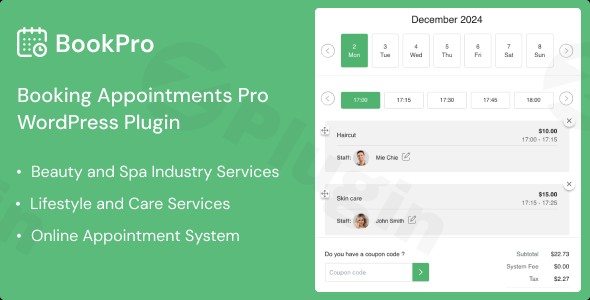
Managing reservations, staff schedules, and client payments can be a logistical nightmare for service-based businesses. The Bookpro appointment booking WordPress plugin is designed to solve these challenges by providing an all-in-one scheduling ecosystem directly within your website. By automating the booking lifecycle, it allows business owners to focus on providing high-quality services rather than managing spreadsheets.Whether you run a medical clinic, a beauty salon, or a consulting firm, this WordPress booking plugin streamlines the user experience from the moment a client lands on your site to the final payment confirmation.
Key Features and Benefits of Bookpro
Bookpro distinguishes itself by offering tools that empower both the administrator and the end-user. Here is a breakdown of why this plugin is a top-tier service business booking plugin.
1. Powerful Front-End Business Dashboard
Unlike many competitors that force users into the WordPress backend, Bookpro offers a dedicated front-end dashboard.
- Admin Control: Manage services, oversee orders, and monitor staff schedules without ever seeing the WordPress “Dashboard.”
- Efficiency: This is ideal for team members or managers who need to handle daily operations quickly without needing technical WordPress knowledge.
2. Multi-Service Bookings in One Transaction
One of the most significant friction points in online scheduling is the inability to book multiple things at once. Bookpro allows clients to:
- Add several services to a single cart.
- View a detailed cost breakdown before checking out.
- Apply discount coupons to the entire bundle.
3. Comprehensive Staff and Schedule Management
If you are looking for a staff scheduling WordPress plugin, Bookpro provides deep functionality for team management:
- Individual Calendars: Assign specific employees to specific services.
- Custom Roles: Define what employees can see and manage (e.g., “My Schedule” vs. “Overall Schedule”).
- Global vs. Local Hours: Set business-wide opening times or unique hours for specific services or staff members.
4. Seamless WooCommerce & Payment Integration
As a WooCommerce booking plugin, Bookpro leverages the power of the world’s most popular eCommerce engine.
- Payment Gateways: Use any payment method supported by WooCommerce (Stripe, PayPal, etc.).
- Offline Payments: Give customers the option to book online and pay in person.
* “My Wallet”: A dedicated customer finance feature that allows clients to manage their funds and deposits within their accounts.
How to Set Up Bookpro Appointment Booking (Step-by-Step)
Setting up an online appointment booking system for WordPress doesn’t have to be complicated. Follow these steps to get Bookpro up and running:
- Installation: Purchase the plugin and download the ZIP file. In your WordPress admin, go to Plugins > Add New > Upload Plugin, select the file, and click Install Now and then Activate.
- Basic Configuration: Navigate to the Bookpro settings. Define your overall business hours, currency, and tax settings to ensure accurate pricing.
- Create Services: Add your services by defining the duration, price, and category. You can also set specific buffer times between appointments.
- Add Staff Members: Create profiles for your employees and assign them to the relevant services.
- Configure Payments: If you want to accept online payments, ensure WooCommerce is installed and configured. Link Bookpro to your WooCommerce products to enable the checkout flow.
6. Place the Booking Form: Use the provided shortcodes or page builder modules (Elementor, WPBakery, or Gutenberg) to place the booking form on your “Book Now” page.
Practical Usage and Best Practices
To get the most ROI from your appointment booking WordPress plugin, consider these real-world workflows:
For Beauty Salons and Spas
Use the multi-service booking feature to allow clients to book a haircut, a manicure, and a facial in one go. By setting up “Service Management” correctly, the plugin ensures that the client isn’t double-booked with the same professional for overlapping times.
For Professional Consultants
Utilize the staff scheduling feature to sync different time zones and availability. If you have a team of consultants, the “My Schedule” view allows each team member to stay organized via the front-end dashboard without seeing confidential data from other colleagues.
Best Practices for Higher Conversions:
- Enable Automated Emails: Use Bookpro’s email notification system to send reminders. This significantly reduces no-shows.
- Offer Discounts: Use the “Advanced Discounting System” to offer lower rates during off-peak hours to fill your calendar.
* Mobile Optimization: Since Bookpro is compatible with major page builders like Elementor, ensure your booking form is easy to use on mobile devices, where over 50% of bookings usually occur.
FAQ & Troubleshooting
Does Bookpro integrate with WooCommerce?
Yes, Bookpro is a WooCommerce booking plugin that integrates fully with WooCommerce (version 9.x.x support included). This allows you to use any WooCommerce-compatible payment gateway to process deposits or full payments for appointments.
Can customers book multiple services at once?
Absolutely. One of Bookpro’s unique selling points is its ability to handle multi-service bookings in a single transaction. Customers can select various services, view the total price, and pay for them all at once, reducing checkout friction.
Is Bookpro compatible with Elementor?
Yes, Bookpro is highly compatible with the most popular WordPress page builders, including Elementor, WPBakery, and the Block Editor (Gutenberg). This makes it easy to design custom booking pages that match your brand.
How do I manage staff schedules?
Staff management is handled through the front-end dashboard or the WordPress backend. Administrators can assign employees to specific services, set their individual working hours, and allow staff members to view their specific “My Schedule” list to track upcoming appointments.
Conclusion: Is Bookpro Right for You?
The Bookpro appointment booking WordPress plugin is a robust, professional-grade solution for any service-oriented business. Its standout feature—the front-end business dashboard—makes it a superior choice for business owners who want a clean, decoupled management experience.By combining multi-service booking, deep WooCommerce integration, and flexible staff scheduling, Bookpro offers a high-value toolset that can help grow your revenue and improve customer satisfaction. If you need a reliable, feature-rich WordPress booking plugin, Bookpro is a top-tier contender available on wppick.com.
I. Download Limits & Account Benefits
- Free Downloads: Each email address receives 3 downloads per day for free products
- Upgrade Benefits: Purchase any paid product to increase your daily download limit by 3 for each paid product
- No Account Required: You can download immediately by receiving the download link via email
- Account Recommended: Create an account for easier access to your order history and direct update downloads
II. Understanding GPL vs Official Versions
Important: The products available on WPPick are GPL-licensed versions, which differ from official developer versions. Before purchasing, please read our comprehensive guide: Understanding GPL & Official Differences at WPPick
Key Points:
- GPL versions may not include premium support from original developers
- Updates may be delayed compared to official releases
- Some premium features might have limitations
- Always consider your specific needs and support requirements
III. Support & Assistance
We’re here to help through multiple channels:
- Email Support: Direct email assistance for all inquiries
- Live Chat: Real-time support during business hours
- Comprehensive Documentation: Detailed guides and tutorials
IV. Order Tracking
Access your complete purchase history and download links anytime: Order History
V. Account Access
New to WPPick? Login or Create Account to manage your downloads and orders efficiently.
VI. Refund Protection
We stand behind our products with a clear refund policy. Review our terms: Refund Policy
VII. Privacy & Security
Your data security is our priority. Learn how we protect your information: Privacy Policy
VII. Terms of Service
Understanding our service terms ensures a smooth experience: Terms of Use
Quick Tips for Best Experience
- Verify Compatibility: Check plugin/theme compatibility with your WordPress version
- Backup First: Always backup your site before installing new plugins or themes
- Test Environment: Consider testing on a staging site first
- Stay Updated: Regularly check for updates in your account dashboard
- Read Documentation: Review any included documentation for optimal setup
Need Help?
If you have questions about downloads, licensing, or need technical assistance, don’t hesitate to contact our support team. We’re committed to ensuring you have the best possible experience with WPPick products.
Ready to get started? Your download adventure begins with just one click!
- Add code for “Comment rating” add-on plugin
- Fix security
- Add Offline payment gateway
- Fix business hour
- Update UI, UX
- Add Offline payment gateway
- Fix business hour
- Update UI, UX