
Bricks Builder – Build WordPress Sites That Rank
/Year
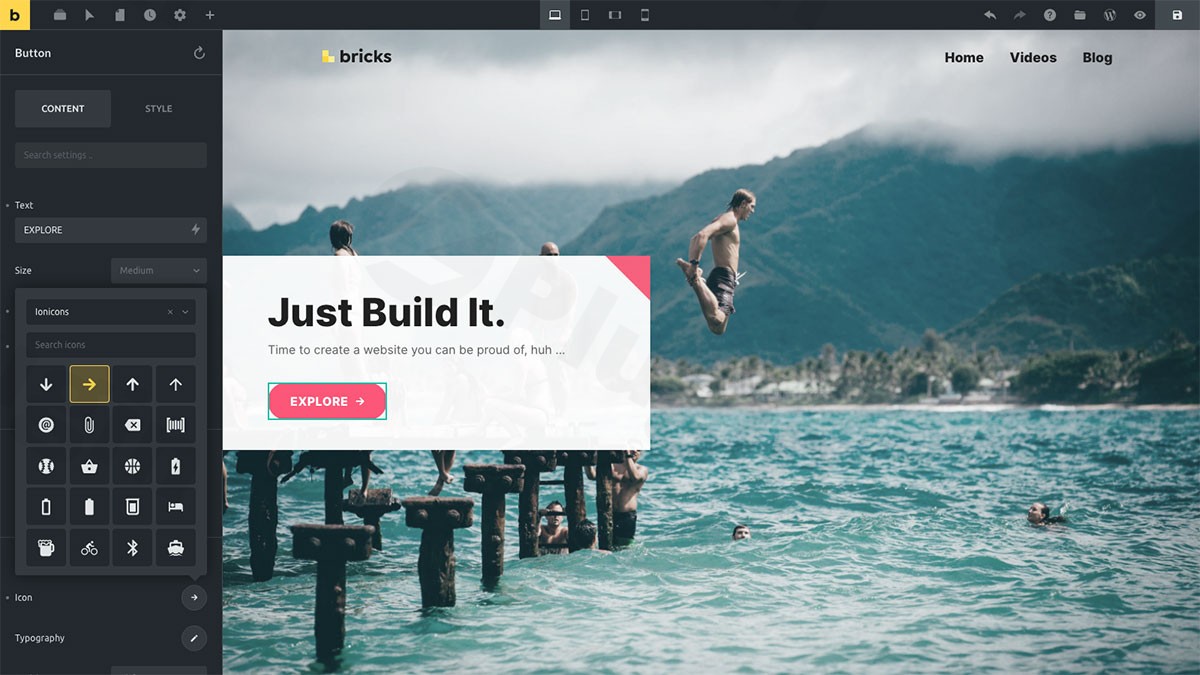
The digital landscape demands more than just a beautiful website; it requires a blazingly fast, highly functional, and SEO-optimized online presence. Enter Bricks Builder WordPress theme, a modern, visual site builder that redefines how you approach website creation. Designed from the ground up for performance, flexibility, and extensive customization, Bricks Builder empowers users to craft stunning, high-converting websites that stand out and rank better in search engines.Whether you’re a seasoned agency, a busy freelancer, or a business owner determined to build a site that excels in Core Web Vitals, Bricks Builder offers a comprehensive suite of tools to achieve your vision without compromise.
Key Features: Design, Layout & Unrivaled Performance
Bricks Builder revolutionizes the WordPress site-building experience by offering powerful visual editing capabilities combined with an unwavering focus on speed and clean code.
Visual Full Site Editing & Flexible Layouts
Bricks Builder gives you complete visual control over every pixel of your website. From intricate headers and footers to custom post types and archive pages, you can design every aspect dynamically. This eliminates the need for multiple plugins, leading to faster load times and superior performance. Its intuitive interface includes:
- Responsive Design Controls: Ensure your site looks perfect on any device with granular controls for desktop, tablet (vertical and horizontal), and mobile breakpoints.
- “Brick” System for Layouts: Build complex layouts using a flexible container system, providing the freedom to structure your content precisely.
- Pre-designed Templates: While encouraging custom creation, Bricks includes built-in templates for common elements like 404 pages, headers, and footers, along with the ability to save your custom designs for reuse.
Advanced Customization & Global Styles
Bricks Builder offers deep customization capabilities, allowing you to establish a consistent brand identity across your entire site with ease:
- Extensive Color Schemes & Typography: Customize colors, fonts (including Google Fonts and custom fonts), line heights, and apply custom styles to achieve your desired aesthetic.
- Granular Spacing & Backgrounds: Control padding, margins, section layouts, and backgrounds (solid colors, gradients, images) with precision.
- Global CSS Classes & Custom Code: Implement a class-first workflow to create and reuse global CSS classes visually. For developers, Bricks supports adding custom CSS, JavaScript, and PHP directly within the builder, even with Emmet abbreviation in its CSS editor.
Powerful Dynamic Data Integration
For complex, data-driven websites, Bricks Builder shines with its seamless integration capabilities:
- Custom Post Type Support: Create dynamic templates for portfolios, testimonials, services, and custom blog layouts using the powerful Query Loop Builder.
- Third-Party Plugin Integration: Natively integrate with popular WordPress plugins like Advanced Custom Fields (ACF), Pods, Meta Box, and CMB2 to display custom fields and build sophisticated layouts.
Unmatched Performance & SEO Readiness
Performance is at the core of Bricks Builder’s design philosophy, making it an excellent choice for Bricks Builder SEO and Core Web Vitals optimization:
- Blazing Fast Page Speeds: Users consistently report significant improvements in GTmetrix and PageSpeed Insights scores, often achieving top-notch performance. Bricks generates clean, optimized, semantic HTML code and loads minimal assets.
- Built-in Optimization Features: Benefits include a smart lazy asset loader for images and videos, selective font loading, and the ability to disable default WordPress scripts like emojis and dashicons to keep pages lean and fast.
- Mobile-First Approach: Its responsive design controls ensure your site is fully optimized for all devices, a crucial factor for modern SEO.
Workflow Efficiency & Professional Site Management
Bricks Builder isn’t just about design; it’s about making your workflow smoother and more efficient:
- Undo/Redo & Revision History: Never lose work with comprehensive undo/redo and automatic revision saving, allowing you to restore previous versions with a single click.
- Customizable Autosave: Set your preferred autosave interval or disable it, with intelligent detection of unsaved changes.
- Granular Access Control: Define builder access levels by user role or individual users, protecting designs while allowing controlled content edits.
- Header & Footer Builder: Create multiple responsive header and footer templates with conditional display rules, implementing sticky headers, mobile menus, and advanced navigation features.
- Multilingual & RTL Support: A fully translatable interface includes right-to-left language support for Arabic, Hebrew, and other RTL languages, extending its reach globally.
Installation & Setup Guide
Getting started with Bricks Builder is straightforward, much like any other WordPress theme. Here’s how to install and begin building your site:
- Download Bricks Builder: After purchasing Bricks Builder (e.g., from ZeroPlugin.com, which provides genuine GPL-licensed versions with regular updates and virus scans), you will receive a ZIP file containing the theme.
- Install the Theme:
- Log in to your WordPress dashboard.
- Navigate to Appearance > Themes.
- Click on the “Add New” button at the top.
- Click “Upload Theme”, then “Choose File”, and select the Bricks Builder ZIP file.
- Click “Install Now”.
- Activate the Theme: Once installed, click the “Activate” link. Bricks Builder is a theme, not a plugin, so it will replace your existing theme upon activation.
- License Activation: After activation, you’ll need to enter your license key to enable updates and support. Navigate to Bricks > Settings > License in your WordPress dashboard and enter your license key.
- Exploring Templates & Starting Your Build: Bricks Builder does not typically rely on a single “one-click demo import” in the traditional sense, as it encourages full-site building from the ground up. However, you can leverage its extensive template library:
- Access the Bricks Builder editor for any page or post.
- Use the “Templates” panel within the builder to import pre-designed sections, pages, or even “Remote templates” from other Bricks installations, accelerating your design process.
- Start building your custom headers, footers, and page layouts visually, piece by piece.Tip: Ensure your server meets the minimum requirements (PHP 7.4+, MySQL 5.6+, WordPress memory limit 64 MB minimum, 512 MB recommended) for a smooth experience, especially when dealing with larger builds or dynamic content.
Mastering Customization with Bricks Builder
Bricks Builder puts powerful customization directly at your fingertips, allowing you to craft a unique brand identity and layout without writing a single line of code (unless you want to).
- Global Styles for Consistent Branding:
- Navigate to Bricks > Settings > Theme Styles in your WordPress dashboard.
- Here, you can define global settings for colors, typography, headings, buttons, and more. This ensures consistency across your entire website and allows for quick, site-wide design changes.
- Define default styles for individual templates to maintain design cohesion.
- Designing Your Header & Footer:
- Go to Bricks > Templates and click “Add New” to create a new template.
- Select “Header” or “Footer” as the template type.
- Use the visual builder to drag and drop elements, create responsive navigation menus, integrate logos, and design unique layouts.
- Set conditional display rules to control where and when these headers/footers appear on your site.
- Customizing Page & Post Layouts:
- When editing any page, post, or custom post type, click “Edit with Bricks” to open the visual builder.
- Utilize the drag-and-drop interface to add sections, containers, and elements.
- The “Structure View” helps you navigate and organize complex layouts efficiently.
- Use the “Query Loop Builder” to create dynamic displays for blog posts, products, or custom listings, pulling content directly from your WordPress database.
- Leveraging the Visual Editor:
- Bricks Builder operates with a “Unified Canvas,” allowing you to edit any page from the same interface, providing a live front-end editing experience.
- Utilize zoom functionality for a birds-eye or detail-oriented workflow, making it easy to perfect every element.The customization experience with Bricks Builder is highly intuitive for those who appreciate granular control. Its class-first workflow and extensive visual options empower you to achieve highly custom designs that would typically require a developer.
FAQ & Troubleshooting
Here are answers to some common questions about Bricks Builder, designed to be clear and helpful for quick reference:
Is Bricks Builder compatible with Elementor / WPBakery / Gutenberg?
Bricks Builder is a WordPress theme designed for full-site editing, meaning it replaces your existing theme upon activation. Therefore, it does not typically “integrate” with other page builder plugins like Elementor or WPBakery in the traditional sense. It offers its own robust visual builder. However, Bricks allows you to build with the default Gutenberg editor, and you can convert Gutenberg blocks to Bricks elements and vice-versa, offering flexibility if you prefer to use native WordPress blocks.
Does Bricks Builder support WooCommerce for online stores?
Yes, Bricks Builder offers a dedicated WooCommerce builder with specific elements for designing shop pages, product archives, cart, and checkout pages. This makes it a strong option for building high-performance and highly customized online stores.
Is Bricks Builder good for beginners?
While Bricks Builder offers professional-grade features and an intuitive visual editor, it can have a steeper learning curve compared to more beginner-friendly builders like Elementor or Divi, especially for its advanced features and class-first workflow. However, users who are comfortable with a bit of a learning curve will find its power and flexibility highly rewarding for creating custom, high-performance websites.
How can I update Bricks Builder without losing my customizations?
Since Bricks Builder is a theme, your customizations are typically stored within the theme’s settings and the WordPress database. Regular updates for Bricks Builder are generally safe and delivered automatically via the WordPress dashboard (after license activation). For any custom code (CSS, JS, PHP), it’s best practice to use the dedicated custom code areas within the Bricks Builder settings or, for more extensive PHP modifications, to create a child theme. While Bricks often negates the need for a child theme for many customizations due to its flexibility, it’s still a recommended practice for direct file modifications.
What should I do if the demo import (or template import) fails or looks different from the demo site?
If you’re importing specific templates and encounter issues, ensure your server meets the recommended PHP memory limits (at least 512 MB for WordPress memory limit) and max_execution_time. Sometimes, conflicts with other plugins or server-side caching can interfere. Try temporarily deactivating non-essential plugins and clearing any caching. If a template still looks different, it might be due to missing images (placeholders often used) or global style differences between the demo and your site. Bricks Builder’s support team is an excellent resource for such issues.
Conclusion
Bricks Builder stands out as a formidable contender in the WordPress ecosystem, particularly for those who prioritize performance, clean code, and deep design flexibility. Its visual full-site editing capabilities, robust dynamic data integration, and commitment to delivering lightning-fast websites make it an ideal choice for:
- Agencies and Freelancers seeking a powerful, efficient tool to build bespoke, high-performance client sites.
- Advanced Developers who appreciate its class-based styling, custom code integration, and granular control over every aspect of a website.
- eCommerce Store Owners aiming for a fast, customizable online shop with dedicated WooCommerce features.
- Content Creators and Businesses looking for a future-proof solution that delivers excellent SEO outcomes and user experience.While it may present a slightly steeper learning curve for absolute beginners, the long-term benefits of its speed, control, and efficiency are undeniable. For those ready to invest in a Bricks Builder lifetime deal and embrace a modern, performance-first approach to WordPress web design, Bricks Builder is a highly recommended and rewarding platform for building exceptional websites.
I. Download Limits & Account Benefits
- Free Downloads: Each email address receives 3 downloads per day for free products
- Upgrade Benefits: Purchase any paid product to increase your daily download limit by 3 for each paid product
- No Account Required: You can download immediately by receiving the download link via email
- Account Recommended: Create an account for easier access to your order history and direct update downloads
II. Understanding GPL vs Official Versions
Important: The products available on WPPick are GPL-licensed versions, which differ from official developer versions. Before purchasing, please read our comprehensive guide: Understanding GPL & Official Differences at WPPick
Key Points:
- GPL versions may not include premium support from original developers
- Updates may be delayed compared to official releases
- Some premium features might have limitations
- Always consider your specific needs and support requirements
III. Support & Assistance
We’re here to help through multiple channels:
- Email Support: Direct email assistance for all inquiries
- Live Chat: Real-time support during business hours
- Comprehensive Documentation: Detailed guides and tutorials
IV. Order Tracking
Access your complete purchase history and download links anytime: Order History
V. Account Access
New to WPPick? Login or Create Account to manage your downloads and orders efficiently.
VI. Refund Protection
We stand behind our products with a clear refund policy. Review our terms: Refund Policy
VII. Privacy & Security
Your data security is our priority. Learn how we protect your information: Privacy Policy
VII. Terms of Service
Understanding our service terms ensures a smooth experience: Terms of Use
Quick Tips for Best Experience
- Verify Compatibility: Check plugin/theme compatibility with your WordPress version
- Backup First: Always backup your site before installing new plugins or themes
- Test Environment: Consider testing on a staging site first
- Stay Updated: Regularly check for updates in your account dashboard
- Read Documentation: Review any included documentation for optimal setup
Need Help?
If you have questions about downloads, licensing, or need technical assistance, don’t hesitate to contact our support team. We’re committed to ensuring you have the best possible experience with WPPick products.
Ready to get started? Your download adventure begins with just one click!
- Bug fixes across the builder, components, filters, and interactions.
- Improvements across the builder, components, filters, and interactions.
- Paste HTML & CSS directly into the builder, automatically converted into native Bricks elements, classes, and variables.
- Refined parts of the builder used every day.
- Major design-system upgrade.
- Powerful new component features.
- Significant workflow improvements.
- Polishing the builder and fixing several bugs
- Handful of smaller new features added
- Plenty of improvements implemented
- Various fixes included
- Updated all affected Woo script handles that Bricks enqueues to address WooCommerce 10.3.0 deprecation warnings
- Builder: JS errors due to the new block editor integration
- Mega menu: Wrong width calculation in sticky header
- Theme Styles: Colors preceding Button styles
- WordPress language set to Japanese causes fatal PHP error
- Accordion: Title hidden inside Tab element
- Components: Backslash added to apostrophe/quote
- Components: Code element not rendered on the frontend (code signing)
- Form: Create/update post action using Text Area/Rich Text field type
- Form: Field value rendered outside input
- Stable release now available after two weeks of testing and improvements based on the 2.1-beta release
- 70+ improvements and bug fixes
- 70+ improvements and bug fixes
- WordPress 6.8: Function _load_textdomain_just_in_time was called incorrectly = FIX