

Buddypress Auto Friendship Pro
/Year
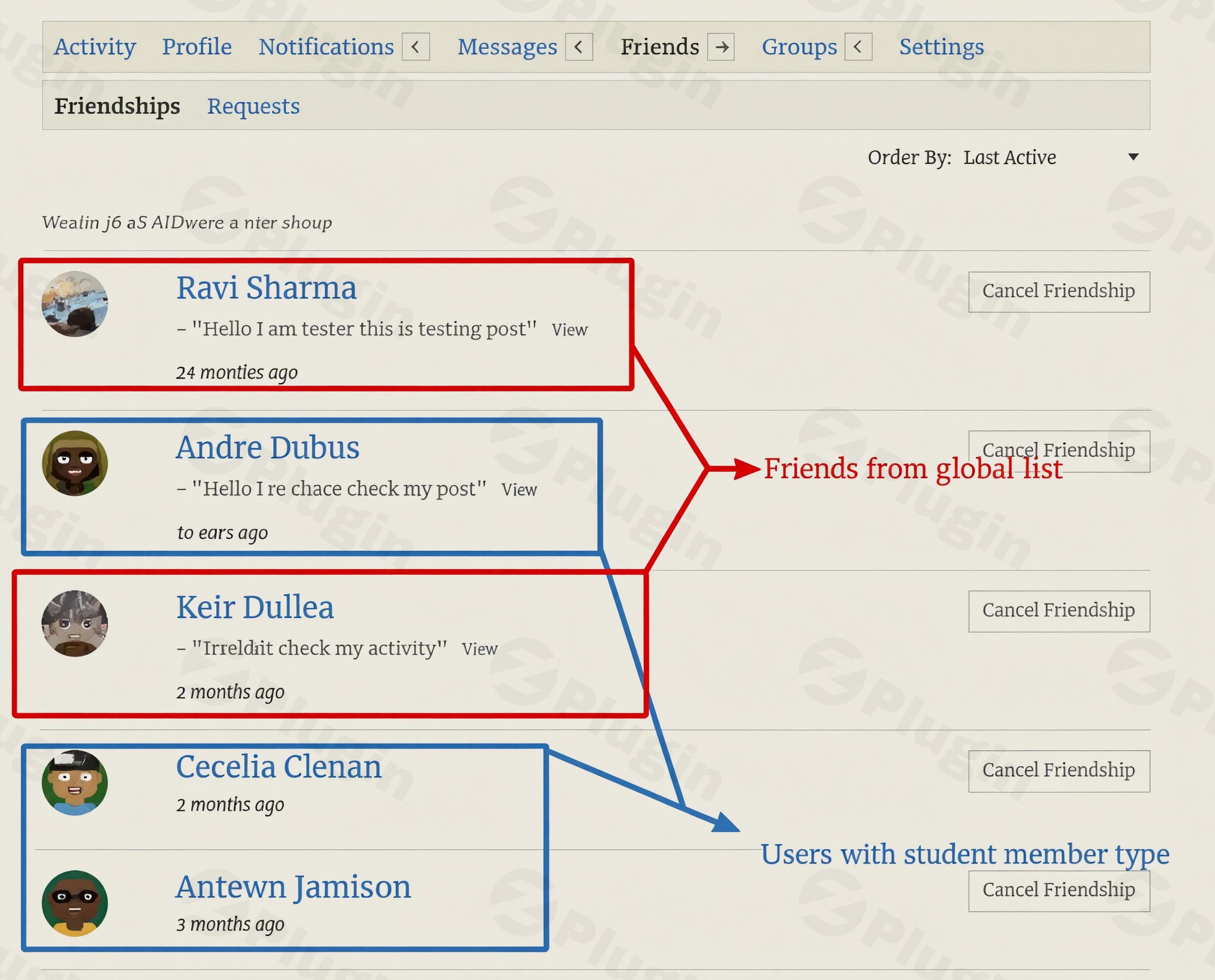
Building a thriving online community on WordPress with BuddyPress or BuddyBoss often faces a common hurdle: new members feeling isolated. They join, create a profile, and then struggle to find initial connections, leading to reduced engagement and higher churn rates. The BuddyPress Auto Friendship Pro plugin solves this fundamental problem by intelligently automating social connections from the moment a user registers. It transforms your community into a welcoming space where immediate interaction is the norm, helping you establish dynamic BuddyPress automatic friends plugin functionality and foster deeper relationships.This powerful BuddyBoss auto friendship solution allows community administrators to define rules for automatically connecting users, whether globally for every new member or conditionally based on specific criteria like shared interests, roles, or member types. By streamlining the initial connection process, BuddyPress Auto Friendship Pro significantly enhances user onboarding, boosts immediate engagement, and cultivates a more active and cohesive social network.
Key Features That Drive Community Growth
BuddyPress Auto Friendship Pro stands out with a comprehensive suite of features designed for robust BuddyPress user connection automation, providing both flexibility and granular control for community managers.
Advanced Friendship Automation
This core functionality allows you to create unlimited friendship lists with custom user selections. It supports both global and conditional friendship rules, enabling sophisticated matching. Imagine connecting new users based on shared profile fields, user roles, or even member types. This intelligent system seamlessly integrates with BuddyPress core functionality to ensure a smooth and native experience.
Global Friendship Lists
Global lists are perfect for establishing foundational connection networks. Select specific “influencer” users, community leaders, or important accounts that every new member should automatically befriend or follow. This instantly populates a new member’s activity stream, reduces the “empty profile” problem, and encourages platform engagement from day one. It’s a powerful way to auto add friends WordPress-wide without any conditions.
Condition-Based Smart Matching
Take your connection strategy to the next level with intelligent conditional lists. This feature automatically connects users based on predefined criteria, fostering meaningful interactions by linking members with shared characteristics or interests. You can create sophisticated matching rules using:
- Extended profile field data matching: Connect users who share interests, locations, or other profile details.
- User role-based connections: Automatically connect users with specific roles (e.g., mentors with mentees, students with faculty).
- Member type-specific friendships: Great for niche communities or tiered memberships.
- Multiple condition combinations for precise targeting: Combine various criteria for highly specific connection rules. This is ideal for implementing BuddyPress conditional friends logic.
BuddyPress Connection Creator Tool
Introduced in version 1.1.0, this handy tool empowers site administrators to manually connect any two users (as friends, followers, or following) directly from the backend. This is invaluable for administrative tasks, managing VIP users, or providing specific support for member relationships.
Bulk Relationship Creation
For existing communities, updating connections manually can be a monumental task. BuddyPress Auto Friendship Pro includes a one-click tool to create bulk relationships for existing users. This ensures that current members also align with your new friendship/follow rules, maintaining consistency and extending the benefits of automated connections across your entire user base. It’s perfect for when you need to BuddyPress auto connect existing members in bulk.
Group-Based Automations
Deepen community integration by automating connections based on group actions. The plugin can establish friendships or follow relationships when a user joins a group, leaves a group, or is removed from a group, making group participation even more impactful.
Administrative Efficiency & Control
Beyond automation, the plugin offers an intuitive, admin-friendly settings interface that makes setup and configuration straightforward. You can also exclude specific users or roles from auto-friending rules, providing fine-grained control over the automation process. For complex setups, administrators can even set a priority order for assignment for multiple matching conditional lists.
Installation & Setup: Get Your Community Connected Fast
Installing BuddyPress Auto Friendship Pro is a standard WordPress plugin procedure, designed to be accessible for non-developers.
- Download the Plugin: After purchasing from ZeroPlugin.com, download the plugin’s
.zipfile to your computer. - Upload to WordPress:
- Log in to your WordPress dashboard.
- Navigate to Plugins > Add New.
- Click the “Upload Plugin” button at the top of the page.
- Click “Choose File”, select the
buddypress-auto-friendship-pro.zipfile you downloaded, and click “Install Now”.
- Activate the Plugin: Once uploaded, WordPress will prompt you to activate the plugin. Click “Activate Plugin”.
- Configure Settings:
- After activation, navigate to the new “BuddyPress Auto Friendship Pro” or similar settings menu that appears in your WordPress dashboard (often under BuddyPress or a dedicated menu item).
- Here, you’ll find options to create your Global Friendship Lists and Conditional Friendship Lists.
- Start by defining which existing users should be part of a global list, meaning every new member will automatically connect with them.
- Then, explore the conditional options: set up rules based on user roles, member types, or extended profile fields. For example, you might create a rule that connects all “Students” with “Mentors” automatically.
- Don’t forget to check out the Bulk Relationship Creation tool if you have existing members you want to retroactively apply connection rules to.Remember, BuddyPress Auto Friendship Pro requires BuddyPress (or BuddyBoss Platform) to be installed and active on your WordPress site to function correctly.
Practical Usage & Best Practices for Enhanced Engagement
BuddyPress Auto Friendship Pro is more than just an automation tool; it’s a strategic asset for cultivating a vibrant online community. Here are some practical usage scenarios and best practices:
- Warm Onboarding for New Members:
- Use Case: A new member joins your fitness community. Instead of an empty activity feed, they immediately see updates from “Fitness Coaches” (globally connected users) and “Local Running Buddies” (conditionally connected based on location profile field).
- Best Practice: Create a “Welcome Committee” global list of active, friendly members. For conditional connections, leverage common sign-up form fields (e.g., interests, goals) to create immediate, relevant peer connections. This “warm” onboarding significantly reduces the time-to-engagement metric.
- Structured Mentorship or Peer-to-Peer Programs:
- Use Case: An educational platform wants to automatically pair “New Students” with “Senior Students” or “Tutors.”
- Best Practice: Utilize conditional lists based on user roles or member types. Set up a rule to automatically connect any user with the “New Student” role to a randomly assigned (or specific group of) user(s) with the “Senior Student” or “Tutor” role. This ensures every new student gets an instant support network.
- Enhancing Niche Group Engagement:
- Use Case: A photography community has groups for “Landscape Photography” and “Portrait Photography.” When a user joins one of these groups, you want them to automatically follow a few key members known for that specific genre.
- Best Practice: Leverage the group-based automation features. Configure the plugin to automatically follow specific “Expert Photographers” whenever a member joins their respective photography group. This immediately exposes new group members to relevant content and profiles, increasing their activity stream and participation.
- Admin-Driven VIP or Support Connections:
- Use Case: As an administrator, you want to ensure all VIP members are automatically friends with the community manager, or you need to quickly connect two specific users for a project.
- Best Practice: Use the global lists for VIP members to ensure they’re always connected to key staff. For one-off connections, the BuddyPress Connection Creator Tool is ideal. This saves countless hours of manual management while ensuring every member receives appropriate social introductions based on your community’s specific needs. This is the best BuddyPress plugin for automated follower lists and friendships.
FAQ & Troubleshooting
Q: What is BuddyPress Auto Friendship Pro?
A: BuddyPress Auto Friendship Pro is a premium WordPress plugin designed to automate user connection processes within BuddyPress and BuddyBoss communities. It automatically establishes friendships, followers, or following relationships for new or existing users based on global lists, conditional rules (profile fields, user roles, member types), or bulk actions, significantly enhancing user onboarding and engagement.
Q: Does BuddyPress Auto Friendship Pro work with BuddyBoss?
A: Yes, BuddyPress Auto Friendship Pro is fully compatible with the BuddyBoss Platform. It functions seamlessly as an add-on to both BuddyPress and BuddyBoss, extending their social networking capabilities with advanced automation for user connections.
Q: How to install BuddyPress Auto Friendship Pro?
A: To install BuddyPress Auto Friendship Pro, first ensure you have BuddyPress or BuddyBoss active on your WordPress site. Then, download the plugin’s .zip file from your purchase source, go to your WordPress dashboard, navigate to Plugins > Add New > Upload Plugin, select the .zip file, install, and activate it. After activation, configure its settings via its dedicated menu item in your WordPress admin.
Q: Can I set conditions for auto friends in BuddyPress?
A: Absolutely! BuddyPress Auto Friendship Pro offers robust conditional logic. You can create “conditional lists” that automatically connect users based on criteria such as matching extended profile field data, specific user roles, or designated member types. This allows for highly targeted and relevant automated friendships.
Q: Does BuddyPress Auto Friendship Pro impact site performance?
A: BuddyPress Auto Friendship Pro is designed as a lightweight add-on for BuddyPress/BuddyBoss. While any plugin adds some overhead, its automation features are optimized to run efficiently and are not known to heavily impact overall site performance. Its primary goal is to improve user engagement and retention, rather than slow down your site.
Conclusion: Build Stronger, More Engaged Communities with Automated Connections
The BuddyPress Auto Friendship Pro plugin is an indispensable tool for any WordPress community builder aiming to foster immediate engagement and enhance member retention. By eliminating the initial isolation new users often feel, it provides a “warm” welcome that encourages deeper interaction from day one.Whether you need to automatically connect every new member with key community figures, establish targeted networks based on shared interests, or efficiently manage existing relationships in bulk, this plugin offers the flexibility and power to do so. Its compatibility with both BuddyPress and BuddyBoss, combined with intuitive administration, makes it an ideal solution for creating dynamic and self-sustaining social environments. Invest in BuddyPress Auto Friendship Pro to transform your community into a truly connected and thriving social network.
I. Download Limits & Account Benefits
- Free Downloads: Each email address receives 3 downloads per day for free products
- Upgrade Benefits: Purchase any paid product to increase your daily download limit by 3 for each paid product
- No Account Required: You can download immediately by receiving the download link via email
- Account Recommended: Create an account for easier access to your order history and direct update downloads
II. Understanding GPL vs Official Versions
Important: The products available on WPPick are GPL-licensed versions, which differ from official developer versions. Before purchasing, please read our comprehensive guide: Understanding GPL & Official Differences at WPPick
Key Points:
- GPL versions may not include premium support from original developers
- Updates may be delayed compared to official releases
- Some premium features might have limitations
- Always consider your specific needs and support requirements
III. Support & Assistance
We’re here to help through multiple channels:
- Email Support: Direct email assistance for all inquiries
- Live Chat: Real-time support during business hours
- Comprehensive Documentation: Detailed guides and tutorials
IV. Order Tracking
Access your complete purchase history and download links anytime: Order History
V. Account Access
New to WPPick? Login or Create Account to manage your downloads and orders efficiently.
VI. Refund Protection
We stand behind our products with a clear refund policy. Review our terms: Refund Policy
VII. Privacy & Security
Your data security is our priority. Learn how we protect your information: Privacy Policy
VII. Terms of Service
Understanding our service terms ensures a smooth experience: Terms of Use
Quick Tips for Best Experience
- Verify Compatibility: Check plugin/theme compatibility with your WordPress version
- Backup First: Always backup your site before installing new plugins or themes
- Test Environment: Consider testing on a staging site first
- Stay Updated: Regularly check for updates in your account dashboard
- Read Documentation: Review any included documentation for optimal setup
Need Help?
If you have questions about downloads, licensing, or need technical assistance, don’t hesitate to contact our support team. We’re committed to ensuring you have the best possible experience with WPPick products.
Ready to get started? Your download adventure begins with just one click!
- Fixed conflict with newer version of PT settings framework
- Fixes compatibility issue with other BuddyDev plugins