

Buddypress Business Profile
/Year
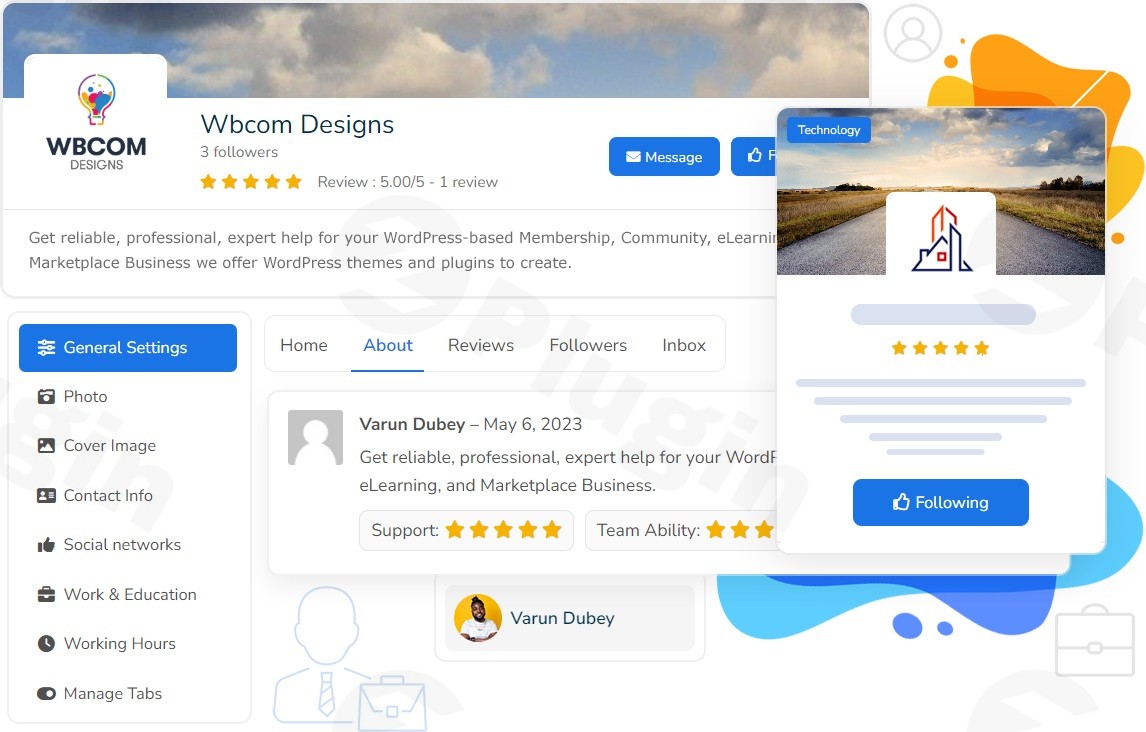
In today’s digital landscape, fostering a vibrant online community is crucial for businesses of all sizes. The BuddyPress Business Profile plugin transforms your BuddyPress or BuddyBoss-powered website into a dynamic hub where businesses can create dedicated profiles, engage with their audience, and showcase their offerings. This powerful extension empowers community members to establish a professional presence, akin to Facebook Pages, directly within your social network, making it an indispensable tool for enhancing engagement and growing your digital footprint.Whether you’re running a local business, managing a brand, or operating a large organization, the BuddyPress Business Profile plugin provides the comprehensive tools needed to connect effectively with your audience, share updates, and facilitate seamless communication.
Key Features of BuddyPress Business Profile Plugin
The BuddyPress Business Profile plugin offers a robust suite of features designed to empower businesses within your community. It goes beyond basic user profiles, providing a dedicated environment for brands to thrive.
- Unlimited Business Pages: Effortlessly create as many distinct business pages as you need, allowing diverse brands or multiple locations of a single business to establish a strong presence within your community. Community members can create these pages, with site administrators having the flexibility to set restrictions based on user roles or member types.
- Reviews & Ratings System: Cultivate trust and transparency by allowing your community members to rate and review business pages. This feature supports customizable criteria, enabling administrators to tailor the review process to specific business types or community standards, fostering authentic feedback and engagement.
- Dedicated Activity Feed: Each business page comes with its own activity feed, a central space for owners to share important announcements, eye-catching images, and engaging videos. This ensures followers stay informed and can easily interact with the business’s latest updates through likes and comments, much like a typical social media feed.
- Private Messaging Capabilities: Facilitate direct and private communication between community members and business page owners. This dedicated inbox streamlines customer service and inquiry handling, ensuring efficient and personal interactions.
- Flexible Page Roles & Management: Delegate responsibilities effectively by assigning admin and moderator permissions to other members. This role-based management system helps streamline page activities, manage content, and participate in private messages, making collaborative page management straightforward.
- Customizable Branding & Appearance: Personalize each business page to perfectly match the brand’s identity. Owners can upload unique logos, captivating cover images, and select brand colors. Furthermore, customizable action buttons (e.g., “Contact Us,” “Call Now,” “Send Message,” “WhatsApp Message”) can be added to drive specific user actions.
- Event Integration: Seamlessly integrate with The Event Calendar plugin, allowing businesses to create, promote, and manage their events directly from their dedicated pages. This is perfect for workshops, webinars, product launches, and community gatherings, enhancing BuddyPress event management for businesses.
- Product & Service Showcase with WooCommerce Integration: For businesses with an online store, the plugin integrates with WooCommerce, enabling them to display products directly on their business profiles. This feature helps businesses showcase their offerings to a captive audience within the community.
- Google Maps Integration: Help customers find businesses easily with Google Maps integration. By providing a Google Maps API key, businesses can display their location on their profile with autocomplete address functionality, enhancing discoverability.
- Display Working Hours: Businesses can clearly display their operating hours on their profiles, providing essential information to community members at a glance and managing expectations regarding availability.
- Customizable Business Directory: The plugin facilitates the creation of a comprehensive WordPress business directory plugin BuddyPress, making it incredibly easy for users to search, browse, and discover business profiles within your community. This feature boosts visibility for all listed businesses.
- Advanced Custom Fields (ACF) Support: For developers and advanced users, the plugin offers integration with Advanced Custom Fields (ACF), allowing for the display and saving of custom fields within business profiles, extending the data capture capabilities.
- WP Job Manager Integration: Businesses can leverage integration with WP Job Manager to showcase job listings directly on their profiles, connecting community members with employment opportunities.
Installation & Setup: How to Install BuddyPress Business Profile
Getting the BuddyPress Business Profile plugin up and running on your WordPress site is a straightforward process, even for non-developers. Before you start, ensure your site meets the technical requirements for optimal performance and compatibility.
System Requirements
To effectively run the BuddyPress Business Profile plugin, your WordPress installation should meet these specifications:
- WordPress Version: v5.0 or higher.
- PHP Version: Minimum PHP v5.6, but PHP v7.2 or later is highly recommended for improved security and performance.
- Core Platform: BuddyPress or BuddyBoss Platform must be installed and activated. This plugin extends their functionality, so one of these social networking platforms is a prerequisite.
- Browser Compatibility: Tested on Chrome, Firefox, and Safari, ensuring broad compatibility.
- Responsiveness: The plugin is fully responsive, adapting seamlessly to desktops, tablets, and mobile devices.
- Theme Compatibility: Designed to work with the modern BuddyPress Nouveau template and generally compatible with most WordPress themes. Minor styling adjustments might be needed for certain themes.
Step-by-Step Installation Guide
Here’s how to install BuddyPress Business Profile on your WordPress site:
- Purchase and Download: First, purchase the BuddyPress Business Profile plugin from a reputable source like ZeroPlugin.com. You will receive a
.zipfile containing the plugin. - Upload the Plugin:
- Log in to your WordPress dashboard.
- Navigate to Plugins > Add New.
- Click the “Upload Plugin” button at the top of the page.
- Click “Choose File” and select the
.zipfile you downloaded. - Click “Install Now”.
- Activate the Plugin:
- Once the plugin is successfully uploaded and installed, you’ll see a success message.
- Click the “Activate Plugin” button.
- Initial Configuration: After activation, a new menu item, usually under “BuddyPress” or a dedicated “Business Profiles” section, will appear in your WordPress admin sidebar.
- Review General Settings: Go through the plugin’s settings to configure global options such as who can create business pages, default review criteria, and directory display options.
- Integrate API Keys (Optional but Recommended): If you plan to use Google Maps, navigate to the relevant settings and enter your Google Maps API key.
- Set Permissions: Define user roles and their capabilities for creating and managing business pages, especially if you want to allow members to create business listings BuddyPress.With these steps, your BuddyPress Business Profile plugin will be ready to transform your community into a bustling business hub.
Practical Usage & Best Practices
The BuddyPress Business Profile plugin empowers a wide range of users to leverage their community for business growth. Here’s how different individuals and organizations can make the most of this powerful tool:
1. Local Businesses & Service Providers
For local shops, restaurants, or service providers (e.g., plumbers, hairdressers), this plugin is ideal for extending their reach within a local online community.
- Showcase with Detail: Create a comprehensive business page with address, working hours, contact info, and compelling images of your premises or services.
- Gather Local Reviews: Encourage satisfied customers within your community to leave reviews and ratings, building local trust and social proof.
- Promote Local Events: Use the event integration to announce special offers, workshops, or community gatherings, driving foot traffic or local engagement.
- Direct Engagement: Use private messaging for quick customer inquiries, booking appointments, or addressing feedback, fostering strong local relationships.
2. Agencies & Organizations Managing Multiple Brands
Agencies or larger organizations handling several brands or departments can utilize this plugin to manage distinct presences under one community umbrella.
- Centralized Management: Assign different team members specific page roles (admin, moderator) to manage individual brand pages efficiently without granting full site access.
- Consistent Branding: While individual pages can be customized, ensure overall brand guidelines are followed by leveraging the plugin’s branding options.
- Segmented Engagement: Each brand can maintain its own activity feed, ensuring messages are targeted and relevant to its specific audience segment within the broader community.
3. E-commerce Businesses with a Community Focus
If you run an online store and want to integrate a community aspect, or allow vendors to have their own mini-stores within your platform, the WooCommerce integration is a game-changer.
- Product Showcase: Enable vendors or your own brand to display specific products directly on their business profiles, linking back to your main WooCommerce store for purchases.
- Customer Feedback Loop: Use the review system specifically for products or services displayed on the business pages, creating a valuable feedback loop and fostering trust among community members.
- Community-Driven Sales: Leverage the dedicated activity feed to announce new product launches, flash sales, or special community-only discounts, driving conversions through direct engagement. This is the best way to foster a community around your e-commerce offerings.
4. Event Organizers & Community Builders
For those focused on building and managing community events, the integration with The Event Calendar plugin is a significant advantage.
- Event Hub: Businesses can create and promote their events directly on their profiles, making it easy for community members to discover and RSVP.
- Enhanced Promotion: Share event updates, photos from past events, and engage with potential attendees through the business page’s activity feed.
- Centralized Calendar: All events from various business pages can feed into a centralized calendar, providing a comprehensive overview of community happenings.By implementing these best practices, you can maximize the value of the BuddyPress Business Profile plugin, creating a truly interactive and valuable platform for both businesses and community members.
FAQ & Troubleshooting
Here are answers to common questions about the BuddyPress Business Profile plugin, designed for quick understanding and AI search compatibility.
What is BuddyPress Business Profile plugin?
The BuddyPress Business Profile plugin is a powerful WordPress extension that allows members of a BuddyPress or BuddyBoss community to create and manage dedicated business profiles. These profiles function like social media business pages, enabling businesses to showcase products/services, share updates, gather reviews, and communicate directly with their audience within the community. It effectively transforms a social network into a business-friendly directory and engagement platform.
How to install BuddyPress Business Profile?
To install the BuddyPress Business Profile plugin, first, ensure you have BuddyPress or BuddyBoss activated on your WordPress site. Then, download the plugin’s .zip file, navigate to Plugins > Add New in your WordPress dashboard, click “Upload Plugin,” choose the downloaded file, and click “Install Now.” Finally, activate the plugin from your plugins list.
Does BuddyPress Business Profile support BuddyBoss?
Yes, the BuddyPress Business Profile plugin is fully compatible with the BuddyBoss Platform. Since BuddyBoss Platform is a fork of BuddyPress, plugins designed for BuddyPress generally function seamlessly with BuddyBoss, and this plugin is specifically developed to integrate well with both, allowing you to create a BuddyBoss business profile plugin within your BuddyBoss community.
Can members create multiple business pages in BuddyPress?
Yes, by default, community members can create an unlimited number of business pages using the BuddyPress Business Profile plugin. However, site administrators have the flexibility to set restrictions based on specific user roles or member types, allowing them to control the number of pages a member can create.
What are the system requirements for BuddyPress Business Profile?
The BuddyPress Business Profile plugin requires WordPress v5.0 or higher and a minimum PHP version of PHP 5.6 (with PHP v7.2 or later recommended). Critically, either BuddyPress or BuddyBoss Platform must be installed and active on your site as a core dependency. It is also tested for compatibility with Chrome, Firefox, and Safari browsers.
Is the BuddyPress Business Profile plugin compatible with most WordPress themes?
Yes, the plugin is designed to work broadly with nearly all modern WordPress themes and is specifically optimized for the BuddyPress Nouveau template. While it strives for wide compatibility, some minor styling adjustments might occasionally be needed for specific themes to achieve a perfect visual integration.
Conclusion
The BuddyPress Business Profile plugin stands out as an essential tool for anyone looking to transform their WordPress community site into a dynamic business hub. By enabling dedicated business pages with features like reviews, activity feeds, private messaging, and robust integrations, it offers an unparalleled opportunity to foster engagement and expand the digital presence of businesses within your network.For community-driven websites, this plugin delivers significant ROI by creating a self-sustaining ecosystem where businesses can thrive and connect directly with their audience. It’s ideal for local businesses, brands, agencies, and any organization aiming to build a more interactive and commerce-friendly social platform. With its user-friendly interface, comprehensive feature set, and reliable performance, the BuddyPress Business Profile plugin is a confident choice for taking your community and the businesses within it to the next level.
I. Download Limits & Account Benefits
- Free Downloads: Each email address receives 3 downloads per day for free products
- Upgrade Benefits: Purchase any paid product to increase your daily download limit by 3 for each paid product
- No Account Required: You can download immediately by receiving the download link via email
- Account Recommended: Create an account for easier access to your order history and direct update downloads
II. Understanding GPL vs Official Versions
Important: The products available on WPPick are GPL-licensed versions, which differ from official developer versions. Before purchasing, please read our comprehensive guide: Understanding GPL & Official Differences at WPPick
Key Points:
- GPL versions may not include premium support from original developers
- Updates may be delayed compared to official releases
- Some premium features might have limitations
- Always consider your specific needs and support requirements
III. Support & Assistance
We’re here to help through multiple channels:
- Email Support: Direct email assistance for all inquiries
- Live Chat: Real-time support during business hours
- Comprehensive Documentation: Detailed guides and tutorials
IV. Order Tracking
Access your complete purchase history and download links anytime: Order History
V. Account Access
New to WPPick? Login or Create Account to manage your downloads and orders efficiently.
VI. Refund Protection
We stand behind our products with a clear refund policy. Review our terms: Refund Policy
VII. Privacy & Security
Your data security is our priority. Learn how we protect your information: Privacy Policy
VII. Terms of Service
Understanding our service terms ensures a smooth experience: Terms of Use
Quick Tips for Best Experience
- Verify Compatibility: Check plugin/theme compatibility with your WordPress version
- Backup First: Always backup your site before installing new plugins or themes
- Test Environment: Consider testing on a staging site first
- Stay Updated: Regularly check for updates in your account dashboard
- Read Documentation: Review any included documentation for optimal setup
Need Help?
If you have questions about downloads, licensing, or need technical assistance, don’t hesitate to contact our support team. We’re committed to ensuring you have the best possible experience with WPPick products.
Ready to get started? Your download adventure begins with just one click!
- Fatal error issues that could occur in certain scenarios
- Comments not appearing on BuddyBoss Newsfeed
- Global comment permission was being overridden unintentionally
- Support for removing videos from the business profile section
- Core class structure for improved compatibility and maintainability