
Buddypress Default Email Notification Settings Control
/Year
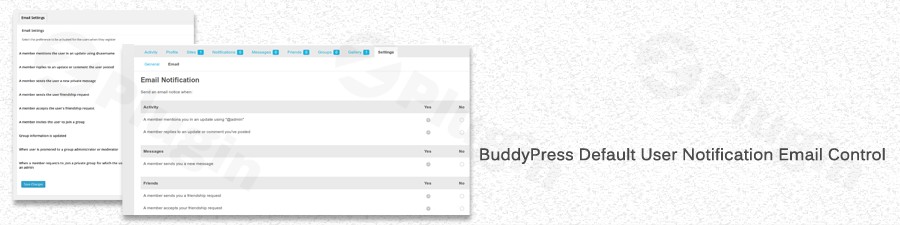
Managing a thriving online community on WordPress often involves a delicate balance of communication. While keeping members informed is crucial, overwhelming them with notifications can lead to disengagement. This is where the BuddyPress Default Email Notification Settings Control plugin becomes an indispensable tool. It empowers BuddyPress administrators to precisely manage and customize user email preferences, ensuring consistent communication and an improved user experience across your social network.This powerful BuddyPress notification plugin was developed in direct response to community needs, addressing a significant gap in core BuddyPress functionality. It simplifies the often complex task of establishing default BuddyPress email settings for new registrants and efficiently updating preferences for your entire existing member base, making it a must-have for any serious community manager.
Key Features for Granular Notification Management
The BuddyPress Default Email Notification Settings Control plugin offers a suite of features designed to provide administrators with comprehensive command over their community’s communication. Each feature contributes to a more streamlined workflow and a better experience for both administrators and members.
- Set Default Email Preferences for New Users: This core functionality allows you to define the initial email notification settings for every new user during registration. Instead of new members starting with a generic or potentially overwhelming set of defaults, you can pre-configure preferences that align with your community’s guidelines or even legal requirements like GDPR (where opting out of certain communications by default might be preferred). This feature is essential for optimizing BuddyPress email preferences for new users from day one.
- Bulk Update Notification Settings for Existing Members: For established communities with a large user base, manually adjusting individual settings is impractical. This plugin provides a crucial feature to bulk update notification settings for all your existing community members. This saves administrators significant time and effort, ensuring consistent communication standards across your entire network with a single action.
- Streamlined Community Management with Centralized Control: The plugin introduces a user-friendly interface that centralizes all your email notification settings. This eliminates the need to delve into complex code or individual user profiles, making it easy for administrators to navigate and make quick adjustments without requiring extensive technical expertise. It allows for effortless modification of customize BuddyPress email notifications to suit specific community needs.
- Maintain Consistent Communication Standards: By allowing administrators to set and enforce default and bulk update options, the plugin ensures that all members receive timely and relevant updates without feeling overwhelmed. This fosters a more active and engaged community by reducing notification fatigue and maintaining a predictable communication strategy.
- BuddyBoss Platform Support: Recognizing the growing popularity of the BuddyBoss Platform for building robust social networks, this plugin has added support for it. It intelligently maps new BuddyBoss notification keys with existing ones, indicating its adaptability and compatibility with this powerful BuddyPress fork.
Installing and Setting Up Your BuddyPress Email Notification Control
Getting the BuddyPress Default Email Notification Settings Control plugin up and running on your WordPress site is a straightforward process. Here’s a step-by-step guide for non-developers:
- Purchase and Download: First, purchase the BuddyPress Default Email Notification Settings Control plugin, for example, from ZeroPlugin.com. After purchase, you will receive a ZIP file containing the plugin.
- Upload the Plugin:
- Log in to your WordPress admin dashboard.
- Navigate to Plugins > Add New.
- Click the “Upload Plugin” button at the top of the page.
- Click “Choose File” and select the ZIP file you downloaded.
- Click “Install Now”.
- Activate the Plugin: Once the plugin is uploaded, WordPress will prompt you to activate it. Click “Activate Plugin”.
- Configure Default Settings:
- After activation, a new settings area (the exact location might vary slightly but is typically found under Settings or a new top-level menu item related to BuddyPress or Notifications) will appear in your WordPress dashboard.
- Navigate to this new settings page. Here, you will find options to set default email notifications for new BuddyPress members.
- Go through each notification type (e.g., new friendship requests, activity mentions, group invitations) and select your desired default preference (e.g., enabled, disabled).
- Save your changes.
- Perform Bulk Updates (Optional, for Existing Users): If you have an existing community, look for the option to bulk update notification settings. This feature will apply your newly defined defaults or other specific settings to all current members. Always exercise caution and consider backing up your site before performing bulk operations.
Practical Usage & Best Practices for Community Managers
The BuddyPress Default Email Notification Settings Control plugin offers significant advantages for various scenarios, making it an ideal tool for any BuddyPress admin control email notifications.
- Onboarding New Members for Optimal UX: Instead of relying on users to manually adjust their preferences after registration, you can proactively set sensible defaults. For example, you might disable less critical notifications by default to prevent new members from feeling overwhelmed, fostering a more positive initial experience. This is the best way to set default email notifications for new BuddyPress members.
- Ensuring GDPR Compliance: With data privacy regulations like GDPR, it’s often advisable to default users out of non-essential communications until they explicitly opt-in. This plugin allows you to establish GDPR compliant BuddyPress email settings by setting certain notification types to disabled by default, protecting both your users and your community.
- Revitalizing Stagnant Communities: If your community experiences notification fatigue or high unsubscribe rates, you can use the bulk update feature to reset or fine-tune notification defaults. By reducing the volume of emails, you might improve engagement and prompt members to re-evaluate their preferences, leading to more relevant communication.
- Standardizing Communication Across a Network: For agencies or large organizations managing multiple BuddyPress communities, this plugin ensures a consistent communication policy across all your sites. You can replicate desired notification settings effortlessly, saving significant time and resources.
FAQ & Troubleshooting
Here are answers to common questions about managing BuddyPress email notifications and the “BuddyPress Default Email Notification Settings Control” plugin.
How do I change default email notifications in BuddyPress?
To change default email notifications in BuddyPress, you typically need a plugin like BuddyPress Default Email Notification Settings Control. While BuddyPress allows individual users to manage their own settings, it doesn’t offer a native administrative interface to set global defaults for new users or bulk update existing ones. With this plugin, you would navigate to its settings page in your WordPress dashboard, define your preferred default settings for each notification type, and save.
Can BuddyPress admins set user email preferences?
Yes, with the BuddyPress Default Email Notification Settings Control plugin, BuddyPress administrators can indeed set user email preferences. The plugin provides an administrative interface to define default notification settings for new users upon registration and also includes a feature to bulk update preferences for all existing members, granting comprehensive control over user communication.
What is the best plugin to control BuddyPress email settings?
The BuddyPress Default Email Notification Settings Control plugin is widely regarded as one of the most effective solutions for administrators looking to control BuddyPress email notification settings. It excels by offering both default settings for new users and bulk update capabilities for existing members, a crucial administrative feature often missing in core BuddyPress or other general notification plugins.
Does the plugin support BuddyBoss Platform?
Yes, the BuddyPress Default Email Notification Settings Control plugin explicitly supports the BuddyBoss Platform. It includes specific mappings for new BuddyBoss notification keys with existing ones, ensuring seamless integration and control over email notifications within your BuddyBoss-powered social network.
How can I make BuddyPress email settings GDPR compliant?
To make BuddyPress email settings GDPR compliant, you should aim to provide users with clear control over their data and default them out of non-essential communications. The BuddyPress Default Email Notification Settings Control plugin helps significantly by allowing administrators to set specific notification types to be disabled by default for new registrations. This means users will only receive essential notifications unless they actively choose to opt into others, aligning with GDPR principles of consent.
Conclusion
The BuddyPress Default Email Notification Settings Control plugin is an essential addition for any administrator running a BuddyPress or BuddyBoss-powered social network. It addresses a critical need by providing administrators with the tools to manage BuddyPress user notifications effectively. By enabling you to set default preferences for new users and perform bulk updates for existing members, it significantly streamlines community management, enhances user experience, and ensures your communication strategy is both consistent and compliant.Whether you’re looking to improve user onboarding, maintain consistent communication standards, or adhere to privacy regulations, this plugin from ZeroPlugin.com offers a robust and user-friendly solution. It’s a smart investment for a more efficient and engaged BuddyPress community.
I. Download Limits & Account Benefits
- Free Downloads: Each email address receives 3 downloads per day for free products
- Upgrade Benefits: Purchase any paid product to increase your daily download limit by 3 for each paid product
- No Account Required: You can download immediately by receiving the download link via email
- Account Recommended: Create an account for easier access to your order history and direct update downloads
II. Understanding GPL vs Official Versions
Important: The products available on WPPick are GPL-licensed versions, which differ from official developer versions. Before purchasing, please read our comprehensive guide: Understanding GPL & Official Differences at WPPick
Key Points:
- GPL versions may not include premium support from original developers
- Updates may be delayed compared to official releases
- Some premium features might have limitations
- Always consider your specific needs and support requirements
III. Support & Assistance
We’re here to help through multiple channels:
- Email Support: Direct email assistance for all inquiries
- Live Chat: Real-time support during business hours
- Comprehensive Documentation: Detailed guides and tutorials
IV. Order Tracking
Access your complete purchase history and download links anytime: Order History
V. Account Access
New to WPPick? Login or Create Account to manage your downloads and orders efficiently.
VI. Refund Protection
We stand behind our products with a clear refund policy. Review our terms: Refund Policy
VII. Privacy & Security
Your data security is our priority. Learn how we protect your information: Privacy Policy
VII. Terms of Service
Understanding our service terms ensures a smooth experience: Terms of Use
Quick Tips for Best Experience
- Verify Compatibility: Check plugin/theme compatibility with your WordPress version
- Backup First: Always backup your site before installing new plugins or themes
- Test Environment: Consider testing on a staging site first
- Stay Updated: Regularly check for updates in your account dashboard
- Read Documentation: Review any included documentation for optimal setup
Need Help?
If you have questions about downloads, licensing, or need technical assistance, don’t hesitate to contact our support team. We’re committed to ensuring you have the best possible experience with WPPick products.
Ready to get started? Your download adventure begins with just one click!