

Candid – Business / Consultancy Website Template (breakdance Builder)
/Year
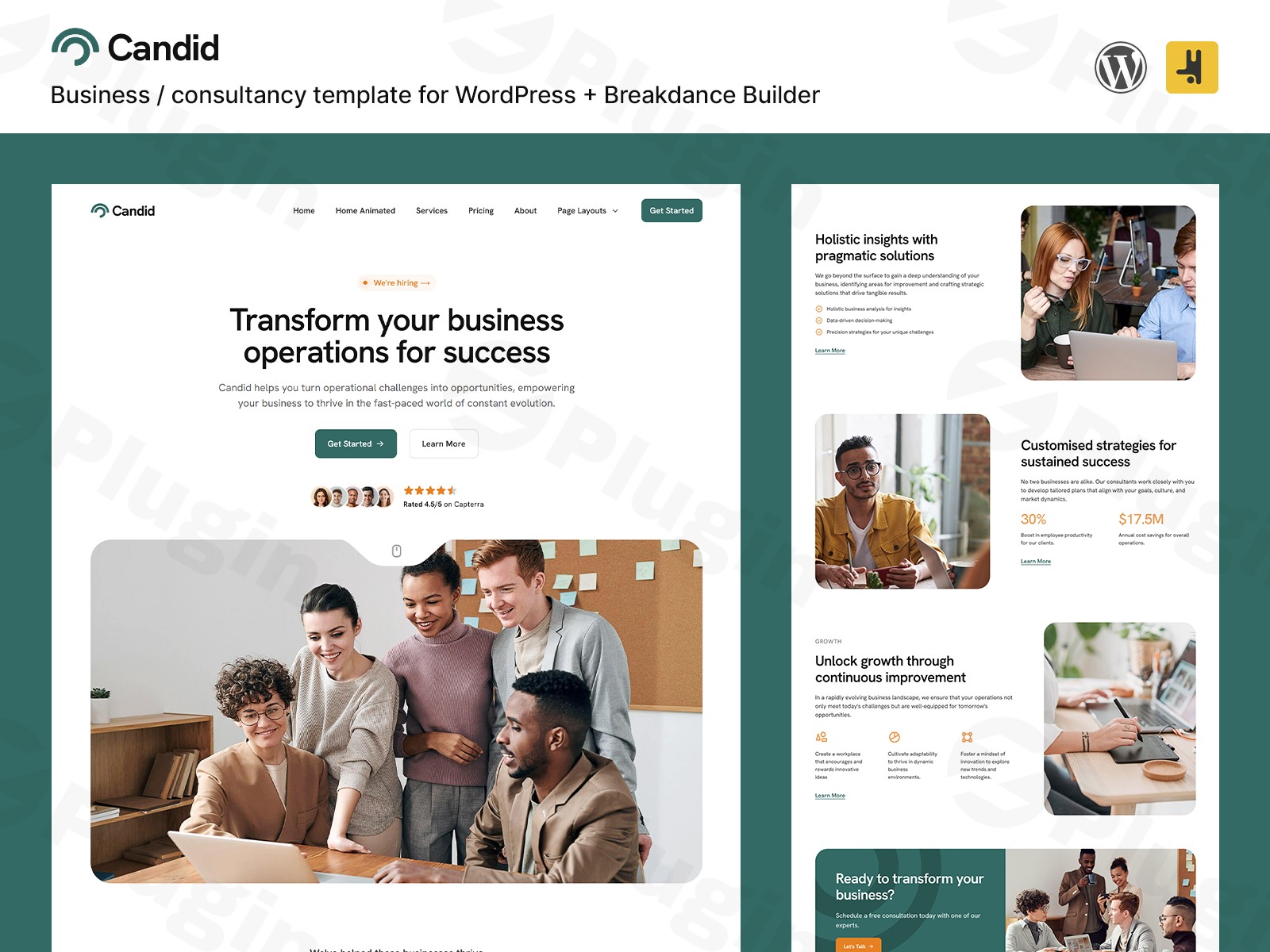
In the competitive world of digital consulting, your website’s first impression is often your only impression. The Candid WordPress theme design set is a premium, high-performance solution specifically crafted for modern professionals. Designed as a comprehensive design set for the Breakdance website builder, Candid offers a sophisticated, trendy aesthetic that bridges the gap between corporate reliability and modern creative agency flair. Whether you are launching a new firm or rebranding an established practice, this business consultancy website template provides the technical foundation and visual polish needed to stand out in a crowded market.
Key Features: Design, Layout & Performance
Candid is not just a collection of pages; it is a meticulously engineered design system. Because it is built exclusively for the Breakdance Builder, it avoids the heavy “code bloat” often found in multipurpose themes, resulting in a lightning-fast user experience.
Modern Design & Layout Options
The design philosophy of Candid centers on “clean professionality.” It utilizes high-quality whitespace, crisp typography, and a refined color palette to establish authority.
- Comprehensive Page Library: Out of the box, you receive pre-built templates for the Home Page, Services, Pricing, About, and Contact pages.
- Dynamic Blog System: Includes dedicated templates for Blog Archives and Single Post layouts, ensuring your thought leadership looks as good as your service pages.
- Visual Flair: The template features subtle micro-animations on buttons and links, along with an animated home page that captures attention without distracting from the content.
Customization Capabilities
Unlike traditional themes with rigid options, Candid leverages the full power of Breakdance’s Global Styles.
- Fluid Typography & Spacing: The template is built with modern CSS principles, meaning your font sizes and margins scale perfectly across different screen sizes.
- Global Style Guide: It includes a dedicated “Style Guide” page, allowing you to tweak colors, buttons, and headings in one place and see them update across the entire site instantly.
- Animated Mega Menu: The built-in mobile-friendly mega menu ensures that even complex site structures remain easy to navigate on smartphones.
Performance & SEO Readiness
Performance is where the Candid Breakdance template truly shines. Because Breakdance produces much cleaner HTML than older builders like Elementor or WPBakery, your site starts with a significant SEO advantage.
- Speed Optimized: Clean markup and efficient asset loading lead to higher Google PageSpeed Insights scores.
- Responsive Excellence: Every section is mobile-friendly out of the box, ensuring a seamless experience for clients browsing on the go.
* SEO Friendly: Compatible with leading plugins like Yoast SEO and Rank Math, with a logical heading structure (H1-H6) already baked into the templates.
Installation & Demo Import
Setting up your modern agency website design with Candid is a streamlined process. Since this is a design set rather than a standalone .zip theme file, follow these steps:
- Install Breakdance Pro: Ensure you have the Breakdance Pro plugin installed and activated on your WordPress site. It is recommended to use the “Breakdance Zero Theme” as your base to ensure no styling conflicts.
- Access the Design Set: Navigate to the Breakdance settings in your WordPress dashboard. Depending on where you purchased Candid (e.g., TemplateGround or InstaWP), you will either use a “Remote Design Set” key or import the provided JSON files.
- Import Templates: Go to Breakdance > Templates and import the Header, Footer, and Global Block templates provided in the Candid package.
- Assign the Style Guide: Open the Breakdance editor on any page, go to Global Settings, and ensure the colors and typography match the Candid design specs.
5. Verify Menus: Once imported, go to Appearance > Menus to assign your primary navigation to the newly imported Mega Menu.
Customization Guide: Branding & Layout
Personalizing the Candid template to match your brand identity is intuitive, even for those without coding knowledge.
Global Branding
To change the look and feel, use the Global Settings within the Breakdance editor. Changing the “Brand Color” here will automatically update accents, buttons, and icons throughout the entire site. This ensures a consistent brand identity with zero manual hunting for individual elements.
Header & Footer Customization
Candid comes with dedicated inner templates for the header and footer. You can easily swap out the logo, update social media links, and adjust the call-to-action (CTA) buttons. The mobile-friendly mega menu is also fully editable, allowing you to add images or multi-column lists to your navigation.
Building New Pages
Because Candid is a design set, you can mix and match sections. If you need a new landing page, you can simply pull in “Sections” or “Blocks” from the Candid library, ensuring that your new content perfectly matches the established design language of your Home and Service pages.
FAQ & Troubleshooting
Is Candid compatible with Elementor or WPBakery?
No, the Candid template is built specifically for the Breakdance Builder. It leverages Breakdance-specific elements and global styling systems that are not compatible with other page builders.
Does Candid support WooCommerce for online stores?
Yes. While Candid is designed primarily as a business and consultancy template, Breakdance has robust WooCommerce integration. You can use Candid’s global styles to ensure your shop pages match the professional aesthetic of the rest of your site.
Do I need a child theme to use Candid?
No child theme is required. In the Breakdance ecosystem, it is best practice to use the “Breakdance Zero Theme.” Your customizations are stored within the builder’s database, meaning they won’t be lost during WordPress updates.
What should I do if the animations aren’t working?
Ensure that you have the latest version of Breakdance Pro installed. Most animation issues are caused by “Entrance Animation” settings being toggled off in the builder or a caching plugin over-optimizing the JavaScript.
Conclusion
The Candid – Business / Consultancy Website Template is a top-tier choice for professionals who prioritize speed, modern aesthetics, and ease of use. By moving away from bloated, multi-purpose themes and embracing the efficiency of the Breakdance Builder, Candid offers a future-proof solution for agencies and consultants alike.Verdict: If you are an agency or a freelancer using Breakdance, Candid provides a “high-end” starting point that significantly reduces development time while delivering a bespoke, premium feel. It is a powerful tool for anyone looking to build a high-converting, SEO-friendly modern agency website design.Ready to elevate your professional presence? Visit wppick.com for more WordPress insights and design tips.
I. Download Limits & Account Benefits
- Free Downloads: Each email address receives 3 downloads per day for free products
- Upgrade Benefits: Purchase any paid product to increase your daily download limit by 3 for each paid product
- No Account Required: You can download immediately by receiving the download link via email
- Account Recommended: Create an account for easier access to your order history and direct update downloads
II. Understanding GPL vs Official Versions
Important: The products available on WPPick are GPL-licensed versions, which differ from official developer versions. Before purchasing, please read our comprehensive guide: Understanding GPL & Official Differences at WPPick
Key Points:
- GPL versions may not include premium support from original developers
- Updates may be delayed compared to official releases
- Some premium features might have limitations
- Always consider your specific needs and support requirements
III. Support & Assistance
We’re here to help through multiple channels:
- Email Support: Direct email assistance for all inquiries
- Live Chat: Real-time support during business hours
- Comprehensive Documentation: Detailed guides and tutorials
IV. Order Tracking
Access your complete purchase history and download links anytime: Order History
V. Account Access
New to WPPick? Login or Create Account to manage your downloads and orders efficiently.
VI. Refund Protection
We stand behind our products with a clear refund policy. Review our terms: Refund Policy
VII. Privacy & Security
Your data security is our priority. Learn how we protect your information: Privacy Policy
VII. Terms of Service
Understanding our service terms ensures a smooth experience: Terms of Use
Quick Tips for Best Experience
- Verify Compatibility: Check plugin/theme compatibility with your WordPress version
- Backup First: Always backup your site before installing new plugins or themes
- Test Environment: Consider testing on a staging site first
- Stay Updated: Regularly check for updates in your account dashboard
- Read Documentation: Review any included documentation for optimal setup
Need Help?
If you have questions about downloads, licensing, or need technical assistance, don’t hesitate to contact our support team. We’re committed to ensuring you have the best possible experience with WPPick products.
Ready to get started? Your download adventure begins with just one click!
- Updated for Breakdance 2.5.2