

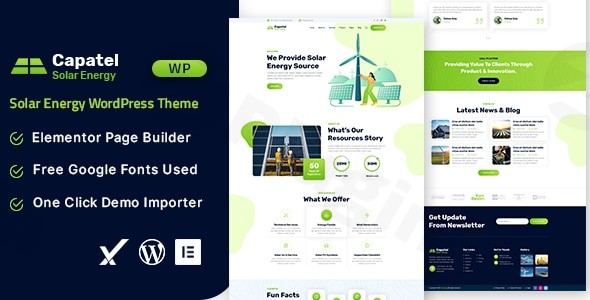
Capatel is a premium Solar Energy WordPress Theme specifically engineered for businesses at the forefront of the renewable energy and green technology sectors. It provides a specialized, visually striking, and highly functional online platform for companies dedicated to sustainability.Designed with an eco-friendly visual style, Capatel leverages bright, energy-inspired aesthetics combined with ample white space for a clean, modern feel. Its core value proposition lies in its direct catering to solar panel installers, renewable energy consultancies, green tech startups, and environmental organizations, ensuring a professional and credible digital presence without demanding extensive coding expertise.
1. Key Features: Design, Layout & Performance
Capatel is built from the ground up to empower green technology businesses with a robust and aesthetically pleasing website. Its feature set focuses on providing both design flexibility and strong technical foundations.
Design & Layout Options
- Responsive & Retina-Ready Design: Capatel ensures your website looks impeccable and functions flawlessly on any device, from high-resolution desktop monitors to smartphones and tablets. This Responsive WordPress Theme for Renewable Energy adapts fluidly to provide an optimal user experience across all screen sizes.
- Eco-Friendly Visual Style: The theme boasts a clean, modern aesthetic with energy-inspired visuals, perfect for showcasing solar panels and sustainable technologies. Thoughtful use of white space creates a calm, professional atmosphere that builds trust.
- One-Click Demo Import: Get a head start with pre-designed demo content tailored for the solar and renewable energy industry. The one-click demo import function allows for quick setup, providing a solid foundation that aligns with your niche.
Customization Capabilities
- Extensive Theme Options: Through the WordPress Customizer (“Appearance > Customize”), Capatel offers a comprehensive theme options panel for global settings. This allows you to easily tailor colors, typography, and other foundational elements to match your brand identity.
- Google Fonts Integration: Access to a wide selection of free Google Fonts provides diverse typographic choices, ensuring your site’s readability and brand consistency.
- Elementor Page Builder Integration: At its heart, Capatel is an Elementor WordPress Theme for Solar businesses. It fully integrates with the Elementor drag-and-drop page builder, offering unparalleled flexibility to design custom layouts, sections, and landing pages visually, without touching a line of code.
Performance & SEO Features
- SEO Optimized: Capatel is built with best practices for search engine optimization, featuring clean code and a structured layout to help your content rank higher in search results. This is crucial for businesses aiming to attract new clients through organic search.
- Clean Codebase: While specific details on asset optimization or lazy loading are not explicitly provided, the theme’s emphasis on clean and well-structured code contributes to better overall performance and faster loading times.
- Cross-Browser Compatibility: The theme is compatible with all major web browsers, including Firefox, Safari, Opera, Chrome, and Edge, ensuring a consistent experience for all your visitors.
2. Installation & Demo Import Guide
Setting up your Capatel Solar Energy WordPress Theme is a straightforward process, designed to get your professional site online quickly. Here’s a step-by-step guide:
- Theme Installation:
- Download the Capatel theme package (usually a
.zipfile) from your purchase source. - Log in to your WordPress dashboard.
- Navigate to
Appearance > Themes > Add New > Upload Theme. - Click
Choose File, select the Capatel.zipfile, and clickInstall Now. - Once installed, click
Activate.
- Download the Capatel theme package (usually a
- Install Required Plugins:
- Upon activation, Capatel will likely prompt you to install a set of recommended plugins. Essential plugins include Elementor Page Builder, Contact Form 7, and if you plan to sell products, WooCommerce.
- Follow the on-screen prompts to install and activate all necessary plugins.
- One-Click Demo Import:
- This is where Capatel truly shines for quick setup. After activating the theme and its plugins, look for a “Demo Import” or “Import Demo Data” option, usually found under
Appearanceor a dedicated theme menu item. - Select the demo you wish to import (Capatel offers demos specifically tailored for solar and renewable energy niches).
- Click the “Import” button. Be patient, as this process can take several minutes depending on your server speed and the size of the demo content.Important Considerations:
- Ensure your server meets the recommended requirements: WordPress v5.0+ (minimum v4.9), PHP 5.5+ (ideally 7.4+ for performance and security), MySQL 5+, a memory limit of at least 128MB (256MB+ recommended), and a maximum file upload size of at least 32MB.
- A successful demo import will populate your site with pre-built pages, posts, widgets, and menu items, making your site look just like the live demo. You can then easily replace the demo content with your own.
- This is where Capatel truly shines for quick setup. After activating the theme and its plugins, look for a “Demo Import” or “Import Demo Data” option, usually found under
3. Customization Guide: Branding & Layout
Capatel offers extensive customization options, allowing you to personalize every aspect of your website to reflect your brand’s unique identity and services. Thanks to its integration with Elementor, much of the visual customization is intuitive and code-free.
- Global Styling with WordPress Customizer: Access
Appearance > Customizeto adjust global settings. Here, you can change your site’s logo, primary and secondary color palettes, general typography (fonts, sizes, line heights), background images, and more. These changes apply site-wide, ensuring consistency. - Page Building with Elementor: For granular control over individual page layouts and content, Elementor is your go-to tool. Open any page or post with Elementor to drag and drop elements, arrange sections, and apply custom styling to text, images, forms, and other widgets. This allows you to create unique landing pages for services like solar panel installation or energy audits.
- Header, Footer, and Menus: While specific dedicated builders for headers and footers are not explicitly detailed, Elementor’s theme builder features often allow for significant customization in these areas. For navigation, go to
Appearance > Menusto create and manage your main menu, footer menu, and any other custom navigation bars. - Child Theme for Advanced Users: Capatel includes a child theme, which is essential for developers or users planning to make significant code-level modifications. Using a child theme ensures that any custom changes are preserved when the main theme receives updates, preventing your work from being overwritten.
4. FAQ & Troubleshooting
Here are answers to some common questions about the Capatel WordPress Theme:
Is Capatel compatible with Elementor and Gutenberg?
Capatel is fully compatible with and leverages the Elementor Page Builder for its drag-and-drop content creation capabilities. While it works with the standard WordPress Block Editor (Gutenberg), it is not explicitly listed as “Gutenberg Optimized,” meaning its primary design and integration focus is on Elementor.
Does Capatel support WooCommerce for online stores?
Yes, Capatel is WooCommerce Solar Theme compatible. This means you can seamlessly integrate e-commerce functionality into your website to sell solar products, green technology gadgets, energy-saving devices, or even offer service packages directly from your site.
Does Capatel include a child theme?
Yes, a child theme is included with Capatel. This is a crucial feature for any user intending to customize the theme’s code or templates, as it protects your modifications from being lost during theme updates.
How can I set up a solar energy website with Capatel?
To set up a Solar Energy Website with WordPress using Capatel, first, install and activate the theme and its recommended plugins (especially Elementor). Then, use the one-click demo import feature to quickly establish a pre-designed layout. Finally, customize the demo content with your specific business details, projects, and services using Elementor and the WordPress Customizer.
What are the recommended server requirements for Capatel?
Capatel requires WordPress v5.0 or higher (minimum v4.9), PHP 5.5 or higher (PHP 7.4+ recommended for optimal performance and security), and MySQL 5 or higher. For smooth operation, a memory limit of at least 128MB (256MB is better for Elementor) and a maximum file upload size of at least 32MB are recommended server settings.
5. Conclusion
Capatel Solar Energy WordPress Theme emerges as an exceptional choice for any business in the renewable energy and green technology sectors seeking a specialized and powerful online presence. Its blend of modern, eco-friendly design and robust functionality, driven by Elementor integration, makes it a standout option.With its responsive design, one-click demo import, and comprehensive customization options, Capatel caters to both beginners looking for a quick setup and experienced users who appreciate clean code and child theme support. While not explicitly optimized for Gutenberg, its strong ties with Elementor provide ample flexibility.If you’re a solar panel installation company, an energy efficiency consultant, or a green technology startup aiming for a professional, high-converting website, Capatel offers the niche focus, visual appeal, and technical readiness to help you shine. It’s more than just a theme; it’s a dedicated platform for showcasing your commitment to a sustainable future.