

Chromium – Auto Parts Shop Shopify Theme
/Year
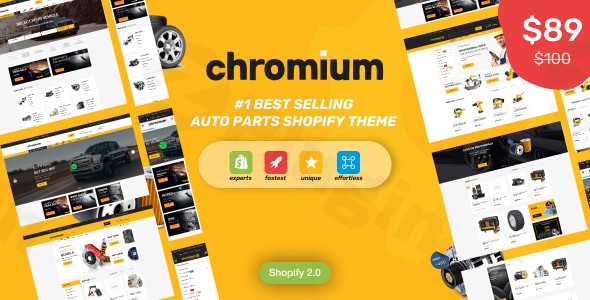
Building a high-performing online store for the automotive industry requires more than just a standard e-commerce layout. You need specialized tools to handle complex catalogs and precise vehicle compatibility. The Chromium auto parts WordPress theme is a professional-grade solution designed specifically for businesses selling auto parts, car accessories, and tools.
Whether you are migrating an existing shop or starting from scratch, choosing a dedicated auto parts WordPress theme like Chromium ensures that your customers can find the exact part they need without the friction of generic search tools.
Why Choose Chromium for Your Automotive E-commerce Store?
The primary challenge for any automotive retailer is ensuring customers purchase parts that actually fit their vehicles. Chromium solves this with a robust technical foundation built on WooCommerce and Elementor, providing a seamless bridge between complex data and a user-friendly interface.
Advanced “Make, Model, Year” Filtering
The standout feature of the Chromium theme is its advanced Make, Model, Year (MMY) filter. This allows customers to narrow down thousands of products to find parts compatible with their specific vehicle in seconds. In the world of automotive SEO, providing this level of utility is essential for reducing bounce rates and increasing conversions.
Fully Responsive and Performance Optimized
Built with Bootstrap, HTML5, and CSS3, Chromium is fully responsive. It utilizes lazy loading and clean coding practices to ensure fast load times—a critical factor for both Google Search rankings and mobile shoppers.
Integration with Elementor
Unlike themes that lock you into rigid layouts, Chromium leverages the power of the Elementor page builder. This allows site owners to customize every aspect of their homepage and internal pages using a drag-and-drop interface, without touching a single line of code.
Key Features & Benefits
- Mega Menu Support: Easily organize massive catalogs of parts using horizontal or vertical mega menus.
- Product Comparison & Wishlists: Enable customers to compare technical specs between different parts before purchasing.
- Conversion Boosters: Includes built-in FOMO (Fear Of Missing Out) popups, countdown timers for sales, and “Quick View” options to streamline the buying process.
- Multi-language & Multi-currency: Ready for international markets with RTL (Right-to-Left) support and compatibility with Google Translate.
- GPL Licensed: Offers the flexibility of the General Public License, ensuring you have control over your software.
How to Install and Set Up the Chromium WordPress Theme
Setting up a specialized WordPress WooCommerce auto parts theme may seem daunting, but Chromium simplifies the process through its demo import system.
- Purchase and Download: Secure your license and download the theme files (typically a
.zipfolder) from a reputable marketplace like ThemeForest. - Upload to WordPress: Navigate to
Appearance > Themes > Add New > Upload Theme. Select thechromium.zipfile and click Install Now. - Activate Required Plugins: Upon activation, Chromium will prompt you to install essential plugins, including WooCommerce, Elementor, and the theme’s core functional plugins. Ensure all are installed and activated.
- Import Demo Data: To get your site looking like the professional preview, go to the theme options panel and select a demo layout that fits your niche. This will import sample products, menus, and homepage settings.
- Configure the MMY Filter: Navigate to the theme’s filter settings to define your vehicle categories (Make, Model, Year). This is the most critical step for an auto parts Shopify theme or WordPress equivalent to function correctly.
Practical Usage & Best Practices
To get the most out of your car parts WordPress theme, follow these industry-proven workflows:
Ideal for Large Catalogs
If you are an agency managing a client with 10,000+ SKUs, utilize Chromium’s Vertical Mega Menu. This keeps the interface clean while allowing shoppers to browse by category (e.g., Brakes, Engines, Lighting) without leaving the homepage.
Best Way to Increase Average Order Value (AOV)
Use the “Related Products” and “Frequently Bought Together” sections specifically for accessories. If a customer is looking for brake pads, ensure the theme is configured to suggest rotors or brake fluid on the single product page.
Leveraging the Elementor Workflow
For marketers, the how to customize Chromium WordPress theme answer lies in Elementor templates. Create custom landing pages for seasonal promotions (like “Winter Car Care”) using Chromium’s pre-designed automotive widgets to maintain brand consistency while driving targeted traffic.
FAQ & Troubleshooting
Does the Chromium theme support year make model search?
Yes. The Chromium theme includes a specialized “Make, Model, Year” filtering system. This is a core feature that allows users to filter products based on specific vehicle attributes, ensuring part compatibility.
Is Chromium compatible with Elementor Pro?
While Chromium works perfectly with the free version of Elementor, it is fully compatible with Elementor Pro. This allows you to use Pro features like the Theme Builder to create custom headers, footers, and product archives.
Can I use Chromium for a Shopify store?
Yes, Chromium is available as both an auto parts Shopify theme and a WordPress theme. While the underlying technology differs (Shopify Liquid vs. WordPress PHP), the core automotive features, such as the MMY filter and responsive design, are available on both platforms.
How do I update the theme without losing my customizations?
Always use a Child Theme for CSS or PHP modifications. For standard settings changed via the Elementor editor or Theme Options, these are stored in the database and will persist through updates. Always perform a backup before updating to the latest version.
Final Verdict
The Chromium auto parts theme is a top-tier choice for any automotive business looking to establish a professional online presence. Its deep integration with WooCommerce, combined with the industry-specific “Make, Model, Year” search functionality, provides a high ROI by significantly improving the user experience and conversion rates.
Whether you are a local mechanic selling specialized tools or a national distributor of replacement parts, Chromium provides the authority and technical reliability needed to compete in the modern e-commerce landscape. For more reviews and WordPress tutorials, visit wppick.com.
I. Download Limits & Account Benefits
- Free Downloads: Each email address receives 3 downloads per day for free products
- Upgrade Benefits: Purchase any paid product to increase your daily download limit by 3 for each paid product
- No Account Required: You can download immediately by receiving the download link via email
- Account Recommended: Create an account for easier access to your order history and direct update downloads
II. Understanding GPL vs Official Versions
Important: The products available on WPPick are GPL-licensed versions, which differ from official developer versions. Before purchasing, please read our comprehensive guide: Understanding GPL & Official Differences at WPPick
Key Points:
- GPL versions may not include premium support from original developers
- Updates may be delayed compared to official releases
- Some premium features might have limitations
- Always consider your specific needs and support requirements
III. Support & Assistance
We’re here to help through multiple channels:
- Email Support: Direct email assistance for all inquiries
- Live Chat: Real-time support during business hours
- Comprehensive Documentation: Detailed guides and tutorials
IV. Order Tracking
Access your complete purchase history and download links anytime: Order History
V. Account Access
New to WPPick? Login or Create Account to manage your downloads and orders efficiently.
VI. Refund Protection
We stand behind our products with a clear refund policy. Review our terms: Refund Policy
VII. Privacy & Security
Your data security is our priority. Learn how we protect your information: Privacy Policy
VII. Terms of Service
Understanding our service terms ensures a smooth experience: Terms of Use
Quick Tips for Best Experience
- Verify Compatibility: Check plugin/theme compatibility with your WordPress version
- Backup First: Always backup your site before installing new plugins or themes
- Test Environment: Consider testing on a staging site first
- Stay Updated: Regularly check for updates in your account dashboard
- Read Documentation: Review any included documentation for optimal setup
Need Help?
If you have questions about downloads, licensing, or need technical assistance, don’t hesitate to contact our support team. We’re committed to ensuring you have the best possible experience with WPPick products.
Ready to get started? Your download adventure begins with just one click!
No changelog available.