

Ciseco – Hydrogen Shopify’s Headless Store Theme
/Year
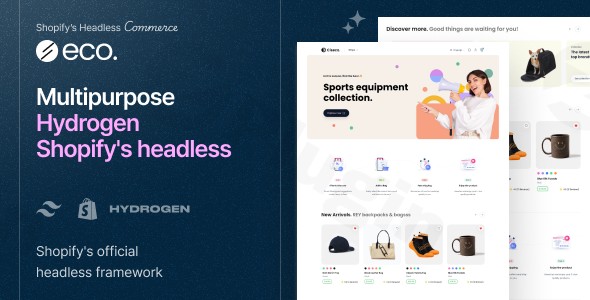
In the rapidly evolving world of e-commerce, speed and user experience are no longer optional—they are the foundation of conversion. Ciseco Hydrogen Shopify Theme is a premium solution designed for merchants who want to break free from the limitations of traditional templates. By leveraging headless Shopify development, Ciseco provides a bridge between Shopify’s powerful backend and a lightning-fast, high-performance frontend built on modern web technologies.
Whether you are a developer building for a client or a brand manager looking to improve your Core Web Vitals, understanding how to implement a Shopify Hydrogen theme like Ciseco is essential for staying competitive in today’s market.
Key Features of the Ciseco Hydrogen Theme
Ciseco is more than just a visual skin; it is a sophisticated technical framework. Built on Shopify Hydrogen 2024 and the Remix framework, it offers a suite of features designed for the modern web.
1. Blazing Fast Performance via Remix & SSR
Traditional Shopify themes use Liquid, which can sometimes become bogged down by heavy apps. Ciseco utilizes Server-Side Rendering (SSR) and the Remix framework to deliver near-instant page loads. This directly improves Shopify headless storefront performance, leading to better SEO rankings and lower bounce rates.
2. Modern Tech Stack (React, Tailwind CSS, TypeScript)
For developers, Ciseco is a dream to customize. It uses:
- React v18.x: For building dynamic, interactive user interfaces.
- Tailwind CSS v3.x: For rapid, responsive styling without bloated CSS files.
- TypeScript: To ensure code quality and reduce bugs during the development process.
3. Native CMS Integration with Shopify Metaobjects
Ciseco eliminates the need for expensive third-party CMS tools by utilizing Shopify Metaobjects. This allows you to manage complex content structures—like author bios, lookbooks, or advanced product data—directly within the Shopify Admin while displaying them seamlessly on your headless frontend.
4. Advanced E-commerce UX
The theme includes high-end features that typically require multiple apps in traditional stores:
- Optimistic UI: Provides instant feedback when users add items to their cart, making the site feel incredibly responsive.
- Smart Search & Filters: Advanced product discovery tools to help customers find what they need faster.
- Internationalization: Full support for Shopify Markets, allowing you to scale globally with ease.
How to Install and Set Up the Ciseco Hydrogen Theme
Setting up a headless storefront is different from clicking “Install” on the Shopify Theme Store. Follow these steps to get your React Shopify storefront up and running.
Step 1: Prepare Your Environment
Before starting, ensure you have the following:
- A Shopify Store (Basic plan or higher).
- Node.js and npm installed on your local machine.
- Familiarity with the command line.
Step 2: Connect to Shopify Oxygen
Shopify Oxygen hosting is the native hosting solution for Hydrogen storefronts.
- In your Shopify Admin, go to Hydrogen under the Sales Channels.
- Create a new storefront and link it to your GitHub repository where the Ciseco code is hosted.
- Configure your environment variables (Public Storefront API token and Private Admin API token).
Step 3: Install the Ciseco Source Code
Once you have purchased Ciseco, download the package and extract it.
- Open your terminal in the project folder.
- Run
npm installto download all necessary dependencies. - Run
npm run devto start a local preview of your store.
Step 4: Import Demo Data
To match the “out-of-the-box” look, use the provided demo data import tools. This will populate your storefront with sample layouts, navigation menus, and collection structures, saving hours of manual configuration.
Practical Usage & Best Practices
To get the most ROI from the Ciseco Hydrogen Shopify Theme, consider these real-world workflows:
Ideal For: High-Growth Fashion & Lifestyle Brands
For brands with high-quality imagery and complex product variants, Ciseco’s Optimistic UI and color variant swatches provide a premium feel that rivals custom-coded enterprise sites.
Best Way to Manage Content: The “Headless” Approach
Instead of hardcoding text into your React components, always use Shopify Metaobjects. This allows your marketing team to update homepage banners or promotional text from the Shopify Admin without needing a developer to push code changes.
When to Use Headless: Performance Optimization
If your current Liquid theme is failing Core Web Vitals, switching to a Remix Shopify theme like Ciseco is the most effective way to achieve a “90+” mobile performance score. This is ideal for stores that rely heavily on paid social traffic (Instagram/TikTok), where mobile load speed is critical for conversion.
FAQ & Troubleshooting
What is Shopify Hydrogen?
Shopify Hydrogen is a React-based framework created by Shopify specifically for building headless storefronts. It provides a set of tools and components that make it easier to connect a custom frontend to the Shopify backend via the Storefront API.
Is the Ciseco theme good for SEO?
Yes, Ciseco is excellent for SEO. Unlike some JavaScript-heavy frameworks, Ciseco uses Server-Side Rendering (SSR) via Remix. This ensures that search engine crawlers can easily read your content, while the superior load speeds contribute to higher rankings in Google’s “Page Experience” algorithm.
What are the technical requirements for Shopify Hydrogen?
To run a Hydrogen store like Ciseco, you need:
- Knowledge of React and JavaScript/TypeScript.
- A hosting provider (Shopify Oxygen is the recommended and free choice for most plans).
- A Shopify store with the Hydrogen Sales Channel enabled.
Can I use my existing Shopify apps with Ciseco?
Because Ciseco is headless, not all “plug-and-play” Shopify apps will work automatically. Apps that modify the Liquid frontend will not function. However, most modern apps (like Okendo for reviews or Klaviyo for marketing) offer APIs or headless integration guides that work perfectly with Ciseco.
Conclusion: Is Ciseco Right for You?
The Ciseco Hydrogen Shopify Theme is a powerful investment for businesses ready to move beyond standard templates. While it requires more technical expertise than a traditional theme, the rewards—unmatched speed, complete design freedom, and a future-proof tech stack—are well worth it.
If you are looking to build a professional, high-converting Shopify Hydrogen theme storefront that stands out from the competition, Ciseco provides the perfect foundation. For more technical guides and plugin reviews, visit us at wppick.com.
I. Download Limits & Account Benefits
- Free Downloads: Each email address receives 3 downloads per day for free products
- Upgrade Benefits: Purchase any paid product to increase your daily download limit by 3 for each paid product
- No Account Required: You can download immediately by receiving the download link via email
- Account Recommended: Create an account for easier access to your order history and direct update downloads
II. Understanding GPL vs Official Versions
Important: The products available on WPPick are GPL-licensed versions, which differ from official developer versions. Before purchasing, please read our comprehensive guide: Understanding GPL & Official Differences at WPPick
Key Points:
- GPL versions may not include premium support from original developers
- Updates may be delayed compared to official releases
- Some premium features might have limitations
- Always consider your specific needs and support requirements
III. Support & Assistance
We’re here to help through multiple channels:
- Email Support: Direct email assistance for all inquiries
- Live Chat: Real-time support during business hours
- Comprehensive Documentation: Detailed guides and tutorials
IV. Order Tracking
Access your complete purchase history and download links anytime: Order History
V. Account Access
New to WPPick? Login or Create Account to manage your downloads and orders efficiently.
VI. Refund Protection
We stand behind our products with a clear refund policy. Review our terms: Refund Policy
VII. Privacy & Security
Your data security is our priority. Learn how we protect your information: Privacy Policy
VII. Terms of Service
Understanding our service terms ensures a smooth experience: Terms of Use
Quick Tips for Best Experience
- Verify Compatibility: Check plugin/theme compatibility with your WordPress version
- Backup First: Always backup your site before installing new plugins or themes
- Test Environment: Consider testing on a staging site first
- Stay Updated: Regularly check for updates in your account dashboard
- Read Documentation: Review any included documentation for optimal setup
Need Help?
If you have questions about downloads, licensing, or need technical assistance, don’t hesitate to contact our support team. We’re committed to ensuring you have the best possible experience with WPPick products.
Ready to get started? Your download adventure begins with just one click!
No changelog available.