

Cooper – Creative Responsive Personal Portfolio WordPress Theme
/Year
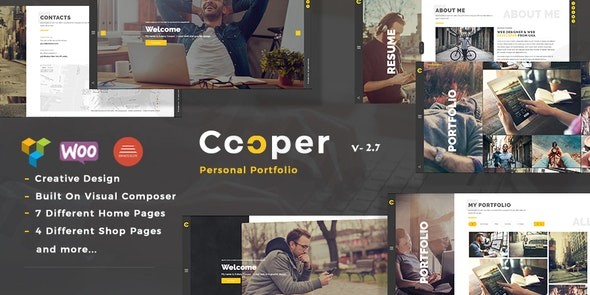
The Cooper WordPress Theme is a professional, multi-purpose solution designed specifically for creative professionals who need a high-impact way to showcase their work. Whether you are a designer, photographer, illustrator, or architect, this Creative Portfolio WordPress Theme provides a visually engaging platform to turn visitors into clients. Built with a focus on bold typography, smooth animations, and a seamless user experience, Cooper balances aesthetic beauty with the functional requirements of a modern portfolio.
Key Features: Design, Layout, and Performance
The Cooper theme is engineered to be as flexible as it is attractive. It offers a suite of design capabilities that allow for a highly personalized digital presence without requiring extensive coding knowledge.
Versatile Layout Options
Cooper provides an impressive array of layout variations to suit different creative niches:
- 7 Homepage Styles: Choose from diverse hero sections including Revolution Slider, static images, carousels, slideshows, and even immersive video backgrounds.
- Advanced Portfolio Layouts: The theme includes 4 distinct portfolio page styles and 6 detail page variations. These support various post formats such as sliders, galleries, and YouTube video backgrounds, ensuring your projects are displayed in their best light.
- One-Page & Multi-Page Support: Whether you want a streamlined one-page scrolling site or a traditional multi-page corporate structure, Cooper handles both with ease.
Deep Customization Capabilities
Personalizing your site to match your brand is straightforward thanks to the integration of the Redux Option Framework.
- Unlimited Color Schemes: Use the backend color selectors to change the mood of your site instantly.
- Advanced Typography: Access over 900 Google Fonts and Font Awesome icons to refine your visual hierarchy.
- Unique Scrolling Effects: Cooper features a signature scrolling effect where backgrounds and text elements transition dynamically based on section identifiers, creating a premium “app-like” feel.
Performance and SEO Readiness
In an era where speed is a ranking factor, the Cooper ecosystem—particularly the WP Cooper block theme variant—is optimized for Google’s Core Web Vitals. As a Responsive Personal Portfolio Theme, it is fully retina-ready and cross-browser compatible (tested on Chrome, Firefox, Safari, and IE9+). The code is clean and lightweight, ensuring fast loading times and a mobile-first experience that search engines favor.
Installation and Demo Import Guide
Getting your site to look like the professional demo is a simplified process thanks to the theme’s built-in tools. Follow these steps to get started:
- Theme Installation: Log in to your WordPress dashboard, navigate to Appearance > Themes > Add New, and upload the
cooper.zipfile. Once uploaded, click Activate. - Plugin Setup: Upon activation, you will see a prompt to install required plugins. These typically include the WPBakery Page Builder, Revolution Slider, and the Redux Framework. Install and activate all recommended plugins.
- One-Click Demo Import: Navigate to the theme options panel (usually labeled “Cooper Options” or “Import/Export”). Locate the One-Click Demo Setup. Click “Import” to bring in the demo pages, posts, and settings.
- Final Checks: Once the import is complete, visit Appearance > Menus to assign your primary menu and Settings > Reading to ensure your homepage is set correctly.
Note: Ensure your hosting environment has sufficient memory (at least 256MB) and execution time to prevent timeouts during the demo data import.
Customization Guide: Branding and Layout
Once the demo data is in place, you can begin tailoring the Cooper WordPress Theme to your specific brand identity.
Using the Admin Panel
The Redux-powered admin panel is your command center. From here, you can toggle global settings, upload your logo, and set your primary and secondary brand colors. This panel allows you to control the unique scrolling animations and background behaviors that set Cooper apart.
Drag-and-Drop Building
Cooper leverages the WPBakery Page Builder (Visual Composer), allowing you to build complex layouts visually. You can drag elements like portfolio grids, testimonials, and contact forms into place. If you are using the newer WP Cooper block theme variant, you will instead utilize Full Site Editing (FSE) and Gutenberg blocks, which offer a more native and performance-focused editing experience.
Setting Up the Shop
Since Cooper is WooCommerce Ready, you can easily add a storefront to your portfolio. The theme provides three shop page styles and two product detail layouts, ensuring your digital or physical products match the creative aesthetic of the rest of your site.
FAQ & Troubleshooting
Is the Cooper WordPress Theme compatible with Elementor?
The original version of Cooper is primarily built for WPBakery Page Builder. While you can install Elementor, the theme’s pre-built demo layouts and specialized portfolio features are designed to work seamlessly with WPBakery.
Does Cooper support WooCommerce for online stores?
Yes, the Cooper WordPress Theme is fully compatible with WooCommerce. It includes custom styling for shop archives and single product pages, making it an excellent choice for creatives selling prints, assets, or services.
Does it support child themes for advanced customization?
Yes, Cooper supports child themes. Using a child theme is highly recommended if you plan to make custom code changes to the PHP or CSS files, as it ensures your modifications aren’t lost during theme updates.
What should I do if the demo import looks different from the live demo?
This usually occurs if the required plugins (like WPBakery or Revolution Slider) were not activated before the import. Ensure all plugins are active, clear your website cache, and re-run the import if necessary.
Conclusion: Why Choose Cooper?
The Cooper WordPress Theme stands out as a top-tier choice for professionals who refuse to settle for generic layouts. Its combination of specialized portfolio styles, WooCommerce integration, and smooth scrolling animations makes it a powerful tool for personal branding.Our Verdict:
- Design Flexibility: High – Especially for portfolio-heavy sites.
- Customization: Intuitive – Thanks to the Redux Framework and WPBakery.
- Performance: Strong – Particularly the FSE-ready variants optimized for speed.
- Ideal For: Freelancers, creative agencies, photographers, and architects looking for a high-end, responsive personal portfolio theme.If you want a site that feels handcrafted and premium without the developer price tag, Cooper is a reliable and stylish investment for your online presence. For more WordPress tips and theme reviews, visit wppick.com.
I. Download Limits & Account Benefits
- Free Downloads: Each email address receives 3 downloads per day for free products
- Upgrade Benefits: Purchase any paid product to increase your daily download limit by 3 for each paid product
- No Account Required: You can download immediately by receiving the download link via email
- Account Recommended: Create an account for easier access to your order history and direct update downloads
II. Understanding GPL vs Official Versions
Important: The products available on WPPick are GPL-licensed versions, which differ from official developer versions. Before purchasing, please read our comprehensive guide: Understanding GPL & Official Differences at WPPick
Key Points:
- GPL versions may not include premium support from original developers
- Updates may be delayed compared to official releases
- Some premium features might have limitations
- Always consider your specific needs and support requirements
III. Support & Assistance
We’re here to help through multiple channels:
- Email Support: Direct email assistance for all inquiries
- Live Chat: Real-time support during business hours
- Comprehensive Documentation: Detailed guides and tutorials
IV. Order Tracking
Access your complete purchase history and download links anytime: Order History
V. Account Access
New to WPPick? Login or Create Account to manage your downloads and orders efficiently.
VI. Refund Protection
We stand behind our products with a clear refund policy. Review our terms: Refund Policy
VII. Privacy & Security
Your data security is our priority. Learn how we protect your information: Privacy Policy
VII. Terms of Service
Understanding our service terms ensures a smooth experience: Terms of Use
Quick Tips for Best Experience
- Verify Compatibility: Check plugin/theme compatibility with your WordPress version
- Backup First: Always backup your site before installing new plugins or themes
- Test Environment: Consider testing on a staging site first
- Stay Updated: Regularly check for updates in your account dashboard
- Read Documentation: Review any included documentation for optimal setup
Need Help?
If you have questions about downloads, licensing, or need technical assistance, don’t hesitate to contact our support team. We’re committed to ensuring you have the best possible experience with WPPick products.
Ready to get started? Your download adventure begins with just one click!
- Update: Theme Core Files.