

Cudly – Toys Store, New Born Babies Shopify Theme
/Year
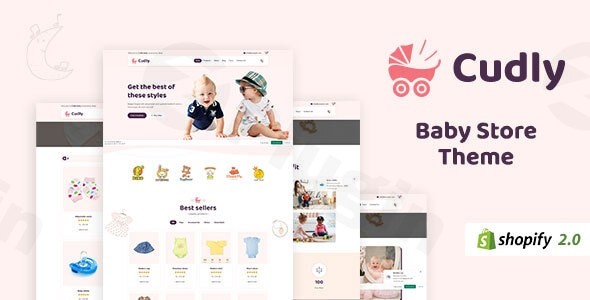
Building a successful online presence for a children’s brand requires a delicate balance of playful aesthetics and robust e-commerce functionality. The Cudly Shopify Theme is a premium, multipurpose solution specifically designed for entrepreneurs launching a toys store Shopify theme or a specialized newborn baby Shopify theme. It addresses the core challenges of the niche—such as mobile responsiveness for busy parents and high-speed performance for better search rankings—right out of the box.Whether you are selling handcrafted wooden toys, organic infant apparel, or educational games, the Cudly theme provides a professional framework that converts browsing visitors into loyal customers.
Key Features of the Cudly Shopify Theme
The Cudly Shopify Theme stands out because it doesn’t just look good; it is engineered for high-performance e-commerce. Below are the core Cudly theme features that provide real-world value to store owners:
1. Advanced Ajax Functionality
Modern shoppers expect a seamless experience. Cudly includes Ajax filters, an Ajax Cart, and an Ajax Wishlist. This allows customers to filter by color or size and add items to their cart without the page reloading, significantly reducing friction in the buying journey.
2. Fully Responsive & Mobile-Optimized Design
With the majority of parents shopping via smartphones, having a responsive Shopify theme for toy stores is non-negotiable. Cudly is 100% mobile-friendly and cross-browser compatible, ensuring your products look stunning on iPhones, tablets, and desktops alike.
3. Dynamic Product Display Tools
- Slick Slider & Product Owl Carousel: Highlight your bestsellers or new arrivals with smooth, touch-friendly sliders.
- Product Image Swap: Let customers see different angles or colors of a product simply by hovering over the image.
- Quick Shop: A “Quick View” popup allows users to see product details and “Add to Cart” directly from the collection page.
4. Conversion-Boosting Navigation
The built-in Mega Menu supports multiple styles, allowing you to organize large inventories (like “Ages 0-3,” “Outdoor Toys,” “Nursery Decor”) with ease. You can even include promotional banners and images directly within the menu to catch a shopper’s eye.
5. SEO & Performance Optimization
Cudly is coded with HTML5, CSS3, and Sass CSS, optimized for both speed and search engine visibility. It includes support for Google Rich Snippets, which helps your product ratings and prices appear directly in search results, improving your click-through rate.
How to Install and Set Up the Cudly Shopify Theme
Setting up your kids toy store Shopify theme is straightforward and requires zero coding knowledge. Follow these steps to get your store live:
- Purchase and Download: Secure your theme files (usually a
.zipfile) from a reputable marketplace like Envato Elements. - Upload to Shopify: Log in to your Shopify Admin. Go to Online Store > Themes. In the “Theme Library” section, click Add Theme > Upload zip file.
- Basic Configuration: Once uploaded, click Customize. This opens the Shopify Theme Editor.
- Drag & Drop Sections: Use the sidebar to reorder homepage sections. You can move the “Featured Products” above the “Newsletter Sign-up” or add a “Recent Sales Popup” for social proof.
- Branding: Navigate to Theme Settings to upload your logo, choose your brand colors, and select fonts that match your “newborn baby” or “toy store” aesthetic.
- Set Up Navigation: Go to Online Store > Navigation to create your Mega Menu structures, then link them within the theme customizer.
7. Publish: Once you are satisfied with the preview, click Publish to make Cudly your live store theme.
Practical Usage & Best Practices
To get the most ROI out of the Cudly Shopify Theme, consider these professional workflow tips:
- For Baby Apparel Stores: Use the Size Chart Integration and Advanced Product Swatches. Parents are often hesitant about sizing; providing clear charts and color swatches reduces return rates.
- For High-Volume Toy Stores: Implement the Ajax Sidebar Cart. It keeps the shopping process fluid and encourages users to keep browsing even after adding an item.
- Creating Urgency: Enable the Recent Sales Popup Notifications. For a newborn baby Shopify theme, seeing that other parents are buying specific strollers or onesies creates immediate trust and “fear of missing out” (FOMO).
* Global Selling: If you plan to sell internationally, leverage the built-in Multi-currency Support. Cudly handles AUD, CAD, USD, GBP, JPY, and more, making it an ideal Shopify baby store theme for global brands.
FAQ & Troubleshooting
What are the main features of the Cudly Shopify theme?
The Cudly Shopify Theme includes a responsive design, Mega Menus, Ajax-powered filters and carts, product sliders (Owl Carousel), multi-currency support, and SEO optimization. It also features unique tools like “Ask An Expert” forms and GDPR-compliant cookie popups.
Is the Cudly theme good for SEO?
Yes, the Cudly theme is highly optimized for SEO. It uses the latest Shopify SEO features, clean HTML5/CSS3 coding for fast loading speeds, and supports Google Rich Snippets to help your products rank higher and look better in search engine results.
How to customize Cudly Shopify theme without coding?
You can customize the Cudly theme entirely through the Shopify Theme Editor. It utilizes a “Drag & Drop” section interface, allowing you to reorder the homepage, change colors, swap fonts, and update background images without touching a single line of code.
Does Cudly support multi-currency for international sales?
Yes, Cudly has built-in support for multiple currencies, including USD, EUR, GBP, AUD, CAD, JPY, and more. This makes it an excellent choice for store owners looking to scale their toy or baby business to a global audience.
Final Verdict: Is Cudly Right for Your Store?
The Cudly Shopify Theme is a top-tier choice for any e-commerce entrepreneur focusing on the children’s market. Its combination of SEO optimization, mobile responsiveness, and specialized features like Advanced Product Swatches and Mega Menus provides a significant competitive advantage.While there are many generic themes available, choosing a niche-specific toys store Shopify theme like Cudly ensures that your site’s user experience aligns perfectly with the expectations of parents and gift-shoppers. If you want a fast, high-converting, and easy-to-manage store for baby products, Cudly is a reliable and professional investment for your brand’s growth.
I. Download Limits & Account Benefits
- Free Downloads: Each email address receives 3 downloads per day for free products
- Upgrade Benefits: Purchase any paid product to increase your daily download limit by 3 for each paid product
- No Account Required: You can download immediately by receiving the download link via email
- Account Recommended: Create an account for easier access to your order history and direct update downloads
II. Understanding GPL vs Official Versions
Important: The products available on WPPick are GPL-licensed versions, which differ from official developer versions. Before purchasing, please read our comprehensive guide: Understanding GPL & Official Differences at WPPick
Key Points:
- GPL versions may not include premium support from original developers
- Updates may be delayed compared to official releases
- Some premium features might have limitations
- Always consider your specific needs and support requirements
III. Support & Assistance
We’re here to help through multiple channels:
- Email Support: Direct email assistance for all inquiries
- Live Chat: Real-time support during business hours
- Comprehensive Documentation: Detailed guides and tutorials
IV. Order Tracking
Access your complete purchase history and download links anytime: Order History
V. Account Access
New to WPPick? Login or Create Account to manage your downloads and orders efficiently.
VI. Refund Protection
We stand behind our products with a clear refund policy. Review our terms: Refund Policy
VII. Privacy & Security
Your data security is our priority. Learn how we protect your information: Privacy Policy
VII. Terms of Service
Understanding our service terms ensures a smooth experience: Terms of Use
Quick Tips for Best Experience
- Verify Compatibility: Check plugin/theme compatibility with your WordPress version
- Backup First: Always backup your site before installing new plugins or themes
- Test Environment: Consider testing on a staging site first
- Stay Updated: Regularly check for updates in your account dashboard
- Read Documentation: Review any included documentation for optimal setup
Need Help?
If you have questions about downloads, licensing, or need technical assistance, don’t hesitate to contact our support team. We’re committed to ensuring you have the best possible experience with WPPick products.
Ready to get started? Your download adventure begins with just one click!
No changelog available.