

Divi Mega Pro – The Ultimate Divi Mega Menu Builder
/Year
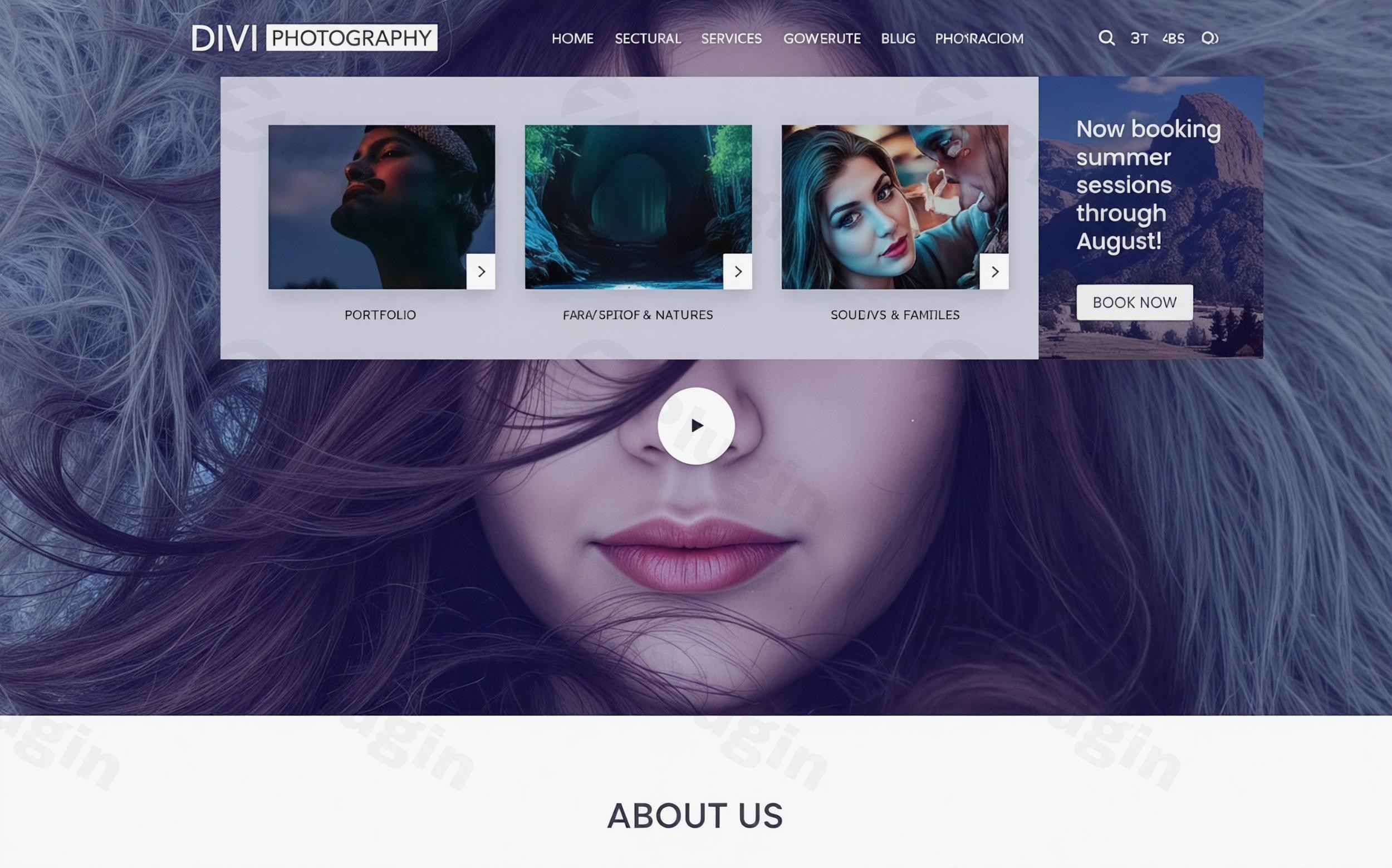
The default navigation options in the Divi theme are functional, but they often lack the “wow factor” and complexity required for modern, high-conversion websites. If you have ever struggled to display products, contact forms, or multi-column layouts within your header, you need a dedicated Divi mega menu builder.Divi Mega Pro is a premium third-party plugin developed by Divi Life that empowers you to design advanced, visually rich mega menus and interactive tooltips using the power of the Divi Builder. Instead of being limited to text links, you can now treat your navigation as a canvas, creating what are essentially “interactive content hubs” that improve user experience and boost on-site engagement.
Key Features: Why Choose Divi Mega Pro?
What makes Divi Mega Pro the standout choice for Divi power users is its ability to bridge the gap between standard WordPress menus and the full creative freedom of the Divi Builder.
1. Full Visual Mega Menu Builder
Unlike other plugins that use a restricted interface, Divi Mega Pro allows you to use the standard Divi Builder (including all sections, rows, and modules) to create your menu. If you can build it on a page, you can put it in your menu.
2. Innovative Mega Tooltips
A standout feature of this plugin is the Divi mega tooltip. This allows you to trigger a rich content pop-up when a user hovers over or clicks an element. This is perfect for:
- Displaying product specifications without leaving the shop page.
- Showing author bios on blog posts.
- Providing definitions or “extra info” boxes on SaaS pricing tables.
3. Unlimited Content Integration
Because it leverages Divi modules, you can embed:
- WooCommerce Modules: Showcase featured products or “Add to Cart” buttons directly in the navigation.
- Contact Forms: Let users send an inquiry without scrolling to the footer.
- Login Forms: Create a sleek, hidden login area for members.
- Tabs and Toggles: Organize massive amounts of information into a compact space.
4. Flexible Trigger System
You aren’t limited to just the main navigation bar. You can trigger your mega menus or tooltips using:
- Hover or Click triggers: Choose the interaction that best fits your UX goals.
- CSS Class Triggers: Add a specific class to any button, image, or text link on your site to launch a Divi Mega Pro post.
5. Pre-designed Layouts
To help you get started quickly, the plugin includes a library of preset templates. These are professionally designed for e-commerce, corporate sites, and creative portfolios, allowing you to import a layout and simply swap the content.
How to Install Divi Mega Pro and Create Your First Menu
If you are looking for how to create a mega menu in Divi without code, follow these straightforward steps to get Divi Mega Pro running on your site.
- Purchase and Download: Secure your license from Divi Life and download the plugin
.zipfile. - Upload to WordPress: Navigate to your WordPress Dashboard > Plugins > Add New > Upload Plugin. Select the file and click Install Now.
- Activate: Once installed, click Activate. You will see a new “Divi Mega Pro” item in your WordPress sidebar.
- Create Your Mega Menu:
- Go to Divi Mega Pro > Add New.
- Give your menu a name (e.g., “Main Shop Menu”).
- Use the Divi Builder to design your layout just like you would a standard page.
- Configure Settings: Below the builder, you will find the “Divi Mega Pro Settings” box. Here, select your trigger type (Hover or Click) and customize the width and animation.
- Link to Your Menu:
- The plugin will generate a unique CSS Class for that specific mega menu.
- Go to Appearance > Menus.
* Open the menu item you want to trigger the mega menu, and paste the CSS Class into the “CSS Classes” field. (If you don’t see this field, enable it in “Screen Options” at the top of the page).
Practical Usage & Best Practices
To get the most out of this Divi menu plugin, consider how it fits into your specific business workflow.
For E-commerce Stores (WooCommerce)
The best Divi mega menu plugin for e-commerce is one that shortens the path to purchase. Use Divi Mega Pro to create a “Mega Category” menu. Instead of just listing “Shoes,” “Shirts,” and “Hats,” create a 3-column layout with images of the products and a “Sale” banner on the right side of the menu.
For Agencies and SaaS
Use the Divi mega tooltip feature to explain technical jargon on your service pages. This keeps the main copy clean while providing “Expert” level details only to those who hover over specific terms, keeping users on the page longer.
Best Practices for Performance
- Keep it Lean: While you can put a video slider in a menu, it might slow down your page load. Stick to optimized images and essential modules.
- Mobile Responsiveness: Use Divi’s built-in responsive settings to hide complex mega menus on mobile and replace them with a simplified version or the default Divi mobile menu.
* Clear Triggers: If using “Click” triggers, ensure the menu item looks interactive (e.g., add a small down-arrow icon) so users know there is more to see.
FAQ & Troubleshooting
What is Divi Mega Pro?
Divi Mega Pro is a WordPress plugin designed specifically for the Divi Theme. It allows users to create complex mega menus and “mega tooltips” using the Divi Builder’s drag-and-drop interface, rather than being restricted to standard WordPress menu links.
Is Divi Mega Pro compatible with the Divi Theme Builder?
Yes. Divi Mega Pro integrates seamlessly with the Divi Theme Builder. You can trigger your mega menus from custom headers and footers created within the Theme Builder, providing total control over your site’s navigation architecture.
Can Divi Mega Pro create tooltips?
Absolutely. One of its unique features is the “Mega Tooltip” functionality. You can set any element on your page (like a text link or an image) to trigger a rich-content tooltip on hover or click, which can contain any Divi module.
Does it support WooCommerce?
Yes, Divi Mega Pro is excellent for e-commerce. You can place WooCommerce modules like “Recent Products,” “Cart,” or “Product Categories” directly inside your mega menus to improve the shopping experience.
How do I update the plugin without losing my menus?
Divi Mega Pro uses a Custom Post Type system. This means your mega menu designs are stored in your database similarly to pages or posts. When you update the plugin, your designs remain safe. Always ensure you have a recent backup of your site before performing updates.
Final Verdict
For users who want to move beyond the constraints of default navigation, Divi Mega Pro is a must-have tool. It effectively turns the Divi mega menu builder into a conversion optimization tool. While there is a slight learning curve in balancing complex layouts with page performance, the ability to build menus visually—without a single line of code—provides a massive ROI for designers and site owners alike. Whether you are building a high-traffic e-commerce store or a sleek professional portfolio, Divi Mega Pro provides the creative freedom necessary to stand out in a crowded digital landscape. Explore more Divi tips and tutorials at wppick.com.
I. Download Limits & Account Benefits
- Free Downloads: Each email address receives 3 downloads per day for free products
- Upgrade Benefits: Purchase any paid product to increase your daily download limit by 3 for each paid product
- No Account Required: You can download immediately by receiving the download link via email
- Account Recommended: Create an account for easier access to your order history and direct update downloads
II. Understanding GPL vs Official Versions
Important: The products available on WPPick are GPL-licensed versions, which differ from official developer versions. Before purchasing, please read our comprehensive guide: Understanding GPL & Official Differences at WPPick
Key Points:
- GPL versions may not include premium support from original developers
- Updates may be delayed compared to official releases
- Some premium features might have limitations
- Always consider your specific needs and support requirements
III. Support & Assistance
We’re here to help through multiple channels:
- Email Support: Direct email assistance for all inquiries
- Live Chat: Real-time support during business hours
- Comprehensive Documentation: Detailed guides and tutorials
IV. Order Tracking
Access your complete purchase history and download links anytime: Order History
V. Account Access
New to WPPick? Login or Create Account to manage your downloads and orders efficiently.
VI. Refund Protection
We stand behind our products with a clear refund policy. Review our terms: Refund Policy
VII. Privacy & Security
Your data security is our priority. Learn how we protect your information: Privacy Policy
VII. Terms of Service
Understanding our service terms ensures a smooth experience: Terms of Use
Quick Tips for Best Experience
- Verify Compatibility: Check plugin/theme compatibility with your WordPress version
- Backup First: Always backup your site before installing new plugins or themes
- Test Environment: Consider testing on a staging site first
- Stay Updated: Regularly check for updates in your account dashboard
- Read Documentation: Review any included documentation for optimal setup
Need Help?
If you have questions about downloads, licensing, or need technical assistance, don’t hesitate to contact our support team. We’re committed to ensuring you have the best possible experience with WPPick products.
Ready to get started? Your download adventure begins with just one click!
- Resolved the issue where the mega menu close icon wasn’t displaying on mobile screens.
- Resolved the issue of dropdown click not working on mobile in firefox until page loads.
- Mega Menu editor now loads correctly in Divi 5 Visual Builder.
- Mega Menu no longer breaks Divi 5 Theme Builder header on frontend (duplicate ID conflict).
- See the full changelog at Divi Life.