

Donatsu – Donut Store Ecommerce Elementor Pro Template Kit
/Year
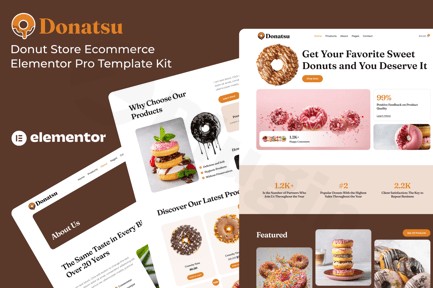
Are you a donut shop owner, bakery, or food entrepreneur looking to establish a mouthwatering online presence? The Donatsu Elementor Pro Template Kit is a specialized, comprehensive solution designed to help you build a stunning and functional e-commerce website with ease. Leveraging the power of WordPress and Elementor Pro, Donatsu provides a modern, appetizing design that’s perfect for showcasing your delectable creations and streamlining online orders. This kit is your secret ingredient for a professional food business website, making it ideal for anyone seeking a dedicated donut store Elementor template or a robust bakery Elementor website kit.
Key Features for a Sweet Online Presence
Donatsu isn’t just a collection of pages; it’s a complete ecosystem tailored for food businesses. Here’s a detailed look at what makes this Ecommerce Elementor Template for Food businesses stand out:
- Niche-Specific, Appetizing Design: Crafted specifically for donut shops, bakeries, cake designers, and dessert cafes, Donatsu boasts a modern, vibrant, and visually appealing aesthetic. Every element is designed to make your products look irresistible, offering a true “Elementor Pro Donut Shop Design” that captivates visitors.
- Effortless Customization with Elementor Pro: Forget complex coding. Donatsu is built for Elementor, allowing you to easily edit colors, fonts, layouts, and content using the intuitive drag-and-drop interface. This empowers you to match the website perfectly to your brand’s unique style. Headers and footers are fully customizable using Elementor Pro’s Theme Builder.
- Fully Responsive Across All Devices: Your customers browse on various devices, from desktops to smartphones. Donatsu ensures your website looks great and functions flawlessly on every screen size, providing an optimal user experience whether they’re ordering on the go or from home.
- Seamless WooCommerce Integration: For any food business looking to sell online, robust e-commerce capabilities are essential. Donatsu integrates seamlessly with WooCommerce, transforming your site into a powerful online store. Manage product catalogs, showcase daily specials, handle transactions, streamline the checkout process, and efficiently manage orders and inventory. This makes it an excellent WooCommerce Donut Shop Template.
- SEO Optimized Structure: Built with best practices for search engine optimization, Donatsu features clean code and structured data. This helps search engines like Google understand your content better, improving your online visibility for relevant keywords and bringing more customers to your virtual doorstep.
- Comprehensive Pre-designed Page Templates: Accelerate your website development with a rich set of essential pre-designed pages, including:
- Home Page
- Products Page & Product Details Page
- Cart Page & Checkout Page
- My Account Page
- About Page & Contact Page
- Blog & Single Blog Post Pages
- FAQ Page
- 404 Page
- Global Style settings for consistent branding.
- Advanced Typography & Language Support: With full support for Google Fonts, you have a vast library of typefaces to choose from. Additionally, the kit supports RTL/LTR (Right-to-Left/Left-to-Left) languages, ensuring global appeal.
- Performance-Optimized Code: Donatsu supports compression of JavaScript and CSS scripts to enhance website speed and overall performance. The underlying code adheres to W3C XHTML 1.0 Transitional and W3C CSS Valid standards, ensuring a modern, secure, and efficient foundation.
Installation & Setup: Your Recipe for a Sweet Website
Getting your Donatsu Elementor Pro Template Kit up and running is a straightforward process, even for those without extensive technical knowledge. Follow these steps to build a donut shop website with Elementor Pro and WooCommerce:
- Prerequisites: Before you begin, ensure you have a fresh WordPress installation. Donatsu is a Template Kit, meaning it works with Elementor, not as a standalone theme.
- Install Required Plugins: You will need to install and activate several key plugins for Donatsu to function correctly and deliver its full capabilities:
- Elementor (free version): The core page builder.
- Elementor Pro (paid version): Essential for many advanced features, theme builder for headers/footers, and some specific templates within Donatsu.
- WooCommerce: For all e-commerce functionality, product management, and checkout.
- The Plus Addons for Elementor: This provides additional widgets and features that the kit leverages.
- Envato Elements plugin: Facilitates the easy import of the template kit.
- Install Your Theme: While compatible with most Elementor-supporting themes, Donatsu is optimized for use with the free Hello Elementor theme. Install and activate Hello Elementor.
- Import the Donatsu Template Kit:
- Go to Elements > Installed Kits in your WordPress dashboard.
- Click the “Upload Template Kit Zip File” button and select the Donatsu zip file you downloaded.
- Once uploaded, click “Import Kit.” The Envato Elements plugin will guide you through installing global styles, template parts, and pages.
- Make sure to import the “Global Style” first to apply the default fonts and colors across your site.
- Configure Elementor Pro Theme Builder: After importing, you’ll want to set up your header and footer using Elementor Pro’s Theme Builder to ensure they display correctly across your site. Navigate to Templates > Theme Builder and assign your imported header and footer templates to their respective locations.
- Import Demo Content (Optional but Recommended): The kit includes demo data. Importing this will help you visualize and understand how the different pages are structured and styled, making customization easier. Remember that demo images from Envato Elements may require separate licensing or should be replaced with your own images.
Practical Usage & Best Practices: Sweetening Your Workflow
The Donatsu Template Kit is designed for practical, real-world application, empowering various food businesses to thrive online.
- For Donut Shop Owners & Bakers:
- Showcasing Daily Specials: Use the easily customizable product pages to highlight seasonal donuts, daily specials, or limited-edition items with mouth-watering photos.
- Streamlined Online Ordering: Integrate WooCommerce to offer a seamless ordering experience. Customers can browse, add to cart, and checkout efficiently, significantly increasing sales and reducing phone orders.
- Pickup & Delivery Options: Configure WooCommerce shipping zones to offer local pickup or delivery services, catering to your customer base’s needs.
- For Cake Designers & Dessert Cafes:
- Visual Portfolio: Leverage the stunning gallery layouts and individual product detail pages to create a rich visual portfolio of your custom cakes, pastries, and desserts. High-quality imagery is crucial here.
- Booking & Consultation Forms: Utilize Elementor’s form widgets (with Elementor Pro) to create contact or inquiry forms for custom orders, catering requests, or consultation bookings.
- Event Promotion: Use blog pages or dedicated landing pages to promote special events, workshops, or tasting sessions.
- For Food Bloggers & Influencers (with products):
- Recipe Sharing with Shop Integration: Combine engaging blog posts (using the pre-designed blog templates) with product links. For example, share a recipe and then link directly to the ingredients or baking tools available for purchase through your WooCommerce store.
- Affiliate Marketing: While showcasing your own products, you can also seamlessly integrate affiliate links for related food items or kitchen gadgets, adding another revenue stream.Best Practices for Maximizing Donatsu:
- High-Quality Photography: Nothing sells food like great photos. Invest in professional photography for your donuts, cakes, and other offerings to fully leverage Donatsu’s visual appeal.
- Regular Updates: Keep your WordPress core, Elementor, WooCommerce, and Donatsu Kit updated to ensure security, performance, and compatibility.
- Mobile-First Design Check: Always test your website on various mobile devices. While Donatsu is responsive, custom changes might sometimes affect responsiveness, so double-check before going live.
- Optimize Product Descriptions: Use compelling and keyword-rich descriptions for your products to entice customers and improve your Food Business Elementor Website‘s SEO.
FAQ & Troubleshooting
Here are answers to common questions about the Donatsu Elementor Pro Template Kit:
What is Donatsu Elementor Pro Template Kit?
Donatsu is a specialized WordPress Template Kit designed for donut shops, bakeries, cake designers, and other food businesses. It provides a set of pre-designed pages and sections that you can import into Elementor Pro to quickly build a modern, e-commerce-ready website for selling food products online.
Does Donatsu Elementor Kit require Elementor Pro?
Yes, Donatsu Elementor Pro Template Kit explicitly requires Elementor Pro in addition to the free Elementor plugin. Elementor Pro is necessary for many of the advanced features, theme builder functionalities (like customizing headers and footers), and specific widgets used within the kit’s templates. WooCommerce and The Plus Addons for Elementor are also required.
How do I install the Donatsu Template Kit?
To install the Donatsu Template Kit, first ensure you have WordPress, Elementor (free), Elementor Pro, WooCommerce, The Plus Addons for Elementor, and the Envato Elements plugin installed and activated. Then, from your WordPress dashboard, navigate to Elements > Installed Kits, click “Upload Template Kit Zip File,” and follow the on-screen prompts to import the kit. Remember to import the “Global Style” first.
Is Donatsu Elementor Template Kit good for small donut businesses?
Absolutely! Donatsu is ideal for small donut businesses, local bakeries, and emerging food entrepreneurs. Its easy customization, pre-designed pages, and robust WooCommerce integration provide all the tools a small business needs to establish a professional online store without needing a large budget for custom web development. It streamlines the process of getting an attractive and functional online bakery orders website up quickly.
Can I customize Donatsu template kit colors and fonts?
Yes, you can easily customize the colors and fonts of the Donatsu Template Kit. After importing the kit, go to your Elementor editor. You can access global styling options to change primary colors, secondary colors, and typography settings globally, or you can adjust these elements individually on each page or section using Elementor’s style controls. Donatsu supports Google Fonts for extensive font choices.
Conclusion: Your Sweet Success Story Starts Here
The Donatsu Elementor Pro Template Kit is more than just a collection of web pages; it’s a strategic asset for any food business aiming for a strong digital presence. By combining a modern, appetizing design with the powerful functionality of Elementor Pro and WooCommerce, Donatsu empowers you to create an engaging, high-converting website with remarkable ease.Whether you’re a burgeoning donut shop, an established bakery, or a creative cake designer, this kit provides a solid foundation for online success. Its intuitive customization options, comprehensive e-commerce features, and SEO-friendly structure mean you can focus on what you do best: creating delicious food. Invest in the Donatsu Elementor Pro Template Kit today and give your customers a website experience as delightful and satisfying as your desserts.
I. Download Limits & Account Benefits
- Free Downloads: Each email address receives 3 downloads per day for free products
- Upgrade Benefits: Purchase any paid product to increase your daily download limit by 3 for each paid product
- No Account Required: You can download immediately by receiving the download link via email
- Account Recommended: Create an account for easier access to your order history and direct update downloads
II. Understanding GPL vs Official Versions
Important: The products available on WPPick are GPL-licensed versions, which differ from official developer versions. Before purchasing, please read our comprehensive guide: Understanding GPL & Official Differences at WPPick
Key Points:
- GPL versions may not include premium support from original developers
- Updates may be delayed compared to official releases
- Some premium features might have limitations
- Always consider your specific needs and support requirements
III. Support & Assistance
We’re here to help through multiple channels:
- Email Support: Direct email assistance for all inquiries
- Live Chat: Real-time support during business hours
- Comprehensive Documentation: Detailed guides and tutorials
IV. Order Tracking
Access your complete purchase history and download links anytime: Order History
V. Account Access
New to WPPick? Login or Create Account to manage your downloads and orders efficiently.
VI. Refund Protection
We stand behind our products with a clear refund policy. Review our terms: Refund Policy
VII. Privacy & Security
Your data security is our priority. Learn how we protect your information: Privacy Policy
VII. Terms of Service
Understanding our service terms ensures a smooth experience: Terms of Use
Quick Tips for Best Experience
- Verify Compatibility: Check plugin/theme compatibility with your WordPress version
- Backup First: Always backup your site before installing new plugins or themes
- Test Environment: Consider testing on a staging site first
- Stay Updated: Regularly check for updates in your account dashboard
- Read Documentation: Review any included documentation for optimal setup
Need Help?
If you have questions about downloads, licensing, or need technical assistance, don’t hesitate to contact our support team. We’re committed to ensuring you have the best possible experience with WPPick products.
Ready to get started? Your download adventure begins with just one click!