

Droip – All-in-one No-code Builder
/Year
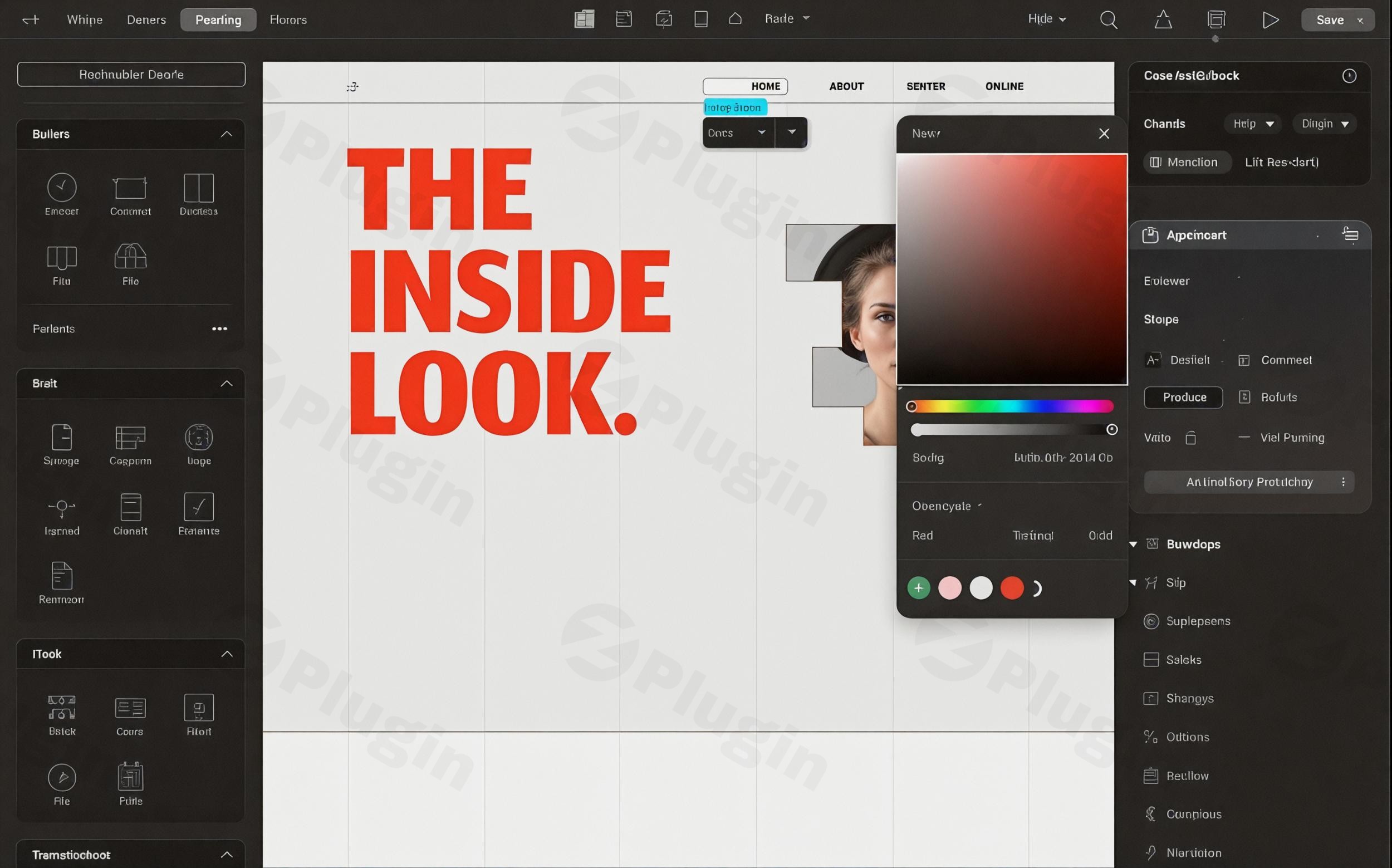
Creating a professional, high-performing website often feels like a daunting task, especially without coding expertise. Traditional WordPress page builders, while helpful, can sometimes introduce bloat, limit design freedom, or require a collection of extra plugins to achieve desired functionalities. This is where Droip No-code Builder steps in, revolutionizing the way you approach WordPress web design.Droip is a powerful all-in-one no-code builder designed to simplify the entire website creation process for WordPress users of all skill levels. It empowers you to craft stunning, pixel-perfect, and highly functional websites with an intuitive drag-and-drop interface, all while generating clean, optimized code for superior performance and SEO. Forget rigid grid systems; Droip offers a freeform visual canvas, bringing the flexibility of modern design tools like Figma and Framer directly into your WordPress workflow.
Key Features That Make Droip a Game Changer
Droip isn’t just another page builder; it’s a comprehensive platform that integrates numerous functionalities typically requiring multiple plugins, streamlining your workflow and enhancing your site’s capabilities.
1. Freeform Visual Canvas & Unparalleled Design Freedom
Unlike traditional builders with restrictive row-and-column structures, Droip offers a truly freeform visual canvas. This allows for pixel-perfect control over element placement, overlapping sections, layering backgrounds, and creating intricate layouts. You can design without limitations, pushing the boundaries of creativity directly within WordPress.
2. Performance-Optimized & Clean Code Output
A significant unique selling point of Droip is its unwavering focus on performance. It generates clean, bloat-free code, minimizing server requests and auto-compressing CSS and JavaScript. This results in faster load times and improved SEO scores, a crucial advantage when you compare Droip vs Elementor performance, where Droip consistently delivers a much cleaner Document Object Model (DOM) and avoids reliance on third-party JavaScript libraries.
3. Seamless Figma to WordPress Integration
For designers, Droip offers a game-changing Figma to WordPress with Droip handoff. You can import Figma designs directly into Droip, and they are responsive by default, adapting to various screen sizes with support for unlimited custom breakpoints. This bridges the gap between design and development effortlessly.
4. Native Dynamic Content Management
Say goodbye to external plugins like Advanced Custom Fields (ACF) for basic dynamic content. Droip includes a built-in Dynamic Content Manager, allowing you to build dynamic content WordPress no code. Create custom content types and fields, establish relationships, and visually design dynamic templates with support for dynamic SEO on template pages and advanced filtering for collection-based layouts.
5. Advanced Interactions & Animations
Elevate your website’s user experience with visually crafted complex animations and interactions. Droip enables text animations (by character, word, or element), custom triggers (scroll, hover, load), and a variety of transition styles, all managed within its intuitive interface.
6. Global Styling with CSS Variables & Class-Based Editing
Droip facilitates a scalable design system through class-based editing and global CSS variables. Define reusable design tokens like colors, fonts, and sizes once, and apply them site-wide. You can even create and switch between different design modes, such as light and dark themes, with ease.
7. Built-in Integrations (Droip Apps)
Manage your third-party tools directly from the editor with Droip’s intuitive “Droip Apps” system. It offers integrations with over 30 popular services like Mailchimp, Zapier, Google, Facebook, ActiveCampaign, and Intercom, reducing your reliance on additional integration plugins.
8. Native Form Builder & Popup Builder
Create simple to multi-step forms with the integrated form builder and manage submissions with the form data manager. Additionally, design and implement popups with various trigger options, all without leaving the Droip interface.
9. Comprehensive Media Manager & AI Content Generator
Droip features a central media hub for organizing and editing all your assets, including SVGs and Lottie files. It offers advanced image editing capabilities, clip paths, shape editing, and even text path creation. For content creation, the integrated AI Content Generator assists with generating website copy directly within the builder.
10. Robust Accessibility & SEO Management Tools
Droip accessibility features are built-in, guiding users towards best practices like semantic HTML, alt text, and ARIA labels. It includes a contrast checker and offers an inclusive editing experience. For SEO, native tools let you define meta titles, descriptions, and Open Graph settings, benefiting from the plugin’s fast page loads and optimized DOM structure for better crawlability.
How to Install and Activate Droip WordPress Plugin
Getting started with Droip is a straightforward process, similar to installing any other WordPress plugin. Follow these steps to unleash its full power:
- Purchase Droip: Obtain your genuine GPL license for Droip from a trusted source like ZeroPlugin.com. This ensures you receive legitimate, regularly updated, and secure files.
- Download the Plugin: After purchase, you will typically receive a downloadable
.zipfile of the Droip plugin. - Log in to WordPress: Access your WordPress admin dashboard (e.g.,
yourwebsite.com/wp-admin). - Navigate to Plugins: In the WordPress dashboard, go to Plugins > Add New.
- Upload the Plugin: Click on the “Upload Plugin” button at the top of the page.
- Choose File: Click “Choose File”, then locate and select the Droip
.zipfile you downloaded. - Install Now: Click “Install Now” to upload and install the plugin.
- Activate Plugin: Once installed, click “Activate Plugin”.
- Enter License Key: Upon activation, Droip will prompt you to enter your license key. This key is essential for receiving future updates, security patches, bug fixes, and maintaining compatibility with the latest WordPress versions.
- Explore Droip: After activation and license verification, you’ll find Droip integrated into your WordPress admin, ready for you to start building. For maximum design freedom, it’s recommended to use the “Droip Base” theme, which removes unnecessary containers and layout restrictions.
Practical Usage & Best Practices with Droip
Droip is designed to cater to a wide range of users, from solo bloggers to digital agencies. Here’s how different professionals can leverage its power in their real-world workflows:
For Freelancers & Agencies: Pixel-Perfect Client Websites
Droip is ideal for freelancers and agencies needing to deliver high-quality, unique client websites efficiently.
- Design Precision: Utilize the freeform visual canvas and absolute positioning to create designs exactly as envisioned in mockups, ensuring client satisfaction.
- Figma Integration: Streamline your design-to-development workflow by directly importing Figma designs, drastically reducing development time and ensuring accuracy.
- Reusable Components (Symbols): Create “Symbols” for reusable sections like headers, footers, or call-to-action blocks. This ensures consistency across client sites and speeds up development for future projects.
- Performance Advantage: Deliver sites that score highly on Lighthouse audits thanks to Droip’s clean code, giving your clients a competitive edge in SEO and user experience.
For Business Owners & Marketers: Fast, Dynamic & Engaging Sites
If you’re a business owner or marketer looking to build a high-converting website, Droip provides the tools for dynamic content, lead generation, and brand consistency.
- Dynamic Product/Service Pages: Use the native Dynamic Content Manager to easily create and manage content for product catalogs, service listings, or team member profiles, all visually without coding.
- Lead Generation with Forms & Popups: Implement custom forms for inquiries, subscriptions, or quotes. Design attention-grabbing popups with various triggers to capture leads effectively.
- Global Styling: Maintain brand consistency across your entire website using global CSS variables and class-based editing for colors, fonts, and spacing.
- SEO & Speed: Benefit from Droip’s optimized performance to rank higher in search results and provide a smooth browsing experience, which directly impacts conversion rates.
For Content Creators & Bloggers: Effortless Content & Design
Bloggers and content creators can focus on their content while Droip handles the technical design aspects, making it simple to create visually appealing articles and layouts.
- AI Content Generation: Leverage the built-in AI Content Generator to assist with drafting compelling headlines, intros, or summaries for your blog posts.
- Visual Blog Layouts: Design custom single post templates or archive pages using the freeform canvas, breaking away from standard blog layouts.
- Interactions: Add subtle animations to images or text elements to make your content more engaging and interactive for readers.
For Performance Enthusiasts: A Lean & Mean WordPress Solution
For those who prioritize speed and efficiency, Droip offers a refreshing alternative to bloated builders.
- Minimal Plugin Dependency: Droip’s all-in-one nature means fewer plugins are required, reducing potential conflicts and maintenance headaches.
- Optimized DOM: Enjoy faster page rendering and better Lighthouse scores due to the significantly cleaner Document Object Model (DOM) compared to traditional builders.
- Auto-Compressed Assets: CSS and JavaScript are automatically compressed, further enhancing load times without manual optimization efforts.
FAQ & Troubleshooting
Q: Is Droip compatible with WooCommerce?
A: As of the currently available information, Droip does not yet officially support WooCommerce. While it excels at building general and dynamic content websites, e-commerce functionalities with WooCommerce are not fully integrated. Users needing robust e-commerce features should verify the latest compatibility status or consider alternatives if WooCommerce is a primary requirement. This functionality may be added in future updates.
Q: What makes Droip different from Elementor?
A: Droip distinguishes itself from Elementor in several key areas:
- Code Output & Performance: Droip generates significantly cleaner, more performance-optimized code with fewer
<div>tags and scripts, leading to faster load times and better SEO scores compared to Elementor’s often heavily nested markup. - Design Freedom: Droip offers a truly freeform visual canvas with pixel-perfect control, including direct use of Flexbox and CSS Grid, and absolute positioning. Elementor, while flexible, can be seen as having more rigid section constraints.
- All-in-one Solution: Droip integrates many essential features like a dynamic CMS, form builder, and design system directly, reducing the need for numerous third-party add-ons and their associated costs and compatibility issues common with Elementor.
- Learning Curve: Elementor might be simpler for basic sites, but Droip offers more power, performance, and flexibility, which comes with a slightly steeper learning curve for its advanced features like dynamic content, reusable components, and class-based styling.
Q: How to use Droip’s visual canvas?
A: Droip’s visual canvas functions much like a graphic design tool. You simply drag and drop elements directly onto the canvas wherever you desire. You can freely position elements using absolute positioning, layer them, and resize them without being confined to a strict grid. To get started:
- Open any page or post with Droip.
- Select an element from the left sidebar (e.g., Heading, Text, Image).
- Drag it onto the canvas.
- Use the on-canvas controls to resize, reposition, and customize its appearance.
- Experiment with overlapping elements and adjusting Z-index for layered effects.
Q: Does Droip have an AI content generator?
A: Yes, Droip incorporates an AI content generator directly within its interface. This feature is designed to assist you with website content creation, allowing you to generate text snippets, headlines, or entire content sections. This can significantly speed up your content workflow and help overcome writer’s block. Look for the AI content generation option within the editor when working with text elements.
Q: Is Droip compatible with WPML?
A: As of July 2025, Droip is not officially listed as compatible with WPML, the popular multilingual WordPress plugin. If your website requires extensive multilingual capabilities powered by WPML, you might encounter limitations or compatibility issues. It’s always recommended to check the latest official documentation or contact Droip support for the most up-to-date information on multilingual support.
Conclusion
Droip No-code Builder represents a significant leap forward in WordPress website development. By offering an all-in-one, freeform visual building experience coupled with a strong emphasis on clean code and performance, it empowers users to create professional, lightning-fast, and unique websites without writing a single line of code.Whether you are a freelancer seeking pixel-perfect control, a business owner needing a dynamic and high-performing online presence, or a content creator aiming for beautiful layouts, Droip provides a robust and reliable solution. While it has a slight learning curve due to its advanced capabilities, the investment in understanding its system yields incredible returns in terms of design freedom, site speed, and reduced plugin dependency.For those looking to build modern, performant, and visually stunning WordPress websites with the power of a modern design tool, Droip stands out as an exceptional choice. It’s more than just a builder; it’s a comprehensive web design platform that’s truly transforming the WordPress no-code website builder landscape.
I. Download Limits & Account Benefits
- Free Downloads: Each email address receives 3 downloads per day for free products
- Upgrade Benefits: Purchase any paid product to increase your daily download limit by 3 for each paid product
- No Account Required: You can download immediately by receiving the download link via email
- Account Recommended: Create an account for easier access to your order history and direct update downloads
II. Understanding GPL vs Official Versions
Important: The products available on WPPick are GPL-licensed versions, which differ from official developer versions. Before purchasing, please read our comprehensive guide: Understanding GPL & Official Differences at WPPick
Key Points:
- GPL versions may not include premium support from original developers
- Updates may be delayed compared to official releases
- Some premium features might have limitations
- Always consider your specific needs and support requirements
III. Support & Assistance
We’re here to help through multiple channels:
- Email Support: Direct email assistance for all inquiries
- Live Chat: Real-time support during business hours
- Comprehensive Documentation: Detailed guides and tutorials
IV. Order Tracking
Access your complete purchase history and download links anytime: Order History
V. Account Access
New to WPPick? Login or Create Account to manage your downloads and orders efficiently.
VI. Refund Protection
We stand behind our products with a clear refund policy. Review our terms: Refund Policy
VII. Privacy & Security
Your data security is our priority. Learn how we protect your information: Privacy Policy
VII. Terms of Service
Understanding our service terms ensures a smooth experience: Terms of Use
Quick Tips for Best Experience
- Verify Compatibility: Check plugin/theme compatibility with your WordPress version
- Backup First: Always backup your site before installing new plugins or themes
- Test Environment: Consider testing on a staging site first
- Stay Updated: Regularly check for updates in your account dashboard
- Read Documentation: Review any included documentation for optimal setup
Need Help?
If you have questions about downloads, licensing, or need technical assistance, don’t hesitate to contact our support team. We’re committed to ensuring you have the best possible experience with WPPick products.
Ready to get started? Your download adventure begins with just one click!
- Fixed dynamic page link not working in Symbol after template import
- Resolved pagination problems within collections
- Fixed issues with searching in nested collections
- Corrected shortcode issues in symbols and popups
- Addressed various miscellaneous bugs and inconsistencies
- Enhanced Undo/Redo performance to better support collaborative workflows
- Optimized smooth scrolling for a more fluid user experience
- Fixed various minor issues to improve overall stability
- Introduced hooks before and after page creation during template import.
- Enabled header and footer display control via hooks.
- Resolved the utility page permalink flush issue.
- Improved validation and handling for font file uploads.
- Strengthened form submission validation and security.
- Corrected SVG upload sanitization.
- Added validation for Base64 image uploads.
- Arbitrary File Upload vulnerability restricted to authenticated content-access users (CVE-2025-5831)
- Missing authorization for multiple actions requiring the authenticated full-access role (CVE-2025-5835)
- Unauthenticated Arbitrary File Download/Deletion vulnerability (CVE-2024-43955)
- Settings change required full-access user roles (CVE-2024-43954)
- Added dynamic content binding support for image ALT text
- The Slider element can now display dynamic content from collections and posts
- A new "Load More" state is added to let users load additional collection items
- Added support for the calc() CSS function when setting size-related properties
- Improved date and time localization across all supported site languages
- Enhanced video element functionality for better playback and customization
- Resolved REST API route issues with certain permalink structures
- Fixed border style reset problem
- Addressed Style Panel toggle activation and deactivation issues
- Collection search now delivers more accurate and relevant results
- Refactored YouTube video playback logic into a separate module for better maintainability
- Added file renaming support for media assets
- Enhanced Symbol editing experience
- Blend mode issue when sorting by background color
- Removed redundant and unused common styles across all pages
- Improve inline symbol editing