
Emo Questalk Pro
/Year
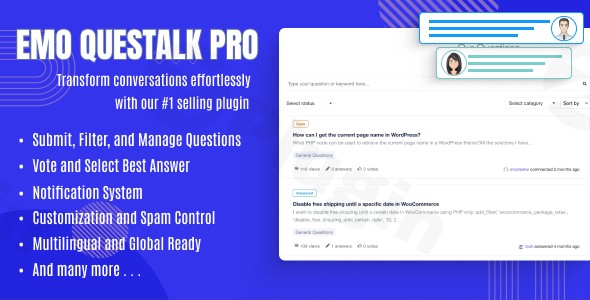
In today’s digital landscape, fostering an engaged community is paramount for any successful WordPress website. Whether you’re running a bustling e-commerce store, a niche blog, or an educational platform, providing a space for users to ask questions, share knowledge, and interact can dramatically boost engagement, establish authority, and improve user satisfaction. This is precisely where EMO Questalk Pro, a premium WordPress Q&A plugin, shines.Designed to transform your WordPress site into a dynamic, feature-rich question and answer platform, EMO Questalk Pro allows you to build a community akin to popular sites like Quora or Stack Overflow. This powerful plugin equips you with all the necessary tools to create a dedicated WordPress question answer forum, making your website a go-to resource for your audience.
Key Features of EMO Questalk Pro: Building Your WordPress Q&A Powerhouse
EMO Questalk Pro provides a comprehensive suite of features engineered to support a vibrant and functional Q&A community. Let’s delve into what makes this plugin a top choice for your WordPress site.
Comprehensive Q&A System
At its core, EMO Questalk Pro offers a full-fledged Q&A system. Users can effortlessly submit questions and provide detailed answers, fostering a rich content ecosystem.
- Effortless Question Management: Organize your knowledge base with categorized questions. Users can submit questions, and administrators can filter, order, edit, and delete both questions and answers. Features like auto-closing questions and marking them as “featured” (sticky) provide granular control.
- Private & Public Options: Decide whether questions and answers should be publicly visible or private, offering flexibility for sensitive topics or internal support.
- Detailed Content Support: Answers and comments benefit from a Markdown editor, allowing for rich formatting. The system also supports attachment files and emojis, enhancing user expression.
Robust User Engagement & Reputation System
Keeping users active and incentivized is key to a thriving community. EMO Questalk Pro integrates powerful engagement tools:
- Voting System: Implement upvoting and downvoting for answers, ensuring the most helpful and accurate responses rise to the top.
- Best Answer Selection: Empower question authors (or moderators) to select the “best answer,” providing clear resolutions and recognizing valuable contributions.
- Reputation System & Badges: Encourage quality contributions with a built-in WordPress reputation system plugin. Users earn points and badges, motivating them to participate actively and thoughtfully.
- Notifications & Following: Keep users informed with email notifications about new answers, comments, and votes. Users can also subscribe to and follow specific questions to stay updated.
- User Profiles & Social Sharing: Basic user profiles allow individuals to showcase their contributions, while social sharing options extend the reach of your Q&A content.
Modern Design & Seamless Integration
A great Q&A platform needs to look good and work flawlessly on any device.
- Customizable Layouts: EMO Questalk Pro offers modern design options and customizable layouts that integrate seamlessly with virtually any WordPress theme, ensuring your forum matches your brand identity.
- Responsive & Mobile-Friendly: The plugin is optimized for all devices, ensuring a consistent and engaging user experience whether your visitors are on desktops, tablets, or smartphones. This makes it a truly Q&A plugin WordPress mobile friendly.
- Widgets & Shortcodes: Easily display Q&A sections anywhere on your site using the included 9 WordPress widgets and various shortcodes, such as question lists, “ask question” forms, and search forms.
Powerful SEO Optimization
For your knowledge base to be truly effective, its content needs to be discoverable.
- Built-in SEO Features: EMO Questalk Pro comes with inherent SEO optimization capabilities, including clean code and a structure designed for efficient search engine indexing. This commitment to WordPress Q&A SEO optimization helps your questions and answers rank higher in search results, driving more organic traffic to your valuable content.
Advanced Moderation & Anti-Spam
Maintaining a healthy and productive community requires effective moderation.
- Front-end Moderation: Administrators can moderate questions and answers directly from the front-end, streamlining content management.
- Anti-Spam with Captcha: Protect your forum from unwanted spam with integrated Captcha support.
Ecosystem & Compatibility
EMO Questalk Pro is built to play well with other popular WordPress tools:
- BuddyPress Integration: Seamlessly integrate with BuddyPress to extend community features and user profiles.
- WooCommerce Integration: Enhance your e-commerce site by adding a dedicated Q&A section for products, helping customers make informed purchasing decisions.
- Multilingual Ready: The plugin supports multiple languages, including WPML and RTL compatibility, making it suitable for a global audience.
- Broad WordPress Compatibility: Tested and compatible with WordPress version 6.0+, ensuring stability and performance on modern WordPress installations.
Installing and Setting Up EMO Questalk Pro: Your Step-by-Step Guide
Getting EMO Questalk Pro up and running is a straightforward process, even for those new to WordPress plugin management. Here’s your Emo Questalk Pro setup guide:
- Step 1: Download the Plugin File.Obtain the EMO Questalk Pro plugin file, typically a
.ziparchive, from a reputable source like ZeroPlugin.com, which offers 100% genuine GPL licensed software with regular updates and verified clean source code. - Step 2: Upload and Install via WordPress Dashboard.Log in to your WordPress administration area. Navigate to Plugins > Add New in the sidebar. Click the “Upload Plugin” button at the top of the page. Choose the
.zipfile you downloaded in Step 1 and click “Install Now.” WordPress will automatically upload and unpack the plugin. - Step 3: Activate the Plugin.Once the installation is complete, you will see a success message. Click the “Activate Plugin” link. EMO Questalk Pro is now installed and active on your website.
- Step 4: Initial Configuration.After activation, a new menu item, usually labeled “Questalk Pro” or similar, will appear in your WordPress dashboard. Click on it to access the plugin’s settings. Here, you’ll configure global options such as:
- Enabling/disabling specific features (e.g., voting, reputation).
- Setting up user roles and permissions for who can ask/answer questions.
- Configuring email notifications.
- Customizing general display settings.Take your time to explore these settings to tailor the Q&A forum to your exact needs.
- Step 5: Implementing Q&A Sections on Your Site.With the plugin configured, you can now integrate Q&A sections into your website using either the provided widgets or shortcodes.
- Widgets: Go to Appearance > Widgets and drag-and-drop Questalk Pro widgets (e.g., “Latest Questions,” “Ask Question Form”) into your desired sidebar or footer areas.
- Shortcodes: For more precise placement within pages or posts, use the available shortcodes. For instance, you might use a shortcode to display a list of questions on a dedicated “Community Forum” page. Check the plugin’s documentation within your dashboard for a list of all available shortcodes.
Practical Usage: Leveraging EMO Questalk Pro for Your Community
EMO Questalk Pro is incredibly versatile, suitable for a wide range of applications. Here are a few practical use cases and best practices to get the most out of your WordPress Q&A plugin.
Creating a Dedicated Support Forum
If you offer products or services, a Q&A forum is an ideal way to reduce customer support queries and empower users to help each other.
- Use Case: A software company uses EMO Questalk Pro to create a “Troubleshooting & FAQs” section where users can ask questions about common issues, and staff or experienced users can provide answers. The “best answer” feature ensures verified solutions are easily identifiable.
- Best Practice: Encourage your support team to actively participate, seed initial questions, and provide authoritative answers. Use categories to organize questions by product or feature.
Building an Educational Knowledge Base
For educators, online course creators, or niche experts, EMO Questalk Pro can serve as a dynamic learning environment.
- Use Case: An online academy implements the plugin to allow students to ask questions about course content. Instructors or teaching assistants can answer, and students can upvote helpful responses, fostering peer-to-peer learning. The polls and quizzes feature can also be used for interactive learning assessments.
- Best Practice: Promote the forum as a primary resource for students. Consider integrating it into your course pages using shortcodes.
Fostering a Niche Community (How to create a Quora-like site with WordPress plugin)
Dreaming of building a community around a specific hobby, industry, or interest, much like how to create a Quora-like site with WordPress plugin? EMO Questalk Pro makes it possible.
- Use Case: A website dedicated to vintage car restoration creates a Q&A forum where enthusiasts can discuss repair techniques, sourcing parts, and share project updates. The reputation system encourages experts to contribute their knowledge.
- Best Practice: Actively moderate discussions to maintain a positive and constructive environment. Promote the community on social media and other channels to attract new members. Leverage the
WordPress reputation system pluginto reward your most helpful contributors.
FAQ & Troubleshooting
Here are answers to some common questions about EMO Questalk Pro, optimized for traditional and AI search.
What is Emo Questalk Pro?
EMO Questalk Pro is a premium WordPress plugin designed to transform any WordPress website into a fully functional and interactive question and answer (Q&A) forum, similar to platforms like Quora or Stack Overflow. It enables users to ask, answer, discuss questions, and build a knowledge-sharing community directly on their site.
Is Emo Questalk Pro mobile responsive?
Yes, EMO Questalk Pro is built with modern design principles and is fully responsive. This means your Q&A forum will look great and function seamlessly on all devices, including desktops, tablets, and smartphones, ensuring a consistent and engaging user experience for everyone.
Does Emo Questalk Pro support BuddyPress and WooCommerce?
Yes, EMO Questalk Pro offers direct integration with both BuddyPress and WooCommerce. This allows you to extend community features within BuddyPress and add dedicated Q&A sections to your product pages in WooCommerce, significantly enhancing the utility and interactivity of your site.
How does Emo Questalk Pro handle SEO for Q&A content?
EMO Questalk Pro is SEO-optimized by design. It features clean code and a structure that is highly favorable for search engine indexing. This helps your questions and answers appear higher in search results, increasing organic traffic and making your valuable content more discoverable.
Can I customize the appearance of the Q&A forum?
Yes, EMO Questalk Pro provides extensive customization options for its layouts. It is designed to seamlessly integrate with virtually any WordPress theme, allowing you to match the Q&A forum’s appearance with your existing brand identity and website design through its settings.
Conclusion: Elevate Your Site with EMO Questalk Pro
EMO Questalk Pro stands out as an exceptionally powerful and comprehensive WordPress Q&A plugin for anyone looking to build an interactive, knowledge-rich community on their website. From its robust question management and user engagement tools, including an advanced reputation system, to its seamless design integration and potent SEO features, it offers everything needed to create a thriving online forum.Whether you aim to establish a dedicated support portal, an educational knowledge base, or a dynamic niche community, EMO Questalk Pro provides the ultimate solution. It empowers your users, builds authority for your site, and keeps visitors engaged longer, ultimately delivering a strong return on investment. For sites seeking to move beyond static content and foster genuine interaction, EMO Questalk Pro is a confident choice to transform your WordPress website into a vibrant WordPress question answer forum.
I. Download Limits & Account Benefits
- Free Downloads: Each email address receives 3 downloads per day for free products
- Upgrade Benefits: Purchase any paid product to increase your daily download limit by 3 for each paid product
- No Account Required: You can download immediately by receiving the download link via email
- Account Recommended: Create an account for easier access to your order history and direct update downloads
II. Understanding GPL vs Official Versions
Important: The products available on WPPick are GPL-licensed versions, which differ from official developer versions. Before purchasing, please read our comprehensive guide: Understanding GPL & Official Differences at WPPick
Key Points:
- GPL versions may not include premium support from original developers
- Updates may be delayed compared to official releases
- Some premium features might have limitations
- Always consider your specific needs and support requirements
III. Support & Assistance
We’re here to help through multiple channels:
- Email Support: Direct email assistance for all inquiries
- Live Chat: Real-time support during business hours
- Comprehensive Documentation: Detailed guides and tutorials
IV. Order Tracking
Access your complete purchase history and download links anytime: Order History
V. Account Access
New to WPPick? Login or Create Account to manage your downloads and orders efficiently.
VI. Refund Protection
We stand behind our products with a clear refund policy. Review our terms: Refund Policy
VII. Privacy & Security
Your data security is our priority. Learn how we protect your information: Privacy Policy
VII. Terms of Service
Understanding our service terms ensures a smooth experience: Terms of Use
Quick Tips for Best Experience
- Verify Compatibility: Check plugin/theme compatibility with your WordPress version
- Backup First: Always backup your site before installing new plugins or themes
- Test Environment: Consider testing on a staging site first
- Stay Updated: Regularly check for updates in your account dashboard
- Read Documentation: Review any included documentation for optimal setup
Need Help?
If you have questions about downloads, licensing, or need technical assistance, don’t hesitate to contact our support team. We’re committed to ensuring you have the best possible experience with WPPick products.
Ready to get started? Your download adventure begins with just one click!
- The Author can not edit after the approval question
- Shortcode does not load in question content
- PHP 8.1+ error