

Epiza – Bulk Movie & Tv Show Importer For WordPress
/Year
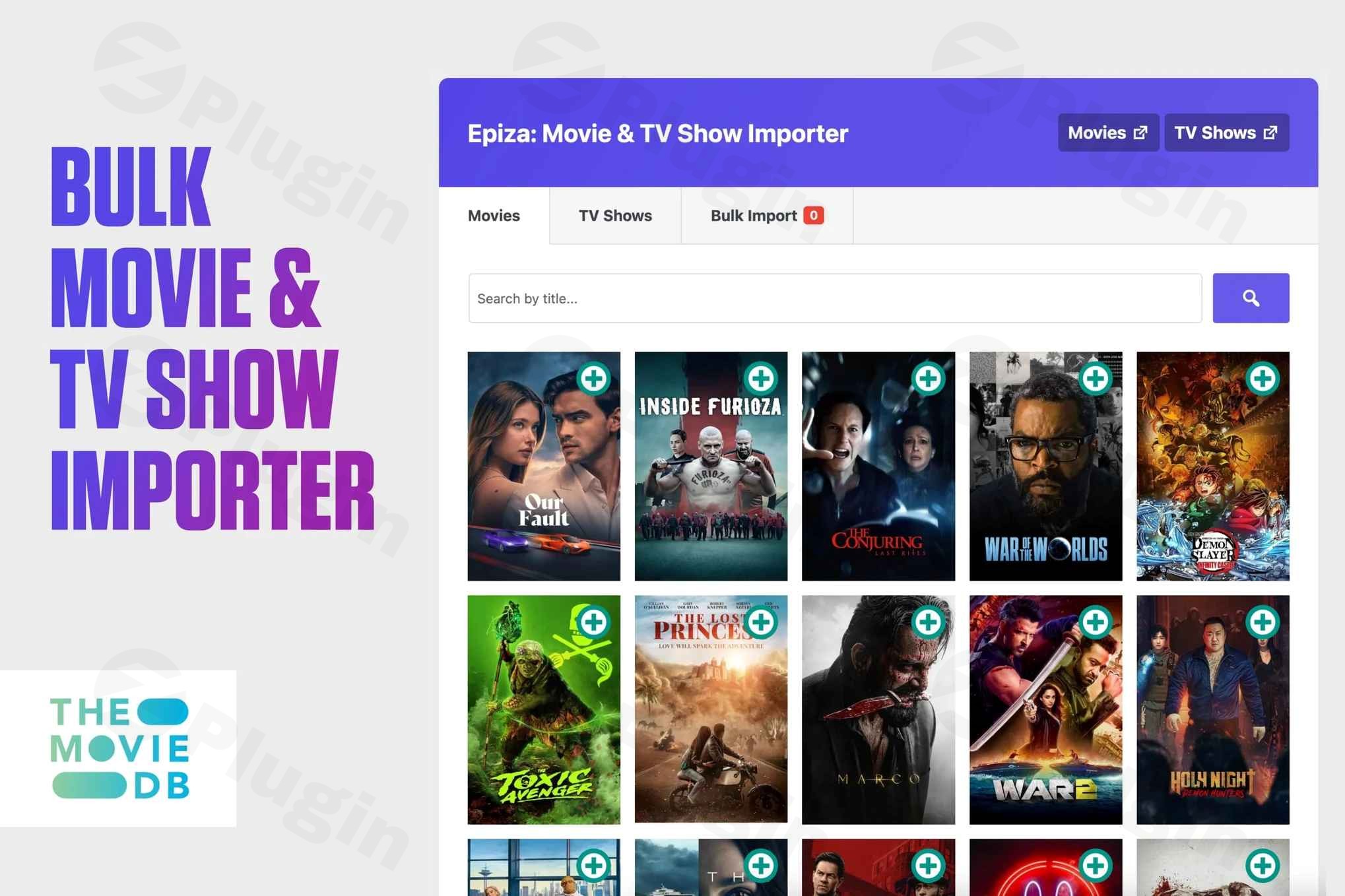
Transforming a WordPress website into a dynamic entertainment hub, rich with movie and TV show data, can be a daunting task. Manual data entry for thousands of titles, cast details, and plot summaries is not just time-consuming, it’s virtually impossible for most site owners. This is where Epiza, a powerful WordPress Movie Importer Plugin, steps in. It’s designed to revolutionize how you manage cinematic content, offering effortless bulk import of movies and TV series directly into your site within seconds.Epiza utilizes the extensive The Movie Database (TMDB) API, enabling you to create a comprehensive, automatically updated database of films and television shows. Whether you’re a film critic, a TV series enthusiast building a fan site, or a content creator aiming to enhance your blog with entertainment data, Epiza provides a streamlined solution. It integrates seamlessly with your existing WordPress theme, making your imported content feel like a native part of your site. This allows you to focus on engaging your audience, rather than wrestling with data input.
Key Features That Make Epiza an Essential TMDB WordPress Plugin
Epiza isn’t just a simple importer; it’s a meticulously crafted solution built to handle the complexities of entertainment data with ease. Its modular structure and use of modern AJAX technology ensure both flexibility and peak performance for your WordPress movie database plugin.
Effortless Bulk Movie & TV Show Import WordPress
The cornerstone of Epiza is its robust bulk import capability. Forget about manually adding each film or episode. With Epiza, you can:
- Rapidly Populate Your Site: Instantly import thousands of movie titles and TV series, complete with detailed information such as plot summaries, release dates, genres, and ratings. This is ideal for quickly launching new content sections or significantly expanding existing ones.
- Eliminate Tedious Data Entry: Save countless hours by automating the collection of essential metadata, cast details, and production information. This allows you to focus your efforts on content creation, marketing, and community building.
- Stay Up-to-Date: Leveraging the TMDB API ensures your film and TV content remains accurate and consistently updated, providing your audience with the latest information.
Deep TMDB API Integration
Epiza’s seamless integration with The Movie Database (TMDB) API is its engine, providing access to one of the largest and most current entertainment databases available.
- Access Vast Data: Tap into an extensive library of movie and TV show data, including cast and crew information, images, trailers, and more.
- Free API Access: While powerful, the TMDB API is free to use, requiring only a simple account registration and API key generation. This makes Epiza a cost-effective solution for serious website owners.
Intelligent Content Structuring with Custom Post Types & Taxonomies
To ensure your entertainment content is well-organized and easily navigable, Epiza automatically creates dedicated structures within WordPress:
- Dedicated Post Types: Movies and TV shows are imported into their own custom post types, keeping them distinct from your regular blog posts. This improves content management and allows for specialized display.
- Automatic Taxonomies: The plugin establishes custom taxonomies for genres (e.g., Action, Comedy, Drama) and a shared taxonomy for actors. These fields are automatically populated upon import, making content discoverability simple for your users. You retain the flexibility to manually edit these fields later if needed.
Smart Import Controls for Optimized Performance
Epiza’s advanced settings panel gives you granular control over what data gets imported:
- Selective Data Import: Don’t need specific data types like trailers or certain cast roles? You can selectively disable them before import. This keeps your database clean, lean, and optimized, preventing unnecessary data bloat.
- Resource Management: The intelligent import system respects your server resources, ensuring comprehensive content delivery without overburdening your hosting environment.
Seamless WordPress & Theme Compatibility
Epiza is engineered to integrate fluidly with your existing WordPress setup:
- Native Feel: Movies and TV shows are displayed using a familiar listing format, much like your theme’s blog layout. This consistent user experience means visitors can easily navigate your entertainment content, regardless of your chosen WordPress theme. This addresses concerns about Movie Database WordPress Theme Compatibility.
- WordPress Standards: The plugin adheres to WordPress coding standards, enhancing stability and ensuring it functions as if it were a built-in WordPress feature, not an external addition.
Installing & Setting Up Your Epiza WordPress Movie Importer
Getting started with Epiza is straightforward, designed for users of all technical skill levels. Follow these steps to transform your WordPress site into a cinema-grade entertainment portal.
Step 1: Purchase, Download, and Install the Plugin
- Acquire Epiza: Purchase the Epiza plugin from a trusted source like ZeroPlugin.com, ensuring you receive genuine GPL-licensed software with security scans and regular updates.
- Download: Once purchased, download the plugin’s
.zipfile to your computer. - Upload to WordPress:
- Log in to your WordPress admin dashboard.
- Navigate to Plugins > Add New.
- Click the “Upload Plugin” button at the top of the page.
- Click “Choose File”, select the Epiza
.zipfile you downloaded, and click “Install Now”.
- Activate: After successful installation, click “Activate Plugin”. Epiza will now appear in your list of installed plugins.
Step 2: Obtain Your Free TMDB API Key
A crucial step for Epiza’s functionality is obtaining a free API key from The Movie Database (TMDB). This key allows Epiza to access the vast movie and TV show data.
- Visit TMDB: Go to themoviedb.org.
- Register/Log In: If you don’t have an account, click “Join TMDB” and follow the registration steps. If you already have an account, simply log in.
- Access API Settings: Once logged in, navigate to your profile settings. Look for a section like “API” or “Settings > API.”
- Request a New API Key: Choose “Developer” and follow the prompts to request an API key. You’ll typically need to agree to their terms of service and briefly describe your intended use (e.g., “WordPress website for movie reviews”).
- Copy Your API Key: Once generated, copy your API key. It will be a string of alphanumeric characters.
Step 3: Configure Epiza Settings in WordPress
- Navigate to Epiza Settings: In your WordPress dashboard, look for a new menu item, usually labeled “Epiza” or “Movie Importer.” Click on it to access the plugin’s settings panel.
- Enter Your TMDB API Key: Locate the field for the TMDB API key and paste the key you copied in Step 2.
- Adjust Import Preferences: Review the advanced settings panel. Here, you can:
- Disable unwanted data: Uncheck boxes for any data types (e.g., specific cast roles, trailers, or images) you don’t wish to import, helping to keep your database lean.
- Set default languages/regions: If applicable, configure these to match your target audience.
- Save Changes: Click “Save Changes” to apply your configurations.Now your Epiza WordPress plugin is configured and ready to start importing content!
Practical Usage & Best Practices with Epiza
Epiza streamlines content creation for various entertainment website models. Here’s how you can leverage it in your workflow:
Use Case 1: Building a Niche Movie Review or Fan Site
For bloggers and niche content creators, Epiza is ideal for quickly populating your site with detailed information about specific genres, actors, or filmographies.
- Workflow: After installing and configuring, use Epiza’s search and bulk import features to pull in all movies starring a particular actor or within a specific genre. Once imported, you can then add your unique review content, ratings, and opinions to each movie post.
- Best Practice: Prioritize importing the core data (title, plot, cast, images) and then enrich it with your original content. This establishes authority quickly, allowing you to focus on the “review” aspect.
Use Case 2: Creating a Comprehensive TV Series Database
If your goal is to be the ultimate destination for television enthusiasts, Epiza simplifies the complex task of managing episodic content.
- Workflow: Utilize the dedicated TV series importer to pull in entire seasons or complete series from TMDB. This includes episode guides, season information, and cast details. The plugin automatically creates structured content for each series and its episodes.
- Best Practice: Ensure your theme is optimized for displaying hierarchical content (series > seasons > episodes). Use Epiza’s smart controls to import only the most relevant data to keep your database efficient. This is the best WordPress plugin for TV series data import and management.
Use Case 3: Enhancing an Existing Blog with Related Entertainment Content
Already have a blog and want to add a rich section about movies or TV shows without manual effort? Epiza is perfect for integrating a dynamic entertainment database.
- Workflow: Identify popular movies or TV shows relevant to your blog’s existing content. Use Epiza to quickly import these titles. You can then link to them naturally from your blog posts, creating an internal network of related content that keeps visitors engaged longer.
- Best Practice: Leverage Epiza’s custom post types to maintain a clear distinction between your blog posts and imported entertainment content. This keeps your site architecture clean and SEO-friendly.
How to Import Movies from TMDB to WordPress Automatically
While Epiza does not feature a fully automated, schedule-based import directly in its current description (as in, “set it and forget it” for new releases), it significantly automates the process of pulling large datasets. You initiate the bulk import through the plugin’s interface, selecting the desired content. The “automatic” aspect refers to the elimination of manual data entry once you trigger the import for chosen titles. For staying up-to-date, you would periodically revisit the plugin’s interface to search for and import newer releases or updated information.
FAQ & Troubleshooting
Here are answers to common questions about using Epiza to ensure a smooth experience.
Q: What is the best WordPress plugin for creating a movie website?
A: While “best” can be subjective, Epiza – Bulk Movie & TV Show Importer For WordPress stands out as an excellent choice for creating a comprehensive movie and TV show website. Its seamless TMDB API integration, effortless bulk import capabilities, smart controls, and strong WordPress theme compatibility make it highly effective for quickly building and managing a rich entertainment database without manual data entry.
Q: Does Epiza WordPress plugin support custom post types for actors?
A: Yes, Epiza creates dedicated custom post types for movies and TV shows and establishes custom taxonomies for actors (along with genres). This means that when you import a movie or TV show, the actors associated with that content are automatically added to the actor taxonomy, allowing you to easily organize and display content based on actors. You can then link related content through these taxonomies.
Q: How to get a TMDB API key for WordPress movie importer?
A: To get a TMDB API key, you need to visit themoviedb.org, register for a free account (or log in), and then navigate to your profile settings to find the “API” section. From there, you can request a “Developer” API key, which is completely free. Once generated, copy the alphanumeric key and paste it into the Epiza plugin’s settings panel in your WordPress dashboard.
Q: Is Epiza compatible with my WordPress theme?
A: Epiza is designed for high compatibility with various WordPress themes. It displays imported movies and TV shows using a listing format similar to your theme’s default blog page layout. This approach ensures a consistent user experience and means the content integrates smoothly, functioning as if it were a native part of any well-coded WordPress theme.
Q: What are the server requirements for Epiza?
A: While Epiza itself is lightweight and fast due to its modular AJAX structure, its server requirements align with general WordPress best practices, especially when handling large datasets. For optimal performance, WordPress generally recommends:
- PHP: Version 8.3 or greater (minimum 7.4).
- Database: MySQL 8.0 or greater, or MariaDB 10.6+.
- Memory: At least 1GB RAM (2GB+ for optimal performance with many imports).
- Disk Space: At least 10GB for content and database storage.
- Other: HTTPS support is essential.The crucial requirement for Epiza’s functionality is a working internet connection to access the TMDB API.
Conclusion: Empower Your Entertainment Website with Epiza
For anyone looking to create, manage, or expand an entertainment-focused WordPress website, Epiza – Bulk Movie & TV Show Importer For WordPress offers an unparalleled solution. By eliminating the manual grind of data entry and leveraging the comprehensive power of the TMDB API, Epiza empowers you to build rich, engaging movie and TV show databases with remarkable efficiency.It’s an investment in a professional, robust solution for serious website owners, ensuring stable performance even with thousands of entries. If you’re aiming to establish a go-to online destination for cinematic content, Epiza provides the technical foundation and ease of use to make that vision a reality. Stop worrying about data and start building your audience with this exceptional WordPress movie importer plugin.
I. Download Limits & Account Benefits
- Free Downloads: Each email address receives 3 downloads per day for free products
- Upgrade Benefits: Purchase any paid product to increase your daily download limit by 3 for each paid product
- No Account Required: You can download immediately by receiving the download link via email
- Account Recommended: Create an account for easier access to your order history and direct update downloads
II. Understanding GPL vs Official Versions
Important: The products available on WPPick are GPL-licensed versions, which differ from official developer versions. Before purchasing, please read our comprehensive guide: Understanding GPL & Official Differences at WPPick
Key Points:
- GPL versions may not include premium support from original developers
- Updates may be delayed compared to official releases
- Some premium features might have limitations
- Always consider your specific needs and support requirements
III. Support & Assistance
We’re here to help through multiple channels:
- Email Support: Direct email assistance for all inquiries
- Live Chat: Real-time support during business hours
- Comprehensive Documentation: Detailed guides and tutorials
IV. Order Tracking
Access your complete purchase history and download links anytime: Order History
V. Account Access
New to WPPick? Login or Create Account to manage your downloads and orders efficiently.
VI. Refund Protection
We stand behind our products with a clear refund policy. Review our terms: Refund Policy
VII. Privacy & Security
Your data security is our priority. Learn how we protect your information: Privacy Policy
VII. Terms of Service
Understanding our service terms ensures a smooth experience: Terms of Use
Quick Tips for Best Experience
- Verify Compatibility: Check plugin/theme compatibility with your WordPress version
- Backup First: Always backup your site before installing new plugins or themes
- Test Environment: Consider testing on a staging site first
- Stay Updated: Regularly check for updates in your account dashboard
- Read Documentation: Review any included documentation for optimal setup
Need Help?
If you have questions about downloads, licensing, or need technical assistance, don’t hesitate to contact our support team. We’re committed to ensuring you have the best possible experience with WPPick products.
Ready to get started? Your download adventure begins with just one click!