

Essential Addons For Voxel
/Year
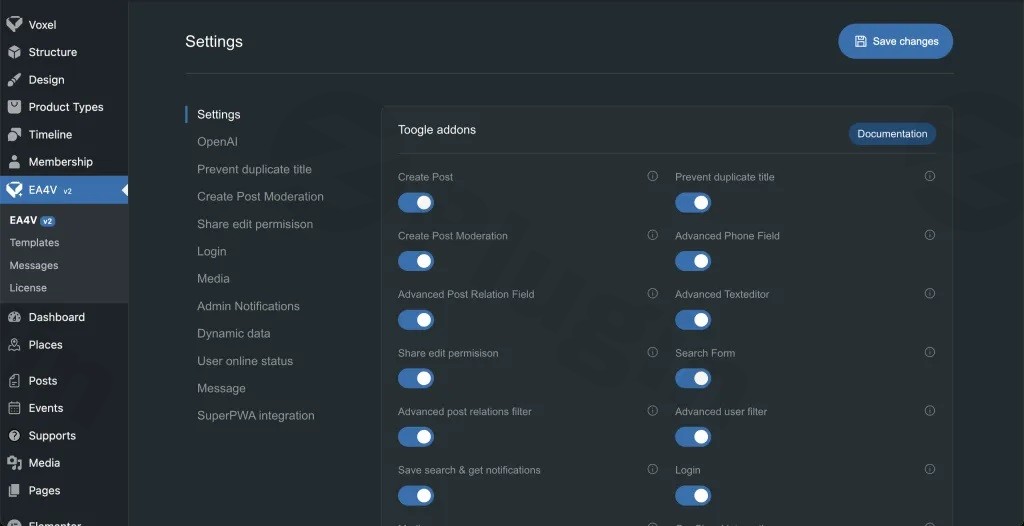
The Voxel WordPress theme is a powerful foundation for building dynamic websites, directories, and listing platforms. However, even the most robust themes can benefit from targeted enhancements that streamline workflows and unlock advanced functionalities. This is where Essential Addons For Voxel (EA4V) comes in. As a premier Voxel addon, EA4V is a professional-grade WordPress plugin meticulously designed to extend the capabilities of your Voxel-powered website with a smart, modular addon system. It addresses common pain points by offering a suite of advanced features, allowing you to activate only what your project needs, thereby ensuring optimal performance and a lean site.
What are the main features of Essential Addons For Voxel?
EA4V boasts a comprehensive suite of features aimed at transforming your Voxel site into a more versatile and powerful platform. Here’s a detailed breakdown of its core functionalities:
Modular Architecture for Custom Functionality & Performance Optimization
At its heart, EA4V operates on a unique modular architecture. All its powerful features are disabled by default, giving you complete control.
- Independent toggle system: Each addon can be activated or deactivated with a single click.
- Activate only specific features: This prevents bloat and ensures your site only loads the necessary scripts and styles, directly contributing to Essential Addons For Voxel performance optimization.
- No performance overhead: Unused modules remain completely inactive, making EA4V an incredibly efficient choice for Voxel users concerned about site speed.
Advanced Post Creation Tools: How to Enhance Voxel Post Submission Forms
The plugin significantly enhances Voxel’s native post submission forms, providing unparalleled control and flexibility.
- Enhanced Post Submission Forms: Gain granular control over field visibility, allowing you to show or hide fields based on specific conditions.
- Single-Step Form Option: Streamline the user experience by bypassing Voxel’s default multi-step submission process for simpler forms.
- Auto-Save Drafts & Live Previews: Improve user experience by preventing data loss and allowing submitters to see their content before final publication.
- Post-Submission Actions & Custom Success Screens: Define what happens after a post is submitted, including redirects or displaying custom messages.
- FluentCRM Integration: Leverage Essential Addons For Voxel FluentCRM integration to trigger actions within FluentCRM upon post submission, such as adding users to lists or initiating automation.
- Schedule Post Feature: Even for posts requiring manual approval, you can schedule them to go live at a later date, enhancing content planning.
Supercharged Search Functionality: Advanced Voxel Search Form Filters
EA4V introduces rich and intuitive filtering capabilities to your Voxel search forms.
- Complete UI for Post Relation Filters: Easily manage and display filters based on post relationships, offering a more refined search experience.
- Taxonomy Term Visibility Controls: Precisely control which taxonomy terms appear or hide in your search forms without affecting the underlying query results.
- Advanced Filtering Capabilities: Provide your users with sophisticated options to find exactly what they’re looking for, making your directories and listings more effective.
- Delay Search as I Move the Map: Optimizes map-based searches by delaying the query until the user stops moving the map, reducing server load.
- Ignore URL Parameters: Offers flexibility in how search results are displayed and linked.
Professional Listing Comparison for Voxel
This powerful feature allows your users to compare any Voxel Custom Post Type (CPT) listings side-by-side, much like popular eCommerce or directory sites.
- Compare Any Voxel CPT Listings: Configure comparison for products, services, properties, or any other listing type you’ve created with Voxel.
- Easy Elementor Integration: Seamlessly integrate comparison buttons and tables into your pages using dedicated Elementor widgets.
- Customizable Widgets: Tailor the appearance and fields displayed in your comparison tables to match your site’s design and user needs.
Dynamic Popup System: Voxel Popup Builder
Create engaging and interactive popups with advanced controls.
- Server-Side or Client-Side Content Rendering: Choose the optimal rendering method for performance and dynamic content.
- Auto-Refreshing Popup Content: Keep your popup content fresh and up-to-date without requiring a page reload.
- Support for Elementor Templates & Voxel CPT Preview Cards: Use existing Elementor templates or display Voxel CPT preview cards dynamically within your popups.
- Load Content with URL Parameters: Dynamically load specific content into your popups based on URL parameters for highly personalized experiences.
Additional Powerful Tools
Beyond the core features, EA4V packs a variety of essential utilities to streamline your Voxel site management.
- Advanced Media Management: Enhance your file management with shared media libraries among users/administrators and automatic file cleanup when posts are deleted, making it the best Voxel media library management plugin. (Note: The Advanced File Field addon was removed in version 2.1.1, with users advised to utilize the new Voxel Field Overrides feature instead.)
- Bulk Indexing Tool: The “EA4V Index All” tool allows for one-click bulk indexing of posts across all CPTs, crucial for search and performance.
- QR Code Generator: Easily generate QR codes for posts or specific content.
- AI Content Tools: Leverage AI capabilities for content generation, keeping your site modern and efficient.
- Notification Systems: Implement custom notification systems for user engagement and site alerts (including OneSignal integration).
- SuperPWA Integration: Enhance your site’s Progressive Web App capabilities.
- Prevent Duplicate Title: A handy tool to maintain content uniqueness and SEO integrity.
Installation & Setup
Installing Essential Addons For Voxel is a straightforward process, just like any other WordPress plugin. Follow these steps to get started:
- Purchase & Download: Obtain the plugin zip file from a trusted source, such as ZeroPlugin.com, ensuring it’s 100% GPL Licensed.
- Upload to WordPress:
- Log in to your WordPress admin dashboard.
- Navigate to Plugins > Add New.
- Click the Upload Plugin button at the top of the page.
- Click Choose File, select the
ea4v.zipfile you downloaded, and then click Install Now.
- Activate the Plugin: Once installed, click the Activate Plugin button.
- Configure Addons: After activation, a new menu item for EA4V will appear in your WordPress dashboard.
- Navigate to the EA4V settings.
- Here, you’ll find the modular addon system where all features are disabled by default.
- Toggle on only the specific addons you need for your project (e.g., “Advanced Post Creation,” “Listing Comparison,” “Dynamic Popup System”). This is key for Essential Addons For Voxel performance optimization.
- Integrate with Elementor & Voxel: For features like listing comparison, popups, or enhanced search forms, you’ll typically configure them further within Elementor’s editor using dedicated EA4V widgets or Voxel’s form builders.
Practical Usage / Best Practices
EA4V is designed to streamline workflows for various types of Voxel users. Here are a few concrete use cases:
For Directory & Listing Site Owners
If you’re running a directory of businesses, properties, or services, EA4V is an obvious must-have.
- Enhanced User Submissions: Use the Voxel create post widget enhanced features to create highly customized and user-friendly submission forms. Implement auto-save, live previews, and custom success messages to reduce abandonment rates. Integrate with FluentCRM to automatically onboard new listing submitters into your email marketing sequences.
- Superior Search Experience: Leverage Voxel search form filters to offer advanced search capabilities. Users can filter listings by complex post relationships or specific taxonomy terms, making it easier to find relevant results.
- Listing Comparisons: Enable visitors to compare multiple listings side-by-side (e.g., comparing two hotels or two real estate properties), aiding their decision-making process. This functionality is ideal for review sites and directories where detailed comparisons add significant value.
For Agencies & Freelancers Building Client Sites
Agencies can significantly shave hours off daily workflows with EA4V, delivering more polished and feature-rich Voxel sites.
- Tailored Functionality: The modular system allows you to activate only the features required by each client’s project, avoiding unnecessary bloat and ensuring optimal performance for their specific needs.
- Rapid Development: Quickly implement advanced features like dynamic popups, custom submission forms, or listing comparisons without custom coding, speeding up development time.
- Consistent Quality: Ensure client sites benefit from robust features tested and maintained by the EA4V developers, rather than relying on disparate, less integrated solutions.
For Content Creators & Bloggers on Voxel
Even if your primary focus isn’t a directory, EA4V offers valuable tools.
- Advanced Media Management: Share media libraries across different user roles if you have a multi-author blog, and rely on automatic file cleanup to keep your database tidy.
- AI Content Tools: Experiment with AI content generation to assist with drafting articles, descriptions, or marketing copy for your Voxel site.
- Dynamic Popups: Use the Voxel popup builder to create engaging email opt-in forms, promotional alerts, or related content suggestions that appear dynamically to users.
FAQ & Troubleshooting
Q1: What are the main features of Essential Addons For Voxel?
A1: Essential Addons For Voxel (EA4V) offers advanced post creation forms, supercharged search filtering capabilities, professional listing comparison, a dynamic popup system, sophisticated media management, bulk indexing tools, QR code generation, AI content integration, and various notification systems, all within a modular architecture.
Q2: Is Essential Addons For Voxel compatible with Elementor?
A2: Yes, Essential Addons For Voxel is designed for seamless integration with Elementor. Many of its features, such as listing comparison and dynamic popups, leverage Elementor widgets for easy setup and customization within the page builder interface. It is compatible with Voxel 1.7 and Elementor Plugin Version 3.32.3 and likely newer versions.
Q3: How does Essential Addons For Voxel improve site performance?
A3: EA4V significantly improves site performance through its highly modular design. All addons are disabled by default, allowing users to activate only the specific features they need. This prevents unnecessary scripts and styles from loading, thereby reducing bloat and ensuring your Voxel site remains fast and optimized, contributing to Essential Addons For Voxel performance optimization.
Q4: Does Essential Addons For Voxel integrate with FluentCRM?
A4: Yes, Essential Addons For Voxel provides robust Essential Addons For Voxel FluentCRM integration. This allows you to define post-submission actions, such as automatically adding users to specific lists within FluentCRM or initiating automation workflows, enhancing your marketing and user management capabilities.
Q5: Can I disable unused features in EA4V?
A5: Absolutely. The core design principle of EA4V is modularity. All features are independently toggled and disabled by default. You have complete control to activate only the specific addons your project requires, ensuring no performance overhead from unused modules. This is a key advantage for keeping your site lean and efficient.
Conclusion
EA4V: Essential Addons For Voxel is more than just another plugin; it’s a strategic enhancement for any serious Voxel user. By filling critical functional gaps and polishing the theme’s inherent capabilities, it offers a robust, modular, and performance-conscious solution for building advanced websites. Whether you’re a directory owner seeking to enhance Voxel post submission forms, an agency needing versatile tools for clients, or a content creator looking for a best Voxel media library management plugin, EA4V delivers significant ROI by saving development time and unlocking features that would otherwise require custom coding. Trust in its GPL licensing, regular updates, and clean source code, and take your Voxel-powered WordPress site to the next level with this indispensable Voxel addon.
I. Download Limits & Account Benefits
- Free Downloads: Each email address receives 3 downloads per day for free products
- Upgrade Benefits: Purchase any paid product to increase your daily download limit by 3 for each paid product
- No Account Required: You can download immediately by receiving the download link via email
- Account Recommended: Create an account for easier access to your order history and direct update downloads
II. Understanding GPL vs Official Versions
Important: The products available on WPPick are GPL-licensed versions, which differ from official developer versions. Before purchasing, please read our comprehensive guide: Understanding GPL & Official Differences at WPPick
Key Points:
- GPL versions may not include premium support from original developers
- Updates may be delayed compared to official releases
- Some premium features might have limitations
- Always consider your specific needs and support requirements
III. Support & Assistance
We’re here to help through multiple channels:
- Email Support: Direct email assistance for all inquiries
- Live Chat: Real-time support during business hours
- Comprehensive Documentation: Detailed guides and tutorials
IV. Order Tracking
Access your complete purchase history and download links anytime: Order History
V. Account Access
New to WPPick? Login or Create Account to manage your downloads and orders efficiently.
VI. Refund Protection
We stand behind our products with a clear refund policy. Review our terms: Refund Policy
VII. Privacy & Security
Your data security is our priority. Learn how we protect your information: Privacy Policy
VII. Terms of Service
Understanding our service terms ensures a smooth experience: Terms of Use
Quick Tips for Best Experience
- Verify Compatibility: Check plugin/theme compatibility with your WordPress version
- Backup First: Always backup your site before installing new plugins or themes
- Test Environment: Consider testing on a staging site first
- Stay Updated: Regularly check for updates in your account dashboard
- Read Documentation: Review any included documentation for optimal setup
Need Help?
If you have questions about downloads, licensing, or need technical assistance, don’t hesitate to contact our support team. We’re committed to ensuring you have the best possible experience with WPPick products.
Ready to get started? Your download adventure begins with just one click!
- Download Essential Addons for Voxel v2.2.0.1
- Success Screen Bug