

Eurus – Shopify Theme By Bss Commerce
/Year
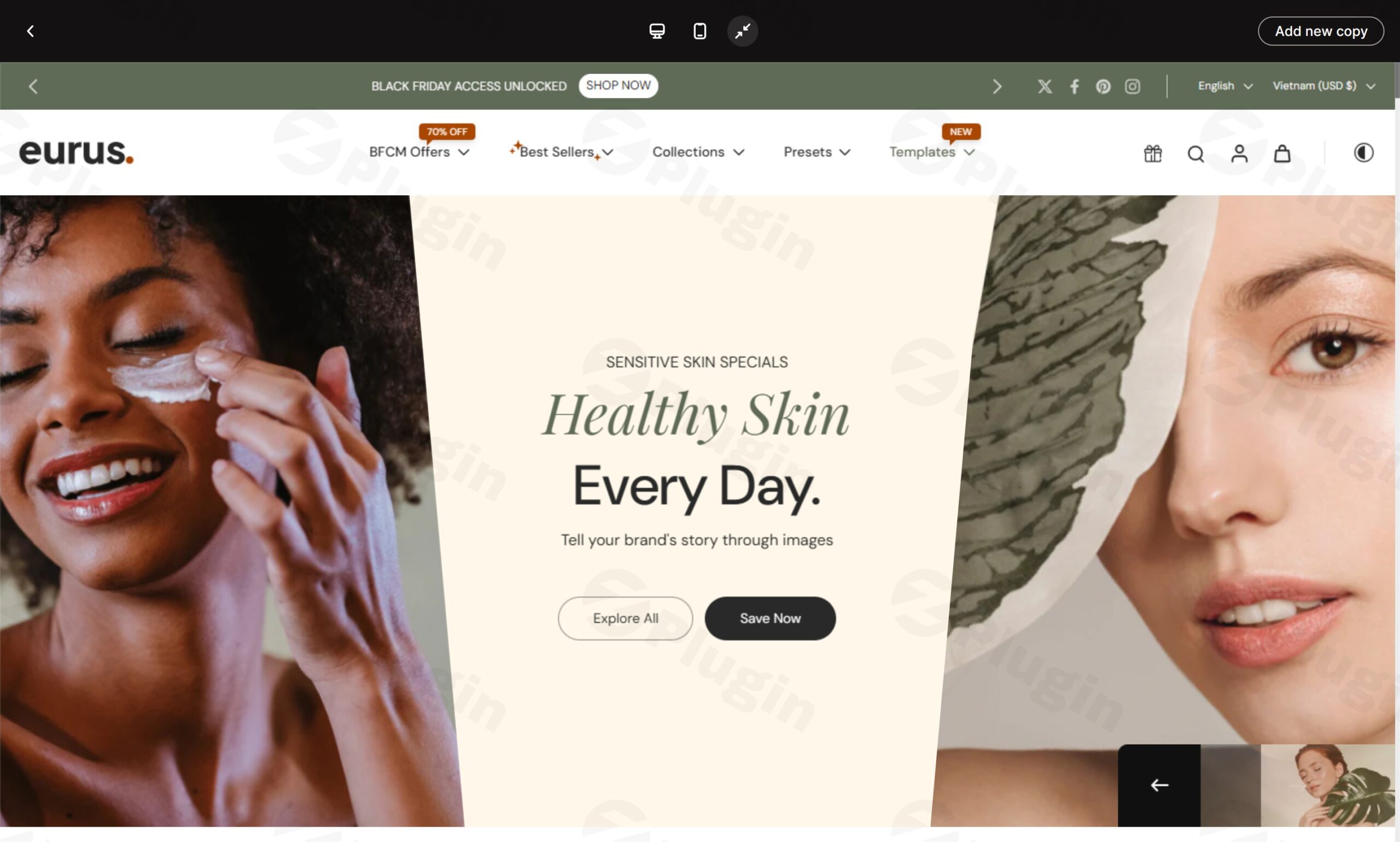
Eurus is a premium Shopify speed optimized theme specifically engineered by BSS Commerce (Omni Themes) for ambitious health, beauty, and high-volume e-commerce brands. In an increasingly competitive online landscape, where speed and conversion rates directly impact sales, Eurus stands out by transforming heavy seasonal traffic into consistent revenue. While the term “plugin” is typically associated with WordPress, it’s important to note that Eurus is a Shopify theme, designed exclusively for the Shopify platform, and cannot be installed on a WordPress site. This theme is built from the ground up to address the critical need for robust performance and a seamless customer journey, particularly during peak shopping seasons.
Why Eurus is Your Go-To Shopify Theme for Conversion
Choosing the right theme is paramount for any Shopify store aiming for significant growth. Eurus is not just a visual template; it’s a strategic asset packed with features designed to boost your store’s efficiency and profitability. It minimizes reliance on numerous third-party apps, offering a cohesive, all-in-one solution developed by experts in e-commerce.
Unmatched Performance & Speed
Experience top-tier Core Web Vitals with Eurus. Built with modern technologies like Tailwind CSS and Alpine.js, this Shopify speed optimized theme guarantees lightning-fast loading times. This optimization is crucial for keeping customers engaged, especially during high-traffic periods, and ensures a seamless shopping experience even during the busiest sales events. The theme’s architecture, including lazy-loaded images and deferred scripts, consistently achieves high scores on performance tests for both desktop and mobile, directly contributing to better user experience and improved SEO.
Global-Ready Design Features
Ready for international expansion, Eurus is fully multilingual and supports Right-to-Left (RTL) languages. It includes built-in EU translations for English, French, Italian, German, and Spanish, alongside full support for Asian markets and an integrated language switcher. This global readiness provides the flexibility needed for worldwide market penetration, making it a trusted choice for global e-commerce winners.
Conversion-Optimized Layouts
Specifically designed with the health and beauty industries in mind, Eurus includes powerful merchandising tools and over 50 flexible sections and blocks that drive sales and enhance product presentation. Its mobile-first Shopify theme design ensures that your store looks stunning and performs flawlessly on smartphones, where a significant portion of e-commerce traffic originates. The “Flexible Area” section further empowers merchants to combine different elements for unique layouts across all store pages.
Comprehensive Eurus Theme Features
Eurus is packed with an extensive feature set, meticulously crafted to reduce the need for external apps and provide everything your store needs to thrive.
Advanced Cart & Checkout Experience
Elevate your customer’s journey from browsing to purchase with integrated tools:
- Slide-out cart functionality: Allows customers to review their cart without leaving the current page.
- Sticky cart: Ensures the cart is always accessible, encouraging completion of purchase.
- Quick buy options & pre-order capabilities: Streamline the purchasing process for popular or upcoming products.
- In-store pickup integration: Offers flexibility for local customers.
- Gift wrapping services & cart notes: Personalize the shopping experience.
- Quantity pricing & Shop Login integration: Caters to various purchasing needs and simplifies repeat visits.
Powerful Marketing & Conversion Tools
Boost your sales with integrated marketing functionalities that drive urgency and trust:
- Promotional banners & popups: Announce sales, new arrivals, or special offers effectively.
- Press coverage displays & trust badges: Build credibility and social proof.
- Countdown timers: Create urgency for flash sales or limited-time offers.
- Cross-selling capabilities & product bundles: Increase average order value by suggesting related items or grouping products.
- Back-in-stock alerts & age verification system: Keep customers informed and ensure compliance.
- Product badges & promotional tiles: Highlight key product attributes or special deals.
Professional Merchandising Solutions
Showcase your products in the best light with versatile merchandising features:
- Lookbook presentations & product video integration: Visually engage customers with rich media.
- Comprehensive size charts & nutritional/ingredients displays: Provide essential product information clearly.
- High-resolution image support & color swatches: Offer detailed product visuals.
- Image hotspots & before/after comparison sliders: Highlight specific features and demonstrate product efficacy, especially valuable for health and beauty products.
Enhanced Product Discovery
Help customers find what they need quickly and efficiently:
- Mega menu navigation: Supports up to 4 levels with various styling options for improved navigation.
- Advanced search functionality & comprehensive product filtering: Refine search results for a tailored experience.
- Sticky header & breadcrumb navigation: Ensure easy site navigation at all times.
- Infinite scroll capabilities: Seamlessly load more products as users scroll.
- Recently viewed products & personalized recommendations: Enhance user experience and encourage further exploration.
Eurus Shopify Theme Installation & Setup
Installing and setting up your Eurus Shopify Theme is a straightforward process, designed for merchants of all technical levels.
- Purchase the Theme: Acquire the Eurus theme from the Shopify Theme Store or a trusted reseller like ZeroPlugin.com. Purchasing from ZeroPlugin.com ensures genuine GPL-licensed software with regular updates and security scanning.
- Add to Your Shopify Store: Once purchased, the theme will automatically be available in your Shopify admin under Online Store > Themes. If you downloaded a .zip file, click “Add theme” and then “Upload zip file.”
- Publish (or Customize First): You can immediately publish the theme or click “Customize” to configure it before making it live. It’s recommended to customize it first to align with your brand.
- Explore Presets: Eurus comes with five professionally designed presets (Eurus, Whiff, Swirl, Breath, and Breeze). These quick-start options allow for rapid deployment and effortless customization tailored to various industries. Choose the preset that best matches your brand aesthetic and product type.
- Customize Sections & Blocks: Use the drag-and-drop Shopify editor to personalize your store. Eurus offers over 50 flexible sections and blocks, allowing you to easily add, remove, and reorder elements like image banners, product grids, testimonials, and marketing pop-ups. Leverage the “Flexible Area” section for greater creative freedom.
- Configure Theme Settings: Adjust global settings like typography, colors, layout, and social media links under the Theme Settings menu.
- Add Your Content: Populate your store with products, collections, blog posts, and static pages, leveraging the theme’s rich features for product presentation, such as video integration and lookbooks.
- Review and Launch: Preview your store on different devices to ensure everything looks and functions correctly, especially on mobile, given Eurus’s mobile-first Shopify theme design. Once satisfied, publish your theme!
Practical Usage & Best Practices with Eurus
Leveraging the Eurus Shopify Theme effectively means focusing on its strengths to enhance customer experience and drive conversions. Here are some practical use cases and best practices:
- Optimizing for Seasonal Sales & Flash Events: During Black Friday, Cyber Monday, or other peak shopping seasons, Eurus’s lightning-fast performance ensures your site handles high traffic without a hitch. Utilize built-in countdown timers and promotional banners to create urgency and highlight limited-time offers. Leverage quick buy and sticky cart features to streamline the checkout process when customers are making rapid purchasing decisions.
- Showcasing Health & Beauty Products with Detail: For health and beauty brands, product presentation is key. Use Eurus’s sophisticated merchandising solutions like before/after comparison sliders to visually demonstrate product effectiveness, product video integration for tutorials, and high-resolution image support for detailed views. The nutritional and ingredients displays are invaluable for transparent product information, building trust with discerning customers.
- Scaling Globally with Multilingual Support: If you’re targeting an international audience, Eurus’s global-ready design is a significant advantage. Implement the built-in language switcher and leverage the pre-translated options to provide a localized shopping experience. This not only broadens your reach but also significantly improves conversion rates in diverse markets, avoiding the need for costly external translation apps.
- Reducing App Dependence & Costs: One of the core benefits of Eurus is its extensive range of built-in features that often require separate paid apps in other themes. Regularly review your current app stack and see which functionalities are now native to Eurus (e.g., advanced cart features, promotional tools, product badges). Consolidating these features within the theme itself will lead to a cleaner, faster store and reduced monthly operational costs – making it a truly cost-effective Shopify speed optimized theme.
FAQ & Troubleshooting
What is the Eurus Shopify Theme?
The Eurus Shopify Theme, developed by Omni Themes (part of BSS Commerce), is a premium, high-performance e-commerce theme designed for Shopify stores, particularly those in the health, beauty, and high-volume sectors. It focuses on speed, conversion rate optimization, and extensive customization capabilities to help merchants maximize sales and improve user experience.
Is the Eurus theme good for SEO?
Yes, the Eurus theme is built with SEO best practices in mind. It features a clean, clear site structure, optimized code for fast loading times (a major SEO factor), breadcrumb navigation, mega menus, and robust support for meta tags and alt texts. These elements contribute to better crawlability, indexing, and ultimately, higher visibility in search engine results, making it an excellent SEO friendly Shopify theme.
How to install Eurus Shopify Theme?
To install the Eurus Shopify Theme, you typically purchase it from the Shopify Theme Store, after which it appears in your Shopify admin under “Online Store > Themes.” You can then customize it using the drag-and-drop editor and publish it when ready. If you have a theme file, you can also upload it directly via the “Add theme” > “Upload zip file” option in your Shopify admin.
Who develops the Eurus Shopify Theme?
The Eurus Shopify Theme is developed by Omni Themes, which is a part of BSS Commerce. BSS Commerce is a reputable company with over a decade of experience in developing e-commerce solutions for platforms like Magento and Shopify, known for their high-quality extensions and themes.
Can I use the Eurus theme on my WordPress website?
No, the Eurus theme is specifically designed for the Shopify e-commerce platform and cannot be directly installed or used on a WordPress website. Shopify themes and WordPress themes are built on different underlying technologies and platforms. If you wish to integrate Shopify functionality with a WordPress site, you would typically use plugins like Shopify’s Buy Button or third-party solutions that sync products between the two platforms.
Conclusion: The Smart Choice for High-Converting Shopify Stores
The Eurus Shopify Theme by BSS Commerce is more than just a beautiful design; it’s a robust, performance-driven solution engineered for significant e-commerce growth. With its focus on exceptional speed, unparalleled conversion features, and global readiness, Eurus empowers health and beauty brands—and any high-volume store—to maximize sales and deliver an outstanding customer experience. Its comprehensive built-in tools reduce the reliance on external apps, offering a streamlined, cost-effective, and ultimately, a more profitable way to run your online business. For merchants seeking to enhance their store’s performance and achieve consistent seasonal success, Eurus represents a confident, authoritative choice.
I. Download Limits & Account Benefits
- Free Downloads: Each email address receives 3 downloads per day for free products
- Upgrade Benefits: Purchase any paid product to increase your daily download limit by 3 for each paid product
- No Account Required: You can download immediately by receiving the download link via email
- Account Recommended: Create an account for easier access to your order history and direct update downloads
II. Understanding GPL vs Official Versions
Important: The products available on WPPick are GPL-licensed versions, which differ from official developer versions. Before purchasing, please read our comprehensive guide: Understanding GPL & Official Differences at WPPick
Key Points:
- GPL versions may not include premium support from original developers
- Updates may be delayed compared to official releases
- Some premium features might have limitations
- Always consider your specific needs and support requirements
III. Support & Assistance
We’re here to help through multiple channels:
- Email Support: Direct email assistance for all inquiries
- Live Chat: Real-time support during business hours
- Comprehensive Documentation: Detailed guides and tutorials
IV. Order Tracking
Access your complete purchase history and download links anytime: Order History
V. Account Access
New to WPPick? Login or Create Account to manage your downloads and orders efficiently.
VI. Refund Protection
We stand behind our products with a clear refund policy. Review our terms: Refund Policy
VII. Privacy & Security
Your data security is our priority. Learn how we protect your information: Privacy Policy
VII. Terms of Service
Understanding our service terms ensures a smooth experience: Terms of Use
Quick Tips for Best Experience
- Verify Compatibility: Check plugin/theme compatibility with your WordPress version
- Backup First: Always backup your site before installing new plugins or themes
- Test Environment: Consider testing on a staging site first
- Stay Updated: Regularly check for updates in your account dashboard
- Read Documentation: Review any included documentation for optimal setup
Need Help?
If you have questions about downloads, licensing, or need technical assistance, don’t hesitate to contact our support team. We’re committed to ensuring you have the best possible experience with WPPick products.
Ready to get started? Your download adventure begins with just one click!
- Added support for customizing price format using product metafields and applying the custom format from Theme settings in Product Information, Featured Product, and Quick View sections.
- Introduced Product Score block in Product Information, Featured Product, and Quick View sections to visually showcase a product’s key attributes, helping customers quickly evaluate its quality and suitability.
- Added Custom description option in Description block across Product Information, Featured Product, and Quick View sections to support detailed variant-specific descriptions using metafields for more precise and engaging presentation.
- Enabled evergreen timer in Product labels and badges.
- Added mobile thumbnail slider in Featured Product and Quick View sections for smooth and effortless browsing of product images.
- Improved Liquid language for better performance, maintainability, and more reliable customization for merchants.
- Refined Vertical Slideshow behavior for smoother scrolling and easier content browsing.
- Optimized mobile layouts for Product Comparison and Product Highlight sections, improving readability and interaction on smaller screens.
- Updated Estimated Delivery Time block to hide automatically when products are sold out to prevent unnecessary information.
- Updated Product Information, Quick View, and Featured Product sections to automatically hide blocks when corresponding metafields are empty, avoiding irrelevant content.
- Enhanced the Buy Your Own Bundle section with Next/Previous navigation buttons in the Sidebar layout, facilitating a structured and seamless step-by-step bundle creation process.
- Reduced mega menu loading delay, enabling faster access to categories and products and a more efficient overall site navigation.
- Corrected translation errors across multiple sections for accurate and professional localization.
- Fixed an issue preventing simple products from being added to cart in Product Information section.
- Restored the missing filter bar on Collection pages to improve product discoverability.
- Adjusted alignment and font sizing issues in Flexible Area section for a polished, professional layout across all devices.
- Fixed a bug preventing removal of Gift Wrapping products from the cart, ensuring accurate cart management and reducing friction at checkout.