

Events Manager Pro
/Year
Events Manager Pro is the essential premium extension that elevates the already robust free Events Manager plugin into a comprehensive, enterprise-grade event management system for WordPress. Designed for businesses, organizations, and professionals who demand advanced functionality, this premium add-on provides a sophisticated suite of features that streamline every aspect of event creation, management, and monetization. It is the definitive solution for transforming your WordPress site into a powerful hub for professional event hosting.
Supercharge Your WordPress Events with Professional Features
Events Manager Pro is engineered to handle a diverse range of event scenarios, from simple workshops to large-scale conferences. Its advanced capabilities are meticulously crafted to save time, reduce administrative overhead, and deliver a superior experience for both organizers and attendees.
Professional Ticketing System
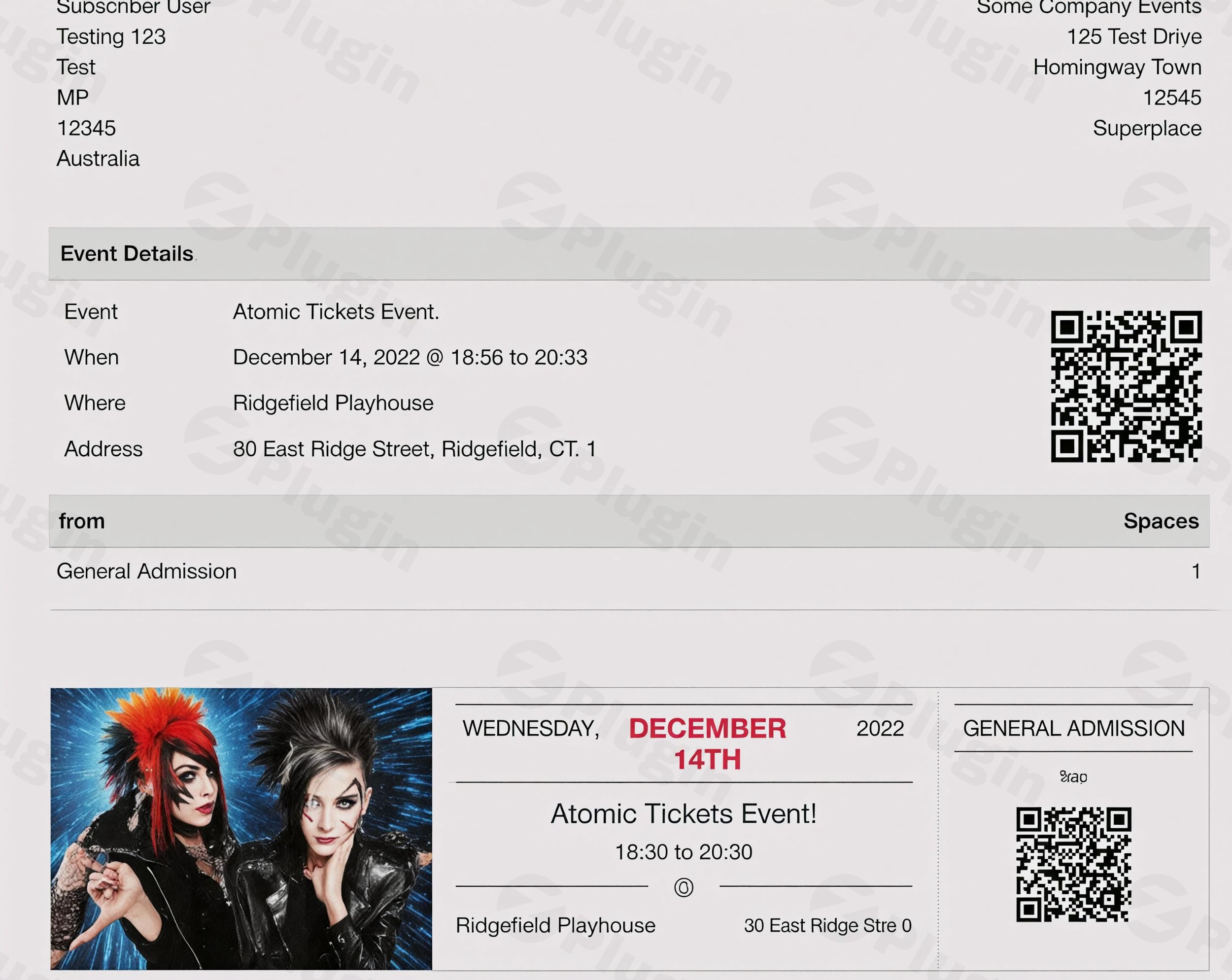
Events Manager Pro offers a sophisticated ticketing system, allowing you to create and manage highly customizable tickets. This includes unique QR codes, barcodes, and printable options for efficient event check-in. Organizers can define multiple ticket types, set precise capacity limits for each, and meticulously manage attendee lists, ensuring smooth operations from registration to event day.
Recurring Events Management
Managing events that occur regularly is effortless with Events Manager Pro. The plugin provides flexible scheduling options to easily set up repeating events. Whether your events are daily, weekly, monthly, or follow a custom recurrence pattern, this feature eliminates the need for redundant data entry, saving significant time and reducing potential errors.
Advanced Booking Management
Complex booking scenarios are simplified with Events Manager Pro’s advanced booking functionalities. It includes conditional booking fields, waitlist management, and approval systems, providing complete control over the registration process. Efficiently handle cancellations, process refunds, and maintain clear communication with attendees, ensuring a professional and organized experience. The system also supports individual attendee custom forms, multiple bookings at once, and manual booking capabilities.
Multiple Payment Gateways & Monetization
Monetize your events with ease using integrated payment gateways such as PayPal and Stripe. Events Manager Pro also supports Authorize.net and other popular gateways, alongside offline payment options. Enhance your marketing strategies with discount codes, coupons, and special pricing options, allowing for flexible pricing models and promotional campaigns. Custom booking emails can be configured per event and payment gateway for tailored communication. For extended e-commerce capabilities, a separate WooCommerce integration is available.
Comprehensive Event Creation and Display
Beyond its core booking features, Events Manager Pro offers robust tools for event creation and display:
- Custom Post Types: Leverage custom post types for structured event content, complete with categories, tags, and custom attributes for meticulous organization.
- Front-End Management: Empower users or dedicated event managers with front-end submission and management capabilities, streamlining collaborative workflows.
- Flexible Calendars: Display events using highly flexible calendars with various layout options, shortcodes, and widgets for lists, grids, and search functionalities.
- Location Integration: Integrate Google Maps for event locations and provide iCal and Google Calendar syncing for attendees to easily add events to their personal calendars.
Communication and Automation
Maintain seamless communication and automate crucial event processes:
- Automated Notifications: Send automated email confirmations, timely reminders, and cancellation notifications.
- Customizable Emails: Tailor booking emails to specific events, enhancing brand consistency and attendee engagement.
- Smart Automation Triggers: Set up automation triggers based on event start times, ensuring that critical actions, such as sending last-minute instructions, are executed precisely.
- Diverse Messaging Channels: Extend communication reach with WhatsApp, SMS, and Telegram integration.
Enhanced User Experience and Developer Flexibility
Events Manager Pro is designed to cater to both end-users and developers:
- GDPR Compliance: Built with GDPR readiness, offering data controls, attendee privacy options, and tools for data export and erasure.
- SEO Optimization: Optimized for search engines with schema markup and clean URLs, improving event visibility.
- Multisite & Multilingual Support: Fully compatible with WordPress Multisite and multilingual plugins like WPML and Polylang, making it suitable for global operations.
- Developer-Friendly: Provides customizable templates, extensive hooks, and custom fields, offering developers unparalleled flexibility for custom implementations.
- Additional Functionality: Features like QR scanning for check-in/out, waitlists, BuddyPress and BuddyBoss support, cross-network event sharing, and network-wide global booking management further enhance its versatility.
Setup and Installation: Getting Started with Events Manager Pro
Installing Events Manager Pro is a straightforward process, designed to quickly integrate advanced event management into your WordPress site.
- Download the Plugin: After purchasing your GPL-licensed Events Manager Pro from ZeroPlugin.com, download the plugin file to your computer.
- Upload to WordPress: Navigate to your WordPress dashboard, go to
Plugins > Add New > Upload Plugin, and upload the downloaded.zipfile. - Activate the Plugin: Once uploaded, activate Events Manager Pro. This will unlock the premium features, seamlessly integrating them with your existing free Events Manager installation.
- Initial Configuration: Access the plugin settings to configure payment gateways, booking options, email templates, and other preferences to align with your event strategy.Technical Specifications & Compatibility:
- WordPress Compatibility: Requires WordPress version 6.1 or higher.
- PHP Version: Requires PHP version 7.0 or higher.
- Plugin Compatibility: While generally compatible with most themes and plugins, testing with the free Events Manager version is recommended to ensure full compatibility with your specific setup. Confirmed compatible with WPML for multilingual support.
- Server Requirements: Functions optimally on a clean WordPress installation.
- Multisite Support: Fully supports WordPress Multisite environments.
Why Choose Events Manager Pro from ZeroPlugin.com?
Opting for Events Manager Pro from ZeroPlugin.com ensures you receive a robust, secure, and fully supported solution for your event management needs.
GPL Licensed and Regularly Updated
We provide genuine GPL-licensed software, guaranteeing compatibility, flexibility, and freedom to use. Our products receive regular updates, ensuring continuous security, functionality, and compatibility with the latest WordPress versions and industry standards.
Security Guaranteed
Your site’s security is paramount. All our plugins undergo thorough VirusTotal third-party security scanning before distribution. This rigorous process guarantees that you are installing clean, safe, and reliable software, free from vulnerabilities.
Professional Support Included
Access professional support and comprehensive documentation to help you maximize your event management capabilities. Our dedicated team is committed to ensuring you get the most value from your investment, providing timely assistance and expert guidance whenever needed.
Perfect For Various Use Cases
Events Manager Pro is an incredibly flexible system, adapting to virtually any event type and scale. It is ideally suited for:
- Conference Organizers: Managing complex schedules, multiple ticket tiers, and speaker details.
- Event Venues: Handling diverse events, booking systems, and attendee flows.
- Educational Institutions: Streamlining workshop registrations, seminar bookings, and student communications.
- Community Organizations: Facilitating public events, volunteer sign-ups, and community gatherings.
- Businesses: Hosting webinars, product launches, training sessions, and corporate events.
Transform Your Event Management Today
Events Manager Pro is more than just a plugin; it’s a comprehensive ecosystem designed to empower you with unparalleled control over your events. By upgrading from the free version, you unlock the full potential of professional event management, enabling you to save time, reduce administrative overhead, and deliver a superior experience for your attendees.Experience professional event management without the enterprise price tag. Get Events Manager Pro today and elevate your events to the next level with confidence, reliability, and advanced features.
I. Download Limits & Account Benefits
- Free Downloads: Each email address receives 3 downloads per day for free products
- Upgrade Benefits: Purchase any paid product to increase your daily download limit by 3 for each paid product
- No Account Required: You can download immediately by receiving the download link via email
- Account Recommended: Create an account for easier access to your order history and direct update downloads
II. Understanding GPL vs Official Versions
Important: The products available on WPPick are GPL-licensed versions, which differ from official developer versions. Before purchasing, please read our comprehensive guide: Understanding GPL & Official Differences at WPPick
Key Points:
- GPL versions may not include premium support from original developers
- Updates may be delayed compared to official releases
- Some premium features might have limitations
- Always consider your specific needs and support requirements
III. Support & Assistance
We’re here to help through multiple channels:
- Email Support: Direct email assistance for all inquiries
- Live Chat: Real-time support during business hours
- Comprehensive Documentation: Detailed guides and tutorials
IV. Order Tracking
Access your complete purchase history and download links anytime: Order History
V. Account Access
New to WPPick? Login or Create Account to manage your downloads and orders efficiently.
VI. Refund Protection
We stand behind our products with a clear refund policy. Review our terms: Refund Policy
VII. Privacy & Security
Your data security is our priority. Learn how we protect your information: Privacy Policy
VII. Terms of Service
Understanding our service terms ensures a smooth experience: Terms of Use
Quick Tips for Best Experience
- Verify Compatibility: Check plugin/theme compatibility with your WordPress version
- Backup First: Always backup your site before installing new plugins or themes
- Test Environment: Consider testing on a staging site first
- Stay Updated: Regularly check for updates in your account dashboard
- Read Documentation: Review any included documentation for optimal setup
Need Help?
If you have questions about downloads, licensing, or need technical assistance, don’t hesitate to contact our support team. We’re committed to ensuring you have the best possible experience with WPPick products.
Ready to get started? Your download adventure begins with just one click!
- Improve free plugin dependency handling