

Experta – Business Consulting Elementor Template Kit
/Year
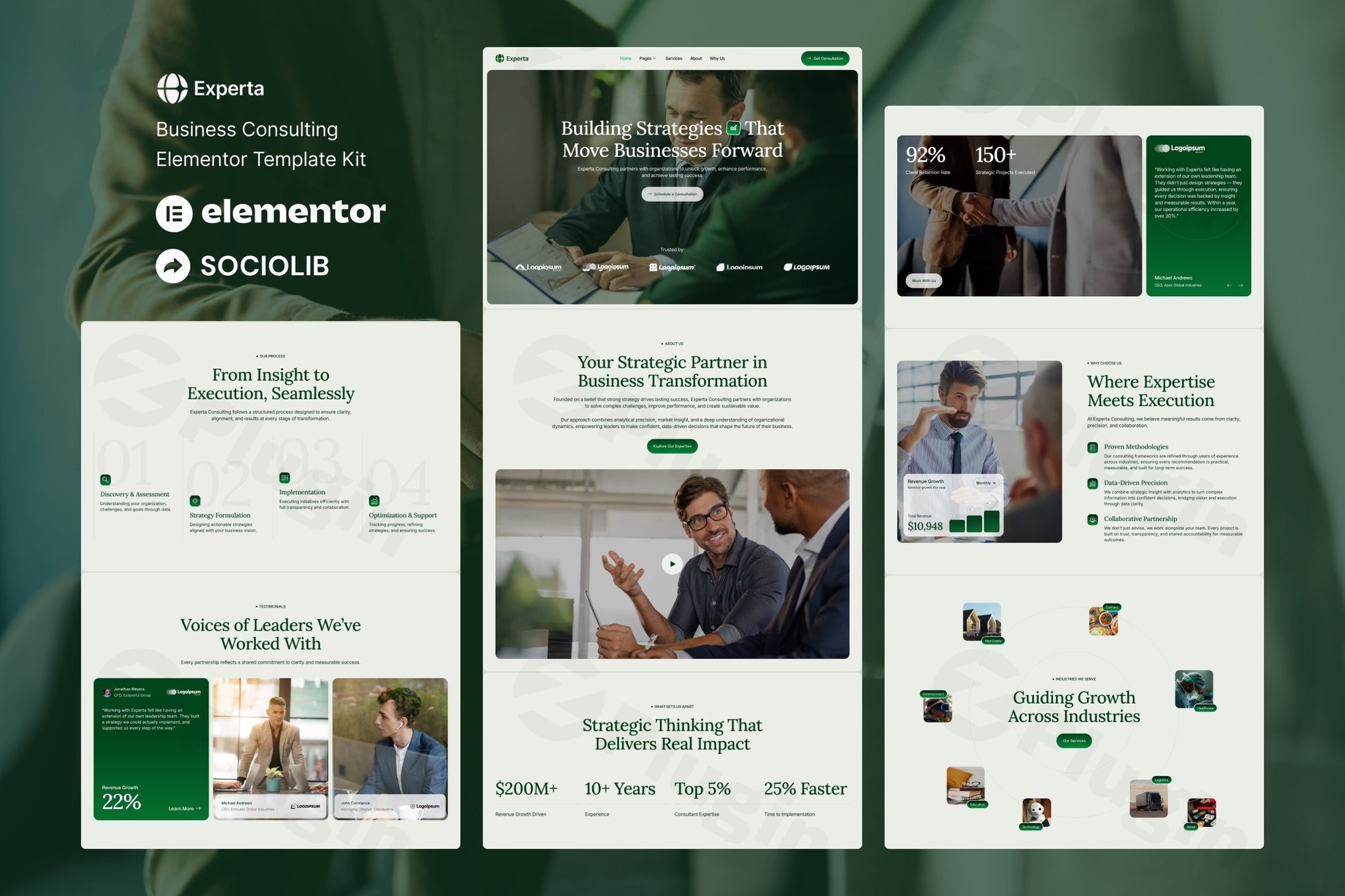
In the competitive world of professional services, your website is often the first point of contact for potential clients. For consultants, coaches, and agencies, building a high-authority site usually requires either a massive budget for developers or hours of frustrating design work. The Experta Elementor Template Kit solves this problem by providing a comprehensive, no-code design solution specifically tailored for the consulting sector.
By using this business consulting Elementor kit, you can bypass the traditional development cycle and launch a polished, fast-loading website that exalts professionalism and builds immediate trust with your audience.
Key Features of the Experta Template Kit
The Experta kit is more than just a collection of layouts; it is a strategic framework designed to convert visitors into clients. Here are the core features and benefits:
- Extensive 14+ Template Library: Unlike basic kits that offer only a homepage, Experta includes over 14 pre-designed templates. This covers everything from complex Case Studies and Team pages to essential “Contact Us” layouts.
- True No-Code Customization: Built entirely for the Elementor Page Builder, you can modify every element using a visual drag-and-drop interface. No HTML or CSS knowledge is required to achieve a premium look.
- Global Styling Controls: Maintain brand consistency effortlessly. You can update your brand colors and typography across all 14+ pages from a single settings panel, ensuring a unified visual identity.
- Performance Optimized & Fast-Loading: Speed is a critical ranking factor for SEO. Experta is built with clean code and minimal bloat to ensure your WordPress business consulting template ranks well and provides a smooth user experience.
- Fully Responsive Design: Every template is meticulously tested to ensure it looks perfect on desktops, tablets, and smartphones, catering to the “mobile-first” reality of modern business.
- MetForm Integration: Lead generation is the lifeblood of consulting. Experta integrates seamlessly with MetForm, allowing you to create custom contact forms and inquiry sequences without technical friction.
How to Install Experta Elementor Template Kit
Setting up your new site is a straightforward process. Follow these steps to get your consulting website WordPress Elementor setup running in minutes:
- Install Required Plugins: Ensure you have Elementor installed and active on your WordPress site. We also recommend installing the Envato Elements plugin and MetForm to ensure all kit features work correctly.
- Select Your Theme: While Experta is compatible with most themes, it is optimized for the Hello Elementor theme. We recommend using it for the best performance and compatibility.
- Upload the Template Kit:
- Navigate to Elements > Installed Kits.
- Click “Upload Template Kit Zip File.”
- Select the Experta file you downloaded.
- Import Global Styles: Before importing individual pages, click the “Import Mixin” or “Install Requirements” button to set up the global fonts and colors.
- Import Pages: Choose the templates you need (e.g., Home, About, Services) and click “Import.” You can then find these in your Elementor “My Templates” library or create a new page and select them directly.
Practical Usage & Best Practices
The Experta Elementor Template Kit is versatile enough to serve various professional niches. Here is how to maximize its value for different business models:
For Business Coaches and Individual Consultants
If you are the face of your brand, use the “Team” and “About” templates to highlight your personal expertise. Best practice: Replace the stock photography with high-quality professional headshots to build immediate rapport and “Expertise” (part of Google’s E-E-A-T guidelines).
For Business Agencies
Agencies should leverage the “Case Studies” templates. Instead of just listing services, use these layouts to showcase data-driven results and testimonials. This creates a “social proof” loop that is essential for high-ticket consulting sales.
Optimization Tips
- Consistency: Stick to the Global Style settings. Over-customizing individual widgets can lead to a cluttered design that loses the “clean and minimal” professional feel.
- SEO: Use the fast-loading nature of this kit to your advantage. Ensure your images are compressed before uploading to maintain the high performance inherent in the kit.
FAQ & Troubleshooting
What is the Experta Elementor Template Kit?
Experta is a collection of pre-designed page layouts for WordPress specifically built for business consultants. It uses the Elementor Page Builder to allow users to create professional websites via a drag-and-drop interface without writing any code.
Is Experta compatible with Elementor Pro?
Yes. While Experta is designed to be accessible, it works seamlessly with both the free and Pro versions of Elementor. Some advanced “Theme Builder” features (like custom Headers or Footers) may require Elementor Pro depending on your specific theme setup.
Can I use Experta with any WordPress theme?
Experta is compatible with most WordPress themes that support Elementor. However, for the best results and fastest loading times, we highly recommend using the free Hello Elementor theme, as it provides a “blank canvas” that prevents styling conflicts.
Does the kit include the images shown in the demo?
Template kits typically include the layouts and placeholders. While some images may be included, it is always a best practice to replace demo content with your own original images to improve your site’s unique value and SEO.
Final Verdict: The Best Elementor Template Kit for Business Coaching?
The Experta Business Consulting Elementor Template Kit stands out for its balance of aesthetic minimalism and technical robustness. With 14+ templates, it offers more depth than most competing kits, making it ideal for established agencies and growing consultancies alike.
If you need a professional, responsive, and high-performance website that you can manage yourself, Experta is a top-tier choice for your next WordPress project.
Explore more WordPress resources and tutorials at wppick.com.
I. Download Limits & Account Benefits
- Free Downloads: Each email address receives 3 downloads per day for free products
- Upgrade Benefits: Purchase any paid product to increase your daily download limit by 3 for each paid product
- No Account Required: You can download immediately by receiving the download link via email
- Account Recommended: Create an account for easier access to your order history and direct update downloads
II. Understanding GPL vs Official Versions
Important: The products available on WPPick are GPL-licensed versions, which differ from official developer versions. Before purchasing, please read our comprehensive guide: Understanding GPL & Official Differences at WPPick
Key Points:
- GPL versions may not include premium support from original developers
- Updates may be delayed compared to official releases
- Some premium features might have limitations
- Always consider your specific needs and support requirements
III. Support & Assistance
We’re here to help through multiple channels:
- Email Support: Direct email assistance for all inquiries
- Live Chat: Real-time support during business hours
- Comprehensive Documentation: Detailed guides and tutorials
IV. Order Tracking
Access your complete purchase history and download links anytime: Order History
V. Account Access
New to WPPick? Login or Create Account to manage your downloads and orders efficiently.
VI. Refund Protection
We stand behind our products with a clear refund policy. Review our terms: Refund Policy
VII. Privacy & Security
Your data security is our priority. Learn how we protect your information: Privacy Policy
VII. Terms of Service
Understanding our service terms ensures a smooth experience: Terms of Use
Quick Tips for Best Experience
- Verify Compatibility: Check plugin/theme compatibility with your WordPress version
- Backup First: Always backup your site before installing new plugins or themes
- Test Environment: Consider testing on a staging site first
- Stay Updated: Regularly check for updates in your account dashboard
- Read Documentation: Review any included documentation for optimal setup
Need Help?
If you have questions about downloads, licensing, or need technical assistance, don’t hesitate to contact our support team. We’re committed to ensuring you have the best possible experience with WPPick products.
Ready to get started? Your download adventure begins with just one click!