
External Importer Pro By Keywordrush
/Year
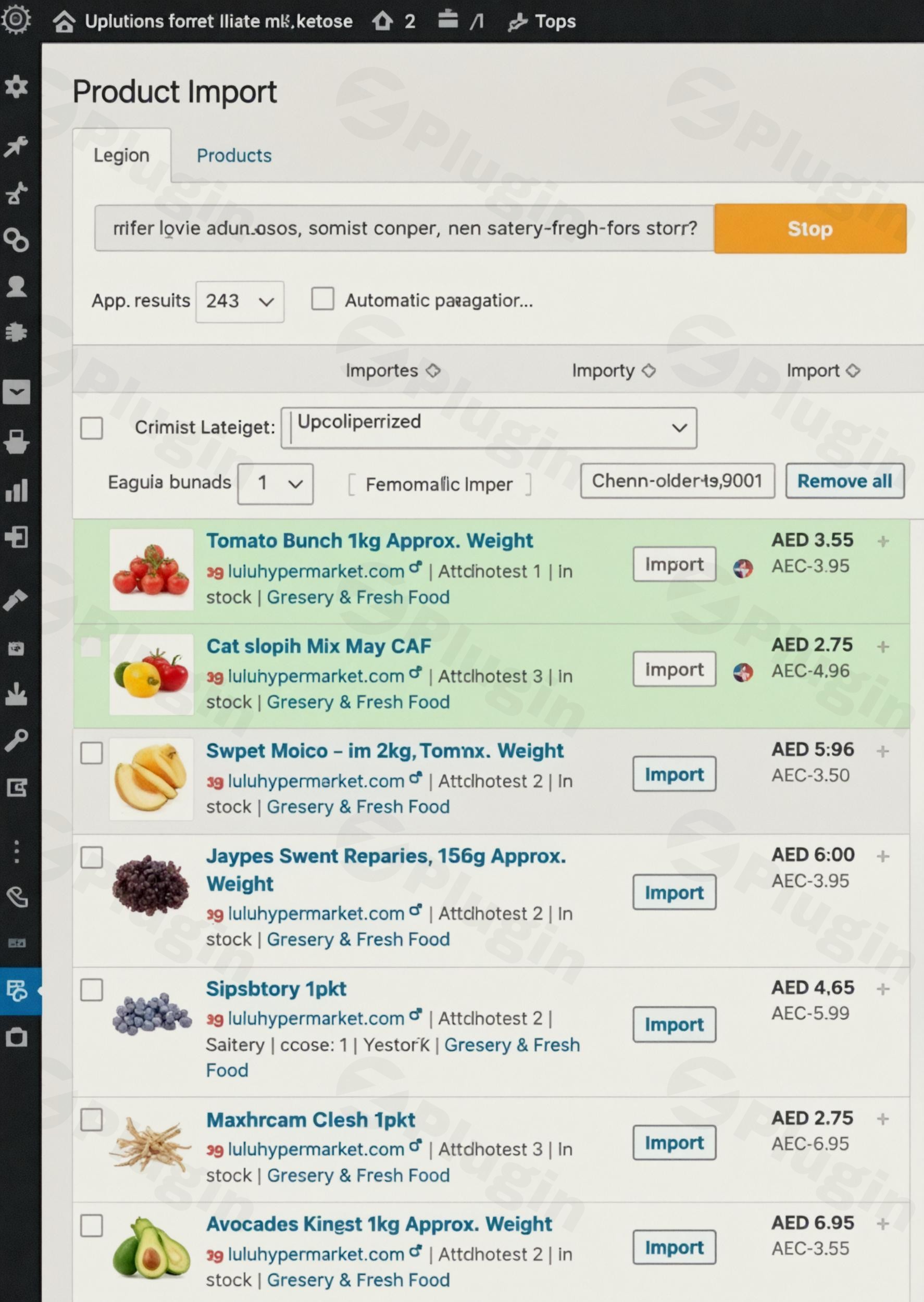
In the dynamic world of e-commerce and affiliate marketing, setting up and maintaining a product catalog can be a time-consuming and complex task. Traditional methods often involve wrestling with large CSV files, navigating intricate APIs, or manually inputting data. This is where External Importer Pro by Keywordrush steps in, revolutionizing how you populate your WooCommerce store with external products. It’s a powerful WooCommerce external product importer designed specifically to streamline product data extraction, automate updates, and even generate unique, SEO-friendly content using advanced AI.Whether you’re an affiliate marketer looking to build niche sites without API headaches or a dropshipper aiming for efficient product management, External Importer Pro offers a robust solution to create and manage your store with unprecedented ease and flexibility.
Key Features of External Importer Pro
External Importer Pro isn’t just a simple WordPress product scraper plugin; it’s a comprehensive toolkit engineered to provide maximum control and automation for your external product catalog.
Seamless Product Data Extraction Without APIs
The plugin’s core strength lies in its ability to extract comprehensive product data directly from e-commerce websites. Forget about API keys or cumbersome CSV imports. Simply paste a product detail URL or a listing page URL, and External Importer Pro handles the rest, extracting essential information like images, descriptions, and prices. This is particularly beneficial for affiliate product import WordPress users who want to bypass technical complexities.
Advanced Multi-Layered Parsing Technology
To ensure broad compatibility and detailed data capture, External Importer Pro employs multiple sophisticated parser layers:
- Structured Parsers: Leverages product schema like JSON-LD, Microdata, Open Graph, and Twitter Card for highly accurate data extraction.
- Advanced Parsers: Supports over 90 popular affiliate programs, capturing a wealth of data including gallery images, old prices, brand information, category paths, specifications, and even user reviews with ratings.
- AI Parsers: Enhances adaptability, allowing the plugin to extract data from approximately 85% of public e-commerce websites, even those without standard schemas.
- Affiliate Egg Integration: Can utilize parsers from the Affiliate Egg Pro plugin, extending its reach to more custom scraping scenarios.
Deep WooCommerce Integration for Affiliate and Dropshipping
External Importer Pro integrates flawlessly with WooCommerce, allowing you to import products as either affiliate/external products or simple products for dropshipping.
- Automated Affiliate Link Generation: The plugin uses your affiliate IDs to automatically generate deep-linked affiliate URLs for all external products, ensuring you retain 100% of your commissions.
- Custom Dropshipping Margins: For dropshippers, you can easily set your own profit margins, giving you full control over your pricing strategy. This makes it an invaluable dropshipping plugin WooCommerce store owners can rely on.
Revolutionary AI Content Generation
One of the standout features is its integrated AI capabilities, making it an excellent AI content generation WordPress plugin. Leveraging services like GPT-5, OpenAI/ChatGPT, Claude API, and OpenRouter API, you can effortlessly create unique product content, solving the common duplicate content problem that plagues many affiliate and dropshipping sites.
- Rewriting and Paraphrasing: Transform existing product descriptions into fresh, unique content.
- Summarization and Translation: Quickly distil long texts or translate content for different markets.
- Diverse Content Formats: Generate bullet points, articles, product descriptions, reviews, how-to guides, and buyer’s guides—all tailored to your products.This feature is crucial for improving SEO and providing real value to your audience.
Powerful Automation and Synchronization
Maintaining an up-to-date product catalog is effortless with the plugin’s automation features:
- Scheduled Automated Price Updates: Keep your product prices current with automatic synchronization from the source websites. This is vital for auto update product price WooCommerce stores.
- Auto-Synchronization: Ensures product availability is always accurate.
- Auto-Import for New Products: Automatically import new products added to target website listing pages.
- Automatic Out-of-Stock Removal: Out-of-stock items can be automatically removed from your store, preventing customer frustration.
Efficient External Image Handling
Save valuable server space and improve site performance by displaying featured images and galleries directly from external websites without saving them to your local media library.
Dynamic Category Assignment
During extraction, products are automatically assigned to relevant WooCommerce categories based on their category paths on the source website, significantly simplifying bulk imports and catalog organization.
Global and Local Attributes Management
You can select product specifications to be converted into global WooCommerce attributes (taxonomy), which is essential for creating powerful product filters and widgets on your site.
Custom Parser Solutions
Should the default parsers struggle with a specific site’s data (e.g., unique specifications or galleries), Keywordrush offers custom parser development as an additional service.
Installation & Setup: Getting Started with External Importer Pro
Installing and setting up External Importer Pro is a straightforward process, designed for WordPress users of all skill levels. Here’s a step-by-step guide to get your WooCommerce external product importer up and running.
- Download the Plugin: After purchasing, download the plugin ZIP file from your Keywordrush account.
- Upload to WordPress:
- Log in to your WordPress admin dashboard.
- Navigate to Plugins > Add New.
- Click on the “Upload Plugin” button at the top of the page.
- Choose the downloaded ZIP file and click “Install Now.”
- Activate the Plugin: Once installed, click “Activate Plugin.”
- Configure Initial Settings:
- Upon activation, you’ll find a new menu item, likely named “External Importer Pro” or similar, in your WordPress dashboard.
- Navigate to this new menu and begin configuring your global settings. This will include:
- Affiliate IDs: Enter your affiliate network IDs to ensure proper link generation.
- AI API Keys: If you plan to use the AI content generation features, you’ll need to input your API keys for services like OpenAI, Claude, or OpenRouter.
- Default Import Settings: Define default product statuses, categories, and other preferences for newly imported items.
- Start Importing Products:
- To import a product, go to the plugin’s import interface.
- Paste the URL of a product detail page or a listing page from your target e-commerce website.
- The plugin will then analyze the page and present the extracted data for your review.
- You can select which data points to import, adjust pricing (e.g., add dropshipping margins), and choose whether to import as an affiliate or simple product.
- Finally, click “Import” to add the product to your WooCommerce catalog.
Practical Usage & Best Practices
External Importer Pro shines in several real-world scenarios, making it an ideal tool for various e-commerce ventures.
1. Building Niche Affiliate Stores without APIs
One of the most powerful use cases is for affiliate marketers who want to create highly focused niche stores. For example, if you want to create a review site for “gaming keyboards from XYZ brand” but XYZ brand doesn’t offer a product API or a readily available feed, External Importer Pro allows you to directly scrape product information from their website. You can import dozens or hundreds of products, automatically generate your affiliate links, and then use the AI content generator to create unique product descriptions and comparison guides, improving your chances of ranking for terms like “how to import Amazon products to WooCommerce without API”.
2. Streamlining Dropshipping Operations
For dropshippers, managing product inventory and pricing across multiple suppliers can be a logistical nightmare. External Importer Pro simplifies this by allowing you to import products and set your custom margins. Its auto-update features ensure that prices and availability are always current, minimizing the risk of selling out-of-stock items or displaying incorrect prices. This automation is key to efficiently scaling a dropshipping business.
3. Rapidly Populating New WooCommerce Stores
Launching a new e-commerce store often involves the daunting task of populating it with products. Whether you’re starting an affiliate store or a dropshipping venture, External Importer Pro can dramatically speed up this process. Instead of manual entry or complex CSV configurations, you can use the plugin to scrape product data and quickly build out your initial catalog. This allows you to focus on marketing and sales rather than tedious data entry. The feature to schedule automated product imports WooCommerce further enhances this capability for ongoing store management.
4. Enhancing Product Content with AI
Beyond just importing, the AI content generation feature is a game-changer for SEO. Instead of relying on manufacturers’ or retailers’ duplicate descriptions, you can use AI to instantly rewrite and enhance product content. This is crucial for improving search engine rankings and providing fresh, engaging content to your audience. Leverage this to generate unique product descriptions with AI WordPress, differentiating your store.
FAQ & Troubleshooting
Here are answers to common questions about External Importer Pro by Keywordrush.
Q1: Does External Importer Pro work with any WooCommerce theme?
A: Yes, External Importer Pro is designed to work seamlessly with any standard WooCommerce-compatible theme and plugins. Its functionality focuses on product data management within WooCommerce itself, rather than front-end display, ensuring broad compatibility.
Q2: Can External Importer Pro scrape dynamic content loaded with JavaScript or Ajax?
A: While External Importer Pro boasts powerful parsing capabilities, it has limitations. It may not fully support content that loads dynamically with JavaScript or Ajax, or websites that actively block bot access. Its strength lies in extracting data from the HTML structure of most public e-commerce websites.
Q3: How to set up dropshipping margins in External Importer Pro?
A: Within the External Importer Pro settings, or during the individual product import process, you will find options to define your dropshipping margins. You can typically set a percentage or a fixed amount to be added to the extracted product price, allowing you to control your profitability before publishing products to your WooCommerce store.
Q4: What is the best WordPress plugin for affiliate marketing without API access?
A: External Importer Pro is highly regarded as one of the best WordPress plugins for affiliate marketing that does not require API access. It excels at directly scraping product data from various e-commerce websites using just a URL, making it ideal for affiliate marketers who need to build comprehensive catalogs without the complexities of API integrations.
Q5: How does External Importer Pro compare to WP All Import?
A: External Importer Pro and WP All Import serve different primary purposes. External Importer Pro specializes in direct web scraping of product data from e-commerce websites using URLs, bypassing the need for APIs or structured files. WP All Import, on the other hand, is a general-purpose importer focused on importing data from structured files like XML, CSV, or Excel. While both can get data into WooCommerce, External Importer Pro is superior for direct web-to-store product population, especially for affiliate and dropshipping models without file feeds.
Conclusion
External Importer Pro by Keywordrush is a game-changing plugin for anyone building or managing a WooCommerce store that relies on external product data. Its ability to extract comprehensive product details directly from websites, automate price and availability updates, and generate unique content with AI offers an unparalleled level of efficiency and control.For affiliate marketers and dropshippers, it provides a robust, API-free solution to rapidly build and maintain highly profitable online stores. By eliminating manual data entry and complex technical hurdles, External Importer Pro empowers users to focus on strategy, marketing, and scaling their business. If you’re looking for a powerful, flexible, and intelligent WordPress product scraper plugin that truly understands the nuances of modern e-commerce, External Importer Pro is an indispensable asset for your toolkit.
I. Download Limits & Account Benefits
- Free Downloads: Each email address receives 3 downloads per day for free products
- Upgrade Benefits: Purchase any paid product to increase your daily download limit by 3 for each paid product
- No Account Required: You can download immediately by receiving the download link via email
- Account Recommended: Create an account for easier access to your order history and direct update downloads
II. Understanding GPL vs Official Versions
Important: The products available on WPPick are GPL-licensed versions, which differ from official developer versions. Before purchasing, please read our comprehensive guide: Understanding GPL & Official Differences at WPPick
Key Points:
- GPL versions may not include premium support from original developers
- Updates may be delayed compared to official releases
- Some premium features might have limitations
- Always consider your specific needs and support requirements
III. Support & Assistance
We’re here to help through multiple channels:
- Email Support: Direct email assistance for all inquiries
- Live Chat: Real-time support during business hours
- Comprehensive Documentation: Detailed guides and tutorials
IV. Order Tracking
Access your complete purchase history and download links anytime: Order History
V. Account Access
New to WPPick? Login or Create Account to manage your downloads and orders efficiently.
VI. Refund Protection
We stand behind our products with a clear refund policy. Review our terms: Refund Policy
VII. Privacy & Security
Your data security is our priority. Learn how we protect your information: Privacy Policy
VII. Terms of Service
Understanding our service terms ensures a smooth experience: Terms of Use
Quick Tips for Best Experience
- Verify Compatibility: Check plugin/theme compatibility with your WordPress version
- Backup First: Always backup your site before installing new plugins or themes
- Test Environment: Consider testing on a staging site first
- Stay Updated: Regularly check for updates in your account dashboard
- Read Documentation: Review any included documentation for optimal setup
Need Help?
If you have questions about downloads, licensing, or need technical assistance, don’t hesitate to contact our support team. We’re committed to ensuring you have the best possible experience with WPPick products.
Ready to get started? Your download adventure begins with just one click!
- Added per-product option to disable automatic synchronization.
- “Sync Now” action in the All Products table.
- All Products list integration — External Importer stock status now replaces the default stock column.
- Added sync details to the Price column.
- “Source product” link added to the Name column.
- Routing Rules for crowler services with extra parameters.
- Added a sync option for custom fields