

Extra Product Options Addon For Export Order Items Pro
/Year
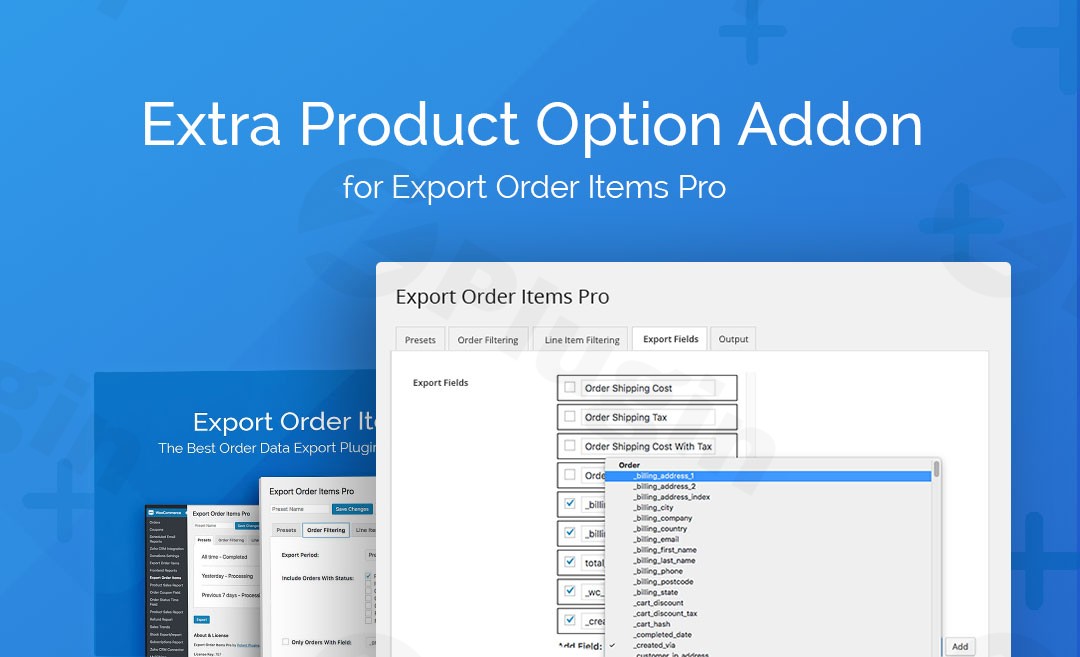
Managing a high-volume WooCommerce store often requires collecting specific details from customers, such as gift messages, custom engravings, or technical specifications. While the “WooCommerce Extra Product Options” (TM Extra Product Options) plugin is excellent for collecting this data, exporting it in a clean, readable format can be a challenge. The Extra Product Options Addon for Export Order Items Pro solves this by bridging the gap between custom product data and professional order reporting.The Extra Product Options Addon for Export Order Items Pro is a specialized extension designed to parse complex custom field data into individual, manageable columns within your export files. Instead of dealing with unorganized strings of text, this addon ensures that every custom selection made by your customer is easy to analyze in Excel or Google Sheets.
Key Features & Benefits
This addon is more than just a connector; it is a productivity tool for store managers who need accurate data for fulfillment and accounting.
- Individual Field Export: The most significant benefit is the ability to parse custom data. Instead of exporting all “Extra Product Options” into a single cell, this addon breaks them down into individual report fields. This makes
WooCommerce Extra Product Options Exporttasks much simpler for data analysis. - Granular Reporting Control: You can choose exactly which custom fields appear in your export. This allows you to create Custom Product Options Export WooCommerce reports that are tailored to specific departments (e.g., a “Production” report containing only engraving text).
- Automatic Field Mapping: Once activated, the addon automatically detects your custom fields and adds them to the “Export Fields” tab in the main plugin. There is no manual coding required.
- Lightweight Performance: Designed by WP Zone to be “plug-and-play,” the addon has a minimal footprint on your site’s performance, ensuring your dashboard remains fast while generating large reports.
Requirements for Use
Before installing, ensure your WordPress site has the following active:
- WooCommerce (The base e-commerce platform).
- Export Order Items Pro (The parent export plugin).
- WooCommerce Extra Product Options (The plugin used to create the custom fields).
How to Install and Set Up the Addon
Follow these steps to get your Export Order Items Pro Addon running in minutes:
- Download the Plugin: Purchase and download the .zip file for the Extra Product Options Addon from the official source or your WPPick account.
- Upload to WordPress: Navigate to your WordPress Dashboard, go to Plugins > Add New > Upload Plugin, and select the .zip file.
- Activate: Click Activate Plugin once the upload is complete.
- Access Export Fields: Go to the Export Order Items Pro settings page.
- Select Fields: Click on the Export Fields tab. You will now see a new section containing all the custom fields created via WooCommerce Extra Product Options.
- Drag and Drop: Drag your desired custom fields into the active export list and save your settings.
Practical Usage & Best Practices
To get the most out of your WooCommerce order reporting custom fields, consider these real-world workflows:
1. Personalized Apparel & Manufacturing
If you sell custom t-shirts where customers choose “Size,” “Color,” and “Custom Text,” use this addon to create a CSV for your printing team. By exporting these as individual columns, your team can use “Sort” or “Filter” in Excel to group all “Large Red” shirts together instantly.
2. Gift & Hamper Services
For stores offering gift wrapping and personalized notes, this is the best way to export WooCommerce order items with custom options. You can generate a daily report that specifically lists the “Gift Message” and “Wrapping Type” next to the order ID, ensuring the fulfillment team never misses a personalized touch.
3. Event Registrations or Catering
When collecting dietary requirements or attendee names via product options, use this addon to generate an attendee list. Since each field is parsed individually, you can quickly calculate how many “Vegan” or “Gluten-Free” meals are needed.
Pro Tip for Agencies:
When setting up sites for clients, use the “Export Profiles” feature in the parent plugin to save these custom field configurations. This allows the client to download their specific reports with a single click without needing to navigate the technical settings.
FAQ & Troubleshooting
Can I export data from WooCommerce Extra Product Options as separate columns?
Yes. The primary function of this addon is to parse the “TM Extra Product Options” data—which is usually bundled together—and separate each field into its own distinct column in your CSV or Excel export.
Does this addon work with the free version of Export Order Items?
No, this addon specifically requires the Export Order Items Pro version. It is designed to extend the professional features of the Pro version to support complex metadata.
How do I export TM Extra Product Options data if fields aren’t showing up?
If your custom fields do not appear in the “Export Fields” tab, ensure that both the parent plugin and the Extra Product Options plugin are active and that you have at least one order containing those custom options. The addon scans for existing metadata to populate the field list.
Is the plugin compatible with the latest version of WordPress?
Yes, the addon is maintained by WP Zone and is regularly updated to ensure compatibility with the latest versions of WordPress, WooCommerce, and the core Export Order Items Pro plugin.
Conclusion: Final Verdict
The Extra Product Options Addon for Export Order Items Pro is an essential purchase for any WooCommerce store owner using TM Extra Product Options for complex product configurations. It removes the manual labor of cleaning up data and provides a professional, automated way to handle Custom Product Options Export WooCommerce workflows. By turning unreadable data strings into organized columns, it significantly increases the ROI of your reporting process. If you need to hand off order data to a manufacturing team, a warehouse, or an accounting department, this addon is the most reliable bridge available.
I. Download Limits & Account Benefits
- Free Downloads: Each email address receives 3 downloads per day for free products
- Upgrade Benefits: Purchase any paid product to increase your daily download limit by 3 for each paid product
- No Account Required: You can download immediately by receiving the download link via email
- Account Recommended: Create an account for easier access to your order history and direct update downloads
II. Understanding GPL vs Official Versions
Important: The products available on WPPick are GPL-licensed versions, which differ from official developer versions. Before purchasing, please read our comprehensive guide: Understanding GPL & Official Differences at WPPick
Key Points:
- GPL versions may not include premium support from original developers
- Updates may be delayed compared to official releases
- Some premium features might have limitations
- Always consider your specific needs and support requirements
III. Support & Assistance
We’re here to help through multiple channels:
- Email Support: Direct email assistance for all inquiries
- Live Chat: Real-time support during business hours
- Comprehensive Documentation: Detailed guides and tutorials
IV. Order Tracking
Access your complete purchase history and download links anytime: Order History
V. Account Access
New to WPPick? Login or Create Account to manage your downloads and orders efficiently.
VI. Refund Protection
We stand behind our products with a clear refund policy. Review our terms: Refund Policy
VII. Privacy & Security
Your data security is our priority. Learn how we protect your information: Privacy Policy
VII. Terms of Service
Understanding our service terms ensures a smooth experience: Terms of Use
Quick Tips for Best Experience
- Verify Compatibility: Check plugin/theme compatibility with your WordPress version
- Backup First: Always backup your site before installing new plugins or themes
- Test Environment: Consider testing on a staging site first
- Stay Updated: Regularly check for updates in your account dashboard
- Read Documentation: Review any included documentation for optimal setup
Need Help?
If you have questions about downloads, licensing, or need technical assistance, don’t hesitate to contact our support team. We’re committed to ensuring you have the best possible experience with WPPick products.
Ready to get started? Your download adventure begins with just one click!