

Fabish – Skincare Cosmetics Store Shopify Theme
/Year
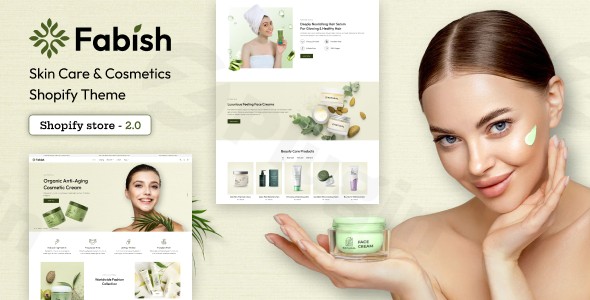
In the highly competitive beauty industry, your online storefront is often the first point of contact between your brand and your customers. To build trust and drive conversions, you need a digital presence that reflects sophistication, speed, and seamless functionality. The Fabish Shopify theme is a premium, multipurpose e-commerce solution specifically engineered for skincare Shopify theme users, cosmetic brands, and beauty retailers who prioritize a high-end aesthetic without compromising on performance.
Whether you are launching an organic skincare line or managing an established fragrance boutique, the Fabish theme provides the technical foundation needed to scale. By integrating advanced Shopify features—such as Ajax-driven interactions and mobile-first responsiveness—Fabish solves the common pain point of “clunky” e-commerce interfaces, ensuring your products remain the star of the show.
Key Features of the Fabish Cosmetics Shopify Theme
The Fabish theme isn’t just a skin for your store; it is a conversion-optimized toolkit. Below are the standout features that make it a leading cosmetics shopify theme.
1. High-Performance Responsive Design
In the beauty niche, a significant portion of traffic comes from social media mobile apps. Fabish is built with a responsive beauty theme Shopify framework, ensuring your high-resolution product imagery looks stunning on iPhones, tablets, and desktops alike.
2. Advanced Ajax Functionality
To reduce friction during the shopping journey, Fabish includes:
- Ajax Sidebar Cart: Customers can add items to their bag and view their totals without refreshing the page.
- Ajax Wishlist: Allows users to “save for later,” increasing the likelihood of return visits.
- Ajax Pagination & Search: Faster browsing leads to higher engagement and lower bounce rates.
3. Product Discovery & Comparison
Finding the right shade of lipstick or the correct serum can be daunting. Fabish simplifies this with Product Sorting and Filtering (by price, A-Z, or custom tags like color) and a built-in Compare Products feature. This allows customers to view technical specifications side-by-side, a must-have for beauty store Shopify theme owners.
4. SEO & Google Rich Snippets
Visibility is everything. Fabish is optimized for the latest search engine standards, including formatted product data for Google Rich Snippets. This helps your price, availability, and ratings appear directly in Google search results, boosting your click-through rate.
Step-by-Step: How to Install the Fabish Shopify Theme
Setting up your store with Fabish is straightforward, even if you don’t have a background in web development. Follow these steps to get started:
- Download the Theme Package: Once purchased, download the Fabish zip file from your provider (e.g., ThemeForest).
- Upload to Shopify: Log in to your Shopify Admin panel. Navigate to Online Store > Themes. Click the Add Theme button and select Upload zip file.
- Publish the Theme: Once uploaded, Fabish will appear in your “Theme Library.” Click Actions > Publish to make it your live store theme.
- Configure Theme Settings: Click Customize to open the drag-and-drop editor. Here, you can modify:
- Typography & Colors: Align the site with your brand identity.
- Sections: Add or remove Hero Sliders, Featured Collections, and Testimonials.
- Newsletter: Connect your Mailchimp or Klaviyo account to start building your email list.
5. Set Up Navigation: Use the Mega Menu feature to organize your categories (e.g., “Cleansers,” “Moisturizers,” “Sets”) for a professional navigation experience.
Practical Usage & Best Practices
To get the most out of the Fabish theme, consider these real-world workflows used by successful beauty entrepreneurs.
Ideal for Organic Skincare Brands
If you are running a Shopify theme for organic skincare brands, use the “Storytelling” sections of Fabish. Highlight your ingredients using the high-quality Product Zoom feature and use the Blog Integration to educate your audience on natural wellness.
Best Way to Launch New Collections
Use the Slick Slider on the homepage to showcase a “New Arrival” hero banner. Combine this with the Recent Sales Popup Notifications to create social proof and urgency, showing new visitors that others are currently buying your products.
Managing Global Sales
For brands scaling internationally, Fabish supports Multi-currency (USD, EUR, GBP, JPY, etc.). Ensure you enable the currency switcher in the header so international customers see accurate pricing immediately, which significantly reduces cart abandonment.
FAQ & Troubleshooting
Is the Fabish theme compatible with WordPress?
No. Fabish is a dedicated Shopify theme and is not compatible with WordPress or WooCommerce. If you are looking for a skincare WordPress theme, you should look for alternatives like Cosmika or Derma Clear. Fabish is built exclusively for the Shopify e-commerce ecosystem.
Does Fabish support social media integration?
Yes. Fabish includes built-in Social Sharing buttons on product pages and newsletter integration. This makes it easy for customers to share their favorite beauty finds on Instagram, Pinterest, and Facebook.
Can I customize the checkout page?
Yes. Fabish allows for a Branded Checkout. You can add your brand logo and customize the color scheme of the checkout process to maintain a consistent experience from the product page to the final thank-you screen.
What should I do if my images look blurry?
Ensure your product images are uploaded at a consistent aspect ratio (e.g., 1:1 square) and high resolution (at least 1024x1024px). The Product Zoom feature requires high-quality source files to function effectively without pixelation.
Final Verdict: Is Fabish Right for Your Store?
The Fabish Shopify theme is a powerful, “all-in-one” solution for the beauty industry. Its strength lies in its ability to combine high-end design with the technical “heavy lifting” of SEO optimization and Ajax performance. While it is strictly for the Shopify platform, its feature set—ranging from GDPR compliance popups to advanced mega menus—offers a significant ROI for business owners who want a professional store without hiring a developer. If you are looking for the best Shopify theme for cosmetics that balances elegance with conversion-ready features, Fabish is a top-tier choice for your skincare or beauty brand.Explore more e-commerce tips and theme reviews at wppick.com.
I. Download Limits & Account Benefits
- Free Downloads: Each email address receives 3 downloads per day for free products
- Upgrade Benefits: Purchase any paid product to increase your daily download limit by 3 for each paid product
- No Account Required: You can download immediately by receiving the download link via email
- Account Recommended: Create an account for easier access to your order history and direct update downloads
II. Understanding GPL vs Official Versions
Important: The products available on WPPick are GPL-licensed versions, which differ from official developer versions. Before purchasing, please read our comprehensive guide: Understanding GPL & Official Differences at WPPick
Key Points:
- GPL versions may not include premium support from original developers
- Updates may be delayed compared to official releases
- Some premium features might have limitations
- Always consider your specific needs and support requirements
III. Support & Assistance
We’re here to help through multiple channels:
- Email Support: Direct email assistance for all inquiries
- Live Chat: Real-time support during business hours
- Comprehensive Documentation: Detailed guides and tutorials
IV. Order Tracking
Access your complete purchase history and download links anytime: Order History
V. Account Access
New to WPPick? Login or Create Account to manage your downloads and orders efficiently.
VI. Refund Protection
We stand behind our products with a clear refund policy. Review our terms: Refund Policy
VII. Privacy & Security
Your data security is our priority. Learn how we protect your information: Privacy Policy
VII. Terms of Service
Understanding our service terms ensures a smooth experience: Terms of Use
Quick Tips for Best Experience
- Verify Compatibility: Check plugin/theme compatibility with your WordPress version
- Backup First: Always backup your site before installing new plugins or themes
- Test Environment: Consider testing on a staging site first
- Stay Updated: Regularly check for updates in your account dashboard
- Read Documentation: Review any included documentation for optimal setup
Need Help?
If you have questions about downloads, licensing, or need technical assistance, don’t hesitate to contact our support team. We’re committed to ensuring you have the best possible experience with WPPick products.
Ready to get started? Your download adventure begins with just one click!
No changelog available.