

Fibofilters – Woocommerce Product Filters Plugin
/Year
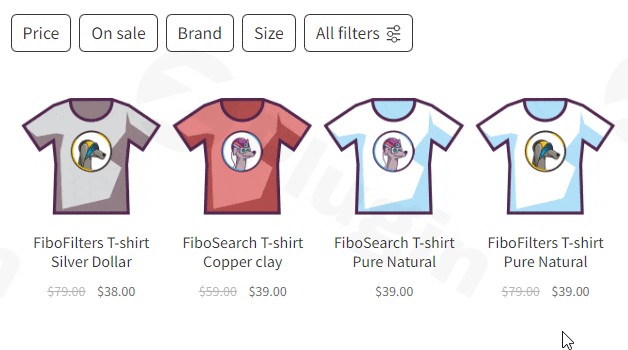
Introduction to FiboFilters
FiboFilters operates as a comprehensive product filtering solution built specifically for WooCommerce environments. As online stores grow their product catalogs, default navigation systems often create friction, leading to frustrated shoppers and increased cart abandonment. This tool directly addresses those navigational challenges by delivering a highly responsive, intuitive, and visually appealing facet search interface. Store visitors can seamlessly narrow down extensive product lists using multiple criteria simultaneously without enduring disruptive page reloads.
Core Functionality
The plugin replaces standard WooCommerce category and attribute widgets with an application-like filtering system. It dynamically generates tailored filter blocks based on the specific context of the shopper’s current category or search query. Shoppers interact with visual elements such as clickable color swatches, image selectors, hierarchical checkboxes, and dynamic price sliders. Behind the interface, an optimized indexation engine ensures that filtering operations execute instantaneously, updating the product grid and URL parameters in real time via AJAX technology.
Target Audience
E-commerce store operators managing medium to large catalogs stand to gain the most from this filtering upgrade. WordPress developers and digital marketing agencies tasked with improving store conversion rates will find the tool invaluable for optimizing the user journey. It is also an essential asset for niche retailers whose inventory relies on highly specific technical attributes, measurements, or compatibility requirements that shoppers need to filter precisely.
Key Capabilities
- Interactive, real-time price sliders for immediate budget-based product discovery
- Visual color swatches and image representations for physical product attributes
- Hierarchical tree displays simplifying navigation through complex brand structures and nested categories
- Proprietary database indexation ensuring rapid query execution regardless of catalog size
- Horizontal and vertical filter layout configurations adapting to various store themes
- Dedicated mobile interface offering an off-canvas filtering experience similar to native mobile applications
- Automatic generation of search engine optimized URLs for filtered pages
- Seamless integration with WordPress core sitemaps and popular SEO plugins
Practical WooCommerce Use Cases
A modern apparel and fashion retailer can deploy color swatches and size selectors, allowing shoppers to instantly filter the catalog to show only clothing items available in their preferred style and fit. An electronics or computer hardware distributor might utilize the hierarchical brand checkboxes and precise specification filters, helping buyers easily locate compatible components like motherboards or processors based on socket types. Meanwhile, a furniture retailer can implement physical dimension filters alongside price sliders, guiding customers toward items that perfectly match their spatial constraints and interior design budgets.
Setup and Compatibility Context
Integrating the filtering system into an existing WooCommerce setup requires minimal manual intervention. Upon installation, the plugin automatically detects registered product attributes, custom taxonomies, and category structures to generate initial filter sets. It maintains extensive compatibility with the broader WordPress ecosystem, offering dedicated support for visual builders like Divi, Elementor, and Bricks, as well as the native block editor. The system respects existing object caching layers and operates reliably alongside complex theme architectures without generating frontend bloat.
Reasons to Choose FiboFilters on WPPick
Implementing this solution provides an immediate, measurable upgrade to store usability. Fast and accurate product discovery directly combats bounce rates and lost sales associated with poor navigation. The architecture prioritizes performance, ensuring that advanced filtering logic does not degrade core web vitals. By offering a polished, enterprise-grade browsing experience, store owners can build higher customer trust and encourage larger average order values.
Latest Version Context
The release of version 1.13.0 introduces robust search engine optimization enhancements and expanded ecosystem compatibility. A major addition is the default enablement of SEO Rules, which includes a new sitemap synchronization flow and integration with the WordPress core sitemap. It also adds canonical link support for SEOPress and All in One SEO. Visual builder support expands with full compatibility for Divi 5 and its Woo Products module across standard and custom pages. The user interface now fully supports RTL languages across both the dashboard and storefront. Additional functional improvements include an optional secondary sorting mechanism by product ID for stable product ordering, alongside a new hierarchical tree display for the checkboxes filter type. The update also resolves numerous compatibility issues across popular themes like WoodMart, Avada, and Bricks, as well as third-party tools like Advanced Custom Fields and WooCommerce Composite Products. Detailed release notes from external internet sources are not available from the provided search results.
Frequently Asked Questions
What is the primary function of this filtering solution?
It provides an advanced, high-speed product filtering interface for WooCommerce, allowing customers to intuitively narrow down extensive catalogs using criteria like price ranges, color swatches, and custom technical attributes without waiting for full page reloads.
Does the system support visual attribute representations?
Yes, it natively supports interactive color swatches, clickable image selectors, and stylized text labels, which provide a significantly better user experience compared to traditional dropdown menus or plain text lists.
How does the filtering mechanism impact storefront performance?
The solution relies on a proprietary indexation system that pre-calculates filtering relationships. This approach minimizes heavy database queries during the browsing session, ensuring the product grid updates rapidly even on stores with thousands of complex variable products.
Is the plugin compatible with popular WordPress page builders?
The filtering blocks integrate seamlessly with major page building tools, including the native block editor, Divi, Elementor, and Bricks, providing dedicated widgets and shortcodes for precise placement within custom store layouts.
Can the filters handle deeply nested product categories?
The interface includes a specialized hierarchical tree display for checkbox filters, making it highly effective for stores utilizing deep category structures or multi-tiered brand relationships.
I. Download Limits & Account Benefits
- Free Downloads: Each email address receives 3 downloads per day for free products
- Upgrade Benefits: Purchase any paid product to increase your daily download limit by 3 for each paid product
- No Account Required: You can download immediately by receiving the download link via email
- Account Recommended: Create an account for easier access to your order history and direct update downloads
II. Understanding GPL vs Official Versions
Important: The products available on WPPick are GPL-licensed versions, which differ from official developer versions. Before purchasing, please read our comprehensive guide: Understanding GPL & Official Differences at WPPick
Key Points:
- GPL versions may not include premium support from original developers
- Updates may be delayed compared to official releases
- Some premium features might have limitations
- Always consider your specific needs and support requirements
III. Support & Assistance
We’re here to help through multiple channels:
- Email Support: Direct email assistance for all inquiries
- Live Chat: Real-time support during business hours
- Comprehensive Documentation: Detailed guides and tutorials
IV. Order Tracking
Access your complete purchase history and download links anytime: Order History
V. Account Access
New to WPPick? Login or Create Account to manage your downloads and orders efficiently.
VI. Refund Protection
We stand behind our products with a clear refund policy. Review our terms: Refund Policy
VII. Privacy & Security
Your data security is our priority. Learn how we protect your information: Privacy Policy
VII. Terms of Service
Understanding our service terms ensures a smooth experience: Terms of Use
Quick Tips for Best Experience
- Verify Compatibility: Check plugin/theme compatibility with your WordPress version
- Backup First: Always backup your site before installing new plugins or themes
- Test Environment: Consider testing on a staging site first
- Stay Updated: Regularly check for updates in your account dashboard
- Read Documentation: Review any included documentation for optimal setup
Need Help?
If you have questions about downloads, licensing, or need technical assistance, don’t hesitate to contact our support team. We’re committed to ensuring you have the best possible experience with WPPick products.
Ready to get started? Your download adventure begins with just one click!
- Added: SEO Rules are now enabled for every installation, with a new sitemap sync-now flow, integration with the WordPress core sitemap, and a search-context guard. See documentation
- Added: Support for the SEOPress and All in One SEO plugins in canonical link handling. See documentation
- Added: Divi 5 theme: support for the Woo Products module. See documentation
- Added: Divi theme: support for the Woo Products module on pages other than the shop page. See documentation
- Added: Settings tooltips now include visual previews and links to the documentation
- Added: RTL support in the dashboard and on the storefront
- Added: Optional secondary sorting by product ID in custom sorting, for a stable order of products with equal values
- Added: Hierarchical tree display in the Checkboxes filter type for brands and other hierarchical taxonomies
- Fixed: WooCommerce 11.0: products disappearing in Divi and filters missing in Avada on the shop page
- Fixed: WoodMart theme: broken header search layout on filtered shop pages
- Fixed: Kadence Shop Kit plugin: fatal error with the single variations option enabled
- Fixed: Bricks theme: filters not working on custom pages built with a template and a custom loop
- Fixed: WPC Product Bundles plugin: products priced over 1000 appearing in every price range
- Fixed: Woo Composite Products plugin: index build never finishing with inconsistent tax settings
- Fixed: Avada theme: wrong sorting after refreshing a page with the orderby parameter
- Fixed: Avada theme: product loading issues when object caching is enabled
- Fixed: ACF plugin: JavaScript error when disabling global number formatting in a Range filter based on a number field
- Fixed: Wrong order when sorting products by custom fields containing floating point numbers
- Fixed: Product filters not working when the
[products]shortcode is nested inside another shortcode - Fixed: Products disappearing after refreshing a page with a category filter
- Fixed: Custom WooCommerce templates losing the product category context after loading products
- Fixed: Translations not working in the Color filter type
- Fixed: The filters and SEO rule blocks not loading in the block editor when it runs in an iframe
- Fixed: SEO Rules: layout jumps in the rule editor
- Fixed: Database errors logged on a fresh installation before the plugin tables are created
- Fixed: Wrong breakpoints in the filters block rendered on the widgets screen
- Fixed: PHP warnings logged by the category filter when SEO Rules generate URLs
- Fixed: Deprecation notice logged by the indexer scheduler on a fresh installation
- Fixed: The Filters screen failing to load when filter blocks come from an imported configuration
- Updated: Clearer copy on the SEO Rules and Filters screens, with links to the documentation
- Updated: Freemius SDK
- Updated: The .pot file