

Fitsy – Sports Fitness Clothing Shopify Theme
/Year
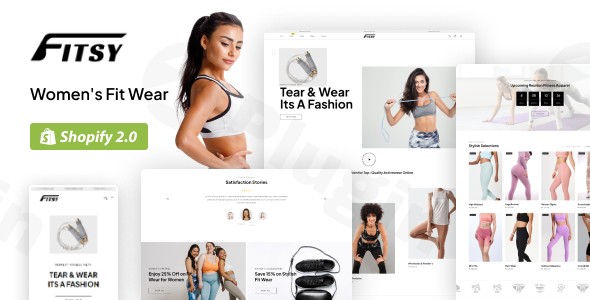
Elevate Your Fitness E-commerce with the Fitsy Shopify Theme
Fitsy is a premium Shopify theme meticulously designed for fitness professionals, sports clothing brands, and wellness businesses. Unlike a WordPress plugin, Fitsy provides a complete e-commerce storefront solution built specifically for the Shopify platform, addressing the unique needs of the fitness industry. This theme empowers businesses to create a professional, high-converting online presence to showcase and sell sports apparel, fitness equipment, and wellness products.
Key Features of the Fitsy Shopify Theme
The Fitsy Shopify theme offers a robust set of features tailored to create an immersive and effective shopping experience for fitness enthusiasts.
Professional Design Elements for Fitness Entrepreneurs
Fitsy transforms your online store with sophisticated design and specialized functionality. It includes dedicated sections for:
- Class Schedules: Ideal for gyms, yoga studios, and personal trainers to display and manage bookings.
- Trainer Profiles: Showcase your team’s expertise and build trust with your audience.
- Workout Programs: Easily promote and sell digital or physical workout plans.
- Nutritional Supplements: Dedicated layouts for displaying and selling health and wellness products.
Optimized for Sports and Fitness Product Sales
Fitsy excels at presenting your sports apparel, fitness equipment, and wellness products with stunning visual clarity and detailed information. Key features include:
- Specialized Product Layouts: Designed for clothing collections, supplement catalogs, and training equipment.
- Size Charts: Essential for apparel sales, ensuring customers find the right fit.
- Color Swatches: Allow customers to easily visualize product variations.
- Detailed Specification Panels: Provide comprehensive information for informed purchasing decisions.
Conversion-Focused Design
Every aspect of Fitsy is engineered to maximize conversions. This includes:
- Strategic Call-to-Action (CTA) Placements: Guide visitors effectively through the sales funnel.
- Optimized Checkout Flows: A streamlined process to minimize cart abandonment and turn visitors into loyal customers.
Mobile-First Responsive Framework
Recognizing that a significant portion of fitness enthusiasts browse on their phones, Fitsy delivers a flawless user experience across all devices. This responsive Shopify theme ensures your customers can browse classes, book sessions, and shop for fitness apparel seamlessly from any screen size.
Integrated Booking and Scheduling
For service-based fitness businesses, Fitsy offers a powerful built-in scheduling system. This feature allows clients to:
- Book personal training sessions.
- Register for group classes.
- Sign up for special events.
- View real-time availability directly on your website.
Advanced E-commerce Capabilities
Leveraging Shopify’s powerful engine, Fitsy enhances it with fitness-specific tools. You can efficiently:
- Manage inventory for a wide range of products.
- Process payments securely.
- Track orders and shipping status.
- Analyze customer behavior with integrated analytics tools to optimize your sales strategies.
Installing and Setting Up Your Fitsy Shopify Theme
As Fitsy is a Shopify theme, the installation process differs significantly from a WordPress plugin. You will manage it directly within your Shopify admin panel.
- Purchase the Theme: Acquire the Fitsy theme from an authorized distributor, such as ZeroPlugin.com, ensuring you receive the genuine GPL licensed product.
- Download Theme Files: You will receive a
.zipfile containing the theme. - Log in to Shopify Admin: Go to your Shopify store’s admin panel (e.g.,
yourstore.myshopify.com/admin). - Navigate to Online Store > Themes: In the left-hand menu, select “Online Store” and then “Themes.”
- Upload Theme: Click the “Add theme” button, then “Upload zip file.” Select the Fitsy theme
.zipfile you downloaded. - Publish (or Customize): Once uploaded, Fitsy will appear under “Theme library.” You can click “Actions” > “Publish” to make it live immediately, or “Customize” to configure its settings, add your branding, content, and products before publishing.
- Configure Theme Settings: Use the Shopify theme customizer to adjust colors, fonts, layouts, and enable/disable specific sections like class schedules, trainer profiles, and product displays to match your brand and business needs.
Practical Usage and Best Practices for Fitness Businesses
Fitsy is an ideal solution for a diverse range of fitness niches, enabling them to create a strong online presence and drive sales.
- For Personal Trainers & Coaches: Use the integrated booking system to manage client sessions and showcase your expertise with trainer profiles. It’s the best way to set up online training bookings directly on your site.
- For Gyms & Yoga Studios: Leverage class schedules and event booking features to streamline registration and membership sales. Fitsy is ideal for managing gym memberships and class bookings.
- For Sports Nutrition & Supplement Retailers: Utilize specialized product layouts to highlight nutritional facts, benefits, and usage instructions for supplements. This theme is perfect when you need to sell health supplements online.
- For Athletic Apparel Brands: Showcase your clothing collections with detailed product views, size charts, and color swatches to enhance the shopping experience and reduce returns. It’s the best Shopify theme for activewear brands.
- For Fitness Equipment Suppliers: Display high-quality images and detailed specifications for equipment, making it easier for customers to compare and purchase.When configuring Fitsy, always prioritize high-quality images and clear, concise product descriptions. Ensure your booking system is clearly visible and easy to use. Regularly update your class schedules and trainer information to keep your site current and engaging.
FAQ & Troubleshooting for the Fitsy Shopify Theme
Here are answers to common questions about using the Fitsy Shopify theme:
Is Fitsy compatible with Shopify 2.0?
Yes, Fitsy is designed to be fully compatible with Shopify 2.0, taking advantage of its enhanced features for flexible store customization and performance improvements. This ensures you can utilize the latest functionalities offered by the Shopify platform.
Does Fitsy support complex product variations like size and color for fitness apparel?
Absolutely. Fitsy includes advanced options for showcasing complex product variations such as size charts, color swatches, and detailed specification panels. This allows customers to easily select their preferred sports fitness clothing options.
How can I update the Fitsy theme to the latest version?
To update your Fitsy theme, you will typically download the latest version from your purchase source (e.g., ZeroPlugin.com) and upload it as a new theme to your Shopify store. You can then copy your customizations from the old theme to the new one, or use Shopify’s native features to manage theme versions. Always back up your current theme before updating.
What should I do if my booking system isn’t displaying correctly?
First, ensure that you have correctly configured the booking and scheduling sections within the Fitsy theme settings in your Shopify customizer. Check for any conflicting apps you might have installed. If issues persist, consult the theme’s documentation or contact the professional support community provided by your theme vendor.
Is Fitsy suitable for both physical products and digital workout programs?
Yes, Fitsy is versatile. While optimized for physical sports fitness clothing and equipment, its advanced e-commerce capabilities fully support the sale of digital products like workout programs, e-books, and online coaching sessions, making it a comprehensive solution for diverse fitness businesses.
Conclusion: Empower Your Fitness Brand with Fitsy
The Fitsy Shopify Theme is a powerful and specialized solution for any business in the sports, fitness, and wellness industry. It delivers a comprehensive e-commerce platform designed for conversion-focused sales of fitness apparel, equipment, supplements, and services like personal training and classes. With its mobile-first design, integrated booking, and professional features, Fitsy offers a robust ROI for entrepreneurs seeking to build a high-converting, authoritative online presence. For those looking to launch or scale their online sports store, Fitsy provides the tools needed to succeed on the Shopify platform.
I. Download Limits & Account Benefits
- Free Downloads: Each email address receives 3 downloads per day for free products
- Upgrade Benefits: Purchase any paid product to increase your daily download limit by 3 for each paid product
- No Account Required: You can download immediately by receiving the download link via email
- Account Recommended: Create an account for easier access to your order history and direct update downloads
II. Understanding GPL vs Official Versions
Important: The products available on WPPick are GPL-licensed versions, which differ from official developer versions. Before purchasing, please read our comprehensive guide: Understanding GPL & Official Differences at WPPick
Key Points:
- GPL versions may not include premium support from original developers
- Updates may be delayed compared to official releases
- Some premium features might have limitations
- Always consider your specific needs and support requirements
III. Support & Assistance
We’re here to help through multiple channels:
- Email Support: Direct email assistance for all inquiries
- Live Chat: Real-time support during business hours
- Comprehensive Documentation: Detailed guides and tutorials
IV. Order Tracking
Access your complete purchase history and download links anytime: Order History
V. Account Access
New to WPPick? Login or Create Account to manage your downloads and orders efficiently.
VI. Refund Protection
We stand behind our products with a clear refund policy. Review our terms: Refund Policy
VII. Privacy & Security
Your data security is our priority. Learn how we protect your information: Privacy Policy
VII. Terms of Service
Understanding our service terms ensures a smooth experience: Terms of Use
Quick Tips for Best Experience
- Verify Compatibility: Check plugin/theme compatibility with your WordPress version
- Backup First: Always backup your site before installing new plugins or themes
- Test Environment: Consider testing on a staging site first
- Stay Updated: Regularly check for updates in your account dashboard
- Read Documentation: Review any included documentation for optimal setup
Need Help?
If you have questions about downloads, licensing, or need technical assistance, don’t hesitate to contact our support team. We’re committed to ensuring you have the best possible experience with WPPick products.
Ready to get started? Your download adventure begins with just one click!
No changelog available.