

Flexible Checkout Fields Pro Woocommerce By Wpdesk
/Year
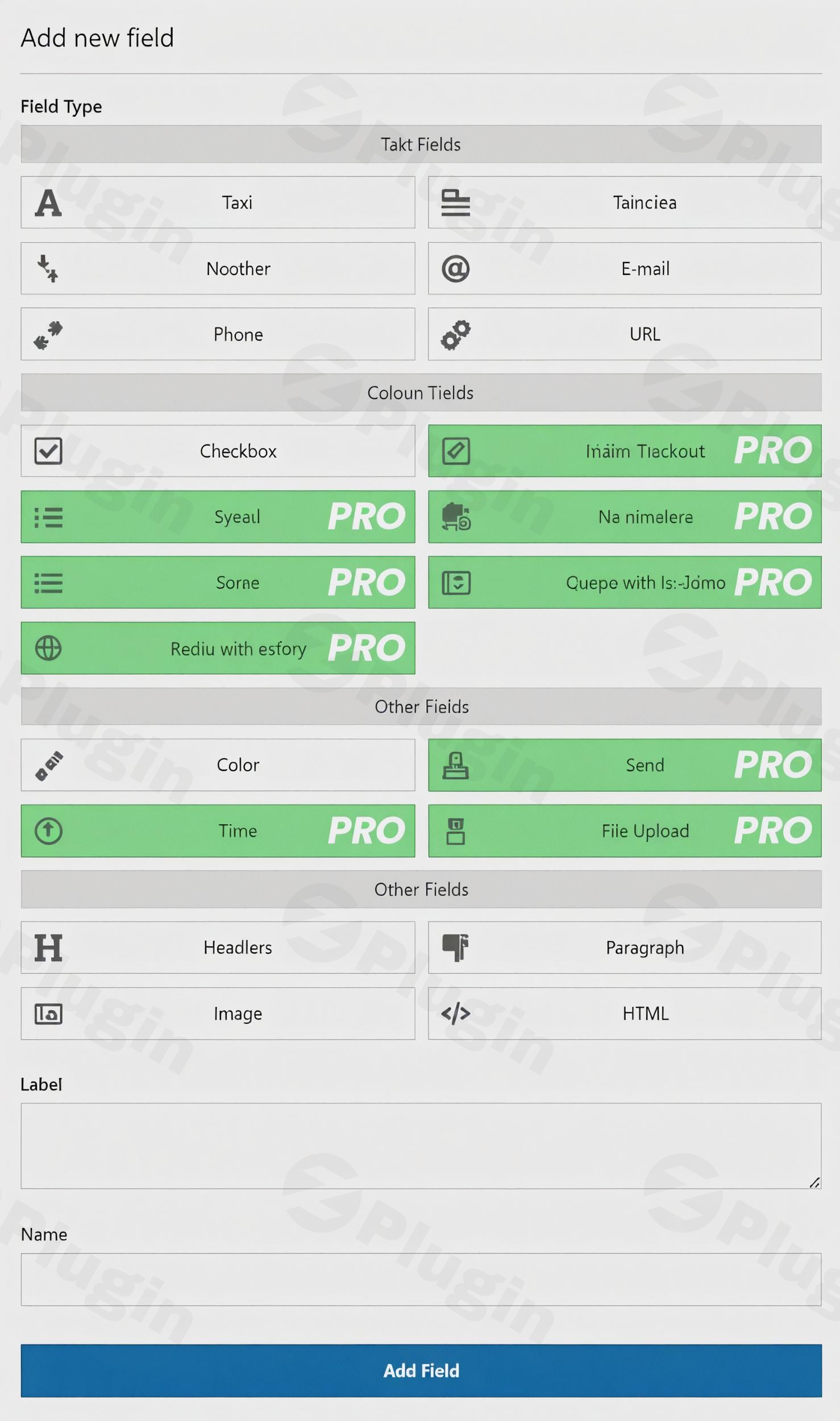
Transforming your WooCommerce checkout page from a generic form into a highly optimized, conversion-focused experience is crucial for any online store. The Flexible Checkout Fields Pro WooCommerce plugin by WPDesk provides the most visually appealing and powerful solution to customize your checkout process effortlessly. This comprehensive WooCommerce Checkout Field Editor Pro empowers store owners to tailor every aspect of their checkout, reducing cart abandonment and improving customer satisfaction by collecting exactly the information they need, precisely when they need it.Whether you’re looking to add WooCommerce custom checkout fields, reorganize existing ones, or implement advanced conditional logic, Flexible Checkout Fields Pro offers the flexibility and control necessary to create a seamless purchasing journey for your customers.
Key Features to Optimize Your WooCommerce Checkout
Flexible Checkout Fields Pro by WPDesk offers an extensive suite of tools designed to give you complete command over your WooCommerce checkout page. Here’s a breakdown of its most impactful features:
Intuitive Drag & Drop Field Ordering
Gone are the days of clunky code edits. This plugin allows you to easily rearrange both WooCommerce’s default fields and all your custom fields using a simple drag-and-drop interface. This intuitive functionality helps you perfectly organize your checkout flow for optimal user experience.
Custom Labels & Placeholders
Personalize your checkout fields with custom labels, including HTML support for rich text. Add helpful placeholders to guide customers, ensuring they understand what information is required in each field, thereby streamlining the completion process.
Comprehensive Field Visibility Control
Take charge of your checkout’s clarity. Show or hide fields with a single click, removing unnecessary distractions like secondary address lines or phone numbers if they’re not essential for your business. This feature is key to creating a clean, focused checkout.
Multi-Location Field Display
Collect and display information precisely where it’s most useful. Beyond the checkout page itself, you can configure custom fields to appear on the Thank You page, within the customer’s My Account section, and directly in order emails, ensuring all relevant data is accessible post-purchase.
Flexible Field Requirement Management
Tailor your checkout form to your exact business needs by easily toggling fields between required and optional. This ensures you gather critical information without creating unnecessary friction for your customers.
Advanced Field Types for Diverse Data Collection
Flexible Checkout Fields Pro goes beyond basic text inputs, offering a wide array of field types to collect virtually any information you need:
- Standard Fields: Text, Textarea, Number, Email, Checkbox, Color Picker.
- PRO Exclusive Field Types: Multi-checkbox, Select dropdowns, Radio buttons (with support for images or colors), Date pickers, Time pickers, and File Upload fields. These advanced options allow for highly specific data collection, from preferred delivery dates to custom artwork files.
Powerful Conditional Logic (PRO Feature)
This is a game-changer for dynamic checkout experiences. With conditional logic, you can show or hide fields, entire checkout sections, or even shipping and payment methods based on a variety of conditions. These conditions can include:
- WooCommerce default fields
- Other Flexible Checkout Fields
- Flexible Product Fields
- Cart contents (number or value of products)
- User roles
- Selected shipping or payment methods
- Specific datesYou can combine multiple conditions using “AND” and “OR” groups for highly complex and tailored checkout scenarios. This feature is invaluable for creating a personalized and efficient checkout process.
Custom Sections (PRO Feature)
Beyond the standard billing, shipping, and order sections, the PRO version allows you to create up to 12 additional custom checkout sections. You can place these sections at various strategic points on the checkout page (e.g., Before Customer Details, After Payment), providing superior organizational flexibility and ensuring information is presented logically.
Field Pricing (PRO Feature)
A unique differentiator, this feature allows you to assign a price directly to specific custom fields. This can be a fixed price, a percentage of the total, or a percentage of the subtotal (excluding or including VAT). This is perfect for offering add-ons, gift wrapping, or customizable options directly within the checkout process, effectively enabling additional charges or discounts.
Developer Friendly Controls
For advanced users and developers, the plugin offers complete control. Set custom meta names for seamless database integration and add your own validation rules to ensure data integrity and prevent submission errors. Additionally, the plugin provides hooks and filters for further customization.
Multilingual Ready
Expand your reach to a global audience. Flexible Checkout Fields Pro is fully compatible with popular translation plugins like WPML and Polylang, ensuring all your custom checkout fields can be seamlessly translated for international stores.
Installation & Setup: Get Started with Flexible Checkout Fields Pro
Installing and configuring WPDesk Flexible Checkout Fields is a straightforward process, designed for users of all technical levels.
- Purchase and Download:
- First, acquire the Flexible Checkout Fields Pro plugin (or the free version from WordPress.org).
- You’ll receive a
.zipfile containing the plugin.
- Upload the Plugin to WordPress:
- Log in to your WordPress admin dashboard.
- Navigate to Plugins > Add New.
- Click on the “Upload Plugin” button at the top of the page.
- Click “Choose File”, select the downloaded
.zipfile, and then click “Install Now”.
- Activate the Plugin:
- Once the plugin is uploaded, WordPress will prompt you to activate it. Click “Activate Plugin”.
- Configure Checkout Fields:
- After activation, you’ll find the plugin settings under WooCommerce > Flexible Checkout Fields.
- Here, you can start customizing your checkout fields using the drag-and-drop interface.
- Important Note for WooCommerce 8.3+ Users: Flexible Checkout Fields Pro requires the traditional
[woocommerce_checkout]shortcode to be present on your checkout page. If your checkout page is built solely with WooCommerce Blocks, the plugin will not function. Ensure your checkout page uses the classic editor or a page builder that renders the shortcode correctly.
- Start Customizing:
- Begin by adding new fields, editing existing ones, setting up conditional logic (PRO), or creating custom sections.
- Remember to save your changes regularly.
Practical Usage & Best Practices for Maximizing Conversions
Flexible Checkout Fields Pro WooCommerce isn’t just about adding fields; it’s about strategically optimizing your checkout process to boost conversions and enhance customer experience.
- Streamlining for Speed:
- Use Case: A store selling digital products might not need shipping information.
- Best Practice: Utilize the Field Visibility Control to hide all shipping-related fields when only digital products are in the cart. This significantly reduces checkout time and potential friction, especially for users on mobile devices.
- Personalized Information Gathering:
- Use Case: A t-shirt store wants to offer gift wrapping and collect a personalized gift message.
- Best Practice: Add a Checkbox field for “Add Gift Wrapping” (with associated Field Pricing for a small fee). Then, use Conditional Logic to show a Textarea field for “Gift Message” only when the gift wrapping checkbox is selected. This improves the customer experience without cluttering the checkout for everyone.
- Dynamic Offers and Upsells:
- Use Case: A subscription box service wants to offer an expedited processing fee.
- Best Practice: Implement a Checkbox field like “Priority Processing” with Field Pricing attached (e.g., a fixed fee or percentage). This gives customers an optional upgrade directly at checkout, increasing average order value.
- Tailored Fields Based on Customer Choices:
- Use Case: A store has different delivery options (e.g., standard shipping, local pickup). For local pickup, they need to know the preferred pickup time.
- Best Practice: Use Conditional Logic to display a Time Picker field for “Preferred Pickup Time” only when “Local Pickup” is selected as the shipping method. This ensures relevant information is collected only when necessary.
- Segmenting Customers by Role:
- Use Case: A B2B store needs to collect a VAT number or company registration details from wholesale customers but not from regular retail buyers.
- Best Practice: Use Conditional Logic to display specific fields (like a “VAT Number” text field) only for users assigned to a “Wholesale Customer” role, keeping the checkout clean for other user types.
FAQ & Troubleshooting
Here are answers to common questions about Flexible Checkout Fields Pro WooCommerce, designed to help you quickly understand its capabilities and address potential issues.
Can I add new sections to WooCommerce checkout with Flexible Checkout Fields Pro?
Yes, with the PRO version of Flexible Checkout Fields, you can add up to 12 additional custom checkout sections. These sections can be placed at various strategic points on the checkout page (e.g., Before Customer Details, After Payment) to better organize your fields and information.
What field types are supported by Flexible Checkout Fields Pro?
The plugin supports a wide range of field types. In the free version, you can add text, textarea, number, email, checkbox, and color picker fields. The PRO version significantly expands this with additional types including multi-checkbox, select (dropdown), radio buttons (with image/color options), date pickers, time pickers, and file upload fields, allowing you to collect highly specific information.
How does conditional logic work in Flexible Checkout Fields Pro?
Conditional logic in Flexible Checkout Fields Pro allows you to dynamically show or hide fields, sections, shipping methods, or payment gateways based on various conditions. These conditions can be simple (e.g., if a checkbox is checked) or complex (e.g., based on cart contents, selected products, user roles, shipping/payment methods, or even specific dates). You can combine multiple conditions using “AND” and “OR” groups for advanced scenarios, ensuring your checkout adapts to customer choices in real-time.
Is Flexible Checkout Fields Pro compatible with WooCommerce 8.3 or newer versions?
Yes, Flexible Checkout Fields Pro is compatible with recent versions of WooCommerce, including 8.3.0 and newer. However, it’s crucial to note that the plugin specifically requires the traditional [woocommerce_checkout] shortcode to be present on your checkout page. If your checkout page has been migrated to use the new WooCommerce Blocks editor exclusively, the plugin’s functionality will not be active. Ensure your checkout page uses the classic editor or a compatible page builder that embeds the [woocommerce_checkout] shortcode.
How can I add custom fields to WooCommerce checkout with pricing?
With the PRO version, you can easily add custom fields and assign a price to them directly within the plugin’s settings. When creating or editing a field, you’ll find options to set a price as a fixed amount, a percentage of the cart total, or a percentage of the cart subtotal (excluding or including VAT). This allows you to offer paid add-ons or customizable options directly through your checkout fields.
Conclusion: Take Full Control of Your WooCommerce Checkout
The Flexible Checkout Fields Pro WooCommerce plugin is an indispensable tool for any online store owner serious about optimizing their sales funnel and improving customer satisfaction. By providing unparalleled control over your checkout page, this WooCommerce Checkout Field Editor Pro empowers you to streamline processes, collect essential customer data, and introduce dynamic offers without writing a single line of code.From intuitive drag-and-drop ordering to advanced conditional logic and field pricing, WPDesk’s Flexible Checkout Fields equips you with the flexibility to create a perfectly tailored and efficient checkout experience. Investing in this powerful plugin means reducing cart abandonment, increasing average order value, and ultimately, driving more conversions for your business. Take control of your WooCommerce checkout today and transform it into a high-performing asset.
I. Download Limits & Account Benefits
- Free Downloads: Each email address receives 3 downloads per day for free products
- Upgrade Benefits: Purchase any paid product to increase your daily download limit by 3 for each paid product
- No Account Required: You can download immediately by receiving the download link via email
- Account Recommended: Create an account for easier access to your order history and direct update downloads
II. Understanding GPL vs Official Versions
Important: The products available on WPPick are GPL-licensed versions, which differ from official developer versions. Before purchasing, please read our comprehensive guide: Understanding GPL & Official Differences at WPPick
Key Points:
- GPL versions may not include premium support from original developers
- Updates may be delayed compared to official releases
- Some premium features might have limitations
- Always consider your specific needs and support requirements
III. Support & Assistance
We’re here to help through multiple channels:
- Email Support: Direct email assistance for all inquiries
- Live Chat: Real-time support during business hours
- Comprehensive Documentation: Detailed guides and tutorials
IV. Order Tracking
Access your complete purchase history and download links anytime: Order History
V. Account Access
New to WPPick? Login or Create Account to manage your downloads and orders efficiently.
VI. Refund Protection
We stand behind our products with a clear refund policy. Review our terms: Refund Policy
VII. Privacy & Security
Your data security is our priority. Learn how we protect your information: Privacy Policy
VII. Terms of Service
Understanding our service terms ensures a smooth experience: Terms of Use
Quick Tips for Best Experience
- Verify Compatibility: Check plugin/theme compatibility with your WordPress version
- Backup First: Always backup your site before installing new plugins or themes
- Test Environment: Consider testing on a staging site first
- Stay Updated: Regularly check for updates in your account dashboard
- Read Documentation: Review any included documentation for optimal setup
Need Help?
If you have questions about downloads, licensing, or need technical assistance, don’t hesitate to contact our support team. We’re committed to ensuring you have the best possible experience with WPPick products.
Ready to get started? Your download adventure begins with just one click!
- Updated axios library to the latest version (security vulnerabilities)
- Support for WooCommerce 10.2
- Optional label for non-required fields
- Support for WooCommerce 9.9
- Fatal error on email preview page in some checkout configurations
- Fixed: Adding pricing "0" to a field