

Flexible Refund And Return Order For Woocommerce By Wpdesk
/Year
Managing product returns is often one of the most time-consuming tasks for eCommerce store owners. The Flexible Refund and Return Order for WooCommerce by WPDesk is a powerful WooCommerce refund plugin designed to transform a complex manual process into a streamlined, professional workflow. By automating communication and providing a self-service portal for users, this plugin helps reduce administrative overhead while significantly improving the customer experience.Whether you need to issue partial refunds, handle shipping cost returns, or manage warranty requests, this WPDesk WooCommerce refund solution provides the flexibility needed to maintain a high-trust shopping environment.
Why Use Flexible Refund and Return Order for WooCommerce?
In a standard WooCommerce setup, refund requests often happen via chaotic email threads or support tickets. This leads to lost information and frustrated customers. Flexible Refund and Return Order for WooCommerce solves this by integrating a dedicated refund system directly into the customer’s “My Account” area.You should use this plugin if you need to:
- Reduce the time spent on manual refund administration.
- Offer customers a transparent, self-service way to request returns.
- Gather specific data (like photos or reasons) before approving a return.
- Automate status updates to keep customers informed without manual emailing.
Key Features of this WooCommerce Return Plugin
This plugin is more than just a “refund button”; it is a comprehensive WooCommerce return management suite. Here are the core features that provide real-world value to your store:
1. Customer Self-Service Refund Portal
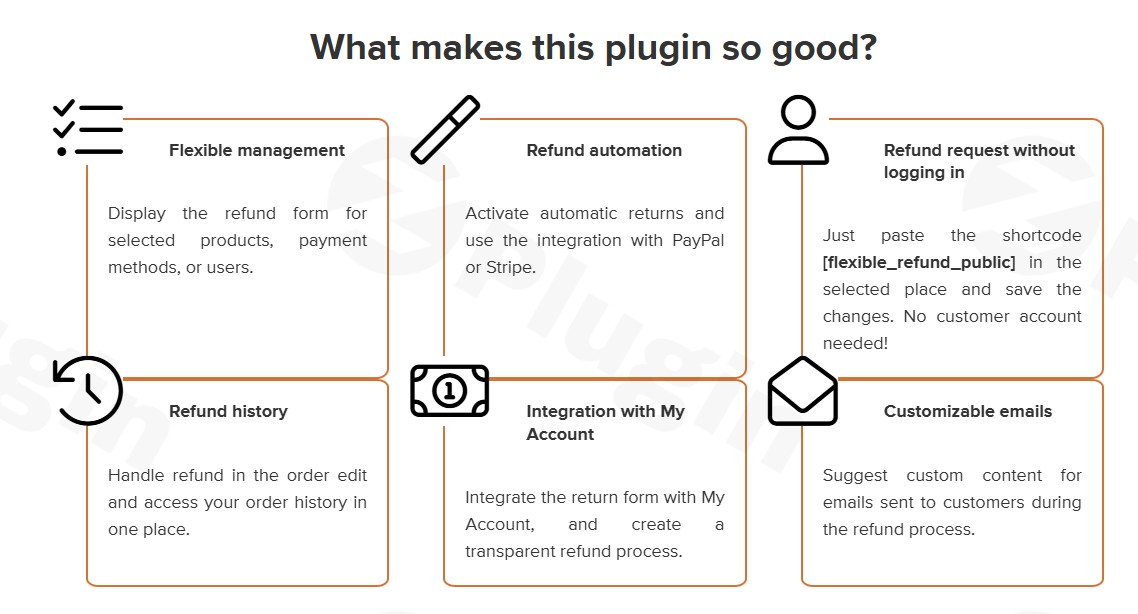
Customers can initiate refund requests directly from their Orders section in the “My Account” page. This centralized system ensures that every request is tied to a specific order ID, preventing confusion and double-handling.
2. Fully Customizable Refund Form Builder
Not every return is the same. The built-in form builder allows you to create custom fields (text areas, checkboxes, radio buttons, and dropdowns) to collect the exact information you need. You can also include a mandatory checkbox for your Refund Policy and Terms, ensuring legal compliance.
3. Granular Refund Control
The plugin provides incredible flexibility regarding how you return money:
- Full or Partial Refunds: Choose to refund the entire order or just specific items.
- Shipping Costs: Optionally include or exclude shipping fees from the total refund.
- Manual Record Keeping: Perfectly track refunds made via cash or bank transfer within the WooCommerce admin.
4. Advanced Pro Features (Warranty & Coupons)
The Pro version of the plugin extends functionality for growing businesses:
- Automatic Coupon Generation: Instead of losing revenue, offer an automated discount coupon as a refund to encourage repeat business.
- Warranty Requests: Allow customers to submit warranty claims, including the ability to upload images of defective products.
* Guest Customer Support: Use the [flexible_refund_public] shortcode to allow guest users to request refunds without an account.
How to Set Up Flexible Refunds in WooCommerce
Setting up the plugin is straightforward and requires no coding knowledge. Follow these steps to get started:
- Installation: Log in to your WordPress dashboard, navigate to Plugins > Add New, and search for “Flexible Refund and Return Order for WooCommerce.” Click Install and then Activate.
- Access Settings: Go to WooCommerce > Settings > Flexible Refund.
- Build Your Form: Navigate to the Refund Form tab. Use the drag-and-drop builder to add fields like “Reason for Return” or “Preferred Refund Method.”
- Configure Notifications: Ensure the Email Notifications are enabled so that customers receive automatic updates when their request is “Pending,” “Approved,” or “Rejected.”
5. Set Global Rules: Define which order statuses (e.g., “Completed”) allow for refund requests and set a time limit (e.g., 14 or 30 days) during which the refund button remains active.
Practical Usage & Best Practices
To get the most out of this WooCommerce refund system, consider these real-world workflows:
- For Clothing Retailers: Use the custom form builder to add a dropdown menu for “Size Mismatch” or “Wrong Color.” This data helps you identify patterns in product descriptions that may need improvement.
- For Electronics Stores: Utilize the Pro version’s warranty request feature. Require customers to upload a photo of the serial number and the defect before you approve the return shipping label.
- For High-Volume Stores: Enable Automatic Coupon Refunds. This is an ideal way to keep liquid cash within your business while still satisfying the customer’s request for a “refund.”
* Managing Guest Orders: If you allow guest checkout, create a dedicated “Returns Center” page and paste the [flexible_refund_public] shortcode. This provides a professional touchpoint for all customers, regardless of account status.
FAQ & Troubleshooting
Can customers request refunds from their account page in WooCommerce?
Yes. Once the plugin is activated, a “Request Refund” button will appear next to eligible orders in the customer’s “My Account > Orders” section. You can control which order statuses trigger this button.
How to customize the WooCommerce refund form?
You can customize the form by navigating to WooCommerce > Settings > Flexible Refund > Refund Form. The plugin includes a visual builder where you can add, remove, or rearrange fields such as text boxes, dropdowns, and file uploads.
Does this plugin support guest customer refunds?
The Pro version of the plugin supports guest refunds. By using the shortcode [flexible_refund_public], you can display a refund request form on any WordPress page, allowing customers without accounts to submit requests using their order ID and email.
What should I do if the refund button isn’t showing up?
First, ensure the order status matches the criteria set in the plugin settings (usually “Completed”). Also, check if the “Refund Availability” period has expired (e.g., if it is set to 14 days and the order is 15 days old, the button will disappear).
Is it compatible with WooCommerce Subscriptions?
Yes, Flexible Refund and Return Order for WooCommerce is compatible with WooCommerce Subscriptions and Yoast SEO, ensuring it fits into your existing tech stack without conflicts.
Conclusion: Is This the Best WooCommerce Refund Plugin?
If you are looking for a reliable, developer-supported way to handle returns, the Flexible Refund and Return Order for WooCommerce by WPDesk is a top-tier choice. It moves the burden of data entry from the store owner to the customer and organizes the entire process within the WooCommerce admin.The ROI is clear: fewer support tickets, faster processing times, and a professional interface that builds customer loyalty. For stores needing WooCommerce order return management with a focus on flexibility and ease of use, this plugin is an essential addition to your toolkit.
I. Download Limits & Account Benefits
- Free Downloads: Each email address receives 3 downloads per day for free products
- Upgrade Benefits: Purchase any paid product to increase your daily download limit by 3 for each paid product
- No Account Required: You can download immediately by receiving the download link via email
- Account Recommended: Create an account for easier access to your order history and direct update downloads
II. Understanding GPL vs Official Versions
Important: The products available on WPPick are GPL-licensed versions, which differ from official developer versions. Before purchasing, please read our comprehensive guide: Understanding GPL & Official Differences at WPPick
Key Points:
- GPL versions may not include premium support from original developers
- Updates may be delayed compared to official releases
- Some premium features might have limitations
- Always consider your specific needs and support requirements
III. Support & Assistance
We’re here to help through multiple channels:
- Email Support: Direct email assistance for all inquiries
- Live Chat: Real-time support during business hours
- Comprehensive Documentation: Detailed guides and tutorials
IV. Order Tracking
Access your complete purchase history and download links anytime: Order History
V. Account Access
New to WPPick? Login or Create Account to manage your downloads and orders efficiently.
VI. Refund Protection
We stand behind our products with a clear refund policy. Review our terms: Refund Policy
VII. Privacy & Security
Your data security is our priority. Learn how we protect your information: Privacy Policy
VII. Terms of Service
Understanding our service terms ensures a smooth experience: Terms of Use
Quick Tips for Best Experience
- Verify Compatibility: Check plugin/theme compatibility with your WordPress version
- Backup First: Always backup your site before installing new plugins or themes
- Test Environment: Consider testing on a staging site first
- Stay Updated: Regularly check for updates in your account dashboard
- Read Documentation: Review any included documentation for optimal setup
Need Help?
If you have questions about downloads, licensing, or need technical assistance, don’t hesitate to contact our support team. We’re committed to ensuring you have the best possible experience with WPPick products.
Ready to get started? Your download adventure begins with just one click!