

Flexible Refund And Return Order For Woocommerce By Wpdesk
/Year
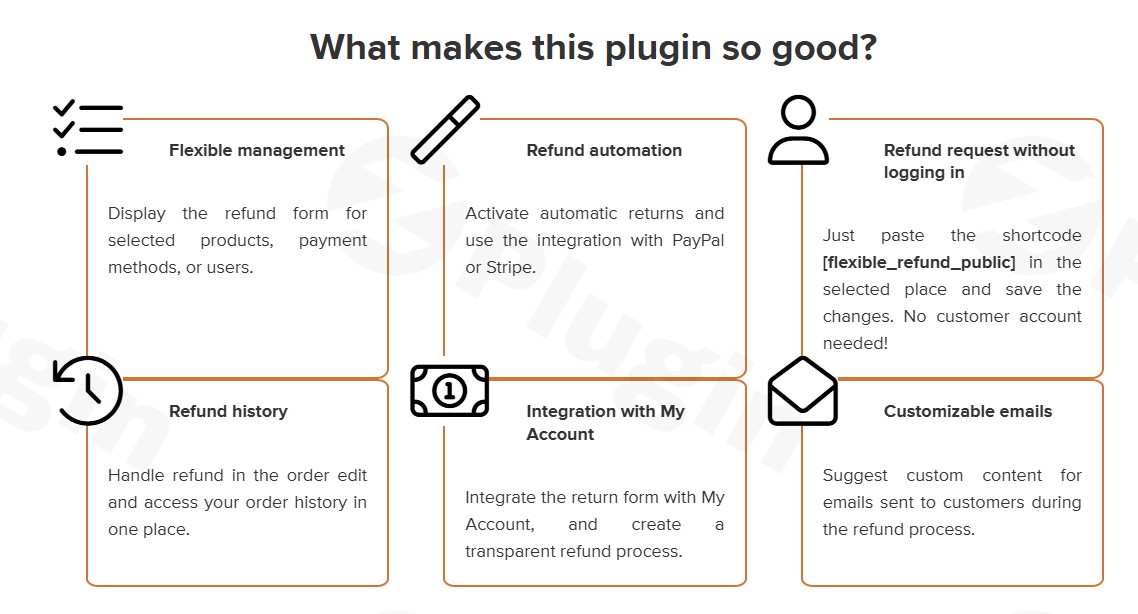
Managing product returns is often the most time-consuming part of running an eCommerce store. The Flexible Refund and Return Order for WooCommerce plugin by WP Desk is a professional-grade WooCommerce refund plugin designed to transform this friction point into a seamless, automated workflow. By allowing customers to initiate requests directly from their accounts, this plugin reduces support tickets and builds long-term buyer trust.In this guide, we will explore how to set up and optimize this WooCommerce return plugin to save time and improve your customer experience.
Key Features: Why Choose the WP Desk Refund Plugin?
The Flexible Refund and Return Order for WooCommerce plugin stands out because it integrates directly with the native WooCommerce order management system. Unlike external helpdesk tools, everything happens within your WordPress dashboard.
1. Customer-Initiated Requests
Instead of emailing back and forth, customers can click a “Refund” button on their My Account page. This simplifies the process for the user and ensures you receive all the necessary data upfront.
2. Customizable WooCommerce Refund Form Builder
You can create a custom form to gather specific details. Whether you need a simple reason for the return or detailed feedback, the WooCommerce refund form builder allows you to add:
- Text and Textarea fields.
- Checkboxes and Radio buttons.
- Select dropdowns.
- Policy Agreement: Add a mandatory checkbox for your “Terms and Conditions” or “Refund Policy” to ensure legal compliance.
3. Automated Email Notifications
Clear communication is vital for WooCommerce refund management. The plugin sends automated, customizable emails to:
- Administrators: Get notified immediately when a new request is submitted.
- Customers: Keep buyers updated on the status of their refund (e.g., Pending, Approved, or Rejected).
4. Advanced PRO Capabilities
For growing stores, the PRO version offers high-level automation:
- Partial Refunds: Allow customers to return specific items rather than the whole order.
- Auto Refund: Approve requests automatically based on specific rules.
- Coupon Refunds: Issue store credit via WooCommerce coupons instead of cash.
- Guest User Support: Use the
[flexible_refund_public]shortcode to let non-registered users request returns.
* File Uploads: Let customers upload photos of damaged products as proof.
How to Set Up Refunds in WooCommerce (Step-by-Step)
Setting up the Wpdesk refund plugin is straightforward. Follow these steps to get your return system live in minutes.
Step 1: Installation
- Log in to your WordPress Admin dashboard.
- Navigate to Plugins > Add New.
- Search for “Flexible Refund and Return Order for WooCommerce.”
- Click Install Now and then Activate.
Step 2: Configure the Refund Form
Once activated, go to WooCommerce > Settings > Refund & Return. Here, you can use the built-in builder to add fields to your request form. Be sure to include a “Reason for Return” dropdown to help you track product quality issues.
Step 3: Set Button Visibility
In the settings, you can choose which order statuses (e.g., “Completed” or “Processing”) will display the refund button to the customer. In the PRO version, you can further restrict this by product category or user role.
Step 4: Managing Requests
When a customer submits a request, it will appear in your WooCommerce Admin under the Refunds tab or directly within the specific Order Edit screen. You can change the status, add internal notes, and process the payout with a few clicks.
Practical Usage & Best Practices
To get the most ROI from your WooCommerce return policy plugin, consider these real-world workflows:
- For Damaged Goods: Use the PRO version’s File Upload feature. Require customers to upload a photo of the damaged item before the “Submit” button becomes active. This prevents fraudulent claims.
- For Clothing/Apparel Stores: Use the form builder to ask for “Size Feedback.” If a customer returns an item because it was “Too Small,” you can use that data to update your size charts.
- Reducing Refund Costs: Instead of a cash refund, offer WooCommerce Coupons (PRO feature). This keeps the revenue within your ecosystem and encourages a future purchase.
* Time-Limited Returns: Use the “Auto Hide” feature to remove the refund button 14 or 30 days after purchase, ensuring you stay within your legal return window.
FAQ & Troubleshooting
Can customers request refunds from the My Account page in WooCommerce?
Yes. Once the Flexible Refund and Return Order for WooCommerce plugin is active, a “Refund” button appears next to eligible orders in the customer’s “My Account” dashboard, allowing them to submit requests without contacting support.
Does this WooCommerce plugin allow partial refunds?
Yes, the PRO version of the plugin supports WooCommerce partial refunds. This allows customers to select specific items and quantities from a multi-product order to return, rather than refunding the entire transaction.
How to automate WooCommerce refunds?
You can automate WooCommerce refunds using the PRO version’s “Auto Refund” feature. You can set specific criteria (such as order value or product type) that, when met, will automatically approve and process the refund request.
Is the plugin compatible with the latest WooCommerce versions?
The plugin is actively maintained and currently supports WooCommerce versions 10.0 through 10.4. It is designed to work seamlessly with modern WordPress environments and major themes.
How do I handle refunds for guest users?
If you have the PRO version, you can place the shortcode [flexible_refund_public] on any page. This creates a public-facing lookup tool where guest users can enter their Order ID and Email to initiate a return.
Final Verdict: Is it the Best WooCommerce Plugin for Product Returns?
If you are looking for a reliable, deeply integrated solution for WooCommerce refund management, the Flexible Refund and Return Order for WooCommerce by WP Desk is an excellent choice. The free version provides all the essentials—custom forms, policy checkboxes, and admin integration—making it ideal for small stores. For larger operations, the PRO version’s support for partial refunds, file uploads, and coupon-based returns provides the automation needed to scale without increasing your customer service overhead. By empowering your customers and organizing your backend, this plugin effectively turns a “loss” (a return) into a professional experience that protects your brand’s reputation.For more WordPress plugin reviews and tutorials, visit wppick.com.
I. Download Limits & Account Benefits
- Free Downloads: Each email address receives 3 downloads per day for free products
- Upgrade Benefits: Purchase any paid product to increase your daily download limit by 3 for each paid product
- No Account Required: You can download immediately by receiving the download link via email
- Account Recommended: Create an account for easier access to your order history and direct update downloads
II. Understanding GPL vs Official Versions
Important: The products available on WPPick are GPL-licensed versions, which differ from official developer versions. Before purchasing, please read our comprehensive guide: Understanding GPL & Official Differences at WPPick
Key Points:
- GPL versions may not include premium support from original developers
- Updates may be delayed compared to official releases
- Some premium features might have limitations
- Always consider your specific needs and support requirements
III. Support & Assistance
We’re here to help through multiple channels:
- Email Support: Direct email assistance for all inquiries
- Live Chat: Real-time support during business hours
- Comprehensive Documentation: Detailed guides and tutorials
IV. Order Tracking
Access your complete purchase history and download links anytime: Order History
V. Account Access
New to WPPick? Login or Create Account to manage your downloads and orders efficiently.
VI. Refund Protection
We stand behind our products with a clear refund policy. Review our terms: Refund Policy
VII. Privacy & Security
Your data security is our priority. Learn how we protect your information: Privacy Policy
VII. Terms of Service
Understanding our service terms ensures a smooth experience: Terms of Use
Quick Tips for Best Experience
- Verify Compatibility: Check plugin/theme compatibility with your WordPress version
- Backup First: Always backup your site before installing new plugins or themes
- Test Environment: Consider testing on a staging site first
- Stay Updated: Regularly check for updates in your account dashboard
- Read Documentation: Review any included documentation for optimal setup
Need Help?
If you have questions about downloads, licensing, or need technical assistance, don’t hesitate to contact our support team. We’re committed to ensuring you have the best possible experience with WPPick products.
Ready to get started? Your download adventure begins with just one click!
No changelog available.