

Flow Notify For Woocommerce
/Year
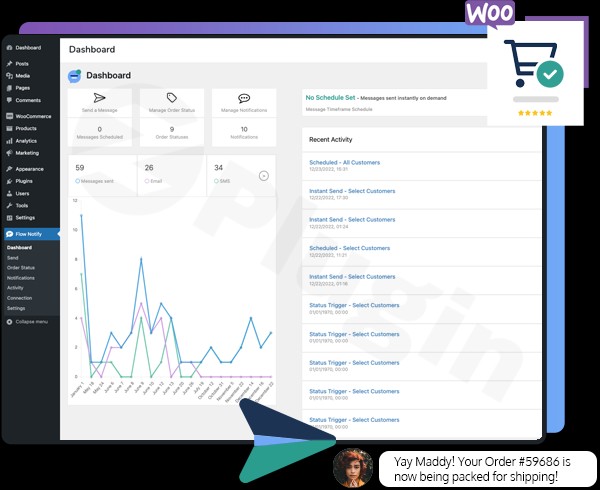
In the competitive world of eCommerce, communication is the bridge between a one-time buyer and a loyal customer. Flow Notify for WooCommerce is a powerful WordPress plugin designed to automate and personalize customer interactions across SMS, WhatsApp, and email. By bridging the gap between order processing and real-time messaging, this plugin helps store owners reduce support inquiries, build trust, and drive repeat sales through timely updates.
Whether you need to send a WooCommerce SMS notification for a shipped order or a WhatsApp alert for a custom order status, Flow Notify provides a centralized hub to manage your entire messaging workflow.
Key Features of Flow Notify for WooCommerce
Flow Notify isn’t just a simple alert tool; it is a comprehensive communication engine. Here is how it adds value to your WordPress site:
1. Multi-Channel Messaging (SMS, WhatsApp, and Email)
Flow Notify allows you to meet customers where they are. By integrating with Twilio for SMS and Meta for WhatsApp, you can send real-time updates directly to a customer’s phone. This is significantly more effective than email alone, as SMS and WhatsApp messages boast much higher open rates.
2. Custom Order Statuses and Workflows
Standard WooCommerce statuses (Pending, Processing, Completed) don’t always fit every business model. Flow Notify allows you to create custom order statuses in WooCommerce with unique labels, icons, and colors. For example, a furniture store might create a “Crafting in Progress” status to keep customers informed during long lead times.
3. Advanced Personalization with Dynamic Data
To make notifications feel human, the plugin supports over 20 dynamic data fields. You can automatically insert:
- Customer Name and Order ID.
- Product details (Names, SKUs, and Prices).
- Shipping and Payment methods.
- Direct URLs for tracking or product reviews.
4. Marketing and Stock Alerts
Beyond transactional updates, Flow Notify acts as a marketing tool. You can send manual or scheduled announcements for product launches or events. Additionally, the Product Stock Alert feature allows customers to opt-in for notifications when an item is back in stock, directly recovering potentially lost revenue.
5. High Performance and Compatibility
Flow Notify is built for speed. It is lightweight, cache-friendly, and fully supports WooCommerce High Performance Order Storage (HPOS). It integrates seamlessly with popular extensions like WooCommerce Local Pickup, Local Delivery, and Order Scheduler Pro.
How to Install and Set Up Flow Notify for WooCommerce
Setting up a WooCommerce notification plugin shouldn’t be complicated. Follow these steps to get Flow Notify running on your site:
- Install the Plugin: Navigate to your WordPress Dashboard, go to Plugins > Add New, and upload the Flow Notify .zip file (or search for it if using the free version). Click Activate.
- Configure Gateway Connections:
- To send SMS, navigate to the Flow Notify settings and enter your Twilio API credentials.
- For WhatsApp, connect your Meta WhatsApp Business Account.
- Create Custom Statuses (Optional): Go to the “Order Status” tab within the plugin settings to add any bespoke statuses your workflow requires.
- Set Up Notification Templates: Define what triggers a message (e.g., “Status changed to Shipped”). Use the dynamic data tags to personalize the message body.
- Test Your Flow: Use the manual notification feature to send a test message to your own number to ensure the formatting and API connections are working perfectly.
Practical Usage & Best Practices
To get the most out of Flow Notify, consider these real-world workflows used by successful agencies and store managers:
- The “Human” Touch for Bespoke Goods: If you sell custom-made items, use a custom status like “Quality Check Passed.” Sending an automated WhatsApp notification at this stage reassures the customer that their order is being handled with care.
- Digital Receipts for Retail: If you use a WooCommerce POS system in a physical store, use Flow Notify to send instant digital receipts via SMS. It’s eco-friendly and gives you a direct line for future digital marketing.
- Flash Sale Announcements: Use the manual broadcast feature to notify your most loyal customers of a 24-hour flash sale. Because these arrive via SMS or WhatsApp, they are seen almost instantly.
- Best Practice – Timing: Avoid sending notifications during late-night hours. Flow Notify allows you to schedule or trigger messages based on order activity, ensuring you respect your customers’ “Do Not Disturb” time.
FAQ & Troubleshooting
What is Flow Notify for WooCommerce?
Flow Notify for WooCommerce is an all-in-one communication plugin that automates customer notifications via SMS, WhatsApp, and Email. It allows store owners to create custom order statuses and send personalized messages based on order triggers.
How do I send WhatsApp messages from WooCommerce?
To send WhatsApp messages using Flow Notify, you must have a Meta WhatsApp Business Account. Once connected via the plugin settings, you can create message templates that trigger automatically when an order status changes.
Is Flow Notify compatible with my WooCommerce theme?
Yes, Flow Notify is designed to be theme-agnostic. It works with most standard WooCommerce themes and builders like Elementor or Gutenberg. It is also tested for compatibility with WordPress 4.6+ and WooCommerce 2.6.0 through the latest versions.
Does the plugin support Twilio?
Yes, Flow Notify uses Twilio as its primary gateway for sending SMS notifications. You will need an active Twilio account and API keys to enable this feature.
Can I automate WooCommerce notifications for custom statuses?
Absolutely. One of the core strengths of Flow Notify is the ability to trigger specific SMS or WhatsApp messages for any custom order status you create, not just the default WooCommerce ones.
Conclusion: Is Flow Notify Worth It?
If you are looking to professionalize your post-purchase experience, Flow Notify for WooCommerce offers an excellent return on investment. By automating WooCommerce SMS and WhatsApp notifications, you reduce the “Where is my order?” (WISMO) queries that plague support desks.
The plugin’s ability to handle custom workflows makes it ideal for specialized businesses, while its lightweight code ensures your site remains fast. For any store owner serious about customer retention and modern communication, Flow Notify is a top-tier choice for your WooCommerce toolkit.
Ready to streamline your store’s communication? Visit wppick.com for more WordPress guides and plugin reviews.
I. Download Limits & Account Benefits
- Free Downloads: Each email address receives 3 downloads per day for free products
- Upgrade Benefits: Purchase any paid product to increase your daily download limit by 3 for each paid product
- No Account Required: You can download immediately by receiving the download link via email
- Account Recommended: Create an account for easier access to your order history and direct update downloads
II. Understanding GPL vs Official Versions
Important: The products available on WPPick are GPL-licensed versions, which differ from official developer versions. Before purchasing, please read our comprehensive guide: Understanding GPL & Official Differences at WPPick
Key Points:
- GPL versions may not include premium support from original developers
- Updates may be delayed compared to official releases
- Some premium features might have limitations
- Always consider your specific needs and support requirements
III. Support & Assistance
We’re here to help through multiple channels:
- Email Support: Direct email assistance for all inquiries
- Live Chat: Real-time support during business hours
- Comprehensive Documentation: Detailed guides and tutorials
IV. Order Tracking
Access your complete purchase history and download links anytime: Order History
V. Account Access
New to WPPick? Login or Create Account to manage your downloads and orders efficiently.
VI. Refund Protection
We stand behind our products with a clear refund policy. Review our terms: Refund Policy
VII. Privacy & Security
Your data security is our priority. Learn how we protect your information: Privacy Policy
VII. Terms of Service
Understanding our service terms ensures a smooth experience: Terms of Use
Quick Tips for Best Experience
- Verify Compatibility: Check plugin/theme compatibility with your WordPress version
- Backup First: Always backup your site before installing new plugins or themes
- Test Environment: Consider testing on a staging site first
- Stay Updated: Regularly check for updates in your account dashboard
- Read Documentation: Review any included documentation for optimal setup
Need Help?
If you have questions about downloads, licensing, or need technical assistance, don’t hesitate to contact our support team. We’re committed to ensuring you have the best possible experience with WPPick products.
Ready to get started? Your download adventure begins with just one click!
- Code optimizations for QIT Testing
- Bug fixes
- Performance improvements
- WP tested up to WP 6.8.3
- WC tested up to WC 10.3.5