
Fluent Boards Pro v1.65
/Year
Streamline Workflows with Native WordPress Project Management
Fluent Boards Pro introduces a complete, self-hosted project and task management system built directly inside the WordPress dashboard. Instead of relying on expensive external subscription services that split team data across multiple external platforms, this plugin centralizes all project documentation, communications, and task assignments in a single secure database. This centralized structure keeps data fully private, eliminates external user seat limits, and ensures rapid navigation by operating entirely within a familiar environment.
What It Does and Who It Is For
The system transforms any standard website backend into a collaborative workspace. It provides the visual clarity of modern agile platforms while maintaining deep integration with existing core user data and database structures. Fluent Boards Pro is designed for agile agencies tracking client deliverables, freelance developers organizing development sprints, editorial teams managing publication schedules, and e-commerce store operators coordination fulfillment workflows. By linking project components directly to local assets, it bridges the gap between management oversight and operational execution.
Key Operational Capabilities
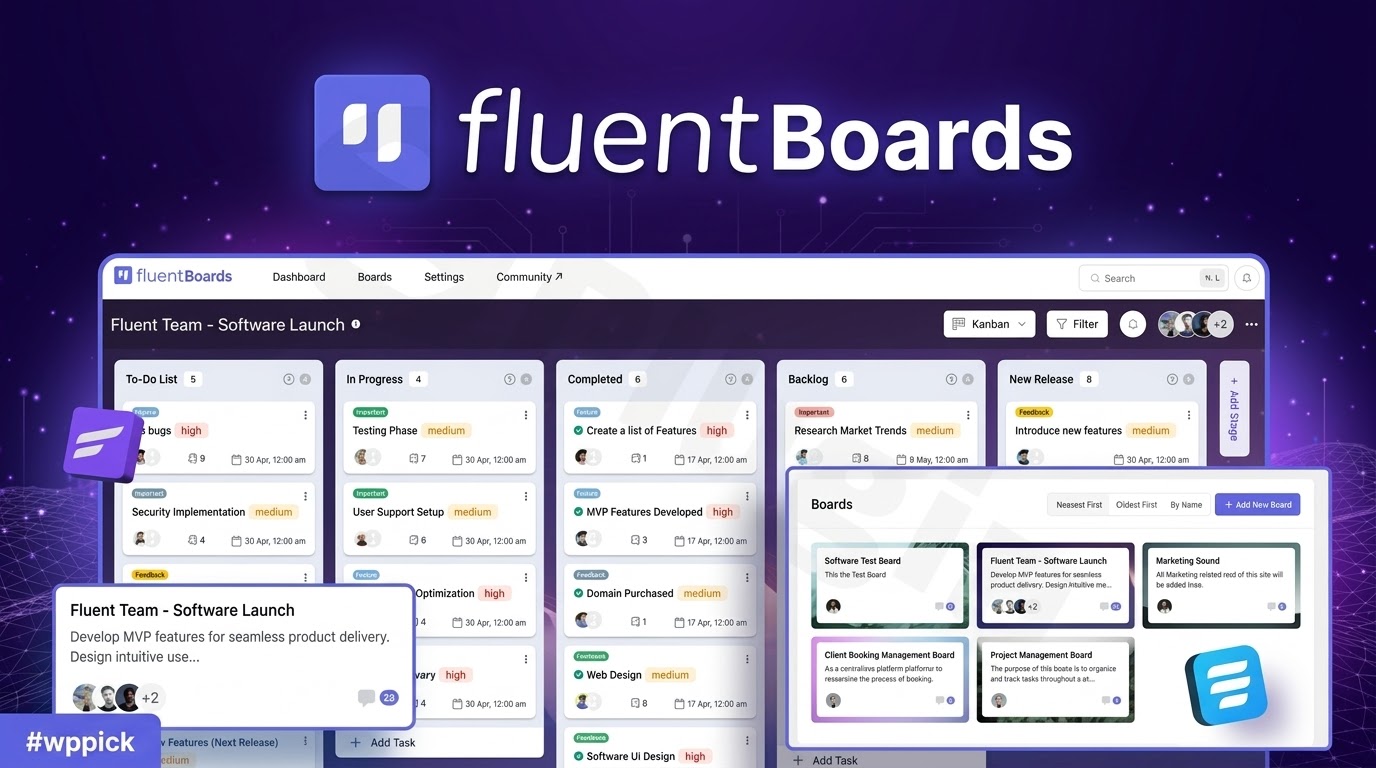
- Visual Kanban Boards: Easily track progress using responsive drag-and-drop cards across customizable columns and stages.
- Comprehensive Task Cards: Map assignments to specific team members, assign priority levels, append multiple attachments, and establish exact target deadlines.
- Subtask Grouping and Lists: Divide complex, overarching project deliverables into small, sequential items for precise status monitoring.
- Advanced Filtering and Search: Isolate critical action items instantly using focused queries for specific assignees, milestones, priority status, or individual watchers.
- Custom Fields Framework: Extend default card structures by generating bespoke text fields, dropdown components, and specialized options to match unique business logic.
- Automated Webhook Integration: Push critical status changes out to external applications or trigger automated workflows internally when tasks move between columns.
Practical WordPress Use Cases
Agencies use the plugin to coordinate multi-stage web development processes. Boards can be structured by client names, with distinct columns tracking tasks from discovery through staging and final deployment. Because the plugin interfaces natively with other operational extensions like Fluent CRM, user assignments link directly to contact profile logs. Editorial departments can build a unified content calendar where content ideas transition smoothly from raw outlines to drafting, proofreading, and scheduled publication phases without requiring external notification systems.
Setup, Security, and Core Compatibility
Deployment requires no external database configurations or API access tokens. Upon activation, the plugin initializes standard management tables alongside default core site data. This lightweight approach ensures minimal overhead while maximizing security through strict data isolation. Because the plugin complies fully with standard internal authorization policies, administrators can assign granular permission structures to control which internal user roles can edit board configurations, move cards, or leave internal updates. Storage components map to standard media parameters or integrate cleanly with dedicated external cloud systems to protect server bandwidth.
Why Source Fluent Boards Pro on WPPick?
Securing the Pro version through WPPick grants businesses instant access to essential workflow utilities without ongoing operational restrictions. Users receive verified, deployment-ready installable archives that maintain all deep task management features, automated webhook behaviors, and collaborative tools safely isolated from tracking scripts. This allows teams to expand board creation endlessly, assign unlimited team members, and build nested workflows across multiple test setups or client properties while remaining fully self-hosted.
Latest Version Context
Detailed release notes are not available from the provided sources. The local technical framework confirms implementation of structured updates designed to tighten authentication validation policies across multi-user environments. Additional internal improvements resolve media processing anomalies, specifically addressing file upload behaviors on cloud-based block storage nodes to guarantee consistent attachment handling for distributed remote teams.
Frequently Asked Questions
Can I assign tasks to users who do not have full administrator site access?
Yes. The system utilizes standard WordPress user roles, allowing administrators to invite specific profiles to boards. Users can view and update their assigned tasks without gaining access to core site settings or unrelated technical dashboards.
How does the system handle file storage for task attachments?
By default, attachments upload to the designated local directory mapping your standard media framework. The platform also supports direct offloading to connected cloud architecture to optimize local hosting storage and bandwidth.
Does this plugin connect directly with external automation tools?
Yes. The inclusion of native outgoing webhook configurations allows task triggers, such as stage transitions or completion updates, to transmit clean structured data payloads to external orchestration systems or communication suites.
Can I view tasks in formats other than a standard Kanban board view?
Yes. Users can toggle project boards between a traditional visual column layout, organized list structures, and structured data tables to suit specific personal tracking preferences and reporting requirements.
I. Download Limits & Account Benefits
- Free Downloads: Each email address receives 3 downloads per day for free products
- Upgrade Benefits: Purchase any paid product to increase your daily download limit by 3 for each paid product
- No Account Required: You can download immediately by receiving the download link via email
- Account Recommended: Create an account for easier access to your order history and direct update downloads
II. Understanding GPL vs Official Versions
Important: The products available on WPPick are GPL-licensed versions, which differ from official developer versions. Before purchasing, please read our comprehensive guide: Understanding GPL & Official Differences at WPPick
Key Points:
- GPL versions may not include premium support from original developers
- Updates may be delayed compared to official releases
- Some premium features might have limitations
- Always consider your specific needs and support requirements
III. Support & Assistance
We’re here to help through multiple channels:
- Email Support: Direct email assistance for all inquiries
- Live Chat: Real-time support during business hours
- Comprehensive Documentation: Detailed guides and tutorials
IV. Order Tracking
Access your complete purchase history and download links anytime: Order History
V. Account Access
New to WPPick? Login or Create Account to manage your downloads and orders efficiently.
VI. Refund Protection
We stand behind our products with a clear refund policy. Review our terms: Refund Policy
VII. Privacy & Security
Your data security is our priority. Learn how we protect your information: Privacy Policy
VII. Terms of Service
Understanding our service terms ensures a smooth experience: Terms of Use
Quick Tips for Best Experience
- Verify Compatibility: Check plugin/theme compatibility with your WordPress version
- Backup First: Always backup your site before installing new plugins or themes
- Test Environment: Consider testing on a staging site first
- Stay Updated: Regularly check for updates in your account dashboard
- Read Documentation: Review any included documentation for optimal setup
Need Help?
If you have questions about downloads, licensing, or need technical assistance, don’t hesitate to contact our support team. We’re committed to ensuring you have the best possible experience with WPPick products.
Ready to get started? Your download adventure begins with just one click!
- Auth policy update for better security.
- Digital Ocean file upload issue.
- Global add button moved for better user experience.
- Internal security improved.
- Improved button color consistency.
- Resolved an issue with Cloudflare R2 file uploads.
- Resolved the problem where stages in a board were not reordering properly.
- Fixed the issue with the edit button in comments.
- Other Improvements & Bug Fixes
- Bulk actions in Table View
- Bulk restore and delete for archived tasks
- Additional webhook triggers
- Better cross-board task movement handling
- WordPress Guidelines and coding standards compliance
- Enhanced error handling and dependency check
- Stages ordering issues in board duplication
- Board description rendering issue with ampersands
- Task deletion issue
- Parent ID falsy (zero) value handling
- Default preferences not applied to newly added settings
- Subtask group assignment inconsistencies
- Microsoft office files attachment upload issue
- Other Improvements & Bug Fixes
- Easy task delete functionality
- Task reminder icon added when reminder active
- Webhook data pattern improved, message key added for better handling
- Added a close icon to the label popover for easier closing
- Custom field select and multiselect error
- Kanban view preference error
- Task creation issue with default assignee in stage
- Duplicate member in assignee
- Other Improvements & Bug Fixes
- Table View for tasks
- Outgoing Webhooks
- Task and subtask reminder feature
- REST API documentation
- 'Assigned' & 'Mentioned' Tab in My tasks section
- Added "Create from template" option in task create action in CRM Automation
- Improved member search to support partial name matches
- Additional translations
- Security Issues in board member invitations
- Roles Issues in board member management
- Frontend portal task creation issue in List view
- Incoming webhook task creation issue with watchers and members
- Email sent issue when self-assigned to task
- Other Improvements & Bug Fixes
- Board folderization for better board management
- Task clone with customization for efficient task duplication
- Boards list view
- Simple notes for subtasks to capture brief task details
- Task List view settings for customizable user experience
- Rearrange custom fields order with drag functionality for better organization
- Added task watcher functionality alongside task assignees
- Added ability to make comments public/private in Roadmap tasks
- Mentioned and assigned filters in notification sidebar
- Board menu now customizable with ability to add/reorder items
- Enhanced JSON export with large data support
- Redesigned custom fields interface for better user experience
- Added 'load more' in quick search
- Open task in new board within move card component for improved task management
- Multiple task creation issue in repeat tasks
- Resolved board view conflict issue
- Stage background color issue in duplicated boards
- Multiclick issue during saving
- Task positioning issue when moving tasks
- Added Fluent Boards to CRM navigation
- Task filtering issue with translated priorities
- Label popover UX issue in task drawer
- Roadmap idea vote count issue
- Auto-focus issue in global search
- Other Improvements & Bug Fixes
- Pinned board functionality for quick access to important boards
- Direct task creation from image drops or pastes
- Enhanced task filtering by CRM contact association
- Task filtering by watchers for better task tracking
- Background blur effect in task details dialog for improved focus
- Customizable task priority levels via filter hook
- Attachments/Files can be mapped with Task from Fluent Form
- Added search functionality in move card popover
- Customizable task tabs for comments and activities via filter hook
- Enhanced comment reply interface
- Improved subtask and group creation UX workflow
- Direct subtask group creation from CRM contact section
- Removed background styling from task title input in list view
- Input Method Editor (IME) compatibility in subtask fields
- Task date removal functionality issue
- Translation Issue
- Other Improvements & Bug Fixes
- Introduced Subtask Group
- Single Board shortcode Functionality
- Custom color support for stage background
- More Optimized UI in List View, Subtask Section etc.
- Scroll to top functionality in task details page
- User image now sourced from WordPress user profile
- Custom field option added in Board Menu
- Task description editor sync and collapse icon added
- Background image upload switched from WP Media to local directory
- Create label directly from empty search
- Added Activity tracking for repeat tasks
- Ability to delete board label
- Global add-task and stage save button multi-click issue
- Multiple emails sent issue on member invitations
- Disappearing search popup Issue for keyword "4466" in search
- Mention Issue in comments for usernames containing emails or space-separated words
- Stage header title text selection issue
- CRM contact not showing in task