
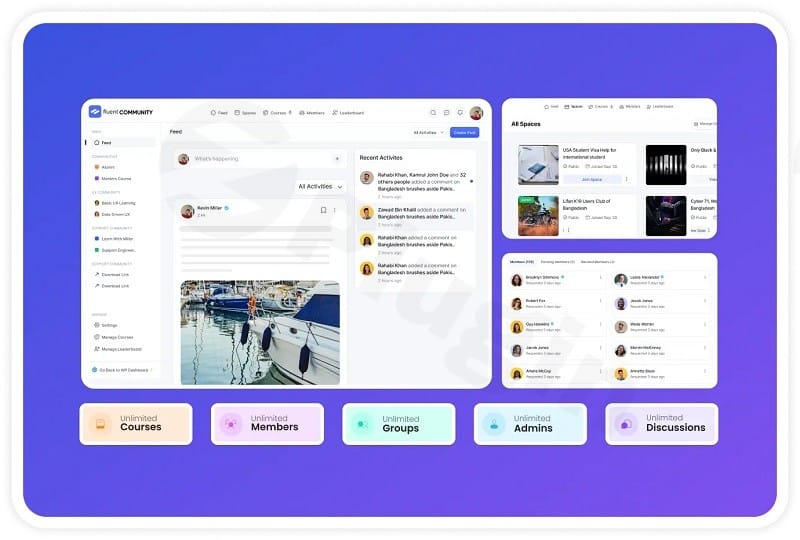
Fluent Community Pro – Fastest WordPress Community Plugin
/Year
Transform WordPress Into a High-Performance Community Platform
Fluent Community Pro is an advanced WordPress plugin designed to help site administrators build, manage, and scale interactive online communities, membership hubs, and social spaces directly within their existing WordPress infrastructure. By combining native social networking features with robust membership capabilities, the platform removes the need for complex, resource-heavy external software while keeping user data fully under your control.
Latest Version 2.7.5 Changes
FluentCommunity Pro version 2.7.5 introduces audio posts, LaTeX Math blocks, and Default Theme Modes. The update also delivers performance speedups, tightens security access controls on Pro features like quiz submissions and document edits, and resolves several notification bugs.
- Added Audio Uploads and Audio Media Gallery powered by FluentPlayer to share audio tracks [1.3.1].
- Introduced a new Math block with LaTeX support for writing formulas in the lesson editor.
- Added Details blocks to create collapsible sections in the lesson editor.
- Implemented Default Theme Mode, allowing admins to set the portal to Light, Dark, or the user’s System setting.
- Added the ability for users to change their password directly from their profile.
- Improved performance with new database indexes, speeding up feeds, the activity ticker, comments, and member lists.
What Fluent Community Pro Does
The plugin establishes a feature-rich social ecosystem inside WordPress, complete with dynamic member feeds, activity tickers, user profiles, comments, and member directories. Administrators can configure custom spaces, host discussions, manage member interactions, and restrict content based on specific membership rules. Recent updates add multimedia capabilities like audio uploads and galleries, specialized lesson editor tools, and granular theme styling controls to tailor the portal’s aesthetic to match your brand.
Who It Is For
This solution serves creators, educators, membership site owners, agencies, and businesses seeking to foster deeper engagement with their audience. Whether you are running an online academy, a private mastermind group, a customer support community, or a creator-driven social hub, Fluent Community Pro delivers the necessary structure to keep participants connected and active.
Key Capabilities
The plugin incorporates a wide array of tools engineered to maximize user interaction and platform efficiency:
- Audio Uploads and Media Gallery powered by FluentPlayer for sharing and playing audio tracks.
- Math block support with LaTeX integration for precise formula writing in lesson and content editors.
- Collapsible Details blocks to organize lengthy educational or community content efficiently.
- Default Theme Mode settings allowing administrators to enforce Light, Dark, or user-defined System preferences.
- Direct profile password management for improved self-service user account handling.
- Optimized database indexes designed to accelerate feed loading, activity tickers, comments, and member lookups.
- Strengthened access controls for sensitive actions such as comment editing, document modifications, quiz submissions, and API key masking.
Practical WordPress Use Cases
Site owners deploy Fluent Community Pro across various scenarios, including:
- Online Courses and Academies: Building interactive learning environments with structured lessons, math formulas, and student discussions.
- Membership Sites: Creating exclusive content spaces where members interact, share resources, and network safely.
- Customer Support Hubs: Establishing peer-to-peer assistance channels and feedback boards to reduce direct support overhead.
- Private Masterminds: Hosting high-value coaching groups with strict access permissions and secure document management.
Setup and Compatibility
Installation follows the standard WordPress plugin upload procedure. Once activated, the system integrates seamlessly with existing themes and supports modern block editor workflows. Database optimizations ensure that even as membership numbers grow, query execution remains fast and responsive across standard hosting environments.
Reasons to Choose It on WPPick
Choosing Fluent Community Pro through WPPick grants you access to clean, installable files for building engagement-driven ecosystems cost-effectively. It provides an efficient alternative to standalone social networks, keeping your community members centralized on your own domain where you retain full ownership of your data and interactions.
Latest Version Context
Version 2.7.5 introduces powerful multimedia and editorial additions, including native audio file uploads via FluentPlayer and LaTeX math block rendering for technical content. Portal administration is streamlined with global Default Theme Mode toggles and direct profile password updates. Under the hood, this release brings significant database performance indexing for faster feed rendering, alongside tightened security controls protecting quiz submissions, document edits, and API keys. Several minor UI and notification bugs have also been resolved for a smoother user experience.
Frequently Asked Questions
Can I customize the visual appearance of the community portal? Yes, administrators can configure default theme modes including light, dark, and system settings, alongside standard layout and styling adjustments to match your branding.
Does the platform support audio sharing? Yes, version 2.7.5 includes dedicated audio upload functionality and an integrated audio media gallery powered by FluentPlayer.
How are member permissions and security managed? The plugin features tightened security access controls covering comment moderation, document edits, quiz submissions, and secure API key masking to protect sensitive community data.
Can I use mathematical formulas in my community content? Yes, a new dedicated Math block with full LaTeX support allows instructors and users to write complex formulas directly within the editor.
Is the plugin optimized for large member databases? Yes, the latest updates include redesigned database indexes specifically engineered to speed up activity feeds, tickers, comments, and member directory lookups.
I. Download Limits & Account Benefits
- Free Downloads: Each email address receives 3 downloads per day for free products
- Upgrade Benefits: Purchase any paid product to increase your daily download limit by 3 for each paid product
- No Account Required: You can download immediately by receiving the download link via email
- Account Recommended: Create an account for easier access to your order history and direct update downloads
II. Understanding GPL vs Official Versions
Important: The products available on WPPick are GPL-licensed versions, which differ from official developer versions. Before purchasing, please read our comprehensive guide: Understanding GPL & Official Differences at WPPick
Key Points:
- GPL versions may not include premium support from original developers
- Updates may be delayed compared to official releases
- Some premium features might have limitations
- Always consider your specific needs and support requirements
III. Support & Assistance
We’re here to help through multiple channels:
- Email Support: Direct email assistance for all inquiries
- Live Chat: Real-time support during business hours
- Comprehensive Documentation: Detailed guides and tutorials
IV. Order Tracking
Access your complete purchase history and download links anytime: Order History
V. Account Access
New to WPPick? Login or Create Account to manage your downloads and orders efficiently.
VI. Refund Protection
We stand behind our products with a clear refund policy. Review our terms: Refund Policy
VII. Privacy & Security
Your data security is our priority. Learn how we protect your information: Privacy Policy
VII. Terms of Service
Understanding our service terms ensures a smooth experience: Terms of Use
Quick Tips for Best Experience
- Verify Compatibility: Check plugin/theme compatibility with your WordPress version
- Backup First: Always backup your site before installing new plugins or themes
- Test Environment: Consider testing on a staging site first
- Stay Updated: Regularly check for updates in your account dashboard
- Read Documentation: Review any included documentation for optimal setup
Need Help?
If you have questions about downloads, licensing, or need technical assistance, don’t hesitate to contact our support team. We’re committed to ensuring you have the best possible experience with WPPick products.
Ready to get started? Your download adventure begins with just one click!
- Disable Feed/Space Layout Switching
- Issue with Vote Casting
- Lesson Content Update Issue
- Child Comments Appearing as Parent Comments
- Minor UI Issue
- App Notification When User Follow
- Gutenberg Block Support in Course and Space Lockscreen
- Breakdance Theme Support in Theme Compatibility
- Auto Scroll Pagination in Bookmark Listing
- Student Last Seen in Course Student List
- Lesson Slug Edit Option
- Spaces & Courses Counts in Listings
- Hook for Default Profile Tab
- Mentioned Users in Create Comment Hook
- Email Notifications
- Month Display in Mobile
- From Email Address Select
- Feed UI in RTL Mode
- UI/UX and Responsiveness
- Multisite Compatibility in Manager and Course Student
- Default Order Ignored When User Can Change Order
- Document Delete Issue on Copy Course Section
- Max Topic Limit Per Space Not Working
- Edit Post Not Working from Profile Posts
- Post Topics Unable to Remove in Edit Post
- Recent Activity Not Updating on Post Move
- Topic Assigning Issue from Course Settings
- Issue on Course Description links
- Scheduled Course Delete Issue
- Issue with Feed Sort By
- Space Link Privacy Issue
- Deleted Comment Activity Not Removing
- Notification Preference Showing for Pending Users
- Allow Join Option Showing for Public Space
- Unlink URL Not Converting to Plain Text in Feed
- Link Update REST Policy Issue with improved security
- Introducing Native Monetization Features for courses and Spaces with FluentCart
- Support Multiple Pricing Plans for Courses and Spaces
- Copy Course Sections between courses
- Duplicate Course with all settings
- New: Badge Remove Action for FluentCRM
- New: Section Completed Trigger for FluentCRM
- Image Gallery Improvements
- Styling Improvements for Feeds and Courses
- Hashtags now works on all languages
- BuddyBoss Migration Improvements
- Underline Framework upgrade for future feature updates
- Improvements on Bookmarks
- Fixed Join Date Timezone issue
- Other Bug fixes and Improvements