

Fonts Plugin Pro – Google Fonts For WordPress
/Year
In the dynamic world of web design, typography is not just about choosing pretty letters; it’s about legibility, branding, and user experience. For WordPress users, gaining complete control over your site’s fonts can often be a frustrating challenge, confined by theme limitations or complex coding. This is where Fonts Plugin Pro WordPress steps in, offering a robust and intuitive solution to transform your website’s visual appeal with unparalleled ease.Fonts Plugin Pro is a comprehensive WordPress Google Fonts plugin designed to give you extensive control over your website’s typography. It addresses the core problem many site owners face: the struggle to implement custom, beautiful, and performant fonts without technical headaches. Whether you’re a blogger, an e-commerce store owner, or an agency, this powerful font manager empowers you to create a truly unique and branded visual experience for your audience.
Key Features: Unleashing Your Website’s Typographic Potential
Fonts Plugin Pro is packed with features that go beyond basic font selection, making it a powerful WordPress font manager and WordPress custom fonts plugin. Here’s a detailed look at what makes it stand out:
1. Massive & Diverse Font Library
Break free from generic fonts. Fonts Plugin Pro grants you access to an extensive collection of over 1,400 Google Fonts, ensuring you’ll find the perfect typeface for any project. But it doesn’t stop there:
- Adobe Fonts (Typekit) Integration: Seamlessly integrate your Adobe Fonts projects, giving you even more premium typographic options.
- Custom Font Uploads: Need a unique brand font? Easily upload custom WOFF2 fonts WordPress plugin support allows you to self-host your own font files in various formats (WOFF2, WOFF, TTF, OTF, SVG), ensuring consistent branding.
2. Live Customizer Preview for Instant Feedback
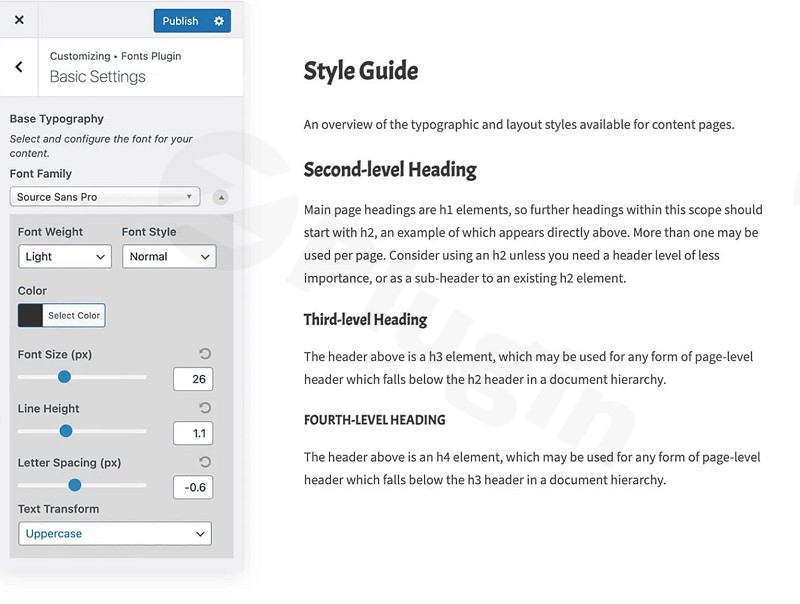
Forget endless saving and refreshing. The plugin’s most loved feature is its Live Preview directly within the WordPress Customizer. This means you can test and visualize every font change—from typeface to size and color—instantly before applying them to your live site. This real-time feedback loop saves immense time and ensures you achieve the perfect look the first time.
3. Granular Typography Controls
Achieve pixel-perfect typography with an array of advanced customization options:
- Font Size, Weight, and Style: Precisely adjust font sizes and select from a spectrum of weights (e.g., Thin, Bold) and styles (like italics) to match your design vision.
- Color and Line Height: Customize font colors to align with your brand palette and fine-tune line height for optimal readability.
- Letter Spacing and Text Transform: Enhance the aesthetic of your text by adjusting letter spacing and applying text transformations (e.g., uppercase, capitalize).
- Responsive Typography: Ensure your design looks flawless on every screen with device-specific settings for font sizes and line heights across desktops, tablets, and mobile devices.
- Variable Font Support: Embrace the future of typography with support for variable fonts, offering dynamic control over weight, width, and italics axes.
4. Advanced Targeting for Ultimate Control
Whether you’re a beginner or a seasoned developer, Fonts Plugin Pro provides the tools for precise font application:
- Per-Element and Per-Block Font Assignment: Apply fonts globally, or target specific HTML elements like headings (H1-H6), body text, navigation menus, buttons, and even individual blocks within the Gutenberg editor.
- Custom CSS Selector Support: For developers seeking maximum control, define your own CSS selectors to apply fonts to non-standard elements or override theme styles with surgical precision.
5. Performance Optimized: A True WordPress Font Optimizer
Website speed is paramount for SEO and user experience. Fonts Plugin Pro shines as a WordPress font optimizer by implementing several strategies to ensure your beautiful fonts don’t slow down your site:
- Local Font Hosting: This feature allows you to host Google Fonts locally in WordPress, eliminating external HTTP requests to Google’s servers. This significantly improves page load times and provides a critical step towards GDPR compliance.
- Efficient Font Loading (WOFF2 & Selective Loading): The plugin optimizes font delivery by supporting the WOFF2 format (which reduces file sizes by up to 30%) and loading only the necessary font weights, preventing your site from being bogged down by unused styles. This can lead to up to 400% faster font loading.
- Font Preloading and Preconnect Resource Hints: Fonts are downloaded as early as possible, preventing the dreaded “flash of unstyled text” (FOUT) and ensuring a smooth user experience.
- Removal of External Font Requests: It can intelligently disable or remove unoptimized Google Font requests from other themes or plugins, ensuring Fonts Plugin Pro maintains complete and efficient control over all typography.
6. GDPR-Friendly
With increasing privacy regulations, Fonts Plugin Pro GDPR compliance features are a significant advantage. By offering local hosting of Google Fonts, the plugin helps website owners comply with data privacy regulations by eliminating external calls to Google’s servers, keeping data under your control.
7. Broad Compatibility and Seamless Integration
Fonts Plugin Pro is built to work harmoniously with your existing WordPress ecosystem:
- WordPress Version Compatibility: Compatible with WordPress 4.0 or higher, tested up to WordPress 6.8.3.
- PHP Version Compatibility: Tested with PHP7 and PHP8.
- Page Builder Integration: Works perfectly with popular page builders including Elementor, Gutenberg (Block Editor), Divi, Beaver Builder, and WPBakery. Fonts Plugin Pro Elementor compatibility means you can fine-tune typography directly within your builder’s interface.
- Theme Compatibility: Tested with popular themes like Astra, GeneratePress, Kadence, Genesis Themes, and many others.
- WooCommerce Support: Fully compatible with WooCommerce, ensuring consistent and branded typography across your online store.
- Translation Ready & Multisite Ready: Supports multilingual sites and offers site-level controls for WordPress multisite installations.
8. Seamless Updates & Reliable Support
Enjoy hassle-free one-click updates to the latest version, ensuring you always have access to new features and improvements. ZeroPlugin.com further ensures peace of mind with GPL licensing, VirusTotal verified safe downloads, scanned dependencies for maximum security, and reliable customer support.
Installation & Setup: Adding Google Fonts to WordPress Without Coding
Installing Fonts Plugin Pro is straightforward, even for non-developers. Here’s how to get started:
- Purchase and Download: Visit ZeroPlugin.com, purchase Fonts Plugin Pro, and download the plugin ZIP file to your computer.
- Upload to WordPress:
- Log in to your WordPress admin dashboard.
- Navigate to Plugins > Add New.
- Click the “Upload Plugin” button at the top of the page.
- Click “Choose File”, select the Fonts Plugin Pro ZIP file you downloaded, and then click “Install Now”.
- Activate the Plugin: Once the installation is complete, click the “Activate Plugin” button.
- Access Settings: After activation, you’ll typically find the Fonts Plugin Pro settings under Appearance > Customize or a dedicated menu item in your dashboard.
- Start Customizing: Navigate to the plugin’s section within the Customizer. You’ll see intuitive dropdowns and controls to select fonts, adjust sizes, colors, and more. Use the live preview to see your changes instantly.This how to add Google Fonts to WordPress without coding with a plugin guide makes it incredibly easy to enhance your site’s typography.
Practical Usage / Best Practices: Optimizing Your WordPress Typography Workflow
Fonts Plugin Pro is incredibly versatile, fitting into various workflows. Here are some practical use cases and best practices:
1. For Designers and Agencies: Crafting Consistent Client Brands
If you’re an agency or freelance designer, maintaining brand consistency across client websites is crucial.
- Best Practice: Utilize the custom font upload feature for client-specific brand fonts. Use the granular control and CSS selector support to ensure every element—from headings to buttons—adheres to the brand guide. The live preview is invaluable for client reviews and quick iterations.
- Use Case: A marketing agency building a new website for a client with a strict brand identity that includes unique custom fonts. Fonts Plugin Pro allows them to easily upload, manage, and apply these fonts across the entire site and even integrate existing Adobe Fonts projects.
2. For eCommerce Store Owners: Enhancing Readability and Trust
A well-designed store with clear typography can significantly impact conversion rates.
- Best Practice: Focus on readability for product descriptions and calls to action. Use responsive typography settings to ensure product titles and prices are clear on mobile devices. Leverage WooCommerce support for consistent styling.
- Use Case: An online fashion boutique wants to use elegant, legible fonts that reflect their brand’s sophistication without slowing down product page loading. Fonts Plugin Pro allows them to choose beautiful Google Fonts, optimize their loading, and apply them specifically to product titles, prices, and checkout buttons.
3. For Performance-Conscious Bloggers: Speeding Up Your Site
Google’s Core Web Vitals prioritize speed. Fonts, if not optimized, can be a major culprit for slow loading times.
- Best Practice: Always enable local font hosting for Google Fonts to reduce external requests. Prioritize WOFF2 format for custom fonts and utilize the selective font loading feature to only load necessary font weights.
- Use Case: A tech blogger whose audience expects fast loading times. They can use Fonts Plugin Pro to locally host all their Google Fonts, ensuring that their site loads quickly and passes Core Web Vitals assessments, improving both SEO and user experience.
4. For Developers: Extending Control and Efficiency
While user-friendly, the plugin also offers powerful tools for those who understand CSS.
- Best Practice: Use custom CSS selectors for precise control over elements not easily targeted by the default options. Leverage the developer hooks for further customization if needed. Ensure to disable external font requests from themes or other plugins to prevent conflicts and ensure Fonts Plugin Pro is the single source of truth for your site’s typography.
- Use Case: A developer needs to apply a specific font to dynamically generated content or a unique widget that isn’t covered by standard theme or plugin options. They can use the custom CSS selector feature to target these elements directly within Fonts Plugin Pro’s interface.
FAQ & Troubleshooting
Here are answers to some common questions about Fonts Plugin Pro:
What are the main features of Fonts Plugin Pro?
Fonts Plugin Pro offers an extensive Google Fonts library (1,400+), Adobe Fonts integration, custom font uploads (WOFF2, TTF, etc.), a live Customizer preview, granular control over font properties (size, weight, color, line height, letter spacing), responsive typography, per-element/per-block font assignment, CSS selector support, and robust performance optimization features like local font hosting and selective loading.
How to host Google Fonts locally in WordPress?
Fonts Plugin Pro makes it simple to host Google Fonts locally. Within the plugin’s settings, typically found in the WordPress Customizer, you will find an option to enable local hosting for Google Fonts. Activating this feature will download the selected Google Fonts to your server, ensuring they are served directly from your website instead of Google’s servers.
Is Fonts Plugin Pro compatible with Elementor / Divi / Gutenberg / WPBakery?
Yes, Fonts Plugin Pro boasts wide compatibility with all major WordPress page builders, including Elementor, Divi, Gutenberg (Block Editor), Beaver Builder, and WPBakery. This allows you to seamlessly manage and apply fonts within your preferred page builder’s interface, ensuring consistent typography across all your content.
How does Fonts Plugin Pro improve website speed?
Fonts Plugin Pro improves website speed significantly through several optimization techniques:
- Local Hosting: Reduces external HTTP requests and DNS lookups by serving Google Fonts from your server.
- WOFF2 Support: Uses the highly compressed WOFF2 format for smaller font file sizes.
- Selective Loading: Loads only the necessary font weights and styles, preventing unnecessary downloads.
- Font Preloading & Preconnect: Uses resource hints to prioritize font loading, preventing a flash of unstyled text (FOUT).These combined methods can lead to up to 400% faster font loading.
Can I use Adobe Fonts with Fonts Plugin Pro?
Yes, absolutely! Fonts Plugin Pro provides seamless integration with Adobe Fonts (formerly Typekit). You can connect your Adobe Fonts projects to the plugin, allowing you to utilize your licensed Adobe typefaces directly within your WordPress site alongside Google Fonts and custom uploads.
Conclusion: Transform Your WordPress Typography with Confidence
Fonts Plugin Pro – Google Fonts For WordPress is more than just a font selector; it’s a comprehensive typography management system that empowers you to take full control of your website’s visual identity. With its intuitive interface, vast font library, granular customization options, and crucial performance and GDPR-focused features like local font hosting, it truly stands out as the premier Google Fonts for WordPress Pro solution.If you’re looking to break free from your theme’s font limitations, enhance your site’s aesthetics, boost performance, and ensure GDPR compliance, Fonts Plugin Pro offers an excellent return on investment. It’s ideal for anyone serious about professional web design – from individual bloggers and marketers to agencies and eCommerce store owners – making it a top-tier WordPress Google Fonts plugin for a refined and optimized web presence.
I. Download Limits & Account Benefits
- Free Downloads: Each email address receives 3 downloads per day for free products
- Upgrade Benefits: Purchase any paid product to increase your daily download limit by 3 for each paid product
- No Account Required: You can download immediately by receiving the download link via email
- Account Recommended: Create an account for easier access to your order history and direct update downloads
II. Understanding GPL vs Official Versions
Important: The products available on WPPick are GPL-licensed versions, which differ from official developer versions. Before purchasing, please read our comprehensive guide: Understanding GPL & Official Differences at WPPick
Key Points:
- GPL versions may not include premium support from original developers
- Updates may be delayed compared to official releases
- Some premium features might have limitations
- Always consider your specific needs and support requirements
III. Support & Assistance
We’re here to help through multiple channels:
- Email Support: Direct email assistance for all inquiries
- Live Chat: Real-time support during business hours
- Comprehensive Documentation: Detailed guides and tutorials
IV. Order Tracking
Access your complete purchase history and download links anytime: Order History
V. Account Access
New to WPPick? Login or Create Account to manage your downloads and orders efficiently.
VI. Refund Protection
We stand behind our products with a clear refund policy. Review our terms: Refund Policy
VII. Privacy & Security
Your data security is our priority. Learn how we protect your information: Privacy Policy
VII. Terms of Service
Understanding our service terms ensures a smooth experience: Terms of Use
Quick Tips for Best Experience
- Verify Compatibility: Check plugin/theme compatibility with your WordPress version
- Backup First: Always backup your site before installing new plugins or themes
- Test Environment: Consider testing on a staging site first
- Stay Updated: Regularly check for updates in your account dashboard
- Read Documentation: Review any included documentation for optimal setup
Need Help?
If you have questions about downloads, licensing, or need technical assistance, don’t hesitate to contact our support team. We’re committed to ensuring you have the best possible experience with WPPick products.
Ready to get started? Your download adventure begins with just one click!
- Fix issue with legacy (.woff) Google Fonts URLs not being downloaded correctly
- Add more font weight options to Customizer for system fonts
- Fix issue with RevSlider URLs not being rewritten or causing errors
- Add license key screen link to plugin list