

Front User Submit | Front Editor (premium)
/Year
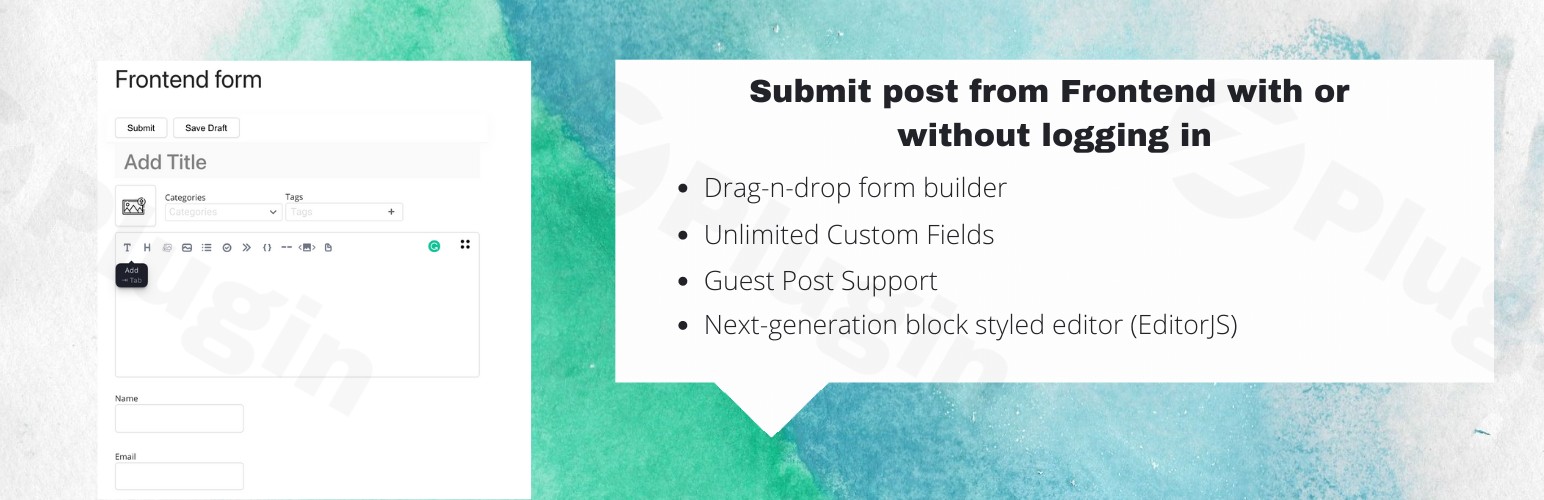
Allowing users to contribute content shouldn’t mean giving them the keys to your WordPress dashboard. The Front User Submit | Front Editor (Premium) is a powerful WordPress frontend submission plugin designed to bridge the gap between site owners and contributors. By moving the entire content creation process to the frontend, you provide a seamless, branded experience for guest bloggers, vendors, and community members while keeping your site’s backend secure.
Whether you are looking to build a community-driven blog, a directory, or a multi-vendor marketplace, this Front Editor WordPress plugin provides the tools necessary to manage user-generated content in WordPress efficiently and professionally.
Key Features & Benefits
The Front User Submit plugin is more than just a simple form builder; it is a comprehensive content management suite. Here is why it stands out:
1. Intuitive Drag-and-Drop Form Builder
Create complex frontend post submission forms without touching a single line of code. The visual builder allows you to arrange fields exactly how you want them to appear to your users.
2. Multiple Professional Editors
Unlike other plugins that force a single interface, this plugin offers flexibility with three distinct editor options:
- EditorJS: A modern, block-styled editor for a clean writing experience.
- Markdown: Ideal for developers and technical writers who prefer syntax-based formatting.
- TinyMCE: The classic WordPress editor experience brought to the frontend.
3. Full Custom Post Type (CPT) & Taxonomy Support
You aren’t limited to standard blog posts. You can create a custom post type submission form for listings, portfolios, testimonials, or any other data structure your site requires. It also handles categories and tags (taxonomies) seamlessly.
4. Over 20 Custom Field Types
From simple text inputs to file uploads, date pickers, and URL fields, the plugin supports over 20 field types. This ensures you can collect exactly the data you need from your contributors.
5. WooCommerce Frontend Product Submission
Turn your store into a marketplace. This feature allows users to perform a WooCommerce frontend product submission, enabling them to upload products, set prices, and manage inventory without ever seeing the WordPress admin area.
Installation & Setup: A Step-by-Step Guide
Follow these steps to get your WordPress frontend submission plugin up and running in minutes.
- Install the Plugin: Navigate to your WordPress Dashboard, go to Plugins > Add New, upload the plugin zip file, and click Activate.
- Create a Submission Form: Go to the “Front User Submit” menu in your sidebar. Click Add New Form. Use the drag-and-drop interface to add the fields you need (Title, Content, Featured Image, etc.).
- Configure Settings: Under the form settings, define the Default Post Status (e.g., “Pending Review” so you can moderate content) and the Post Type (Post, Page, or Product).
- Publish the Form: Once saved, the plugin will provide a Shortcode. Copy this code.
- Add to a Page: Create a new page on your site (e.g., “Submit Your Guest Post”), paste the shortcode into the editor, and publish the page.
- Set Up Redirections: In the plugin settings, choose where users should be sent after a successful submission (e.g., a “Thank You” page).
Practical Usage & Best Practices
To get the most out of Front User Submit | Front Editor (Premium), consider these real-world workflows:
Guest Posting for Blogs
Ideal for: High-traffic blogs that want to enable guest authors to submit posts on WordPress frontend.
- Best Practice: Use the “Guest Posting” capability to allow non-registered users to submit content, but always set the default status to “Pending” to prevent spam.
Multi-Vendor Marketplaces
Ideal for: Niche eCommerce sites using WooCommerce.
- Best Practice: Combine the plugin with a payment gateway to charge users a fee for submitting their products. This creates an immediate revenue stream.
Community Directories
Ideal for: Local business listings or event boards.
- Best Practice: Use custom post types and Google reCAPTCHA integration to ensure submissions are organized and protected from bots.
User Profile Management
Ideal for: Membership sites.
- Best Practice: Use the dedicated shortcode to create a User Admin Panel on the frontend. This allows members to edit or delete their own previous submissions easily.
FAQ & Troubleshooting
Can users submit posts from the frontend of WordPress without an account?
Yes. The plugin includes a Guest Posting feature that allows unregistered visitors to submit content. You can configure specific permissions and security measures (like reCAPTCHA) for these users.
Is Front Editor compatible with Elementor or Gutenberg?
Yes. Front User Submit is designed to work with most modern themes and page builders. You can simply drop the form shortcode into an Elementor text widget or a Gutenberg shortcode block.
Does it support WooCommerce product uploads?
Absolutely. One of the premium features is the ability to create a WooCommerce frontend product submission form, allowing users to upload products, images, and prices directly.
What should I do if my form style doesn’t match my theme?
While the plugin includes customizable design templates, minor CSS conflicts can occasionally occur. Most issues can be resolved using the built-in design settings or by adding small CSS adjustments in the WordPress Customizer.
How do I prevent spam submissions?
The plugin integrates seamlessly with Google reCAPTCHA. We highly recommend enabling this in the settings to filter out automated bot submissions.
Conclusion: Final Verdict
If you are looking for a way to streamline user-generated content in WordPress, the Front User Submit | Front Editor (Premium) plugin is a top-tier choice. It eliminates the friction of the WordPress backend, providing a professional and secure interface for your contributors.
The ROI of this plugin is clear: it saves you time on manual content entry and increases user engagement by making the submission process as easy as possible. For more WordPress tips and plugin reviews, visit wppick.com.
I. Download Limits & Account Benefits
- Free Downloads: Each email address receives 3 downloads per day for free products
- Upgrade Benefits: Purchase any paid product to increase your daily download limit by 3 for each paid product
- No Account Required: You can download immediately by receiving the download link via email
- Account Recommended: Create an account for easier access to your order history and direct update downloads
II. Understanding GPL vs Official Versions
Important: The products available on WPPick are GPL-licensed versions, which differ from official developer versions. Before purchasing, please read our comprehensive guide: Understanding GPL & Official Differences at WPPick
Key Points:
- GPL versions may not include premium support from original developers
- Updates may be delayed compared to official releases
- Some premium features might have limitations
- Always consider your specific needs and support requirements
III. Support & Assistance
We’re here to help through multiple channels:
- Email Support: Direct email assistance for all inquiries
- Live Chat: Real-time support during business hours
- Comprehensive Documentation: Detailed guides and tutorials
IV. Order Tracking
Access your complete purchase history and download links anytime: Order History
V. Account Access
New to WPPick? Login or Create Account to manage your downloads and orders efficiently.
VI. Refund Protection
We stand behind our products with a clear refund policy. Review our terms: Refund Policy
VII. Privacy & Security
Your data security is our priority. Learn how we protect your information: Privacy Policy
VII. Terms of Service
Understanding our service terms ensures a smooth experience: Terms of Use
Quick Tips for Best Experience
- Verify Compatibility: Check plugin/theme compatibility with your WordPress version
- Backup First: Always backup your site before installing new plugins or themes
- Test Environment: Consider testing on a staging site first
- Stay Updated: Regularly check for updates in your account dashboard
- Read Documentation: Review any included documentation for optimal setup
Need Help?
If you have questions about downloads, licensing, or need technical assistance, don’t hesitate to contact our support team. We’re committed to ensuring you have the best possible experience with WPPick products.
Ready to get started? Your download adventure begins with just one click!