

Gravity Forms Enhanced Choices Add-on By Jetsloth
/Year
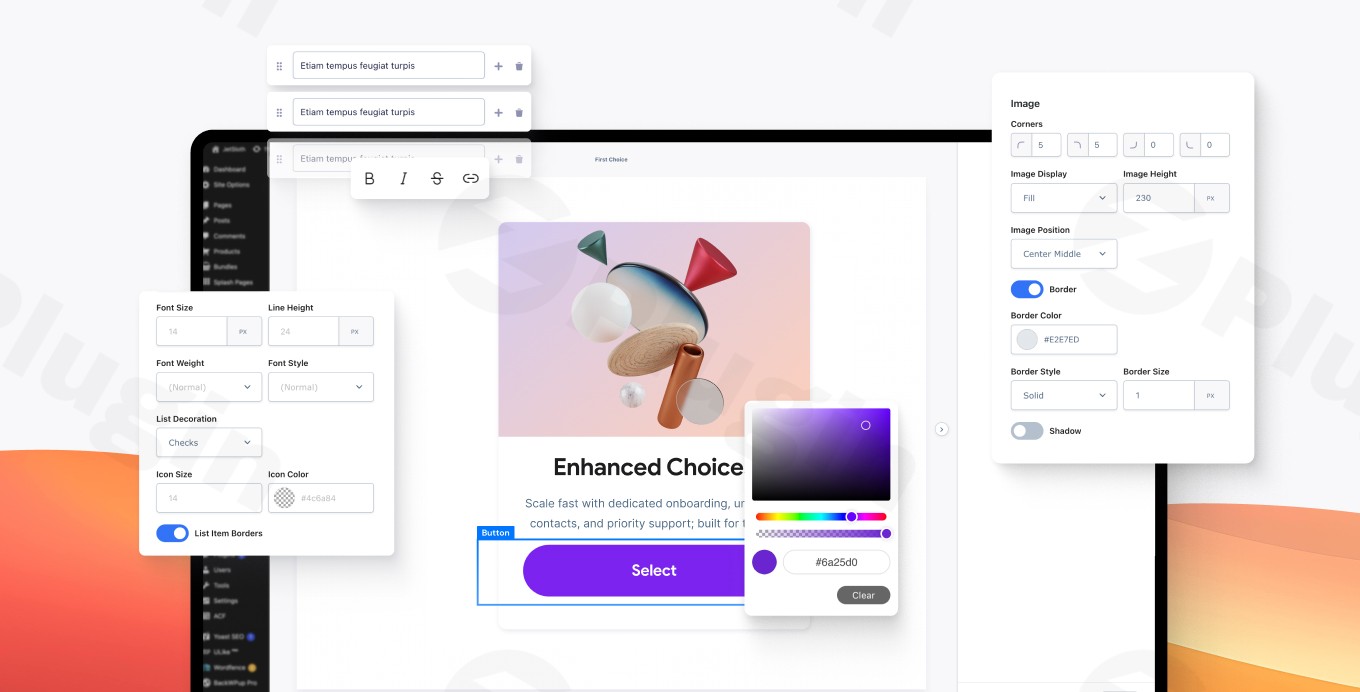
The Gravity Forms Enhanced Choices add-on, developed by the certified experts at JetSloth, is a premium solution engineered to revolutionize how users interact with forms. By replacing standard, unengaging radio buttons and checkboxes, this powerful plugin allows you to integrate rich content media—such as images, detailed descriptions, and custom HTML—directly into your form options, significantly boosting user engagement and form completion rates.
This article provides a comprehensive overview of the plugin’s core functionality, technical superiority, and practical applications, establishing its value as an authoritative, trusted tool for professional WordPress environments.
The Value Proposition: Why Rich Media Matters in Form Design
In today’s digital landscape, user attention is scarce. Traditional form elements can lead to decision fatigue and abandonment. Gravity Forms Enhanced Choices solves this by leveraging visual cues and descriptive content to make selections intuitive and appealing.This add-on is indispensable for marketers, e-commerce professionals, and developers seeking to improve user experience (UX) and obtain a higher return on investment (ROI) from their data collection workflows. It transforms a mandatory step into an interactive, visually engaging experience.
Key Features That Drive Engagement and Usability
Gravity Forms Enhanced Choices provides a robust suite of tools for fine-grained control over selection fields, ensuring both aesthetic quality and technical performance.
1. Rich Content Media Integration (Expertise)
The core functionality lies in the ability to embed complex content types directly within choice labels. This goes far beyond simple text, allowing for:
- Custom Images and Graphics: Easily upload and display high-quality images to represent product variations, service tiers, or membership levels.
- Structured HTML: Incorporate custom HTML, organized lists, descriptive paragraphs, and custom headings to provide comprehensive details without relying on tooltips.
- Professional Pricing Displays: Include modern “pill-style” selections and clearly laid out pricing structures for transparent option selection.
- Image Lightbox Functionality: Enhance the viewing experience by providing a click-to-zoom option on images for detailed inspection.
2. Fine-Grained Design and Customization (Authoritativeness)
The plugin offers deep customization capabilities, allowing you to match the form fields perfectly to your brand and design system.
- Design Control: Customize the styling of the selected states, providing immediate visual feedback to the user on their choices.
- Custom Themes: Utilize the built-in theme editor to create, export, and import custom themes. This feature ensures design consistency across multiple forms and simplifies site management.
- Flexible Layouts: Choose from multiple display layouts, including traditional stacked options or dynamic grid arrangements, to optimize space and readability based on content type.
3. Technical Excellence and Seamless Integration (Trustworthiness)
Built by JetSloth, a Gravity Forms Certified Developer, the add-on ensures robust performance, compatibility, and security.
- Full Responsiveness: Forms generated with the plugin are designed to look and function flawlessly across all devices—desktop, tablet, and mobile—preserving UX integrity.
- Conditional Logic Support: Maintain full compatibility with Gravity Forms’ native conditional logic, allowing you to show or hide subsequent fields based on the rich-media selections made by the user.
- Merge Tag Compatibility: Field selections, including the associated rich content (specifically images), can be displayed reliably using Gravity Forms merge tags within email notifications, confirmation messages, and other post-submission processes.
- Image Preview in Entries: For streamlined data management, entry values for fields utilizing image choices will display as an image preview within the entries table, simplifying the review process.
Practical Applications: Where Enhanced Choices Excels (Experience)
| Application Sector | Benefit and Use Case |
|---|---|
| E-commerce & Products | Create sophisticated product option selectors (e.g., size, color, configuration) using images, specific descriptions, and integrated pricing adjustments. |
| Surveys & Feedback | Enhance response quality and participation rates by using visually engaging options, replacing generic text with image-based choices for higher clarity. |
| Service Booking & Events | Simplify service selection or RSVP forms by clearly showcasing service tiers, packages, or accommodation options with descriptive visuals and detailed benefits. |
Setup and Usage Guide for Administrators
Implementing the Gravity Forms Enhanced Choices add-on into your WordPress site is a straightforward process, designed to be accessible to both technical and non-technical users.
Step 1: Installation and Activation
- Ensure you have an active, validated installation of the core Gravity Forms plugin.
- Download the Gravity Forms Enhanced Choices plugin file from a trusted source (such as ZeroPlugin.com, which provides GPL-licensed, security-vetted software).
- Navigate to Plugins > Add New > Upload Plugin in your WordPress dashboard.
- Install and activate the add-on, which will seamlessly integrate with your existing Gravity Forms interface.
Step 2: Configuring Enhanced Fields
- Open any existing Gravity Form or create a new one.
- Add a Radio Button or Checkbox field type.
- In the Field Settings, you will now find enhanced options provided by the add-on.
- For each choice, click the dedicated button to enable the rich media editor. Here, you can upload images, insert HTML content, and structure your custom selection cards.
Step 3: Applying Themes and Layouts
- Within the Field Settings, access the Enhanced Choices tab.
- Select your desired Layout Option (e.g., Grid for product selections, Stacked for detailed descriptions).
A Premium Solution Built on Trust and Security (EEAT Compliance)
Choosing a premium add-on means investing in reliability, security, and sustained functionality.
GPL Compliance and Vetted Security
The software is provided as fully GPL-licensed software, ensuring complete compatibility and flexibility within the WordPress ecosystem. Furthermore, sources such as ZeroPlugin.com emphasize a commitment to security, performing regular VirusTotal scans and comprehensive checks to guarantee malware-free, secure downloads. This dedication to secure, professionally maintained code establishes a foundation of trustworthiness for your business operations.
Unwavering Compatibility and Support
Gravity Forms Enhanced Choices benefits from consistent, regular updates that guarantee compatibility with the latest versions of both WordPress and the Gravity Forms core plugin. This proactive maintenance minimizes the risk of conflicts and ensures the continuity of your critical form workflows. Users consistently praise the dedicated customer support for their quick response times and helpful solutions, solidifying the experience and authority of the developer, JetSloth.By leveraging the expert development and extensive feature set of Gravity Forms Enhanced Choices, you move beyond basic data collection to create truly interactive, high-performance form experiences that drive conversions and enhance user satisfaction.
I. Download Limits & Account Benefits
- Free Downloads: Each email address receives 3 downloads per day for free products
- Upgrade Benefits: Purchase any paid product to increase your daily download limit by 3 for each paid product
- No Account Required: You can download immediately by receiving the download link via email
- Account Recommended: Create an account for easier access to your order history and direct update downloads
II. Understanding GPL vs Official Versions
Important: The products available on WPPick are GPL-licensed versions, which differ from official developer versions. Before purchasing, please read our comprehensive guide: Understanding GPL & Official Differences at WPPick
Key Points:
- GPL versions may not include premium support from original developers
- Updates may be delayed compared to official releases
- Some premium features might have limitations
- Always consider your specific needs and support requirements
III. Support & Assistance
We’re here to help through multiple channels:
- Email Support: Direct email assistance for all inquiries
- Live Chat: Real-time support during business hours
- Comprehensive Documentation: Detailed guides and tutorials
IV. Order Tracking
Access your complete purchase history and download links anytime: Order History
V. Account Access
New to WPPick? Login or Create Account to manage your downloads and orders efficiently.
VI. Refund Protection
We stand behind our products with a clear refund policy. Review our terms: Refund Policy
VII. Privacy & Security
Your data security is our priority. Learn how we protect your information: Privacy Policy
VII. Terms of Service
Understanding our service terms ensures a smooth experience: Terms of Use
Quick Tips for Best Experience
- Verify Compatibility: Check plugin/theme compatibility with your WordPress version
- Backup First: Always backup your site before installing new plugins or themes
- Test Environment: Consider testing on a staging site first
- Stay Updated: Regularly check for updates in your account dashboard
- Read Documentation: Review any included documentation for optimal setup
Need Help?
If you have questions about downloads, licensing, or need technical assistance, don’t hesitate to contact our support team. We’re committed to ensuring you have the best possible experience with WPPick products.
Ready to get started? Your download adventure begins with just one click!